
More project photos (3)
The problem
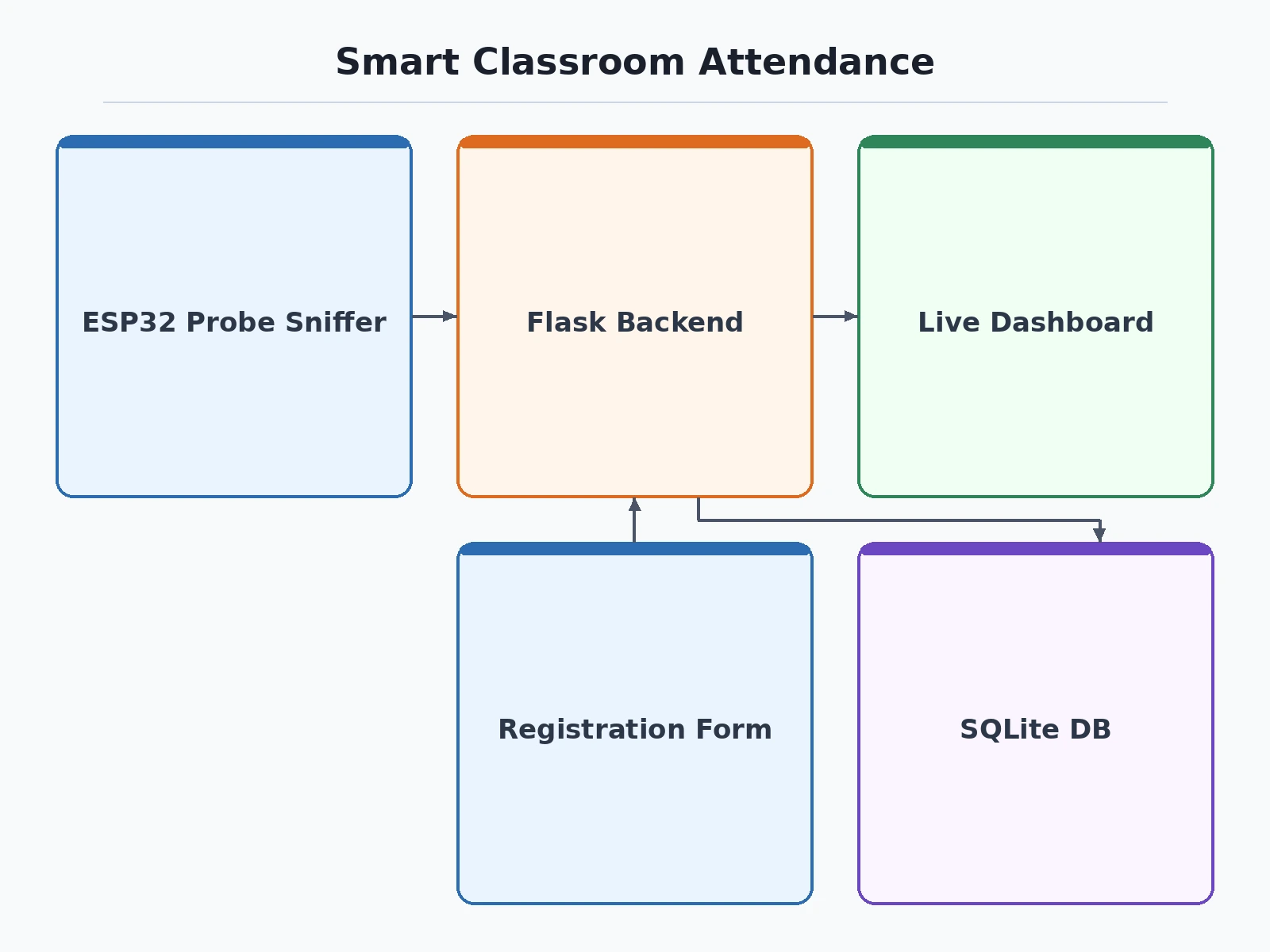
The Smart Classroom Attendance System using WiFi Probe Requests replaces manual roll calls with passive device sensing: an ESP32 in promiscuous mode listens on the 2.4 GHz band for 802.11 probe requests — the short management frames phones broadcast while scanning for networks — and records each sender's MAC address with a received signal strength (RSSI) reading. A Flask backend deduplicates the sightings, matches them against an opt-in registration table of student devices, and applies an RSSI threshold plus a sighting-count rule to mark students present, all on a live web dashboard. Roll calls and sign-in sheets still dominate college classrooms, consuming teaching time and inviting proxy attendance. Biometric and RFID systems need door hardware and force queues; camera systems raise heavier privacy questions and cost. This project sits between those extremes: one ESP32 node per classroom, no per-student hardware, and a consent-first design where only registered devices count.
Phones broadcast 802.11 probe requests while scanning for Wi-Fi networks.
Follow the working sequence
How it works
An ESP32 in promiscuous mode is the system's ear: with the WiFi radio in WIFI_MODE_NULL and esp_wifi_set_promiscuous() enabled, it dumps every 802.11 management frame it hears on the 2.4 GHz band, and a management-frame filter keeps only probe requests — the frames unassociated devices broadcast while scanning for networks. For each probe, the firmware reads the sender's MAC address and the rx_ctrl.rssi value supplied by the ESP-IDF WiFi driver, attaches a timestamp and the current channel, and posts the batch to the Flask backend over HTTP or MQTT every few seconds. The backend collapses repeat sightings inside a 30-second dedup window, looks each surviving MAC up in the opt-in registration table, and applies the presence rule: three or more sightings above −70 dBm within the session-start window marks the student present. The dashboard reads this state continuously, showing live sightings, the growing present list and the final register when the session closes.
- The ESP32 boots into WIFI_MODE_NULL, enables promiscuous mode, and hops across the 2.4 GHz channels 1–13 every 500 ms (design target), listening for management frames.
- The promiscuous filter keeps only probe requests; each surviving frame yields the transmitter MAC and rx_ctrl.rssi, batched with a timestamp and channel number.
- Every few seconds the node posts the batch to the Flask backend over HTTP (MQTT as an alternative); the backend stores raw sightings in SQLite for audit.
- The dedup engine collapses sightings from the same MAC inside a 30-second window (design target) into one entry, so one chatty phone cannot dominate the register.
- Each deduped MAC is checked against the opt-in registration table; unregistered addresses stay anonymous and are never counted toward attendance.
- The presence rule fires: three or more deduped sightings stronger than −70 dBm (both design targets) inside the session-start window marks the student present.
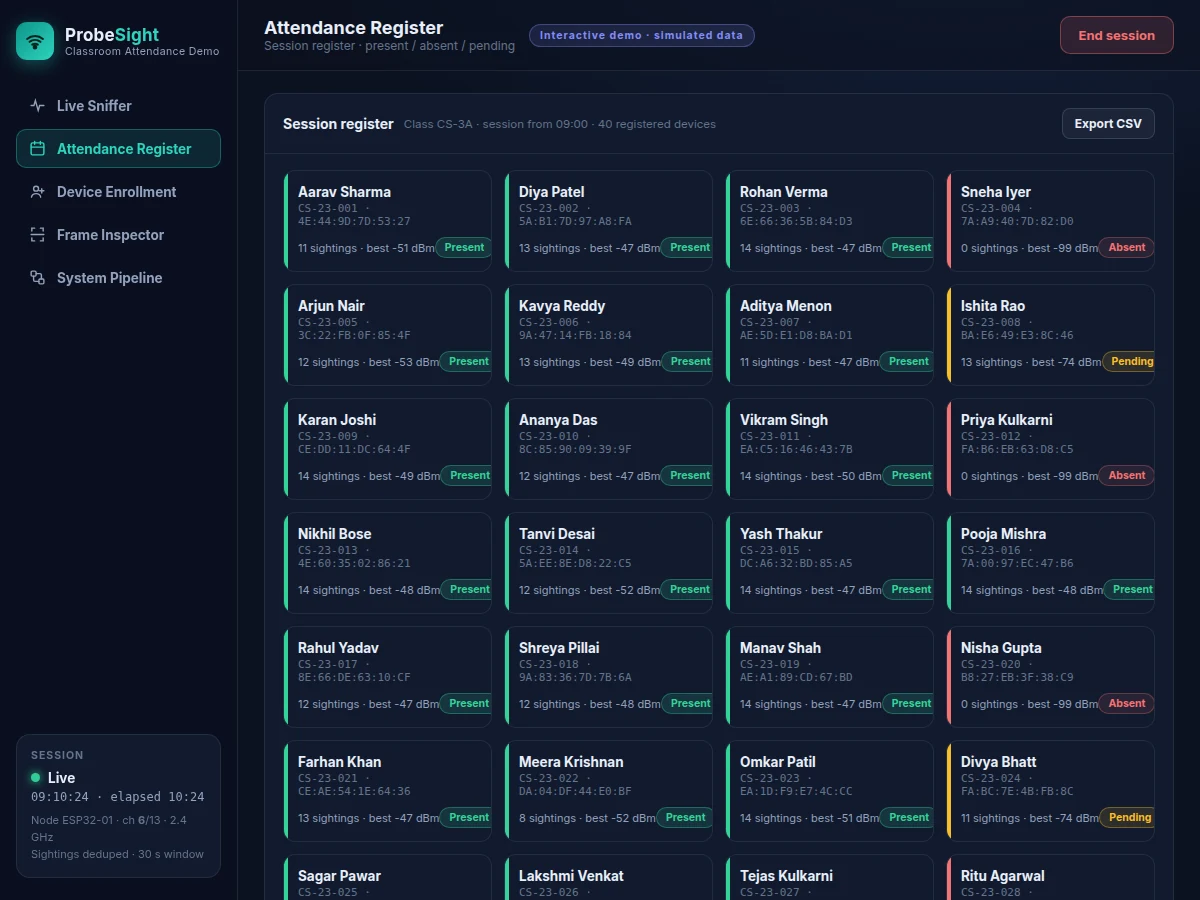
- The dashboard renders live sightings, per-student status and the final register; one click exports the session as CSV.
Tech stack:
- ESP32 (2.4 GHz sniffer node)
- ESP-IDF · esp_wifi_set_promiscuous
- Python · Flask
- SQLite
- MQTT · HTTP transport
- HTML · CSS · JavaScript dashboard
- Git
| Parameter | Value |
|---|---|
| Sniffer radio | ESP32 promiscuous mode, 2.4 GHz band only (datasheet) |
| Captured frames | 802.11 management frames, probe requests only (filtered) |
| RSSI source | rx_ctrl.rssi per frame from the ESP-IDF WiFi driver (datasheet) |
| Presence threshold | −70 dBm RSSI, configurable (design target) |
| Dedup window | 30 seconds per MAC (design target) |
| Presence rule | ≥3 deduped sightings inside the session-start window (design target) |
| Channel hopping | Channels 1–13, hop every 500 ms (design target) |
| Uplink batching | Sighting batches posted every ~5 s over HTTP or MQTT (design target) |
| Backend | Flask + SQLite, single process (implemented) |
| Demo build note | The interactive demo simulates probe traffic in the browser; no ESP32 hardware is emulated (implemented) |
Project features
The system's four strongest capabilities are the promiscuous-mode probe sniffer, the dedup and presence engine, the opt-in registration model, and the live attendance dashboard. The ESP32 firmware puts the radio in promiscuous mode on the 2.4 GHz band and filters only 802.11 probe-request management frames, extracting the sender MAC and RSSI from each frame before pushing batches to the Flask backend over HTTP or MQTT. The backend applies a 30-second dedup window and a presence rule — three or more sightings above −70 dBm inside the session-start window — so one passing device cannot mark anyone present. Registration is consent-first: a student registers their device's current randomized address through the dashboard form, and only registered addresses are counted. The dashboard renders live sightings, per-student status, session control and one-click CSV export of the register.
- [Promiscuous-mode probe sniffer] Implemented: firmware uses esp_wifi_set_promiscuous() with a management-frame filter to capture only probe requests on the 2.4 GHz band, extracting the sender MAC and rx_ctrl.rssi from each frame.
- [Sighting transport pipeline] Implemented: the node posts timestamped sighting batches to the Flask backend every few seconds over HTTP (MQTT as an alternative), each batch tagged with node ID and channel.
- [Dedup and presence engine] Implemented: repeat sightings from one MAC inside a 30-second window collapse to a single entry (design target); a student is marked present after three or more qualifying sightings above −70 dBm (both design targets) inside the session-start window.
- [Opt-in device registration] Implemented: students register their current device address through the dashboard form with a consent checkbox; unregistered addresses are logged as anonymous sightings and never counted toward attendance.
- [Live attendance dashboard] Implemented: session start/stop, live sightings table with RSSI signal bars, present/absent/pending register cards, per-device sighting counts and one-click CSV export.
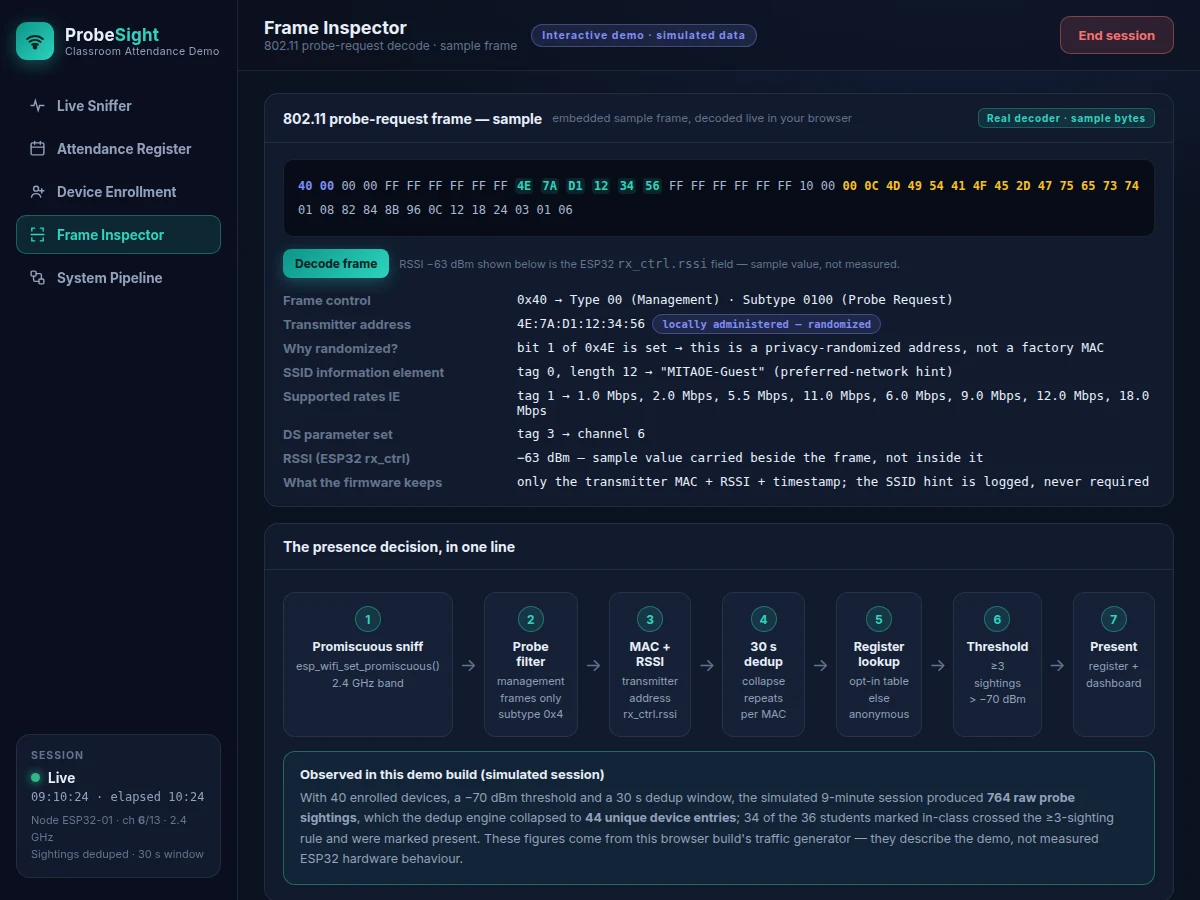
- [802.11 frame inspector] Implemented: an interactive probe-request frame decoder in the dashboard that parses frame type, transmitter address, SSID information element and the locally-administered bit — built for the viva demonstration.
- [Multi-classroom nodes] Optional customization: additional ESP32 nodes, each tagging batches with a node ID, feeding one backend with per-classroom registers — scoped separately, not in the base build.
- [RSSI zone mapping] Future scope: calibrating RSSI bands to rough classroom zones — with the honest caveat that RSSI is not distance, so zones stay approximate.
What is included
- ESP32 sniffer firmware (ESP-IDF, promiscuous mode + probe-request filter)
- Flask backend with dedup engine, registration table and presence logic
- Live web dashboard (session control, sightings table, register, CSV export, frame inspector)
- SQLite schema with seed data for demonstration
- Project report PDF (background, 802.11 primer, methodology, MAC-randomization privacy analysis)
- PPT presentation for final review
- Viva Q&A preparation document (promiscuous mode, probe requests, RSSI, MAC randomization)
Limitations & prerequisites
- iOS 14+ and Android 10+ randomize probe-request MACs by default (locally administered addresses), so anonymous per-student identification is not possible — attendance only works with opt-in registration of each student's current address, which the OS may rotate.
- RSSI is not distance: bodies, walls and multipath shift readings by tens of dB, so the −70 dBm threshold is a configurable design target, not a range measurement.
- The ESP32 radio is 2.4 GHz only — devices scanning on 5 GHz alone are invisible to the sniffer.
- The sniffer listens on one channel at a time; a device probing on another channel during the dwell is missed — channel hopping trades coverage against dwell time.
- Probe emission depends on the phone's scan behaviour; a connected, idle device probes less often, which can delay or miss presence detection.
- Buddy attendance is possible: a second registered phone in the room counts as its owner — the system detects devices, not people.
- Consent and notice are required: students must opt in and be informed; passive MAC logging of non-consenting people is a privacy risk any deployment must address.
Frequently Asked Questions
How does the ESP32 detect phones without connecting to them?
Phones that are not connected to a network periodically broadcast 802.11 probe requests — unencrypted management frames that carry the sender's MAC address. In promiscuous mode the ESP32 receives every frame on its channel, filters for probe requests, and logs the MAC plus the received signal strength. No association, no pairing and no app on the phone are involved at any point. The firmware uses esp_wifi_set_promiscuous() with a management-frame filter (Espressif ESP-IDF), batches sightings with timestamps and posts them to the Flask backend every few seconds over HTTP or MQTT.
Why can't it track every student's phone automatically?
Because iOS 14+ and Android 10+ randomize probe-request MAC addresses by default — you can spot them because bit 1 of the first octet is set, making them locally administered addresses. The address stays stable per network but can rotate over time, so a sniffer cannot reliably link sightings to a person without that person's cooperation. This project is therefore designed consent-first. Students register their current address once through the dashboard's opt-in form; unregistered sightings are logged as anonymous and never counted. When the OS rotates the address, the student simply re-registers — a workflow the report documents as part of the privacy analysis.
Is the RSSI reading accurate enough to prove a student is in the room?
No, and this page does not claim it. RSSI measures received signal strength, not distance — bodies, walls and multipath reflections move it by tens of dB, so the −70 dBm figure is a configurable design target meaning "probably nearby", not "within three metres". Confidence comes from repeated sightings over the session, never from one strong reading. The presence rule requires three or more deduped sightings above the threshold inside the session-start window; the threshold itself is a firmware constant the student can tune during testing and justify in the viva.
Does each phone need an app installed, or WiFi switched on?
No app is needed — that is the point of the design. The phone only needs WiFi switched on so it keeps scanning; a device with WiFi off emits no probe requests and is completely invisible to the sniffer. The system never touches the phone, installs nothing and reads no payload data. One honest caveat: devices already connected to a network probe less frequently, so detection can be slower for them — the limitations section explains this and the report suggests how to demonstrate it.
Can the system cover multiple classrooms?
Yes, as an optional customization rather than part of the base build. Each ESP32 node tags its sighting batches with a node ID, and the Flask backend keeps a separate register per node, so one dashboard can show several classrooms side by side. The base build ships with a single node and one classroom register; multi-node deployment — node placement, channel planning and per-node thresholds — is scoped separately as an add-on.
Is this project suitable for a final-year project?
Yes — for Computer Science, IT and IoT & Embedded Systems programs. It demonstrates 802.11 wireless fundamentals, embedded firmware with the ESP-IDF WiFi driver, backend API design, a real-time dashboard and an honest privacy analysis of MAC randomization that makes a strong viva discussion. The build also gives the student a working demo to defend: a live sniffer view, a real 802.11 frame decoder and a presence engine whose every threshold is labeled as a design target rather than a measured claim.
Components & software requirements
- ESP32 (2.4 GHz sniffer node)
- ESP-IDF · esp_wifi_set_promiscuous
- Python · Flask
- SQLite
- MQTT · HTTP transport
- HTML · CSS · JavaScript dashboard
- Git
Delivery information
Built-to-order project. Delivery timeline is shared after order confirmation based on current queue.
Support terms
Complete documentation, setup guide, and viva preparation included. Support for setup and explanation provided.
Download free synopsis (PDF)
Enter your name and WhatsApp number — the synopsis PDF downloads immediately. We may send occasional project updates on WhatsApp; no spam.