
More project photos (2)
The problem
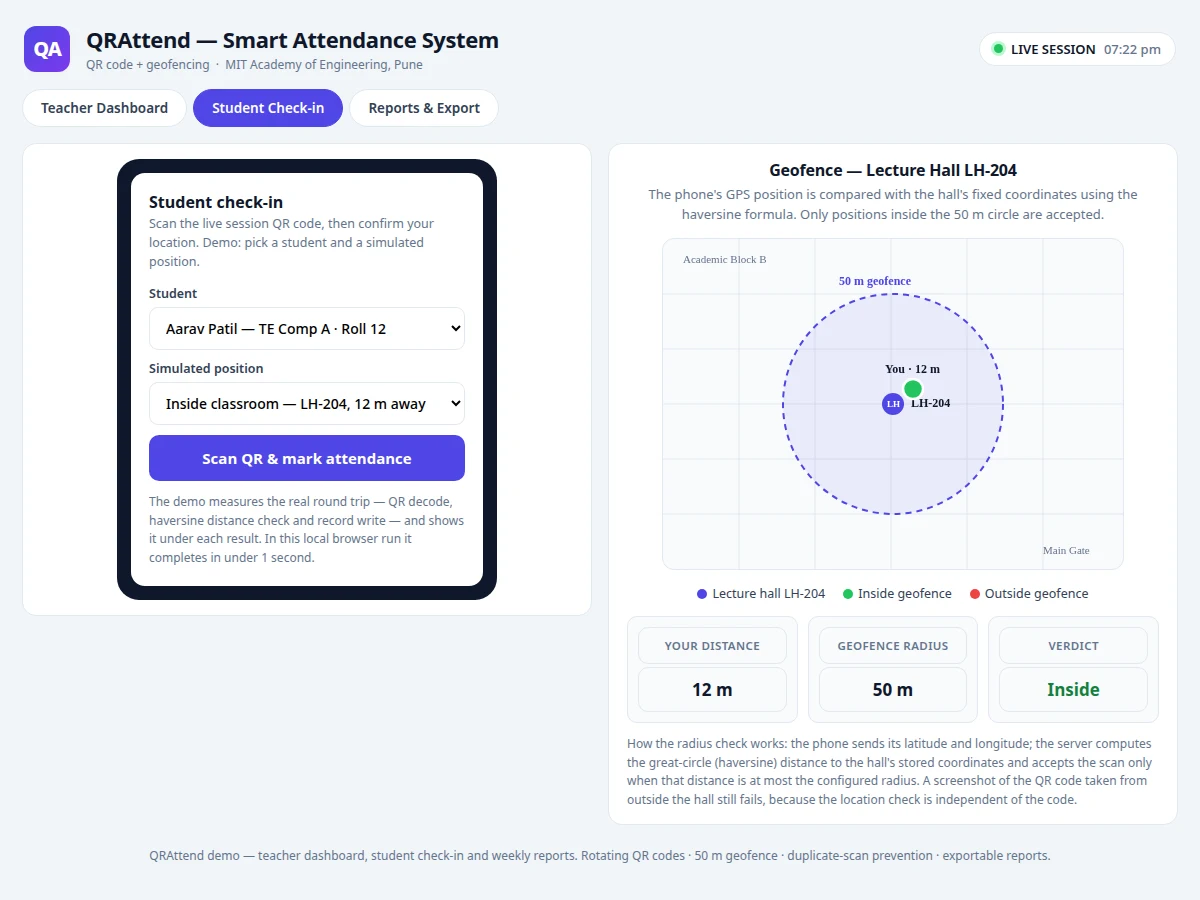
Manual attendance eats the first minutes of every lecture: the teacher calls names from a register, students answer for absent friends, and the paper sheet is later typed into a spreadsheet where errors creep in. The Smart Attendance System using QR Code and Geofencing replaces that ritual with a two-proof check. At the start of the lecture the teacher opens a session and projects a QR code that rotates every 45 seconds; a student scans it with a phone, and the system accepts the scan only when the code is current and the phone's GPS position is within a 50 m geofence around the lecture hall. A duplicate scan is blocked, a scan after the cut-off is marked late, and a scan from outside the hall is rejected with the measured distance shown. The live register updates on the teacher's screen as students check in, and the same records feed weekly reports and a defaulter list.
The teacher opens a session for the class and room and projects the live QR code.
Follow the working sequence
How it works
A lecture's attendance flows from code generation to stored record. The teacher opens a session for the class and room, and the server generates a QR code bound to that session with a 45-second rotation timer. The code is projected in the hall; each student scans it with a phone, sending the code, their identity and GPS coordinates to the server. The server first checks that the code is the current rotation for a live session, then computes the haversine distance from the phone to the hall's stored coordinates and compares it with the 50 m radius. If the code is stale, the distance is too large, or the student is already marked, the scan is refused with the reason shown; otherwise the record is written, late marking is applied after the cut-off, and the live register updates within a second. When the session closes, the code stops working and the records feed weekly reports and a defaulter list.
- The teacher creates a session: class, subject, room and the hall's stored coordinates, with a 50 m geofence radius and a 5-minute late cut-off (both configurable design targets).
- The server generates a session-bound QR code and projects it in the hall; the code rotates to a fresh token every 45 seconds (design target).
- Each student scans the code with a phone; the app sends the code, the student's login identity and the phone's GPS coordinates to the server.
- The server validates the code against the current rotation, computes the haversine distance to the hall, and checks the register for an existing record for that student in this session.
- A valid scan writes one attendance record — marked Present, or Late when it arrives after the cut-off — and the teacher's live register updates immediately.
- A failed scan is refused with the reason shown on the student's screen (stale code, outside geofence, or duplicate), and the rejection is logged with the measured distance.
- When the session closes, the code stops working and the teacher exports the CSV report and the defaulter list for the week.
Tech stack:
- HTML · CSS · JavaScript
- Node.js · Express
- MongoDB
- qrcode library
- Geolocation API · haversine formula
- JWT session tokens
- CSV · PDF export
- Git
| Parameter | Value |
|---|---|
| Session QR rotation | 45 seconds (design target) |
| Geofence radius | 50 m around the lecture hall (design target, configurable) |
| Late cut-off | 5 minutes after session start (design target, configurable) |
| Check-in round trip | Under 1 second in the local browser demo (measured in the demo run) |
| Demo class size | 30 students in the demo register (demo data) |
| Session window | 60 minutes per lecture (design target) |
| Records per session | 1 per student (duplicate scans blocked) |
| Distance method | Haversine great-circle distance from stored hall coordinates |
| Defaulter threshold | 75% attendance (design target, configurable) |
| Export formats | CSV and PDF reports |
| Platform | Web app, runs in a desktop or mobile browser |
Project features
The system is built around four capabilities that work together in every lecture. Rotating QR codes give each session a fresh, short-lived token, so a photograph of an earlier code is useless within a minute. Geofence validation compares the phone's GPS position with the hall's stored coordinates using the haversine formula and accepts only positions inside the configured radius, which is what stops proxy attendance from the hostel or the canteen. Duplicate-scan prevention keeps one record per student per session, so a second scan is refused instead of creating a second entry. And the live register with late marking and exportable reports turns the raw scans into the documents a teacher actually needs: who was present, who was late, who was rejected and why, and who is falling below the attendance threshold. The features below are all implemented in the base build; optional additions are listed separately in the customization answer below.
- [Rotating session QR codes] The teacher's session generates a QR code bound to that lecture, and the code rotates to a fresh token every 45 seconds (design target), so a screenshot taken earlier in the session cannot be reused.
- [Geofence validation with haversine distance] Each scan sends the phone's GPS coordinates to the server, which computes the great-circle (haversine) distance to the hall's stored coordinates and accepts the scan only inside the configured 50 m radius (design target).
- [Duplicate-scan prevention] The server checks the register before writing, so a second scan by the same student in the same session is refused with a clear message instead of creating a second record.
- [Late marking with a configurable cut-off] Scans arriving after the cut-off — 5 minutes after session start as the design target — are marked Late rather than Present, so punctuality is visible in the register.
- [Live attendance register] The teacher's dashboard updates as students check in, showing present, late, absent and rejected counts with each student's scan time and measured distance from the hall.
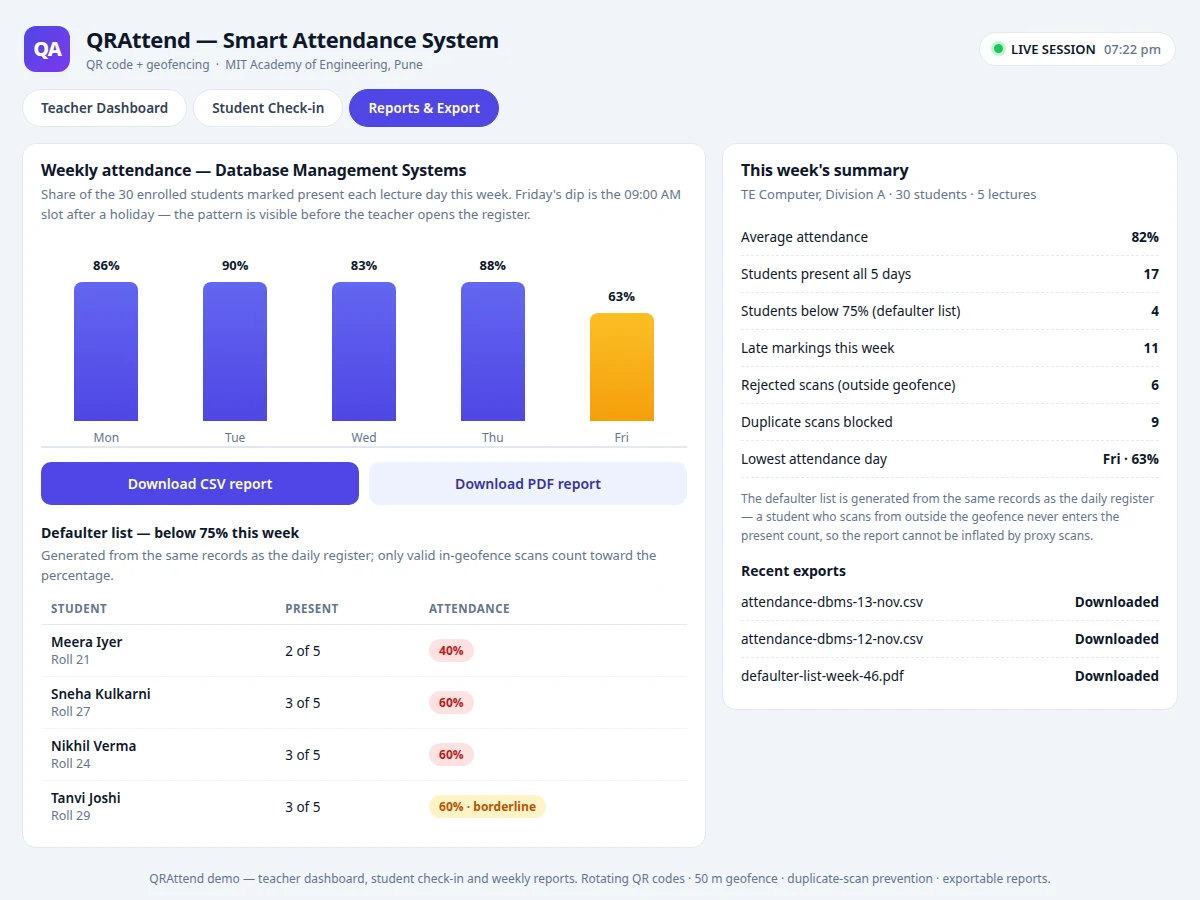
- [Weekly reports and defaulter list] The same records produce a weekly attendance chart per subject and a defaulter list of students below the 75% threshold (design target, configurable), with no separate data entry.
- [CSV and PDF export] Attendance and defaulter reports export as CSV and PDF, so the teacher can file them or share them with a coordinator without retyping anything.
What is included
- Complete source code (teacher dashboard, student check-in, session and report modules)
- Working demo of the teacher dashboard, student check-in flow and weekly reports
- Database setup with sample class, subject and student records
- Project report (background, methodology, geofence mechanism, results, limitations)
- PPT presentation for final review
- Viva Q&A preparation document (QR rotation, haversine distance, geofence limits, proxy-attendance defences)
- Project abstract PDF
Limitations & prerequisites
- Phone GPS typically resolves to within 5–10 m outdoors but can drift to 20–30 m inside concrete buildings (approximate, device-dependent), so the 50 m radius is a design target that may need widening for halls with weak GPS reception.
- Every student needs a GPS-enabled smartphone with location permission; students without one need a manual fallback entry by the teacher.
- Scanning needs a visible projection and a working phone camera; a dim projector or a damaged screen can slow the check-in.
- The check relies on the phone reporting its true GPS position; a mocked-location app can defeat the geofence, so the system deters casual proxy attendance rather than guaranteeing it.
- Internet connectivity is required during the lecture for live register updates; the check-in flow does not work offline.
- The 75% defaulter threshold is configurable; the build does not enforce any particular college's attendance policy.
Frequently Asked Questions
Is this project suitable for a final-year project?
Yes — for Computer Science and IT programs, and for Electronics students comfortable with web development. It demonstrates session management, QR-code generation, GPS-based geofencing with the haversine formula, database design and report generation in one working system, with a clear problem, a measurable mechanism and honest limitations to discuss in the review.
How does the geofence stop proxy attendance?
The geofence stops proxy attendance because a scan is accepted only when two independent proofs pass at once: the QR code must be the current rotation for a live session, and the phone's GPS position must be within 50 m of the lecture hall. A friend cannot mark attendance for an absent student from the hostel, because the absent student's phone is not in the hall — and a photo of the QR code sent from the hall fails the same way, because the code check and the location check are independent.
What happens if a student scans the QR code from outside the classroom?
The scan is rejected and no record is written. The server computes the phone's haversine distance from the hall — in the demo, a scan from 214 m away is refused — and shows the student the measured distance and the reason. The rejection is also logged on the teacher's dashboard, so repeated outside scans are visible instead of silently disappearing.
Can the same student mark attendance twice?
No. The server checks the register before writing, and a second scan by the same student in the same session is refused with a duplicate-scan message instead of creating a second record. The demo shows this directly: a student already marked present gets the duplicate warning, and the present count does not change.
Can the radius, late cut-off and reports be changed?
Yes — the geofence radius, the late cut-off in minutes, the session window and the defaulter threshold are all configuration values, not hard-coded constants. Changing them needs only a settings edit, not a code rewrite. Extra reports, such as a monthly summary or a per-subject comparison, and a native mobile app wrapper can be added as optional customizations on request.
What will I receive with the project?
The complete source code for the teacher dashboard, student check-in and reports, the working demo shown on this page, the database setup with sample class and student records, the project report, PPT, viva Q&A document and abstract PDF. The build is prepared fresh for the order, with the class, subjects and hall coordinates set to the student's college.
Components & software requirements
- HTML · CSS · JavaScript
- Node.js · Express
- MongoDB
- qrcode library
- Geolocation API · haversine formula
- JWT session tokens
- CSV · PDF export
- Git
Delivery information
Built-to-order project. Delivery timeline is shared after order confirmation based on current queue.
Support terms
Complete documentation, setup guide, and viva preparation included. Support for setup and explanation provided.
Download free synopsis (PDF)
Enter your name and WhatsApp number — the synopsis PDF downloads immediately. We may send occasional project updates on WhatsApp; no spam.