
More project photos (2)
The problem
Recording the screen looks simple until you try to build it correctly. The capture itself needs the MediaProjection API, which only hands over the display after the user approves a system consent dialog for every single session. The session then belongs to a foreground service whose declared service type must match what the platform expects — on Android 14 and later that type is mandatory, and a mismatch throws the session out. Floating controls add another permission (drawing over other apps), internal-audio capture only works on Android 10 and newer, and trimming a video without re-encoding means cutting exactly at keyframes rather than at arbitrary timestamps. This project wires all of that into one clean Android app: consent-driven capture, a correctly-typed foreground recording service, a draggable control bubble, optional internal or microphone audio, and a timeline trimmer that copies compressed samples straight into a new MP4. It is a strong demonstration of real Android platform APIs — services, overlays, media pipelines — rather than a wrapper around someone else's SDK.
The user who starts recording, approves the capture consent and trims clips in the trimmer.
Follow the working sequence
How it works
- The user taps Record; the app calls createScreenCaptureIntent() and Android shows the system consent dialog, which must be approved for every session.
- On approval, the app starts the foreground RecorderService with the mediaProjection service type and posts its ongoing notification.
- The service obtains the MediaProjection, creates a virtual display at the configured resolution, and attaches the display surface to a configured MediaRecorder.
- MediaRecorder encodes H.264 video (plus AAC audio when an audio source is selected) and writes the MP4 file to app storage.
- The floating bubble appears over all apps; tapping its pause, resume or stop buttons sends commands to the service without leaving the current app.
- On stop, the encoder is released, the file is finalized and inserted into MediaStore, and the recording appears in the app's list with duration and size.
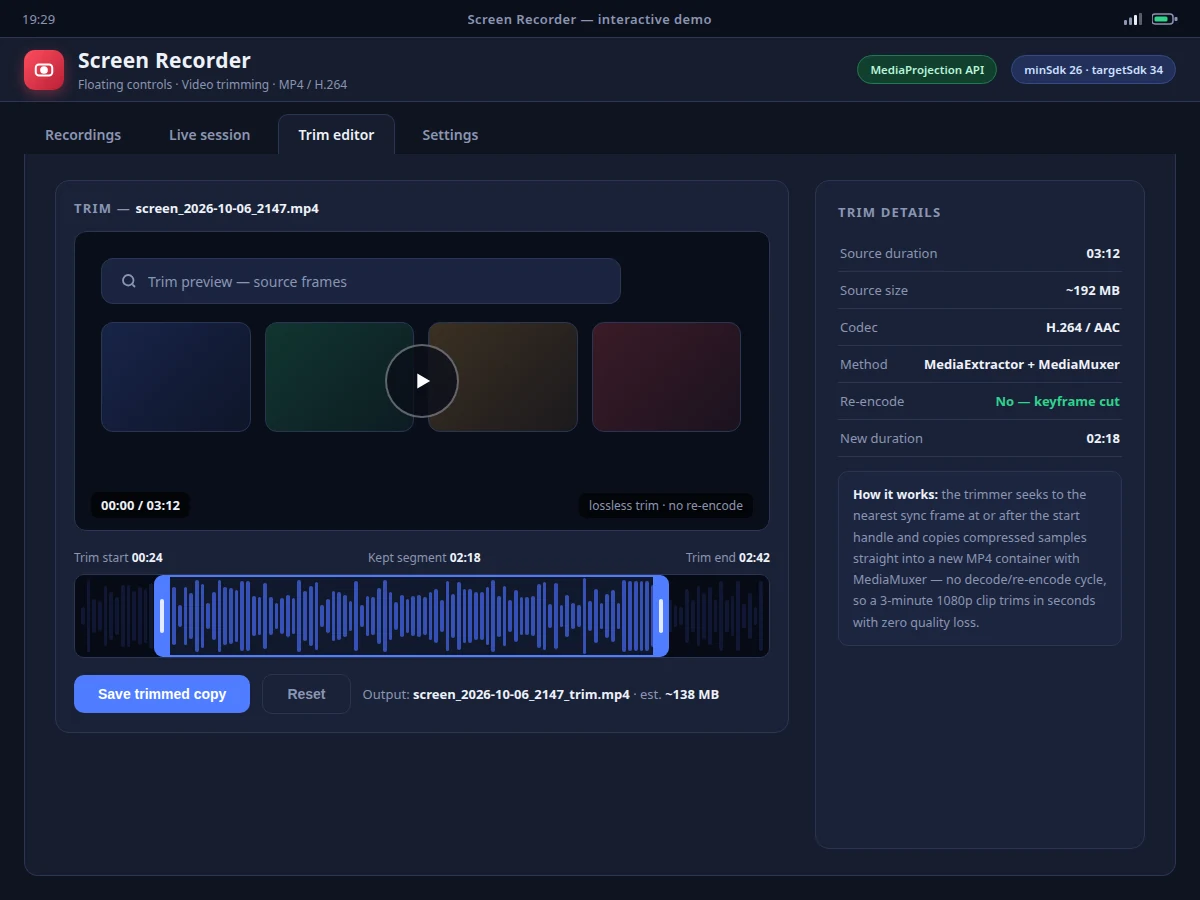
- In the trimmer, the user drags handles over the timeline; the app seeks to the nearest keyframe at the start point and copies the kept segment's samples into a new MP4 via MediaMuxer.
Tech stack:
- Kotlin
- Android SDK (MediaProjection · MediaRecorder · MediaExtractor · MediaMuxer)
- Foreground service (mediaProjection type)
- WindowManager overlay (SYSTEM_ALERT_WINDOW)
- AudioPlaybackCapture API
- MediaStore API
- Android Studio · Gradle
- Material 3 UI components
| Parameter | Value |
|---|---|
| Minimum Android version | 8.0 (API 26) |
| Target Android version | 14 (API 34) |
| Capture API | MediaProjection (API 21+, per Android documentation) |
| Video codec | H.264 (AVC) |
| Audio codec | AAC, 128 kbps (expected) |
| Container | MP4 |
| Max resolution | 1920 × 1080 (configurable down to 720p) |
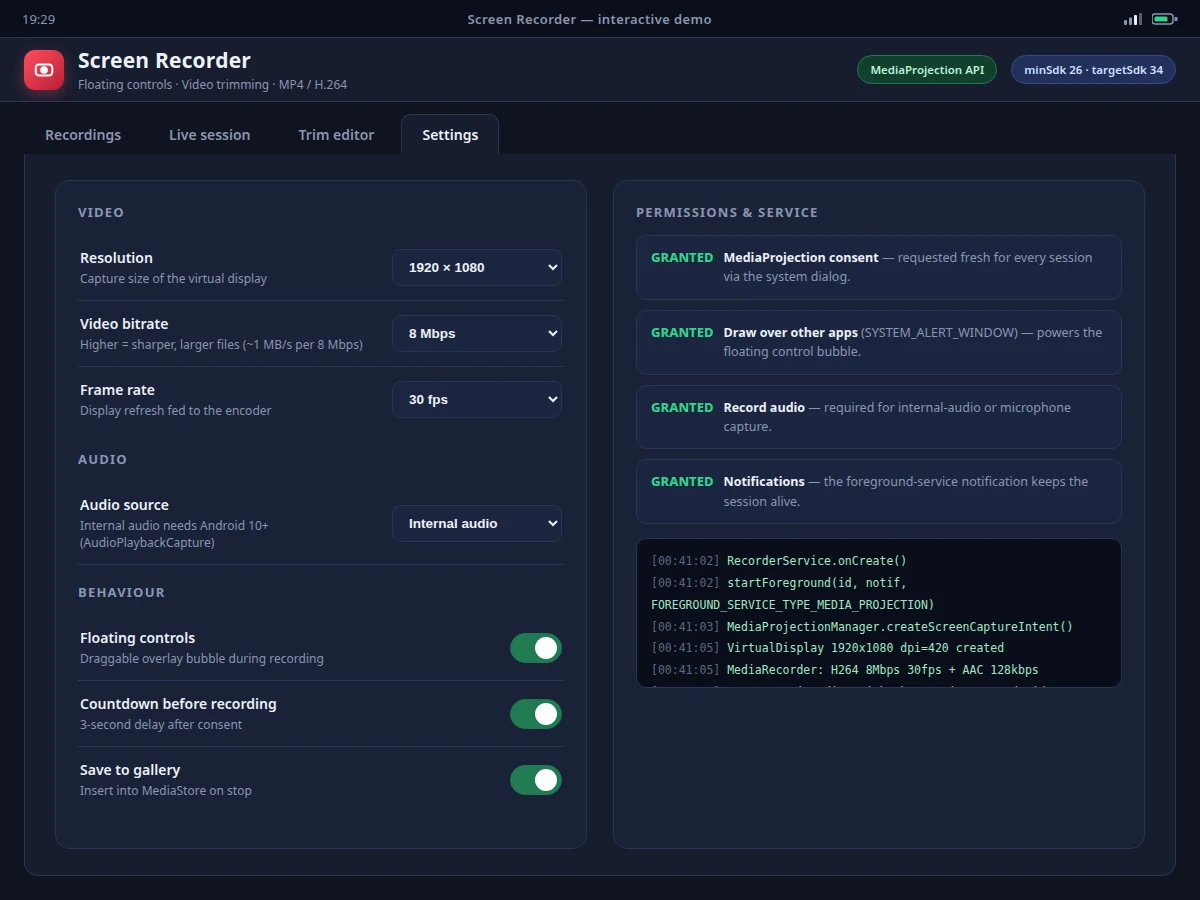
| Video bitrate | 4–16 Mbps, user-selectable (default 8 Mbps) |
| Frame rate | 24 / 30 / 60 fps, user-selectable |
| Internal audio | Android 10+ only (AudioPlaybackCapture requirement) |
| Trim method | Keyframe cut via MediaExtractor + MediaMuxer, no re-encode |
| Trim speed | Design target: 3-minute 1080p clip trims in seconds |
| File size | Approximately 1 MB per second at 8 Mbps (expected) |
| Internet requirement | None — fully offline |
Project features
- [MediaProjection screen capture] The app requests capture through MediaProjectionManager.createScreenCaptureIntent(), renders a virtual display at the chosen resolution, and feeds its surface to MediaRecorder for H.264 video and AAC audio in an MP4 container.
- [Foreground recording service] The projection session is owned by a foreground service declared with the mediaProjection service type, with the mandatory ongoing notification — the session survives the activity being destroyed and complies with Android 14 foreground-service rules.
- [Floating control bubble] A draggable overlay drawn through WindowManager (SYSTEM_ALERT_WINDOW permission) floats above every app during recording, with pause, resume and stop actions wired directly to the service.
- [Internal-audio capture] On Android 10 and later the app captures device audio via AudioPlaybackCapture alongside the microphone-only and no-audio modes, selectable per session.
- [Lossless video trimming] A timeline editor with draggable start/end handles seeks to the nearest sync frame and copies compressed samples into a new MP4 using MediaExtractor and MediaMuxer — no decode/re-encode cycle, so a multi-minute 1080p clip trims in seconds with zero quality loss.
- [Configurable encoder settings] Resolution (up to 1080p), video bitrate, frame rate and audio source are adjustable before each session, with the choices applied when the virtual display and encoder are created.
- [MediaStore export] Finished and trimmed recordings are inserted into MediaStore on stop, so clips appear in the gallery immediately with correct duration metadata.
What is included
- Complete Android source code (Kotlin) with the capture, service, overlay and trimmer modules
- Debug APK demo build for testing on a physical device
- Encoder configuration guide (resolution/bitrate/frame-rate trade-offs)
- Project report PDF (background, MediaProjection pipeline, service lifecycle, permission model, trimming method)
- PPT presentation for final review
- Viva Q&A preparation document (foreground services, MediaProjection consent, keyframes, AudioPlaybackCapture)
- Abstract PDF (matches this page)
Limitations & prerequisites
- MediaProjection consent is requested by the system before every session and cannot be skipped or remembered by the app.
- The recording session ends if the foreground service is killed; on Android 14 the service must keep its declared mediaProjection type and ongoing notification.
- Internal-audio capture requires Android 10 or newer; on older versions only microphone or no-audio modes are available.
- Trim cuts land on the nearest keyframe at or after the chosen start point, so the cut can shift by a fraction of a second from the exact handle position.
- Very high bitrate plus 60 fps on low-end devices can drop frames — encoder throughput is hardware-dependent.
- Some apps (banking, DRM video) block screen capture at the OS level; those surfaces record as black by platform design.
Frequently Asked Questions
How does the screen capture actually work?
The app uses Android's MediaProjection API: it asks the system for capture consent, creates a virtual display mirroring the screen, and feeds that display's surface into MediaRecorder, which encodes H.264 video and AAC audio into an MP4 file. No third-party recording SDK is used.
Why does it need a foreground service?
The MediaProjection session is tied to a foreground service so Android does not kill the recording when the app leaves the foreground. On Android 14 and later the service must declare the mediaProjection foreground-service type — this project does, with the mandatory ongoing notification.
How do the floating controls work?
After the SYSTEM_ALERT_WINDOW ("draw over other apps") permission is granted, the app renders a draggable bubble through WindowManager that stays above every app during recording, with pause, resume and stop buttons wired to the recording service.
Does trimming reduce video quality?
No. The trimmer seeks to the nearest keyframe and copies the already-compressed samples into a new MP4 with MediaMuxer — there is no decode/re-encode step, so quality is identical and trimming takes seconds.
Can it record internal audio from games and apps?
Yes on Android 10 and newer, via the AudioPlaybackCapture API. Microphone-only and no-audio modes are also available, and the source is selectable before each session.
Is this project suitable for a final-year project?
Yes — for Computer Science, IT and mobile-application programs. It demonstrates MediaProjection capture, foreground-service lifecycle, overlay windows, the media encoding pipeline and keyframe-accurate trimming, all with standard Android SDK APIs.
Components & software requirements
- Kotlin
- Android SDK (MediaProjection · MediaRecorder · MediaExtractor · MediaMuxer)
- Foreground service (mediaProjection type)
- WindowManager overlay (SYSTEM_ALERT_WINDOW)
- AudioPlaybackCapture API
- MediaStore API
- Android Studio · Gradle
- Material 3 UI components
Delivery information
Built-to-order project. Delivery timeline is shared after order confirmation based on current queue.
Support terms
Complete documentation, setup guide, and viva preparation included. Support for setup and explanation provided.
Download free synopsis (PDF)
Enter your name and email — the synopsis PDF downloads immediately. We may send occasional project updates; no spam, unsubscribe anytime.