
More project photos (3)

The problem
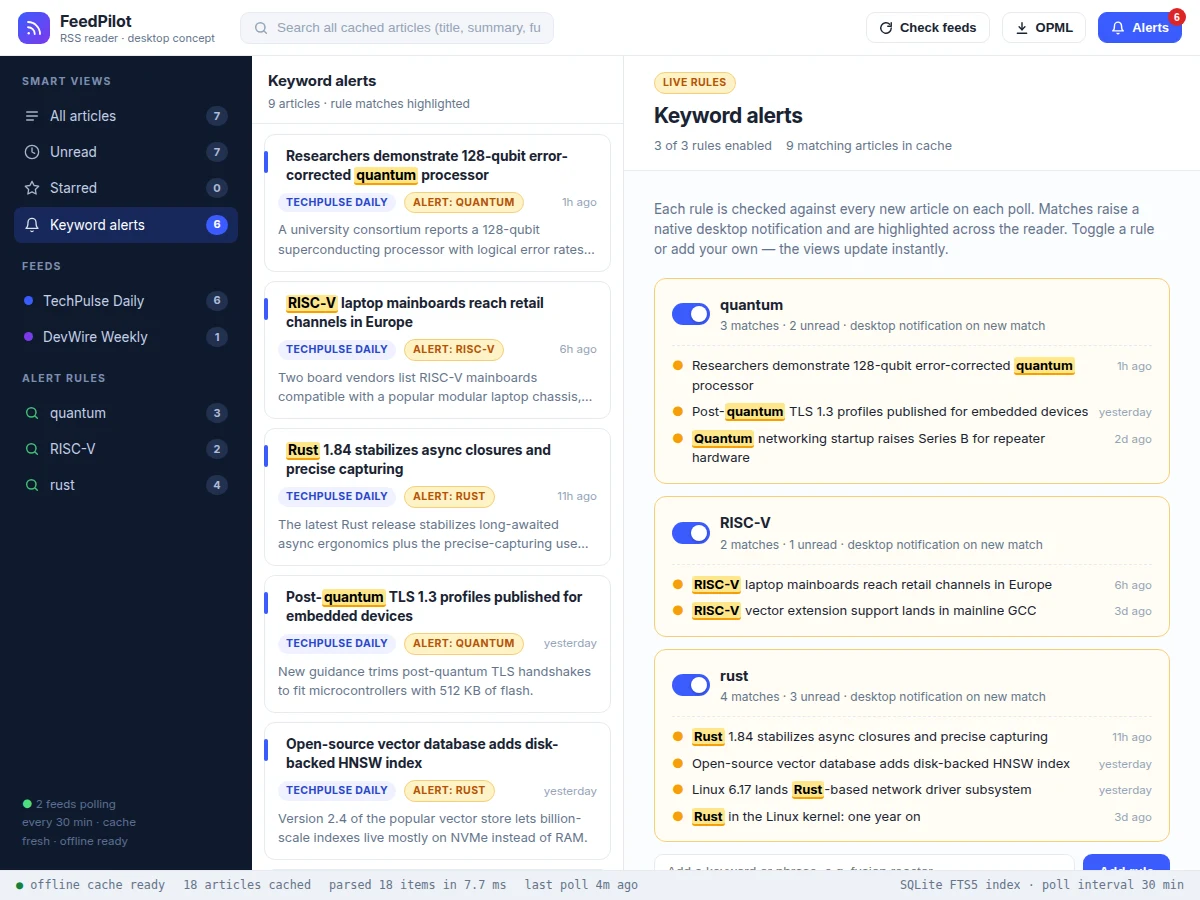
FeedPilot is an RSS feed reader desktop application built in Python with PyQt6. It subscribes to RSS and Atom feeds, checks them on a configurable schedule, stores every article in a local SQLite database, and raises a native desktop notification the moment a user-defined keyword rule matches a new item. It addresses attention overload: students and developers follow dozens of sources, and the stories they care about drown in the daily flood of headlines. Web-based readers demand an account and a connection, and their ranking decides what gets seen; a desktop reader keeps subscriptions, read state and the complete article archive on the user's own machine. Keyword alerts turn the reader from a passive inbox into a monitor — tracking terms like "RISC-V" or "quantum" surfaces matching stories within one polling interval instead of weeks later. Offline reading completes the loop: everything fetched on the last poll stays fully readable with no connection, which matters on unreliable campus networks.
This is a built-to-order software project: the complete PyQt6 source code, SQLite schema, keyword-rule engine, OPML module, background poller, packaging script and the full viva kit (report, PPT, Q&A) are prepared fresh for you.
The engineering substance is in the unglamorous parts: feedparser normalizes the wild variety of real-world RSS and Atom into one clean article model, a QThread worker polls without freezing the interface, SQLite with FTS5 makes full-text search over thousands of cached articles effectively instant, and OPML 2.0 import/export means subscriptions are never locked into one app. The concept demo bundled with this listing is a working single-file web build of the same interface — it parses an embedded 18-article sample feed, evaluates three keyword rules with word-boundary matching, and demonstrates search, read/unread state and the alerts dashboard.
How it works
A complete poll cycle runs like this: the scheduler wakes the QThread worker, which issues conditional HTTP requests to every subscribed feed and hands the responses to feedparser; feedparser normalizes RSS 2.0, RSS 1.0 and Atom into one internal article model. New entries are deduplicated by GUID (falling back to link) and written to SQLite with their metadata, and the FTS5 index is updated incrementally in the same transaction. Each new article is then evaluated against every enabled keyword rule with word-boundary matching, matches are flagged in the database, and a native desktop notification is raised through QSystemTrayIcon. Clicking the notification opens the article with the keyword highlighted. Because all of this happens in a worker thread, the interface stays responsive throughout, and once a poll completes the entire archive — text and search index — is available offline until the next cycle.
- The user adds feeds by pasting URLs or imports an OPML file; feedparser normalizes RSS 2.0, RSS 1.0 and Atom into one internal article model.
- A QThread worker polls every subscribed feed on the configured interval (default 30 minutes), sending conditional requests with ETag and Last-Modified headers so unchanged feeds cost almost no bandwidth.
- New entries are deduplicated by GUID (falling back to the article link) and written to SQLite with feed, category, publish date and read/starred flags; the FTS5 full-text index updates in the same transaction.
- Each new article is checked against every enabled keyword rule with word-boundary matching, and matches are flagged in the database.
- Matches raise a native desktop notification via QSystemTrayIcon; clicking it opens the article in the reader with the matched keyword highlighted.
- Search always reflects the latest poll because the index updates incrementally, and the whole archive remains readable offline between polls.
Tech stack:
- Python 3 and PyQt6 (Qt 6 desktop UI)
- feedparser (RSS 2.0, RSS 1.0 and Atom normalization)
- SQLite with FTS5 full-text search
- QThread worker for background polling
- QSystemTrayIcon for native desktop notifications
- OPML 2.0 import and export
- requests (conditional HTTP fetching)
- PyInstaller (single-file packaging)
| Parameter | Value |
|---|---|
| Platform | Windows, macOS and Linux desktops (Python 3.10+) |
| UI toolkit | PyQt6 (Qt 6) |
| Feed formats | RSS 2.0, RSS 1.0 and Atom via feedparser |
| Local database | SQLite with FTS5 full-text index |
| Sample-feed parse | Approximately 2–20 ms for 18 articles (measured in the concept demo) |
| Search latency | Design target: under 100 ms on a 10,000-article cache |
| Polling interval | Configurable; default 30 minutes |
| Deduplication | By GUID, falling back to article link |
| Notifications | Native desktop notifications via QSystemTrayIcon |
| Subscription interchange | OPML 2.0 import and export |
| Packaging | Single-file executable via PyInstaller (optional add-on) |
Project features
The four capabilities that define this build are the keyword alert engine, which evaluates user-defined rules against every new article and raises native desktop notifications; the offline SQLite cache with FTS5 full-text search, which keeps the entire archive readable and searchable with no connection; OPML 2.0 import and export with feed categories and smart views, which makes subscriptions portable and organized; and the background polling scheduler, which refreshes every feed on a configurable interval in a worker thread so the interface never stutters. Around that core sit read/unread tracking, starring, and a single-file PyInstaller package for distribution. Every feature below is implemented in the base build except the last, which is explicitly marked as an optional customization so the scope stays honest. That separation matters because buyers should know exactly what ships on day one.
- [Keyword alert engine] User-defined keyword or phrase rules are checked against every new article on each poll using word-boundary matching; matches raise a native desktop notification and are highlighted across the reader. Rules can be toggled, added or removed at any time.
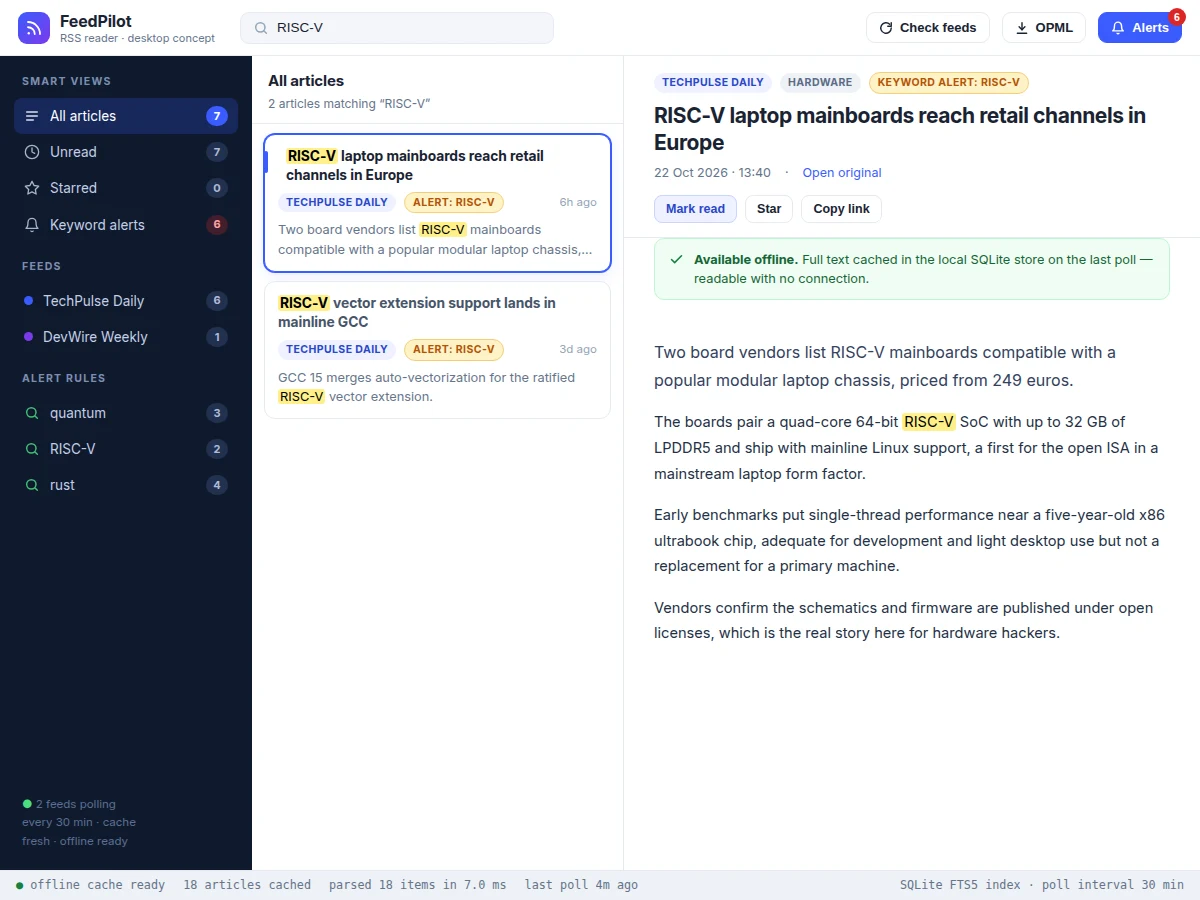
- [Offline article cache] The full text of every fetched article is stored in a local SQLite database, so reading works with no connection at all; cached items carry a visible offline badge in the reader.
- [Full-text search] An SQLite FTS5 index covers titles, summaries and cached bodies. The concept demo searches its 18-article sample instantly, and the design target is sub-100 ms queries on a 10,000-article archive.
- [OPML import/export] One-click export of all subscriptions to OPML 2.0, and import from any reader that exports OPML, so the user's feed list is never locked into one application.
- [Categories and smart views] Feeds are organized into collapsible categories, with smart views for All articles, Unread, Starred and Keyword alerts, each showing live unread counts.
- [Read/unread and starring] Per-article read state and starred flags persist in SQLite; mark-all-read works per feed or per view, and state survives restarts.
- [Background polling scheduler] A QThread worker checks every subscribed feed on the configured interval (default 30 minutes) without blocking the UI, using conditional HTTP requests (ETag/Last-Modified) so unchanged feeds cost almost no bandwidth.
- [Full-text extraction for summary-only feeds — optional customization] Some publishers syndicate summaries only; a readability-style extractor that fetches the full article text can be added on request as a customization, and is not part of the base build.
What is included
- Complete PyQt6 desktop application source code
- SQLite schema with FTS5 full-text index setup
- Keyword-rule alert engine with word-boundary matching
- OPML 2.0 import/export module
- QThread-based background poller with conditional HTTP fetching
- PyInstaller build script for single-file packaging
- Starter OPML file with sample technology feeds
- Working concept demo (single-file HTML build of the interface)
- Project report PDF (background, architecture, methodology, testing notes)
- PPT presentation for final review
- Viva Q&A preparation document (threading, SQLite FTS5, feed parsing, notifications)
requirements:
- Python 3.10 or newer
- PyQt6 (pip installable, cross-platform)
- feedparser and requests libraries
- SQLite with FTS5 (bundled with standard Python builds)
- PyInstaller (only needed for single-file packaging)
- A desktop OS: Windows 10+, macOS 12+, or any modern Linux distribution
- Git (optional, for version control)
Limitations & prerequisites
- Polling is pull-based: a breaking story can lag up to one full interval (default 30 minutes); the app cannot push instantly the way a websocket service does.
- Feeds that syndicate summaries only show summaries offline; fetching the full article text for such feeds is an optional customization, not in the base build.
- Notification appearance, sound and persistence follow the host OS — Windows, macOS and Linux each behave differently, and the app cannot override OS-level notification settings.
- The design target is a 10,000-article working set; archives beyond roughly 50,000 articles slow FTS5 index builds, so retention pruning (for example, keep 90 days) is configurable.
- JSON Feed and other non-RSS/Atom formats need a parser extension; that is listed as future scope, not in the base build.
- Some publishers rate-limit or block automated fetching; the poller respects ETag/Last-Modified and backs off after HTTP 429 responses, but a hard block means replacing that feed manually.
Frequently Asked Questions
Is this project suitable for a final-year project?
Yes — for Computer Science and IT programs, this is a strong desktop-application project. It demonstrates GUI development with PyQt6, multithreading with QThread workers, relational database design with SQLite and FTS5, real-world data parsing with feedparser, and OS integration through native notifications. The report documents the polling architecture, the schema and the keyword-matching design, and the viva kit covers exactly the questions examiners ask about threading and offline storage.
Which toolkit does the desktop app use, and why PyQt6?
The app is built with PyQt6, the Python binding for Qt 6. PyQt6 was chosen because it provides real native widgets, a proven threading model (QThread with signal/slot communication), system-tray integration for notifications, and true cross-platform builds from one codebase. It is pip-installable, well documented, and a recognizable skill on a resume — unlike niche or abandoned GUI frameworks.
How do the keyword alerts work?
Each rule is a keyword or phrase the user defines, evaluated against every new article on each poll using word-boundary matching — so a "rust" rule matches "Rust 1.84" but not "trusted". Matches are flagged in the database, raise a native desktop notification immediately, and appear highlighted in the article list, the reading pane and the alerts dashboard. Rules can be toggled or added at any time and take effect on the next poll.
Does the app work without an internet connection?
Reading and searching work fully offline, because every fetched article's full text and the FTS5 search index live in the local SQLite database on the user's own machine. Only fetching new articles, checking for updates and importing remote OPML files need connectivity, so a lost connection never interrupts reading. Articles fetched on the last poll carry an offline badge in the reader, so it is always clear what is available without a connection.
Can I move my subscriptions from another feed reader?
Yes — moving subscriptions in or out takes one step through OPML, the standard subscription-interchange format every serious feed reader supports. Export the OPML file from the old reader and import it here, and feeds, titles and folder structure come across together, ready to poll on the next cycle. Export works the same way in reverse, so the subscription list is never locked into this app.
Components & software requirements
- Python 3 and PyQt6 (Qt 6 desktop UI)
- feedparser (RSS 2.0, RSS 1.0 and Atom normalization)
- SQLite with FTS5 full-text search
- QThread worker for background polling
- QSystemTrayIcon for native desktop notifications
- OPML 2.0 import and export
- requests (conditional HTTP fetching)
- PyInstaller (single-file packaging)
Delivery information
Built-to-order project. Delivery timeline is shared after order confirmation based on current queue.
Support terms
Complete documentation, setup guide, and viva preparation included. Support for setup and explanation provided.
Download free synopsis (PDF)
Enter your name and WhatsApp number — the synopsis PDF downloads immediately. We may send occasional project updates on WhatsApp; no spam.