
More project photos (2)
The problem
Manual expense entry is slow and error-prone, yet every receipt looks different — logos, fonts, thermal-paper fade, crumpled scans. The difficulty is not just reading the text: generic OCR returns raw text lines, but the real work is deciding which line is the merchant name, which date is the transaction date and which number is the grand total among all the subtotals, taxes and item prices. Receipt layouts vary wildly across vendors, so the extraction logic must combine spatial heuristics (where on the receipt a value usually sits), entity recognition and pattern rules — a structured-extraction problem, not just text recognition. A pipeline that reliably turns arbitrary receipt images into clean JSON fills a real automation gap for expense tracking, accounting and audit. For students, it is a strong project precisely because it bridges two domains: computer vision for the OCR stage and NLP for the extraction stage, with per-field F1 scores that make the results measurable and demoable.
Frequently asked questions
- Why not just use a generic OCR tool on receipts? OCR only gives raw text; the real work here is the NER plus regex stage that decides which line is the merchant name, which date is the transaction date and which number is the grand total — a structured-extraction problem, not just text recognition.
- What dataset is used for evaluation? SROIE — the ICDAR 2019 competition dataset of 1,000 scanned receipts with annotated key fields. The evaluation notebook computes per-field F1 scores against these annotations for merchant, date and total.
- How does it handle so many different receipt layouts? A combination of spatial heuristics (where on the receipt a value usually sits), spaCy entity tagging and pattern rules covers the common layout families, and the report documents the failure cases honestly.
- Is my receipt data sent anywhere? No — the whole pipeline runs locally on the machine, so no receipt images leave the laptop.
- Is this project suitable for a final-year project? Yes. It suits B.E./B.Tech students in Computer Science, AI/ML and Data Science, demonstrating OCR, NER, information extraction, per-field F1 evaluation and a locally-running document-AI demo.
- What will I receive? Complete source code, the spaCy NER component and receipt-tuned regex rule set, evaluation notebooks, dataset and batch-processing scripts, project report PDF, PPT presentation, viva Q&A document and a setup guide.
How it works
Dataset & model:
Dataset name: SROIE (ICDAR 2019).
Source: public competition dataset for scanned receipt information extraction.
Task: key-field extraction from receipt images (OCR + entity extraction, not a single classifier).
Classes/fields: merchant (company), date, total are extracted and evaluated; SROIE also annotates address, which this build does not target — stated openly.
Model: OCR engine (PaddleOCR or EasyOCR) for text recognition plus spaCy NER with receipt-tuned regex post-processing and a per-field candidate scoring step; no single trained classifier.
Input: scan or photo of a receipt (JPG/PNG/PDF), preprocessed with deskewing and contrast enhancement.
Prediction: per-field value candidates with confidence scores.
Output: structured JSON (merchant, date, total) plus CSV/Excel export and a source-region overlay visualization.
Evaluation metrics: per-field F1 scores computed by the notebook against SROIE annotations during the build.
Design targets: merchant 0.90+, date 0.95+, total 0.90+ F1. These are design targets, not measured claims; the notebook computes the actual F1 scores during the build.
Working:
- The user uploads a receipt image; the preprocessing pipeline deskews it and enhances contrast to counter thermal-paper fade.
- The OCR engine (PaddleOCR or EasyOCR) detects text regions and recognizes text lines with bounding boxes.
- Detected lines are normalized (casing, spacing cleanup) and passed to the extraction stage.
- spaCy NER tags candidate entities while regex rules lock down dates and totals by pattern; a scoring step picks the best candidate per field, resolving conflicts between nearby numbers such as subtotal versus grand total.
- Evaluation phase: the notebook computes F1 scores per key field against the SROIE annotations and produces error analysis.
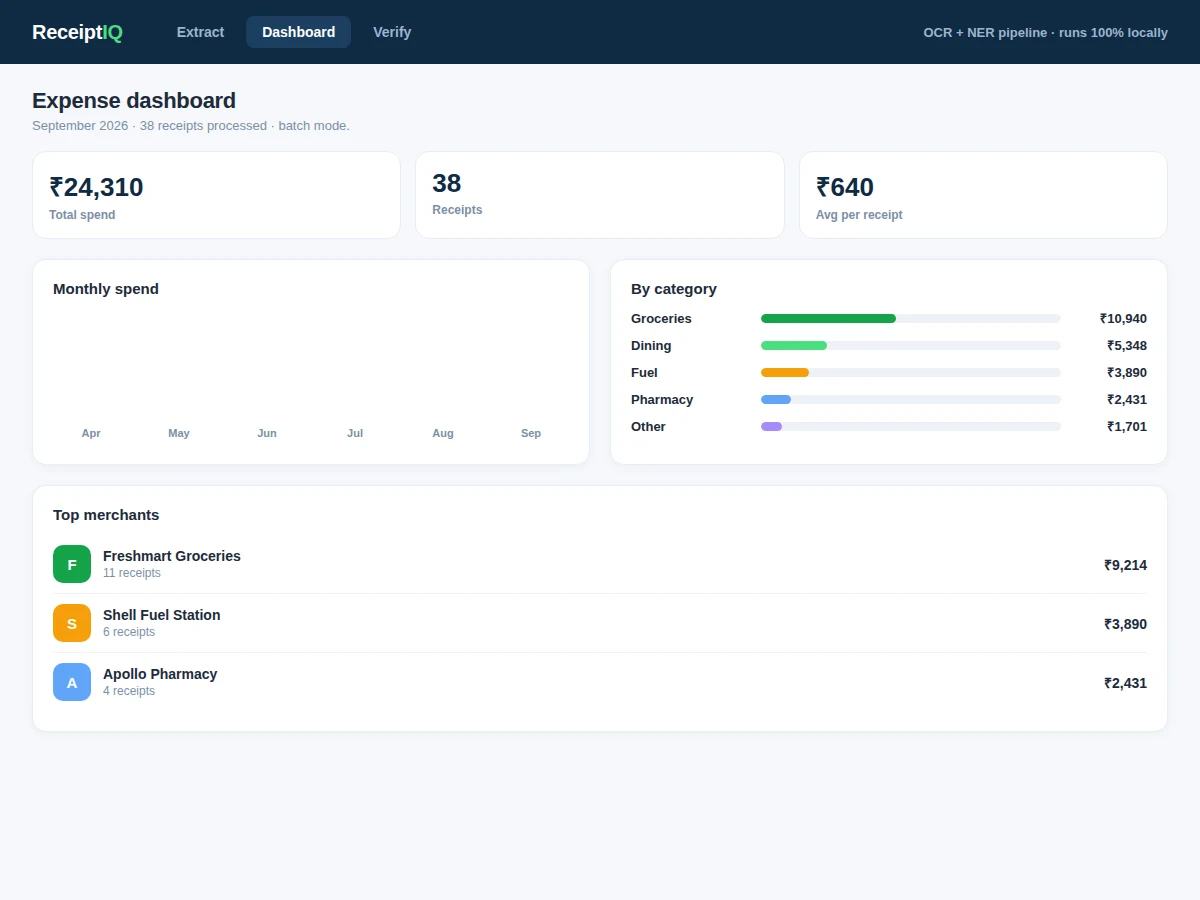
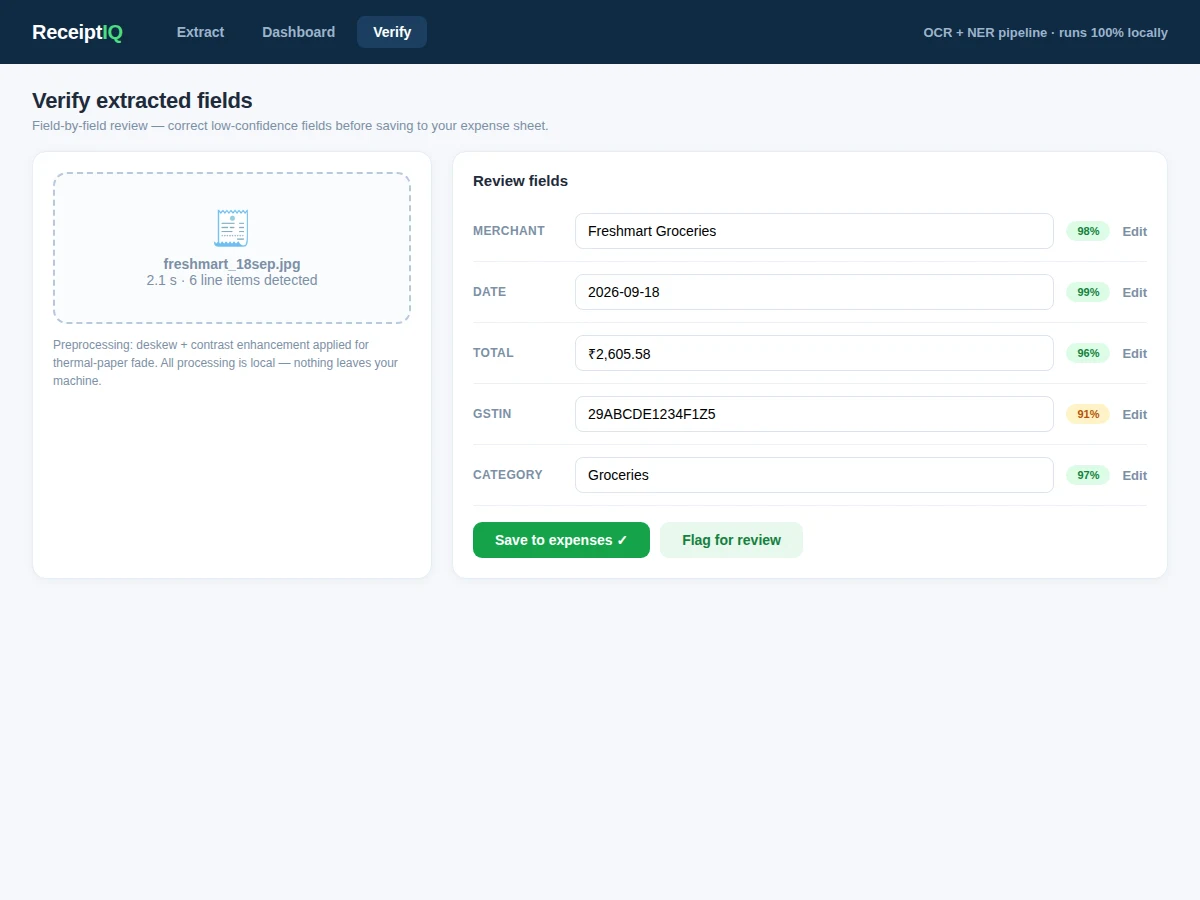
- Inference phase: the web app renders the structured JSON with per-field confidence scores and an overlay highlighting exactly where each value was found on the receipt image.
- Date normalization converts multiple date formats to ISO, currency parsing standardizes amounts, and results export to CSV/Excel or process in batch mode for whole folders of receipts.
Specifications:
Pipeline | OCR (PaddleOCR/EasyOCR) + spaCy NER with regex post-processing
Dataset | SROIE ICDAR 2019 (1,000 scanned receipts with key-field annotations)
Design targets | Merchant 0.90+, date 0.95+, total 0.90+ F1 (design targets, not measured claims)
Fields extracted | merchant, date, total — structured JSON
Input | Scan or photo of a receipt (JPG/PNG/PDF)
Output | JSON plus CSV/Excel export, overlay visualization
Inference | CPU, a few seconds per receipt
Platform | Windows/Linux/macOS, Python 3.10; web demo included
Project features
[Receipt OCR] (implemented) — PaddleOCR or EasyOCR reads text from scanned and photographed receipts, with deskewing, contrast enhancement and denoising tuned for thermal-paper scans.
[Key-Field Extraction] (implemented) — Extracts merchant name, purchase date and total amount into structured JSON using a spaCy NER stage plus regex post-processing rules tuned for receipt layouts.
[Source-Region Overlay] (implemented) — The demo highlights exactly where each extracted value was found on the receipt image, making every extraction visually verifiable.
[Per-Field Confidence Scores] (implemented) — Each extracted field ships with a confidence score so uncertain extractions are visible rather than silently wrong.
[Per-Field F1 Evaluation] (implemented) — The evaluation notebook computes F1 scores per key field against the SROIE annotations, with error analysis of failure cases.
[Date Normalization & Currency Parsing] (implemented) — Multiple date formats are converted to ISO and currency amounts parsed consistently.
[CSV/Excel Export] (implemented) — Extracted data exports to CSV/Excel for direct use in expense sheets.
[Batch Mode] (implemented) — Processes whole folders of receipts at once for bulk extraction demos.
What is included
Complete source code (preprocessing, OCR, NER extraction, web app)
spaCy NER component and receipt-tuned regex rule set
Evaluation notebooks (per-field F1 computation, error analysis)
Dataset preparation and batch-processing scripts
Project report PDF (document-AI background, pipeline methodology, evaluation)
PPT presentation for the final review
Viva Q&A preparation document (OCR, NER, information extraction, F1 metrics)
Setup guide (environment, dependencies, dataset download steps)
Limitations & prerequisites
Crumpled, faded or blurry receipts degrade OCR quality and extraction accuracy.
Handwritten receipts are out of scope — the pipeline is tuned for printed text.
Merchant-name ambiguity: abbreviations and logo-only headers can confuse the NER stage.
Optimized for English receipts; multilingual layouts are a known limitation.
The build targets merchant, date and total only; SROIE's address field is not extracted.
All reported figures are design targets computed by the buyer's own evaluation run; no pre-measured F1 is claimed.
Frequently Asked Questions
Why not just use a generic OCR tool on receipts?
OCR only gives raw text; the real work here is the NER plus regex stage that decides which line is the merchant name, which date is the transaction date and which number is the grand total — a structured-extraction problem, not just text recognition.
What dataset is used for evaluation?
SROIE — the ICDAR 2019 competition dataset of 1,000 scanned receipts with annotated key fields. The evaluation notebook computes per-field F1 scores against these annotations for merchant, date and total.
How does it handle so many different receipt layouts?
A combination of spatial heuristics (where on the receipt a value usually sits), spaCy entity tagging and pattern rules covers the common layout families, and the report documents the failure cases honestly.
Is my receipt data sent anywhere?
No — the whole pipeline runs locally on the machine, so no receipt images leave the laptop.
Is this project suitable for a final-year project?
Yes. It suits B.E./B.Tech students in Computer Science, AI/ML and Data Science, demonstrating OCR, NER, information extraction, per-field F1 evaluation and a locally-running document-AI demo.
What will I receive?
Complete source code, the spaCy NER component and receipt-tuned regex rule set, evaluation notebooks, dataset and batch-processing scripts, project report PDF, PPT presentation, viva Q&A document and a setup guide.
Components & software requirements
Python 3.10
PaddleOCR or EasyOCR
spaCy with a trained NER component
OpenCV, Pillow
NumPy, Pandas, Matplotlib
Flask or Streamlit
SROIE dataset (public; preparation scripts included)
CPU is sufficient; no GPU needed
Delivery information
Built to order — the source code, trained components, project report, PPT and viva Q&A are prepared fresh for each buyer after the order is placed. The delivery schedule is confirmed at order time, and includes time for pipeline tuning, evaluation and assembling the complete documentation kit.
Support terms
- Environment and dependency setup guidance, including OCR engine and spaCy setup.
- Viva preparation support covering OCR, NER, information extraction and F1 metrics.
- Explanation of the evaluation notebook output and how to present the per-field results in the review.
- Discussion of feasible customizations before ordering, such as extra fields (address, line items) or a database-backed expense store.