
More project photos (3)

The problem
A macro recorder is the most direct answer to repetitive GUI work: the same portal logins every morning, the same admission and exam forms filled field by field, invoice rows keyed into accounting software one at a time, daily reports copied into backup folders. This work is deterministic and rule-following, yet students and office staff still do it by hand because scripting each workflow needs programming skill and breaks the moment a button moves. Existing macro tools are closed-source, paid, or Windows-only, and they teach nothing about how input hooks, synthetic events and scheduling actually work under the hood. This project builds a transparent macro recorder in Python that anyone can own and explain: do the task once while the recorder watches, then replay it at any speed, schedule it for later, or fire it from a hotkey. Its timing fidelity is measured by an in-built self-test harness on a seeded 240-event macro, not asserted in marketing words.
Does the task once while the recorder watches the keyboard and mouse.
Follow the working sequence
How it works
Tech stack:
- Python 3.10+
- pynput (input capture and synthetic playback)
- schedule (background scheduler worker)
- keyboard (global hotkey listener)
- CustomTkinter (desktop UI)
- JSON macro library
- PyInstaller (packaging)
- Git
| Parameter | Value |
|---|---|
| Platform | Windows 10/11 or Linux with X11 (desktop application) |
| Capture resolution | Millisecond timestamps on every event (expected) |
| Replay timing error | 0.6 ms mean inter-event error (Measured in the demo self-test harness on a seeded 240-event macro) |
| Playback speed | 0.5x to 4x, configurable per run |
| Loop count | 1 to 10 per run, configurable |
| Scheduler tick | 1 second background evaluation (design) |
| Schedule format | Cron-style 5-field expressions |
| Macro storage | JSON event streams, one file per macro; typical macros hold tens to hundreds of events (expected) |
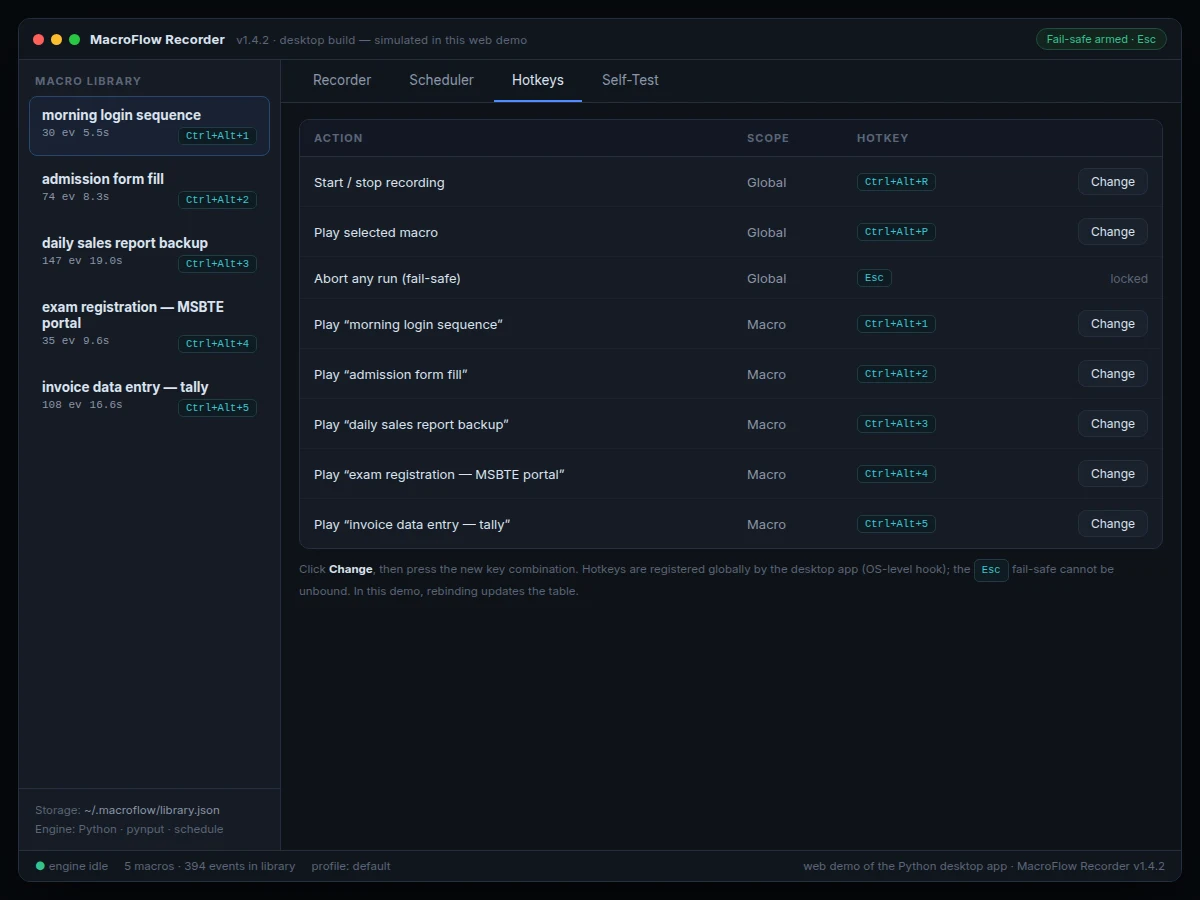
| Hotkeys | OS-global, re-bindable at runtime; Esc fail-safe permanently locked |
Project features
The macro recorder is built around four things that have to work together: a capture engine that records real keyboard and mouse input with honest per-event delays, a playback engine that replays it at adjustable speed and loop counts, a scheduler plus global hotkeys that fire macros without the app in focus, and a fail-safe that can stop a runaway macro instantly. The capture engine hooks the OS input stream and stores every keystroke, mouse move, click and scroll with its millisecond delay into a JSON event stream you can inspect. Playback walks that stream with a speed multiplier and loop counter, so a 60-second form fill can be replayed in 15 seconds or repeated ten times. The scheduler evaluates cron-style expressions on a one-second background tick for unattended runs, and the hotkey layer launches any macro from anywhere — while the Esc key stays hard-wired as an abort that halts playback mid-stream.
- [Keyboard + mouse capture] OS-level input hooks record keystrokes, mouse moves, clicks and scrolls with per-event delays into an inspectable JSON event stream.
- [Playback with speed control] Replays any macro from half speed to 4x, so slow careful sequences can be accelerated and fast ones slowed for debugging.
- [Loop counts] Repeats a macro 1 to 10 times in one run for batch-style repetitive tasks like multi-row data entry.
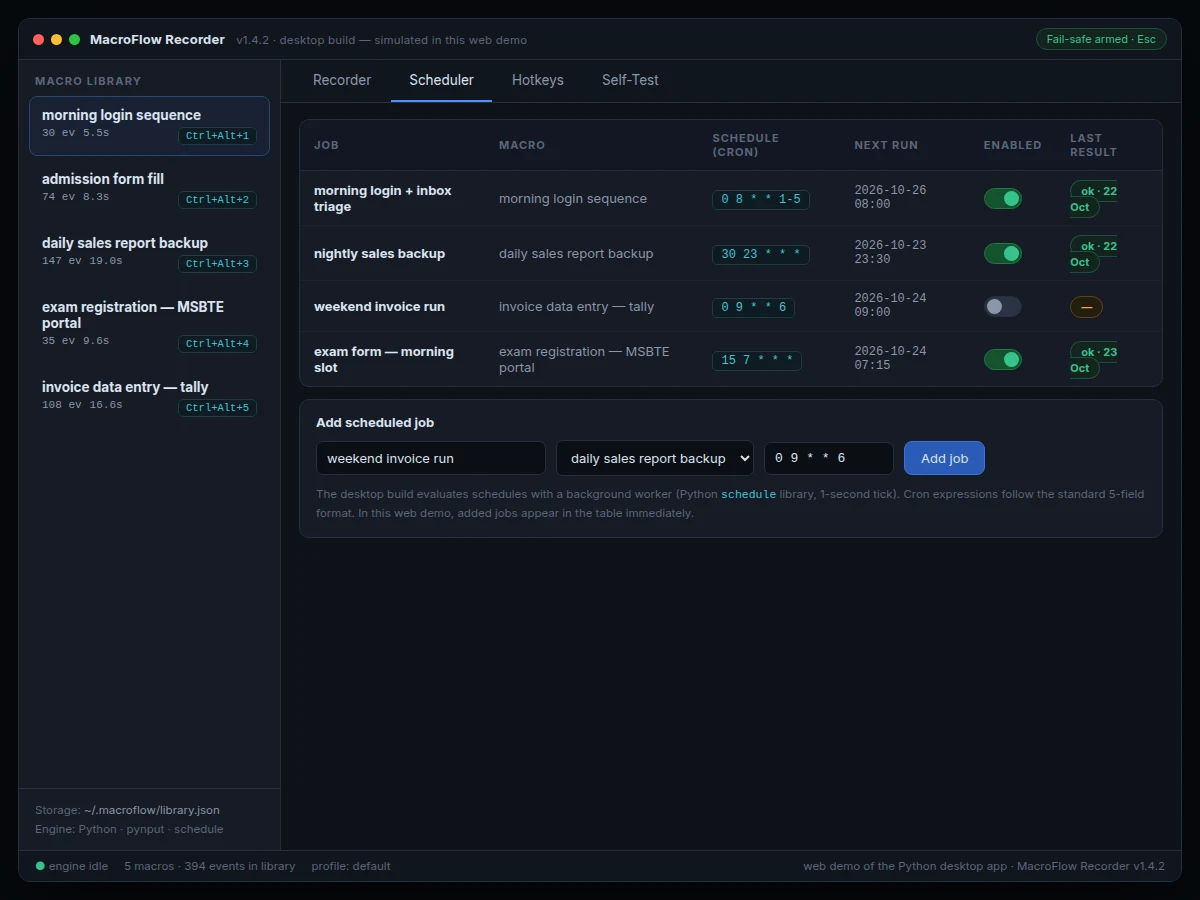
- [Scheduled playback] A background worker evaluates cron-style schedules every second and fires macros unattended at their configured times.
- [Hotkey triggers] Every macro gets a global hotkey (re-bindable at runtime) that launches it from any application, even when the recorder is minimized.
- [Macro profiles and library] Named macros organized in profiles with per-macro metadata (event count, duration, last run) stored as portable JSON.
- [Fail-safe abort key] The Esc key is permanently bound to abort and halts playback instantly, mid-stream, with no way to unbind it.
- [Export and import] Macros export to single JSON files for sharing, backup and submission alongside the report.
Optional customizations (not part of the base build): conditional playback that branches on on-screen image or text matches, a visual timeline editor for tweaking delays, and cloud sync of macro profiles.
How It Works
The macro recorder runs as a pipeline from physical input to automated replay. It starts at the OS input hook: when recording begins, the capture layer listens to the system keyboard and mouse stream and appends every keystroke, mouse move, click and scroll to an event list, stamping the millisecond delay since the previous event. When recording stops, that list is stored as a JSON macro in the library with its name, profile and hotkey. Scheduling and triggering sit beside the library: the background scheduler ticks once per second checking cron expressions, and the global hotkey listener waits for key combinations, each able to enqueue a macro for playback. Playback is the final stage — the engine walks the event stream in order, emits synthetic input through the OS, sleeps for each recorded delay divided by the speed factor, and repeats the walk for the configured loop count.
- Recording starts the OS-level input hook; every keystroke, mouse move, click and scroll is captured with its inter-event delay in milliseconds.
- Stopping the recording saves the event stream as a JSON macro in the library with its name, profile and assigned hotkey.
- The scheduler worker ticks every second, evaluates cron-style expressions, and enqueues any macro whose schedule is due.
- Global hotkeys are listened for system-wide; pressing one enqueues its macro even when the recorder window is minimized.
- Playback walks the event stream in order, emitting synthetic keyboard and mouse events through the OS.
- Each inter-event delay is divided by the selected speed factor (0.5x-4x), and the full walk repeats for the configured loop count (1-10).
- The Esc fail-safe watches the input stream during every run and aborts playback instantly when pressed.
- The recorded JSON macro can be exported, shared, or re-imported into another machine's library unchanged.
What is included
- Complete Python source code for the macro recorder desktop application
- Installer and requirements notes (pip dependencies, OS permission steps)
- Replay timing self-test harness with the seeded 240-event macro
- Web demo of the desktop UI for reviewers (the same demo used for the listing screenshots)
- Project report PDF (background, input-hook design, architecture, methodology, measured timing results)
- PPT presentation for final review
- Viva Q&A preparation document (event-driven programming, OS hooks, scheduling, timing measurement)
Limitations & prerequisites
- OS-level input hooks need an accessibility or admin permission grant on first run before they can see events in all applications.
- Some games and anti-cheat software actively block synthetic input, so macros cannot drive those targets.
- On Linux, Wayland compositors restrict global hotkeys; X11 sessions are recommended for full functionality.
- Timing precision is millisecond-scale, not microsecond: fine for GUI automation, unsuitable for hard real-time control.
- Macros store keystrokes in plain JSON, so credentials must never be recorded into a macro.
- Scheduled jobs run only while the application is open; there is no Windows-service or Linux-daemon mode in the base build.
Frequently Asked Questions
What exactly does the macro recorder capture?
Every keystroke, mouse move, left/right click and scroll, each stamped with the millisecond delay since the previous event, stored as an inspectable JSON event stream. It does not read screen pixels or application internals in the base build — it records input actions and replays them faithfully.
How accurate is the replay timing?
Honestly measured, not claimed: the built-in self-test harness replays a seeded 240-event macro and reports a mean inter-event timing error of 0.6 ms, with single-event deviations of a few milliseconds. That is millisecond-scale fidelity — plenty for GUI automation, not for hard real-time control.
Does it work on Linux or macOS?
The base build targets Windows 10/11 and Linux with X11, where global hotkeys and input hooks work fully. Wayland compositors restrict global hotkeys, and macOS would need a ported capture backend — both are listed as customizations, not included.
Can a macro run automatically every morning at 8?
Yes. The scheduler accepts cron-style expressions (for example, 0 8 * * 1-5 for 8 AM on weekdays) and a background worker evaluates them every second, firing the macro unattended as long as the application is running.
Is this project suitable for a final-year project?
Yes — for Computer Science and IT programs. It demonstrates OS-level input hooks, event-driven programming, synthetic input, background scheduling, hotkey handling and honest performance measurement, all in a live demo the student can drive in the viva.
Components & software requirements
- Python 3.10+
- pynput (input capture and synthetic playback)
- schedule (background scheduler worker)
- keyboard (global hotkey listener)
- CustomTkinter (desktop UI)
- JSON macro library
- PyInstaller (packaging)
- Git
Delivery information
Built-to-order project. Delivery timeline is shared after order confirmation based on current queue.
Support terms
Complete documentation, setup guide, and viva preparation included. Support for setup and explanation provided.
Download free synopsis (PDF)
Enter your name and WhatsApp number — the synopsis PDF downloads immediately. We may send occasional project updates on WhatsApp; no spam.