
More project photos (3)
The problem
Placement preparation is the stretch of weeks before campus interviews when a student must revise technical topics, practise speaking about projects, book practice interviews, collect feedback, and fix a resume, all at once. The Placement Preparation Web App gives that scattered work one home: a student profile, a preparation plan, mock interview bookings, written feedback after each session, and a resume review checklist, all visible on one dashboard. Instead of juggling separate notes, spreadsheets, chat messages and calendar reminders, the student works through a single plan that shows what is done, what is booked next, and which resume items are still open. A mentor or peer who hosts a mock session writes feedback into the same record the student revises from, so advice does not get lost between chats. The resume checklist turns vague advice such as improve your resume into tickable fixes with a visible count of what remains. Nothing here promises a job.
| Preparation approach | Tracking | Feedback | Scheduling |
|---|---|---|---|
| Structured preparation app | One dashboard shows plan tasks, bookings and resume items together | Written feedback is stored with the session it belongs to | Bookings, hosts and upcoming sessions sit in one place |
| Scattered notes and spreadsheets | Progress lives across files that drift out of date | Feedback sits in separate chats and is hard to find later | Dates are tracked by hand and clashes are easy to miss |
| Coaching-only preparation | The student depends on the coach for the next step | Feedback arrives in a session and may never be written down | Sessions depend on the coach's availability alone |
Student who creates a profile with target role, topics to revise, and current resume notes.
Follow the working sequence
How it works
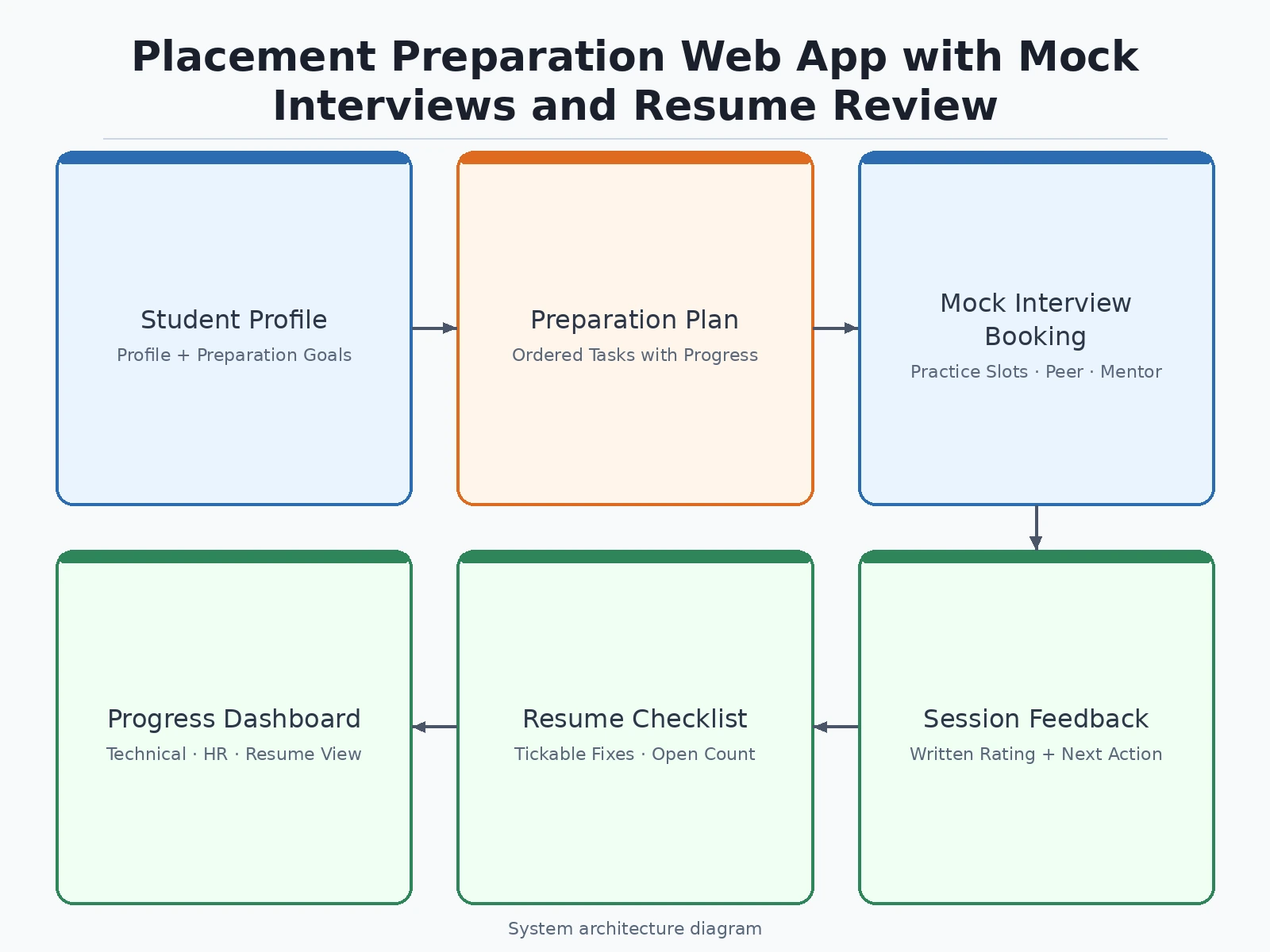
The end-to-end mechanism starts with a student profile that records the target role, the topics to revise, and the current resume state. From that profile the app builds a preparation plan of ordered tasks, and the dashboard shows progress across technical topics, HR preparation and resume work. The student books a mock interview from the available practice slots, choosing a topic and a peer or mentor host, and the booking appears in the plan as an upcoming session. After the session the host writes feedback into that session's record, with a practice rating and a follow-up action, and the student revises from that written record rather than from memory. In parallel the student works through the resume review checklist, ticking each fix as it is made, and the dashboard count of open items falls as the resume improves. Progress tracking ties the loop together: completed tasks, finished sessions and ticked checklist items all feed the same dashboard view.
- The student creates a profile with a target role, topics to revise, and notes on the current resume, which the app uses to shape the preparation plan.
- The app presents the preparation plan as ordered tasks, and the student works through them while the dashboard tracks progress per area.
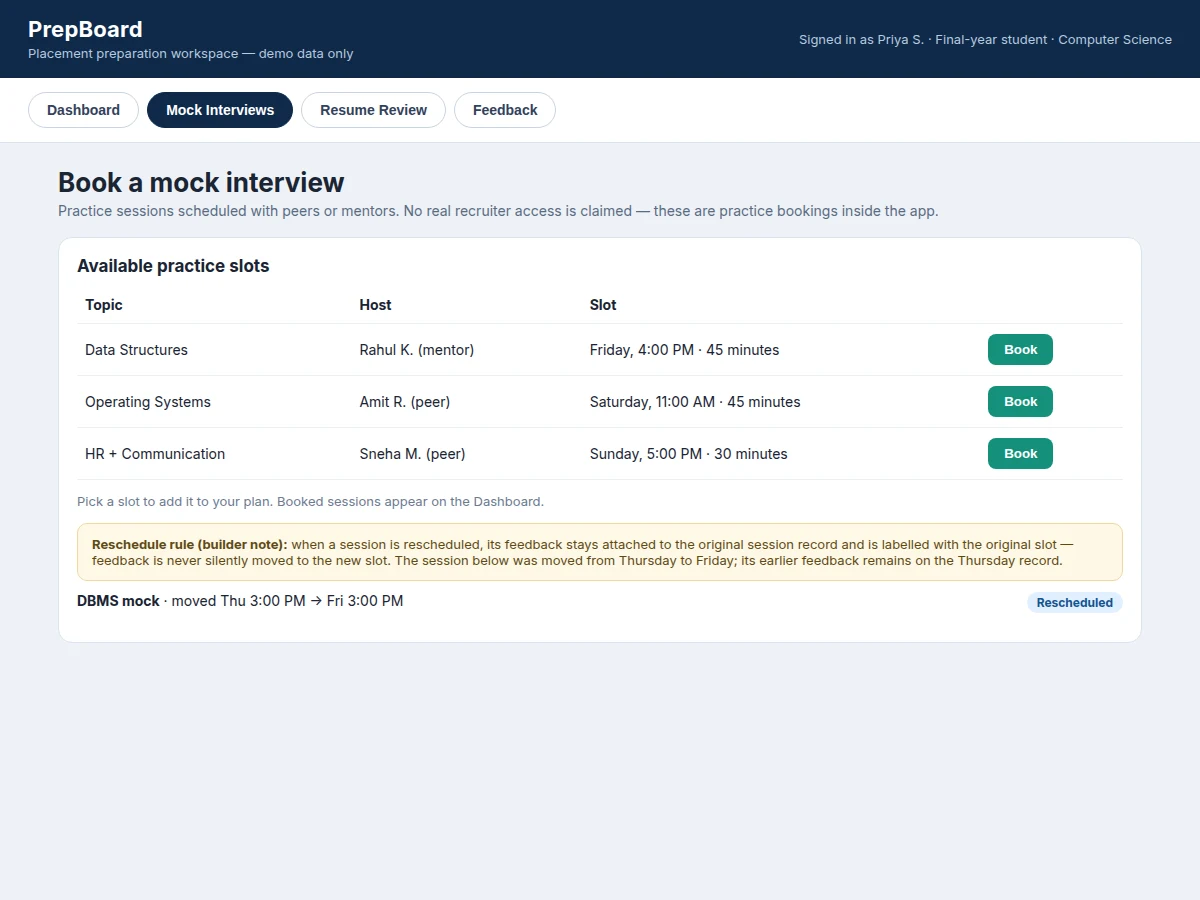
- The student opens the mock interview list, picks a topic and a peer or mentor host, and books a practice slot, which appears as an upcoming session.
- The student attends the practice session and discusses technical topics or HR questions, exactly as arranged, with the call held on a separate tool.
- After the session, the host writes feedback into that session's record, including a practice rating and one follow-up action for the student.
- The student revises from the written feedback, works on the follow-up action, and books the next mock to test whether the weak point has improved.
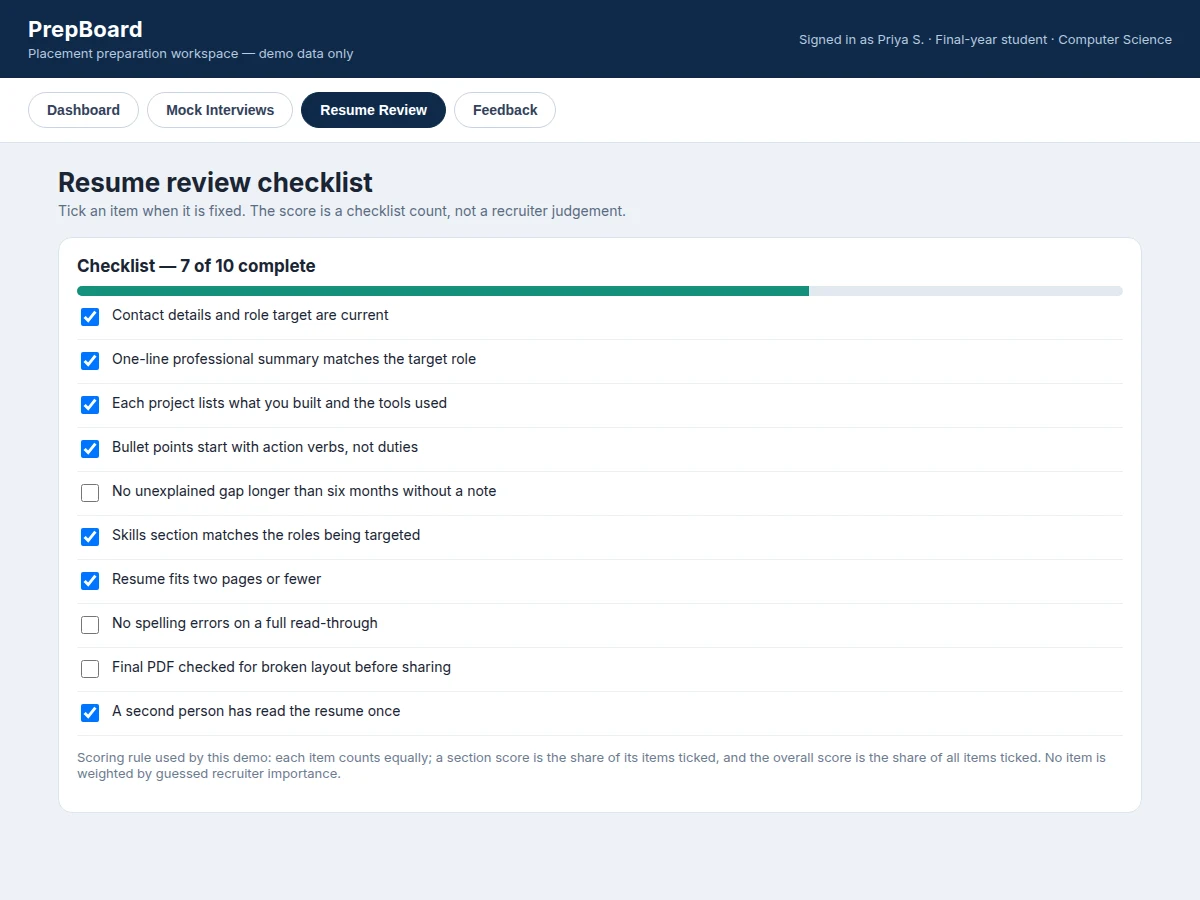
- Alongside the mocks, the student works through the resume review checklist, ticking each fix as it is made, until the count of open items reaches zero and the resume is ready to share.
Tech stack:
- React · component-based user interface with state hooks
- Node.js with Express · HTTP routes for profiles, bookings and feedback
- MongoDB · document storage for plans, sessions and checklists
- HTML · CSS · JavaScript · page structure, styling and interaction
- REST API design · JSON endpoints for bookings, feedback and progress
- JWT-based session handling · signed-in student and host sessions
- Responsive web layout · dashboard usable on desktop and mobile browsers
- Git · version control for the codebase
| Parameter | Value |
|---|---|
| Build type | Web application · student dashboard plus booking plus feedback plus checklist (design target) |
| Student profile | Target role plus topics to revise plus current resume notes (design target) |
| Preparation plan | 8-week plan length (design target) · ordered tasks with progress per area (design target) |
| Mock session length | 30 to 45 minutes per session (design target) |
| Session hosts | Peer hosts and mentor hosts · practice sessions only · no recruiter access (design target) |
| Feedback record | Written feedback plus practice rating plus one follow-up action per session (design target) |
| Resume checklist | 10 items in the checklist (design target) · each item counts equally toward the completion count (design target) |
| Progress calculation | Share of completed items per area · share of all items overall (design target) |
| Reschedule rule | Feedback stays attached to the original session record and is labelled with the original slot (design target) |
| Verified stack fact | React useState adds a state variable to a function component and returns the current value plus a setter function (verified: React official docs) |
| Verified stack fact | Express routing maps an HTTP method plus a path to a handler function, for example app.get for a GET request (verified: Express routing docs) |
| Builder note | While building the demo, the reschedule edge case was handled by keeping feedback on the original session record with its original slot label, after noticing that moving feedback to the new slot would let a student revise from advice about a session that had not happened yet · noted as a builder observation |
Project features
The app's strongest capabilities are the preparation plan, mock interview booking, written feedback tied to sessions, and the resume review checklist. The preparation plan turns an open-ended revision period into ordered tasks with visible progress, so a student always knows the next piece of work rather than staring at a syllabus. Mock booking replaces back-and-forth messages with a list of practice slots, hosts and session lengths that a student can book directly. Feedback written after a session stays attached to that session record, so revision starts from concrete advice instead of memory. The resume checklist converts resume advice into tickable items with a count of what is still open, so a resume improves visibly rather than by guesswork. Together these four capabilities cover the full loop: plan, practise, learn from feedback, and fix the resume.
- [Preparation plan dashboard] Ordered plan tasks with progress shown per area, so a student sees what is done, what is next, and where revision is lagging, with a filter by technical topics, HR preparation or resume work — implemented in the base build.
- [Mock interview booking] Practice slots with a topic, a peer or mentor host, and a session length, booked from one list without arranging each session over chat — implemented in the base build.
- [Session feedback records] Written feedback and a practice rating stored with the session they belong to, plus a follow-up action the student can work on before the next mock — implemented in the base build.
- [Resume review checklist] A tickable checklist of resume fixes with an overall completion count, so each fix visibly moves the resume toward done — implemented in the base build.
- [Progress filtering] Progress shown for all areas together or filtered to technical topics, HR preparation or resume work alone, so a weak area can be inspected on its own — implemented in the base build.
- [Reschedule-safe feedback] When a session is rescheduled, its feedback stays attached to the original session record and is labelled with the original slot, never silently moved to the new slot — implemented in the base build.
- [Email reminders for booked sessions] Optional extension, not implemented in the base build: reminders sent before a booked session so a practice slot is not missed.
- [Video calling inside the app] Future scope only, not implemented: sessions are currently arranged as bookings with the call held on a separate tool, and an in-app call would be a separate piece of work.
What is included
- Complete working web app (student profile, preparation plan dashboard, mock interview booking, session feedback records, resume review checklist, progress filtering)
- Preparation plan content (ordered tasks across technical topics, HR preparation and resume work)
- Mock booking and feedback flow (practice slots, peer and mentor hosts, written feedback with follow-up actions)
- Resume review checklist (tickable fixes with a visible completion count)
- Project report PDF (background, system design, module descriptions, demonstration walkthrough, honest limitations)
- PPT presentation for final review
- Viva Q&A preparation document (React state handling, Express routing, data modelling for bookings and feedback, checklist scoring, reschedule handling)
Limitations & prerequisites
- No placement promise: the app organises preparation and practice, and it cannot promise interviews, offers or jobs, since hiring decisions belong to employers, not to this app.
- No real recruiter access: mock interviews are practice sessions with peers or mentors arranged inside the app, not interviews with company recruiters, and no company placement data is used anywhere.
- Practice scores are not employer scores: feedback ratings come from practice hosts and describe one practice session, so they must never be presented as a hiring assessment.
- Web only in the base build: there is no mobile app, no offline mode and no in-app video calling, so sessions need a separate calling tool and an internet connection.
- Feedback quality depends on the host: a vague or late feedback note limits what the student can revise from, and the app cannot force a host to write useful feedback.
- This is an academic prototype, not a certified product: resume advice in the checklist is general preparation guidance, not professional career counselling, and students should check employer-specific requirements themselves.
Frequently Asked Questions
Is this project suitable for a final-year project?
Yes, for Computer Science, IT and Web Development programmes, because it combines a real multi-module web application with a booking workflow, a feedback data model, and a checklist scoring rule that can each be explained and defended, with the demo available to show live in a review. The work covers frontend state handling, backend routes, data modelling, and a genuine edge case in rescheduling, which together give a review discussion far more substance than a single static page.
Does this app connect students with real recruiters or guarantee placement?
No, it does neither, and it must never be described as doing so, because mock interviews here are practice sessions with peers or mentors and no company placement data or recruiter access is involved at any point, and every session in the app is a practice booking only. What the app honestly offers is structured practice: booked sessions, written feedback tied to each session, and a resume checklist that shows visible improvement over time.
How does mock interview booking work?
A student opens the list of available practice slots, each showing a topic, a peer or mentor host, and a session length, then books one directly in the app, and the booking immediately appears as an upcoming session in the preparation plan for the student to prepare for. After the session the host writes feedback into that session's record, and the student revises from it before booking the next mock.
How is the resume checklist scored?
The score is a simple checklist count, not a recruiter judgement or a hiring prediction, calculated by counting ticked items, with each item counting equally, a section score equal to the share of its items ticked, and the overall score equal to the share of all items ticked. That rule is deliberately plain so a student can verify it by hand: ticking one more item always moves the count by exactly one item, and no hidden weighting changes the result.
What happens to feedback if a mock session is rescheduled?
Feedback stays attached to the original session record and is labelled with the original slot, so it is never silently moved to the new slot, because feedback describes a session that already happened and attaching it to a future slot would mislead the student about which session the advice came from. The rescheduled session starts with a clean record, and the earlier feedback remains findable under its original slot.
Can the app be extended after the base build?
Yes, and the honest extensions are email reminders before booked sessions, in-app video calling, and mentor availability calendars, each listed as future scope rather than claimed now, because each one needs its own design, build and testing before it can be promised to a student using the app. Email reminders would reduce missed practice slots, in-app calling would remove the separate calling tool, and availability calendars would let hosts publish open hours instead of listing fixed slots. Each extension is a separate piece of work with its own testing, not a feature the base build already claims.
Components & software requirements
- React · component-based user interface with state hooks
- Node.js with Express · HTTP routes for profiles, bookings and feedback
- MongoDB · document storage for plans, sessions and checklists
- HTML · CSS · JavaScript · page structure, styling and interaction
- REST API design · JSON endpoints for bookings, feedback and progress
- JWT-based session handling · signed-in student and host sessions
- Responsive web layout · dashboard usable on desktop and mobile browsers
- Git · version control for the codebase
Delivery information
Built-to-order project. Delivery timeline is shared after order confirmation based on current queue.
Support terms
Complete documentation, setup guide, and viva preparation included. Support for setup and explanation provided.
Download free synopsis (PDF)
Enter your name and WhatsApp number — the synopsis PDF downloads immediately. We may send occasional project updates on WhatsApp; no spam.