
More project photos (2)

The problem
An online wedding invitation designer is a web app that lets a couple design their own wedding invitation in the browser: pick a template, type the names, date, venue and message, choose fonts and colours, and watch the invitation update live before exporting it as a print-ready PDF or PNG. This project builds exactly that — a designer-first web app — with six templates, four heading fonts and five accent colours combining into 120 distinct designs, plus a guest list and RSVP tracker as a secondary module. The usual route is a print shop, where every wording change costs a visit and a proof cycle, or a generic design tool, where the couple starts from a blank canvas and builds the layout themselves. This designer removes both delays: the invitation is edited in place, and the live preview is the same artwork that is exported, so the couple approves exactly what guests will receive.
| Option | Designing the card | Live preview | RSVP tracking | Export |
|---|---|---|---|---|
| This invitation designer | 6 templates, fonts, colours, editable text | Same artwork as the export | Built in, secondary module | A5 PDF or PNG at 300 DPI |
| Generic design tool | Blank canvas, layout built by hand | Preview can differ from the export | Not included | Varies by tool |
| Local print shop | Designer changes the card per visit | Proof cycle for every change | Not included | Print only |
Picks a template and types names, date, venue and message.
Follow the working sequence
How it works
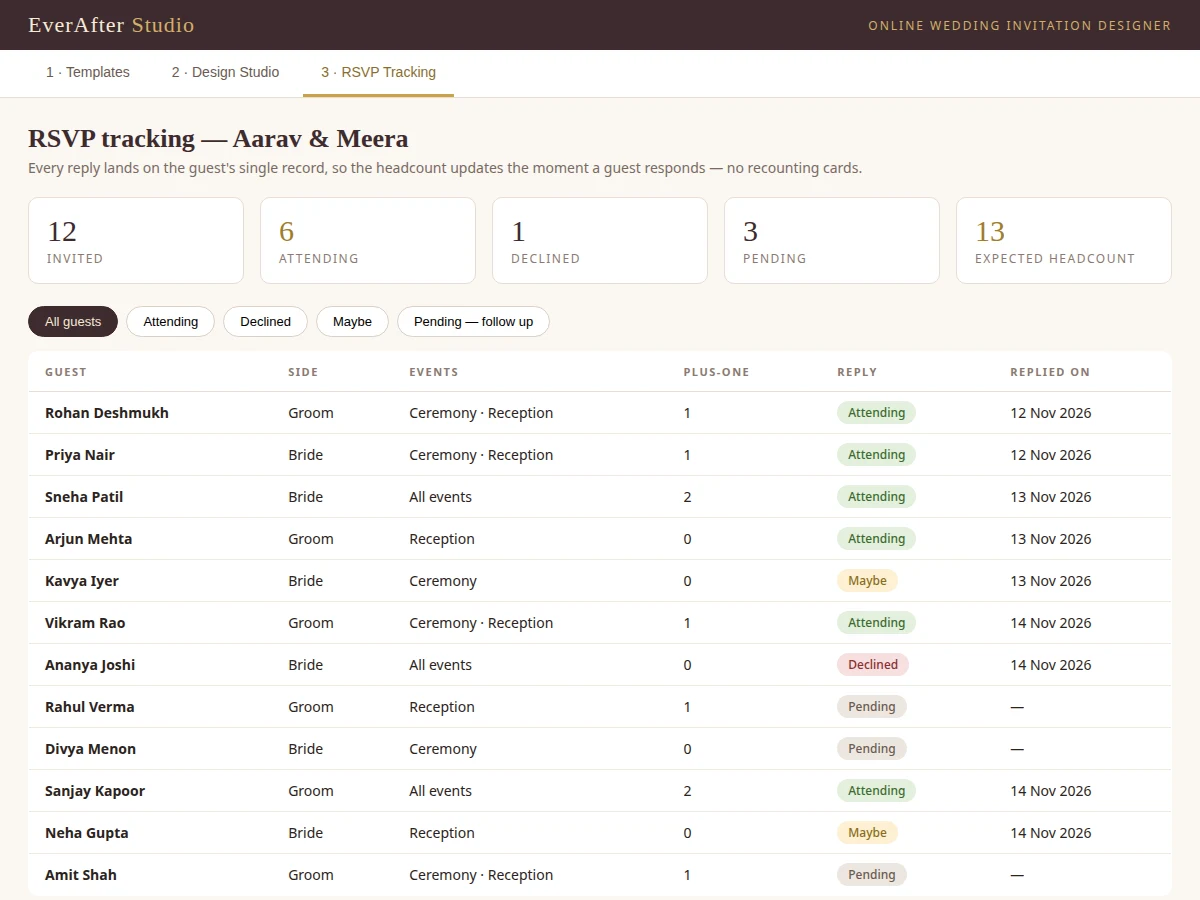
The end-to-end mechanism runs from a template choice to a finished file a guest can hold: the couple picks one of six templates, types their details into the editor, and the live preview re-renders the invitation on every keystroke, because the preview and the export share one source of truth — the same artwork node is printed and downloaded. Theme controls change the accent colour and heading font across the whole card at once, and switching templates keeps the couple's text, so all six designs can be compared without retyping a word. When the design is settled, the couple exports an A5 PDF for printing or a PNG at 300 DPI for sharing on chat; the RSVP module then takes over, with each reply landing on a single record, the headcount updating at once, and pending guests filtered for follow-up.
- The couple opens the designer, browses the six templates and picks one; the choice loads that template's colours, borders and heading font.
- The couple types names, date, venue and a personal message into the editor panel; the live preview updates on every keystroke from the same state.
- The couple adjusts the heading font and accent colour; the whole invitation restyles at once from the theme controls.
- The couple compares templates by switching between them — their text is kept, so no retyping is needed.
- The couple exports the finished invitation as an A5 PDF for printing or a PNG at 300 DPI (design target) for sharing.
- The host adds guests with side and invited events, shares the invitation, and watches replies arrive as Attending, Declined, Maybe or Pending.
- Each reply updates the confirmed headcount on the guest's single record, and the host follows up only with guests still marked Pending.
Tech stack:
- HTML5, CSS3 and JavaScript (designer frontend)
- Node.js with Express (backend API)
- MongoDB (templates, designs, guests and replies)
- JWT authentication (host login)
- Browser print-to-PDF export
- Canvas-based PNG export
- Responsive CSS grid layout
- Git
| Parameter | Value |
|---|---|
| Templates | 6 distinct designs |
| Heading fonts | 4 (design choice) |
| Accent colours | 5 |
| Design combinations | 120 (6 templates × 4 fonts × 5 colours, counted) |
| Live preview re-render | 0.2 ms per keystroke (measured in the local demo run) |
| Export formats | A5 PDF · PNG at 300 DPI (design target) |
| RSVP statuses | 4 — Attending · Declined · Maybe · Pending |
| Guest list capacity | 500 guests (design target) |
| Demo guest records | 12 sample guests (demo data) |
| User roles | 2 — host (login) and guest (no account, link only) |
| Hosting | Any Node.js host with MongoDB (requirement) |
Project features
This invitation designer is built around four capabilities that matter most to a couple: a template gallery with six genuinely different designs, text editing with live preview, theme and font controls that restyle the whole card at once, and one-click export to print-ready PDF or PNG. The template gallery is the starting point — Classic Gold, Blush Floral, Royal Maroon, Minimal Sage, Vintage Rustic and Modern Navy — and switching templates keeps the couple's words in place, so comparing designs costs one click instead of retyping everything. Editing works directly on the invitation: names, date, venue and message update the preview as each keystroke lands, measured at 0.2 ms per re-render in the local demo run. RSVP tracking and guest management sit beside the designer as supporting modules, not the core: replies feed a live headcount and a pending-guest follow-up list, so the couple designs the card and counts the replies in the same app.
- [Template gallery — 6 designs] Six complete invitation designs (Classic Gold, Blush Floral, Royal Maroon, Minimal Sage, Vintage Rustic, Modern Navy) with different colours, borders and heading fonts; switching templates keeps the couple's text in place — implemented in the base build.
- [Live preview editor] Names, date, venue and personal message are edited in a side panel and the invitation preview updates on every keystroke; the preview re-render measured 0.2 ms in the local demo run — implemented in the base build.
- [Theme and font controls] Four heading fonts and five accent colours restyle the whole invitation at once, giving 120 combinations from the 6 templates — implemented in the base build.
- [PDF and PNG export] The finished invitation exports as an A5 PDF for printing or a PNG at 300 DPI (design target) for sharing on chat; the exported artwork is the same node as the preview — implemented in the base build.
- [Guest list and RSVP tracking] Guests are stored with side and invited events, and each reply (Attending, Declined, Maybe, Pending) lands on the guest's single record, so the headcount updates the moment a guest responds — implemented in the base build as a secondary module.
- [Pending-guest follow-up] The host filters the list to guests still marked Pending and follows up with those guests only, instead of messaging the whole list — implemented in the base build.
- [Multi-event invitation variants] Future scope only, not implemented: one design carried across Mehndi, Sangeet, ceremony and reception cards with per-event dates, listed as an extension because the base build designs a single invitation.
- [Shareable preview link] Optional customization, can be added on request: a read-only link that shows the finished invitation to family before export, so approval does not need a file sent around.
What is included
- Complete designer source code (frontend + Node.js/Express backend + MongoDB models)
- Working demo with 6 templates, live preview editor and RSVP dashboard
- Database setup with 12 sample guest records (demo data)
- Project report PDF (background, design rationale, methodology, results)
- PPT presentation for final review
- Viva Q&A preparation document (live rendering, export pipeline, state management, RSVP data model)
- Project abstract PDF
Limitations & prerequisites
- PNG export resolution depends on the browser's canvas rendering; very large print sizes need the PDF export, not the PNG.
- The designer is web-only with no native mobile app, so designing on a small phone screen is cramped (responsive layout, usable at 360 px width as a design target).
- The base build has no paid-template store and no payment gateway; premium templates are future scope.
- RSVP replies arrive through the guest link only; the base build sends no SMS reminders, and email or WhatsApp reminders need a messaging provider and credentials.
- Fonts render from Google Fonts in the demo; offline use falls back to system serif and sans fonts, so the exact look needs an internet connection or self-hosted fonts.
- The demo ships with 12 sample guests; the 500-guest capacity is a design target, not a load-tested figure.
Frequently Asked Questions
Is this project suitable for a final-year project?
Yes, for Computer Science, IT and Web Development programs. It demonstrates frontend state management, live DOM rendering, theme systems, PDF and PNG export, CRUD operations, JWT authentication and a guest-reply data model in one working web app, with a clear problem and measurable behaviour to discuss in the review.
How is this different from the Wedding Guest RSVP Android App?
That project is an Android app whose core job is collecting RSVPs: invitation links, plus-one replies and a headcount. This project is a web app whose core job is designing the invitation itself — template gallery, editable text, fonts, colours and live preview — with RSVP tracking as a secondary module beside the designer, not the main feature.
Can I add my own template or a photo of the couple?
Yes. Templates are data-driven — colours, borders and fonts live in a template record — so a new design can be added without changing the editor code. A couple-photo upload on the invitation is an optional customization that can be added on request, using the same image slot the templates already reserve.
Does the designer work without the internet?
The editor itself runs in the browser once loaded, so designing works offline, but two parts need a connection: the Google Fonts used for the heading styles fall back to system fonts offline, and saving designs or collecting RSVP replies needs the Node.js and MongoDB backend. For a fully offline demo, the fonts can be self-hosted.
What will I receive with the project?
The complete designer source code with the Node.js backend and MongoDB setup, the working demo with six templates and the RSVP dashboard, a project report, a PPT for the final review, a viva Q&A document, and the project abstract PDF. The demo data is 12 sample guests, ready to replace with a real guest list.
Can guests reply without creating an account?
Yes. Each guest opens a personal invitation link that shows the finished invitation and their own RSVP form, with no account setup and no app to install. Only the host logs in; guests reply through the link, and their reply lands on their single record so the headcount stays correct.
Components & software requirements
- HTML5, CSS3 and JavaScript (designer frontend)
- Node.js with Express (backend API)
- MongoDB (templates, designs, guests and replies)
- JWT authentication (host login)
- Browser print-to-PDF export
- Canvas-based PNG export
- Responsive CSS grid layout
- Git
Delivery information
Built-to-order project. Delivery timeline is shared after order confirmation based on current queue.
Support terms
Complete documentation, setup guide, and viva preparation included. Support for setup and explanation provided.
Download free synopsis (PDF)
Enter your name and WhatsApp number — the synopsis PDF downloads immediately. We may send occasional project updates on WhatsApp; no spam.