
More project photos (2)

The problem
Pet owners usually book vet visits by phone. The clinic writes the appointment in a paper register or a diary, and the pet's vaccination history lives on a separate paper card that is easy to lose. When a booster is due, nobody reminds the owner, so vaccinations slip, and when the pet changes clinic, the new vet starts with no history at all. Phone lines stay busy during clinic hours, so owners keep redialling, and clinic staff spend the morning answering calls instead of attending to animals. A pet's species, breed, age and weight, details that change how a vet examines it, are repeated from scratch at every visit because no single record follows the pet.
This is a built-to-order software project: the web application, database, report, abstract and presentation slides are built fresh for each order.
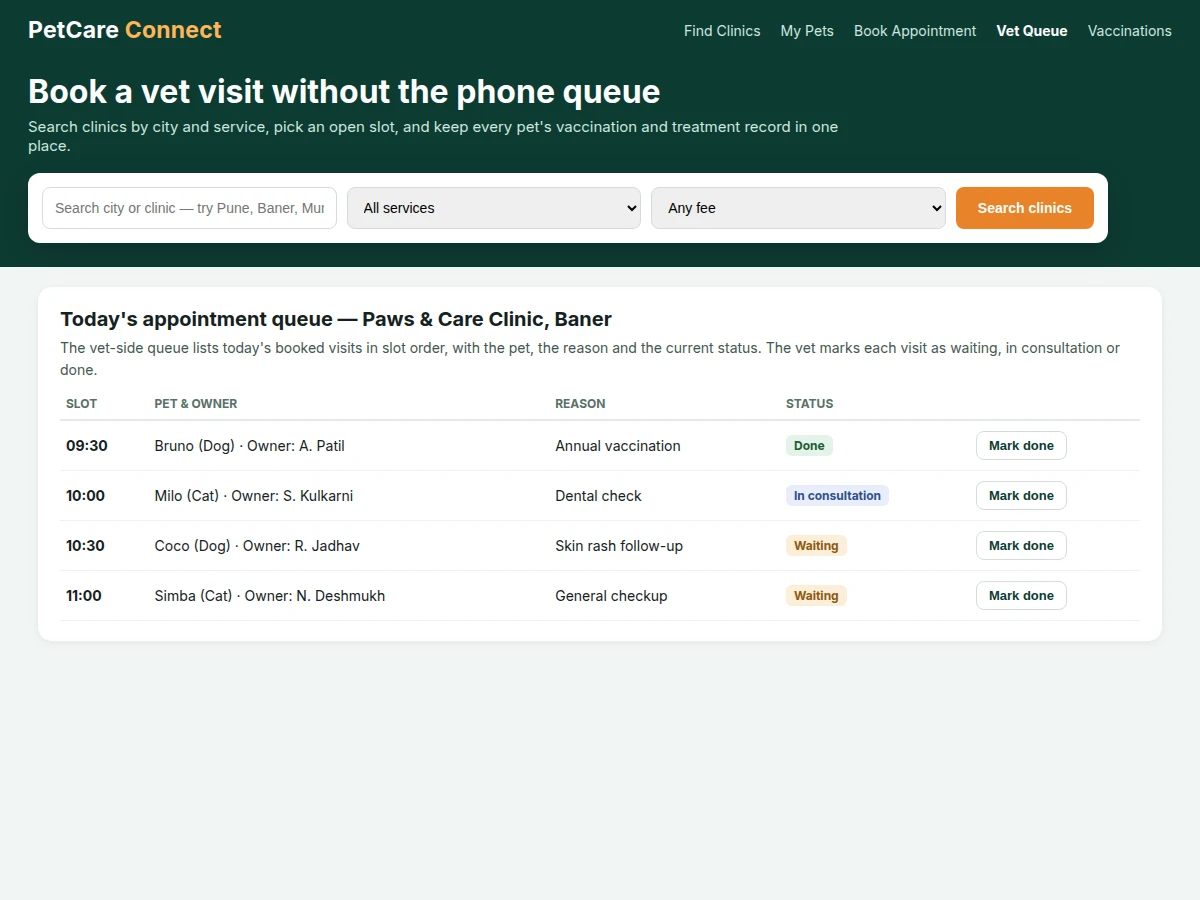
The Online Veterinary Appointment Web App with Pet Records and Clinic Search gives pet owners one place to find a vet clinic, book a visit and keep a pet's health record. An owner searches clinics by city and by service, compares consultation fees, and books an open 30-minute slot instead of calling the clinic and waiting for a free line. Each pet gets a profile with species, breed, age and weight, and the system keeps a vaccination list with due dates, so a booster that is coming due or already overdue is visible before the visit. On the clinic side, the vet sees the day's appointments in slot order and marks each visit as waiting, in consultation or done, so the waiting room runs in order. Records from earlier visits stay attached to the pet, so a new visit starts with history rather than a blank page.
| Aspect | This web app | Phone booking | Paper clinic register |
|---|---|---|---|
| Booking | Owner picks an open slot online at any hour | Owner calls during clinic hours and waits for a free line | Staff write the visit in a diary by hand |
| Records | Pet profile and visit history stay attached to the pet | No record is kept beyond the call | History lives on a paper card that can be lost |
| Reminders | Vaccination due list shows coming and overdue boosters | Owner must remember the next due date alone | No reminder unless staff call the owner |
| Search | Clinics filter by city, service and consultation fee | Owner asks around or checks one clinic at a time | No search; owners rely on clinics they already know |
Clinics are filtered by city, service and consultation fee.
Follow the working sequence
How it works
The Online Veterinary Appointment Web App with Pet Records and Clinic Search runs as one end-to-end flow from search to the vet's queue. An owner opens the clinic search, filters by city and service, and compares consultation fees and ratings before picking a clinic. The owner then opens the booking form, selects a pet profile, picks a date and chooses from the open 30-minute slots for that clinic, while taken slots stay crossed out. On confirmation the appointment is saved and appears in the owner's upcoming list and in the vet's queue for that day. The vet works through the queue in slot order, marking each visit as waiting, in consultation or done, and checks the pet's vaccination due list during the visit so overdue boosters are caught on the spot.
- The owner searches clinics by city or clinic name, filters by service type and consultation fee, and picks a clinic from the results.
- The owner creates a pet profile with the pet's name, species, breed, age and weight, or selects an existing pet for the visit.
- The owner opens the booking form, selects the pet and clinic, picks a visit date and enters the reason for the visit.
- The owner chooses from the open 30-minute slots shown for that clinic and date; taken slots are crossed out and cannot be selected.
- On confirmation the system re-checks the slot and saves the appointment, or shows a conflict message if the slot was just taken.
- The appointment appears in the owner's upcoming appointments list and in the vet's queue for that clinic and day.
- The vet works through the queue in slot order, marks each visit as waiting, in consultation or done, and checks the pet's vaccination due list during the visit.
Tech stack:
- HTML · CSS · JavaScript frontend
- Node.js with Express backend
- MySQL database for clinics, pets and appointments
- REST API for search, booking and queue updates
- Session-based login for owner and vet roles
- Slot validation logic against double booking
- Responsive layout for phone and desktop browsers
| Parameter | Value |
|---|---|
| Appointment slot length | 30 minutes per slot (design target) |
| Sample clinics in demo | 6 clinics across 4 cities (sample data) |
| Consultation fee in sample data | Rs 350 to Rs 800 per visit (sample data) |
| Pet profile fields | Species · breed · age · weight (4 fields) |
| Vaccination tracking | Due-date list with overdue highlight (design target) |
| User roles | Pet owner and vet or clinic staff (2 roles) |
| Queue statuses | Waiting · in consultation · done (3 statuses) |
| Platform | Web application for desktop and phone browsers (design target) |
| Demo data storage | In-browser state in the single-file demo; database in the delivered build |
Project features
The Online Veterinary Appointment Web App with Pet Records and Clinic Search is built around four capabilities that carry the whole experience. Clinic search lets owners filter clinics by city and service and compare consultation fees before choosing, instead of calling one clinic at a time. Pet profiles hold species, breed, age and weight for each animal, so the vet sees the background before the visit begins. Slot booking shows only open 30-minute slots and blocks taken ones, so two owners can never book the same time. The vaccination due list tracks each vaccine's due date and highlights overdue items, so boosters are not missed between visits. Together these four pieces replace the phone call, the paper register and the loose vaccination card with one record that follows the pet.
- [Clinic search by city and service] Owners search clinics by city and service type and compare consultation fees before choosing, instead of calling clinics one at a time. Implemented in the base build.
- [Pet profiles with species, breed, age and weight] Each pet gets a profile holding species, breed, age and weight, and owners can add a new pet through a form that checks every field is filled. Implemented in the base build.
- [Slot booking with a conflict guard] Owners pick from open 30-minute slots for a chosen clinic and date, and taken slots are crossed out and cannot be selected. Builder note from the demo build: the first booking flow let a taken slot stay selectable after the clinic changed, so the demo now re-renders the slot grid on every clinic and date change and re-checks the slot at confirmation, showing a conflict message instead of double-booking. Implemented in the base build.
- [Vet-side appointment queue] The vet view lists the day's booked visits in slot order with the pet, the owner, the reason and a status of waiting, in consultation or done, and the vet can mark each visit done. Implemented in the base build.
- [Vaccination due list] Each pet's vaccines are listed with the last given date and the next due date, and overdue vaccines are highlighted so a missed booster is visible before the visit. Implemented in the base build.
- [Visit history per pet] Past appointments stay attached to the pet's record with the clinic, date, slot and reason, so the next visit starts with history instead of a blank page. Implemented in the base build.
- [Owner appointment list] Owners see their upcoming appointments in one place with the clinic, date, slot and reason, so a booked visit is easy to confirm before leaving home. Implemented in the base build.
Optional and future scope (not in the base build): SMS or email reminders for due vaccinations, online payment of the consultation fee, prescription uploads per visit, multi-branch support for a clinic group, and a mobile app version of the owner view. These can be developed on request and are not claimed as included.
What is included
- Complete web application source code with clinic search, pet profiles, slot booking, vet queue and vaccination due list
- Database schema for clinics, pets, appointments and vaccinations
- Setup guide covering installation, database setup and first booking
- Project report covering background, working, database design and limitations
- Project abstract PDF with 10 labelled sections matching this page
- Presentation slides for final review
- Viva Q&A preparation document covering booking flow, slot validation and role-based views
Limitations & prerequisites
- The demo uses sample clinics and sample pets only; it does not connect to any real clinic and no booking is sent to a real practice.
- No SMS or email reminders are included in the base build, so vaccination due dates are shown on screen but not messaged to the owner.
- No online payment is included; consultation fees are shown for comparison and are sample figures, not a payment flow.
- The system is a booking and records tool only; it gives no medical advice, diagnosis or treatment recommendation, and it is not a substitute for a veterinarian's judgement.
- The single-file demo keeps data in browser state, so demo bookings do not persist across devices; the delivered build uses a database instead.
- The vet queue in the demo covers one clinic at a time; multi-branch support is future scope, not included.
- The hosted version needs an internet connection; the demo file alone runs offline in a browser with its sample data.
Frequently Asked Questions
Is this project suitable for a final-year project?
Yes, it fits Bachelor of Engineering and Bachelor of Technology programmes in Computer Science and Information Technology, because it combines search, booking, role-based views and record keeping in one testable web application. Reviewers can try the full flow: create a pet, book a slot, watch the vet queue update and check the vaccination due list. The build also gives reviewers a clear testable story across two roles, owner and vet, with a visible slot-conflict rule they can try to break.
Does the app connect to real vet clinics?
No, the demo uses sample clinics and sample pets only, and it does not connect to any real clinic, send bookings to a real practice, or claim any partnership with a veterinary practice. The sample data exists so reviewers can try search, booking and the vet queue without real patient data, and a team deploying it for a real clinic would need that clinic's permission and its own appointment data.
Can a pet's vaccination record be tracked?
Yes, each pet has a vaccination list with the vaccine name, the date it was last given and its next due date, and overdue vaccines are highlighted so they stand out before a visit. Owners see which boosters are coming due and which are already overdue, and the vet sees the same list during the visit, so a missed booster is caught at the appointment instead of discovered months later.
Can the app stop two owners booking the same slot?
Yes, the booking flow only shows open slots, and taken slots are crossed out and cannot be selected, so two owners cannot book the same clinic slot through the same screen. If a slot is taken after the owner opens the form, the confirmation step checks again and shows a conflict message instead of saving a double booking, and the owner picks a different open slot.
Can this project be customized?
Yes, realistic changes include adding SMS or email reminders, online payment for the consultation fee, a prescription upload for each visit, multi-branch support for a clinic group, and a mobile app version of the owner view. Each change builds on the existing booking and records flow rather than replacing it, so the team can pick one or two extensions that fit the review timeline.
Components & software requirements
- HTML · CSS · JavaScript frontend
- Node.js with Express backend
- MySQL database for clinics, pets and appointments
- REST API for search, booking and queue updates
- Session-based login for owner and vet roles
- Slot validation logic against double booking
- Responsive layout for phone and desktop browsers
Delivery information
Built-to-order project. Delivery timeline is shared after order confirmation based on current queue.
Support terms
Complete documentation, setup guide, and viva preparation included. Support for setup and explanation provided.
Download free synopsis (PDF)
Enter your name and WhatsApp number — the synopsis PDF downloads immediately. We may send occasional project updates on WhatsApp; no spam.