
More project photos (2)
The problem
Students in hostels and PGs, and office workers across Indian cities, depend on tiffin services for daily home-style meals — yet most small tiffin providers still run on WhatsApp messages, paper registers and phone calls. Subscriptions are tracked manually, payments are chased on chat, pausing for a trip means a phone call, and customers have no idea where their tiffin is until the doorbell rings. The result is missed payments, double-booked deliveries and daily coordination overhead for the kitchen. This project builds the missing software layer: a web application where customers browse a rotating weekly menu, subscribe to a weekly plan with their meal preferences and delivery slots, pay online, pause days with automatic wallet credit, and track each delivery through preparation to doorstep. For the provider, an admin dashboard consolidates the day's orders, active subscriptions and pause requests in one view. It is scoped as a single-kitchen operation with honest limits — test-mode payments, kitchen-entered tracking statuses and no delivery-route optimization.
The customer who browses the weekly menu, picks a subscription plan and tracks each tiffin delivery.
Follow the working sequence
How it works
- The customer browses the week's menu on the home page, filters by day, and adds meals or picks a weekly subscription plan.
- Plan configuration captures the start date, meals per day, preference (veg/Jain/diet) and delivery slot; the frontend computes the weekly total instantly.
- At checkout the form validates the name, 10-digit mobile number and address, applies the coupon, and shows the final order summary.
- The customer pays via UPI or card through Razorpay Checkout in test mode (or chooses cash on delivery); the backend verifies the payment signature before confirming the order.
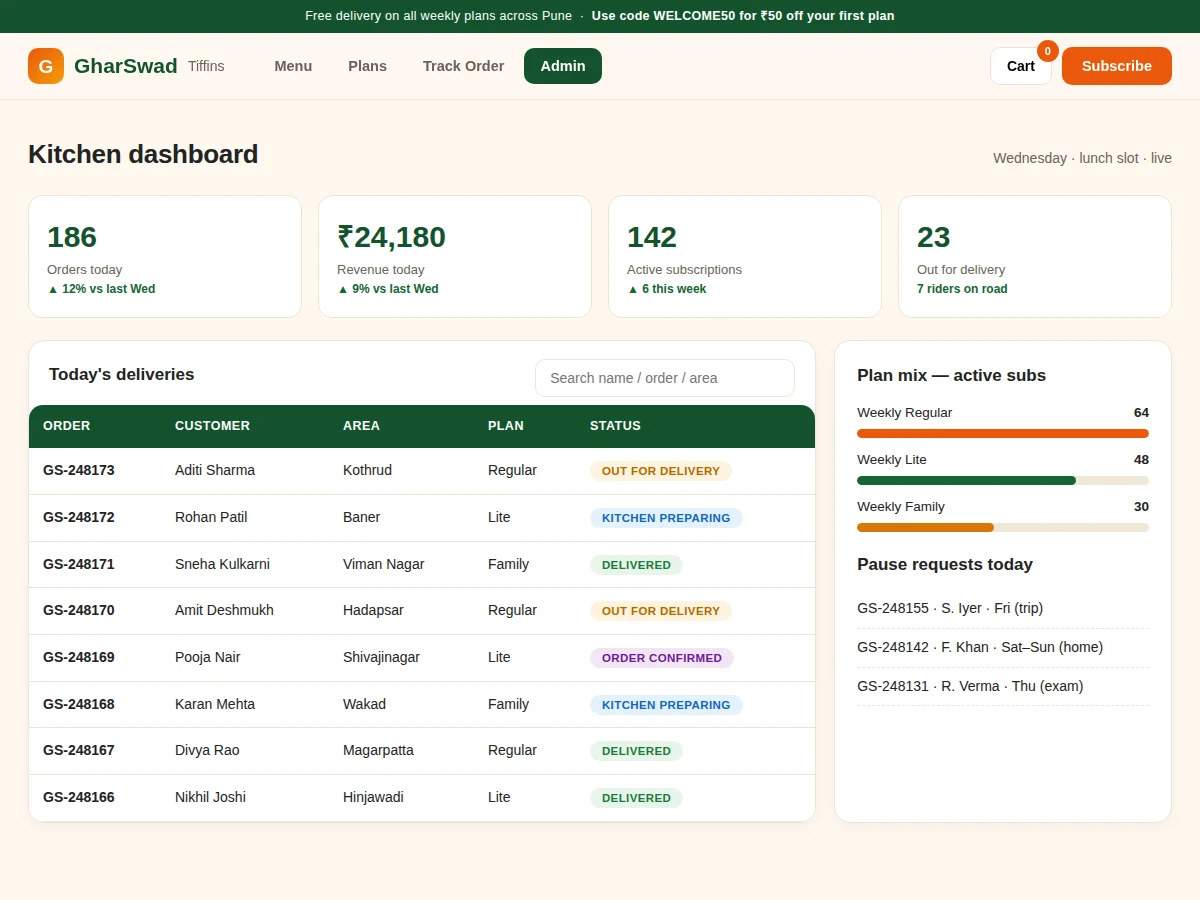
- The confirmed order is stored in MongoDB and appears on the kitchen dashboard, where staff advance its status through the five preparation and delivery stages.
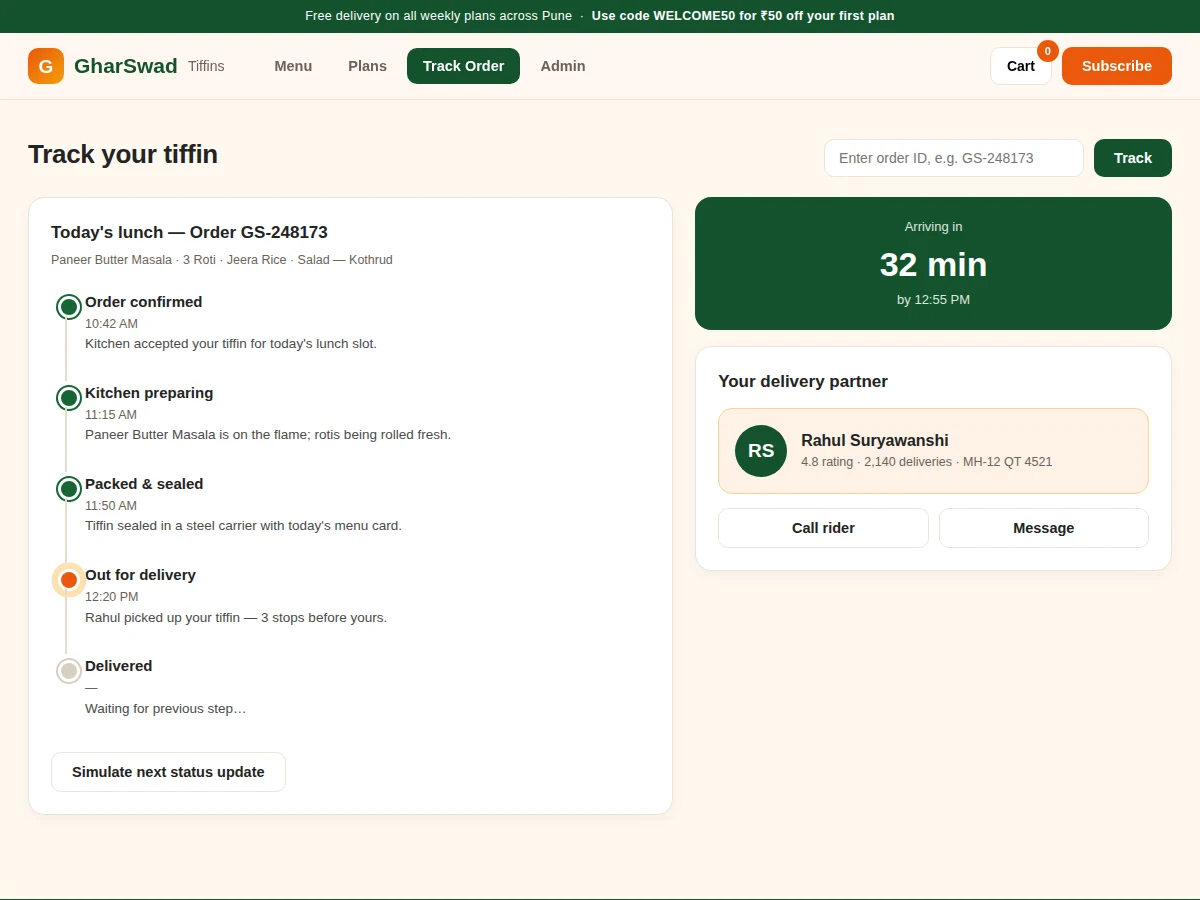
- The customer follows the live timeline on the tracking page — ETA, rider details and status updates — until the tiffin is marked delivered.
Tech stack:
- React 19 (component-based frontend SPA)
- Node.js + Express (REST API backend)
- MongoDB (orders, menus, subscriptions, users)
- Razorpay Checkout in test mode (UPI/card payments)
- JWT authentication (customer, admin and rider roles)
- REST polling for live tracking updates
- Responsive CSS (mobile-first UI)
| Parameter | Value |
|---|---|
| User roles | 3 (customer, kitchen admin, rider) |
| Subscription plans | 3 weekly tiers (design scope) |
| Tracking stages | 5 per order |
| Menu cycle | 7-day rotating week |
| Demo delivery areas | 8 Pune localities |
| Payment modes | UPI, card (test mode), cash on delivery |
| Order ID format | GS- followed by 6 digits |
| Page load | Under 2.5 s on broadband (design target) |
| Concurrent users | Approximately 100 on a single small VPS (design target) |
| Database | MongoDB document store |
Project features
- [Weekly subscription plans] Three weekly tiers (Lite, Regular, Family) with configurable start date, lunch-only or lunch-plus-dinner options, meal preference (regular veg, Jain, low-oil diet) and delivery slot; the weekly total is computed live as options change.
- [Rotating weekly menu] A day-wise menu for all seven days with veg, Jain-option and spicy tags plus approximate calorie figures; the kitchen edits the week chart from the admin side and subscribers see it every Monday.
- [Validated checkout flow] Delivery form with 10-digit Indian mobile validation, area selection, address capture and a WELCOME50-style coupon code, ending in a live order summary before payment.
- [Razorpay test-mode payments] UPI and card checkout wired through Razorpay test API keys (instant, no KYC needed for testing), with cash-on-delivery as a fallback; switching to live keys is documented for production.
- [Five-stage delivery tracking] Every order moves through confirmed, kitchen preparing, packed, out for delivery and delivered, rendered as an animated timeline with ETA and a delivery-partner card.
- [Pause days with wallet credit] Subscribers pause individual days; the amount is credited to their wallet automatically, and every pause request lands on the kitchen dashboard.
- [Kitchen admin dashboard] Daily KPIs (orders, revenue, active subscriptions, riders on road), a searchable deliveries table with status pills, plan-mix bars and the day's pause requests.
What is included
- Complete frontend (React 19) and backend (Node.js + Express) source code
- MongoDB schema with seed data: weekly menu, plans, sample orders and users
- Razorpay test-mode integration guide (key generation, test cards, going live)
- Setup instructions for local run and cloud deployment
- Project report PDF (background, architecture, data flow, testing, limitations)
- PPT presentation for final review
- Viva Q&A preparation document (full-stack, auth, payments, deployment)
Limitations & prerequisites
- Online payments run in Razorpay test mode — no real money moves until live keys are added, which needs business KYC on Razorpay's side.
- Tracking statuses are entered by kitchen/rider roles; there is no GPS-based live map of the rider.
- Delivery-route optimization across multiple riders is not implemented; the demo models one kitchen with a simple rider list.
- Calorie figures on the menu are approximate sample data, not lab-tested nutrition values.
- Hosting, domain and SMS costs are separate from the software build.
- The build targets a single kitchen; multi-kitchen or franchise support is future scope.
Frequently Asked Questions
Is the payment gateway really integrated?
Yes — UPI and card checkout run through Razorpay Checkout using test API keys, which Razorpay issues instantly with no KYC, so the full payment flow (order creation, signature verification) works end to end. Accepting real money needs live keys plus business KYC, which is documented in the setup guide.
Is this project suitable for a final-year project?
Yes — for Computer Science, IT and Web Development programs. It demonstrates full-stack development, role-based authentication, third-party payment integration, database design and a working admin dashboard, all of which map cleanly to viva questions.
Can it be hosted online?
Yes. The React frontend builds to static files for any static host, and the Node.js API plus MongoDB run on a small VPS or a cloud app platform. Hosting and domain charges are separate and the setup instructions cover both.
Does delivery tracking use GPS?
No. Statuses advance through the five-stage timeline when the kitchen or rider updates them, and the customer page reflects the change. GPS rider tracking is listed as future scope, not part of this build.
Can more plans, areas or a mobile app be added?
Yes. Extra plans and delivery areas are configuration changes, and the REST API is structured so a mobile app can consume the same endpoints. Larger additions like a rider mobile app are available as customization.
Components & software requirements
- React 19 (component-based frontend SPA)
- Node.js + Express (REST API backend)
- MongoDB (orders, menus, subscriptions, users)
- Razorpay Checkout in test mode (UPI/card payments)
- JWT authentication (customer, admin and rider roles)
- REST polling for live tracking updates
- Responsive CSS (mobile-first UI)
Delivery information
Built-to-order project. Delivery timeline is shared after order confirmation based on current queue.
Support terms
Complete documentation, setup guide, and viva preparation included. Support for setup and explanation provided.
Download free synopsis (PDF)
Enter your name and email — the synopsis PDF downloads immediately. We may send occasional project updates; no spam, unsubscribe anytime.