
More project photos (2)
The problem
Students applying for internships and placements usually build resumes in Word or Google Docs, where formatting breaks silently, nothing checks whether the resume will survive an applicant-tracking system, and every revision means re-exporting a PDF by hand. Recruiters, meanwhile, filter applications through ATS software that parses text, matches keywords from the job description, and discards resumes that fail basic structural checks — so a good candidate can be rejected before a human ever reads the resume. ResumeForge, the web app built in this project, closes that gap: it is a form-driven resume builder that renders a live, print-ready preview, runs a rule-based ATS score checker over the content on every keystroke, flags missing keywords, weak verbs and unquantified achievements, and exports the finished resume to PDF with one click. Three professional templates are included, and the entire application is a single HTML file with no backend, so the student can explain every line in a viva.
Student building the resume and improving the ATS score.
Follow the working sequence
How it works
- The student fills the guided editor tabs; all entries are stored in a single JavaScript state object.
- Every keystroke updates the state and re-renders the live preview instantly — no save button, no page reload.
- On each change, the ATS checker scans the full resume text: it validates the email format, counts skills, and measures the word count for the one-page range.
- Each experience bullet is tested for a leading action verb (from a curated verb list) and for containing a number, producing the verb-strength and quantification percentages.
- The keyword check compares the target job keywords entered in the ATS Keywords tab against the resume text with literal matching and lists the gaps.
- The eight check scores combine into a 0–100 score shown on an SVG gauge, and the top failing items become the "Top fixes" action list.
- Switching templates swaps the render function applied to the same state, so content is never re-entered.
- Export PDF opens the browser print dialog with a print stylesheet that hides the editor and panels, leaving only the resume page for a clean A4 PDF.
Tech stack:
- HTML5
- CSS3 · Flexbox & Grid
- Vanilla JavaScript (ES6)
- CSS print stylesheet (@media print)
- Inline SVG (score gauge)
- System font stack (zero external requests)
| Parameter | Value |
|---|---|
| Application format | Single HTML file, no build step, no backend |
| Editor sections | 6 tabs: Personal, Experience, Education, Skills, Projects, ATS Keywords |
| ATS checks | 8 rule-based checks (contact, summary, experience, verbs, numbers, skills, keywords, length) |
| Score range | 0–100, recalculated on every keystroke (expected behavior) |
| Resume templates | 3 — Classic, Modern, Minimal (one-click switch) |
| PDF export | Via browser print dialog, A4 layout (print stylesheet) |
| Offline use | Yes, after the file is downloaded (expected) |
| Browser support | Modern browsers with ES6 JavaScript (Chrome, Edge, Firefox, Safari) |
Project features
- [Live form-driven editor] Guided tabs for Personal, Experience, Education, Skills, Projects and ATS Keywords; every keystroke updates the resume instantly with add/remove controls for repeatable entries.
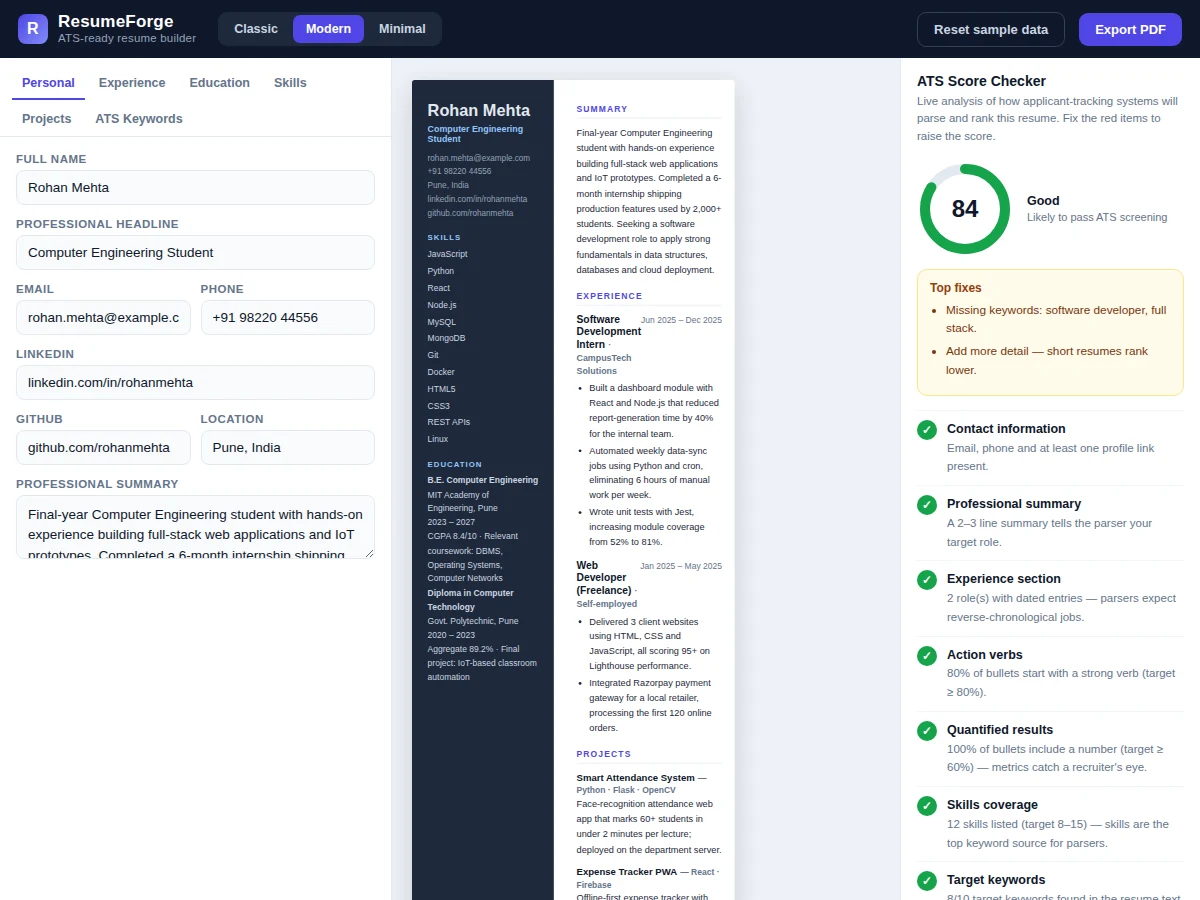
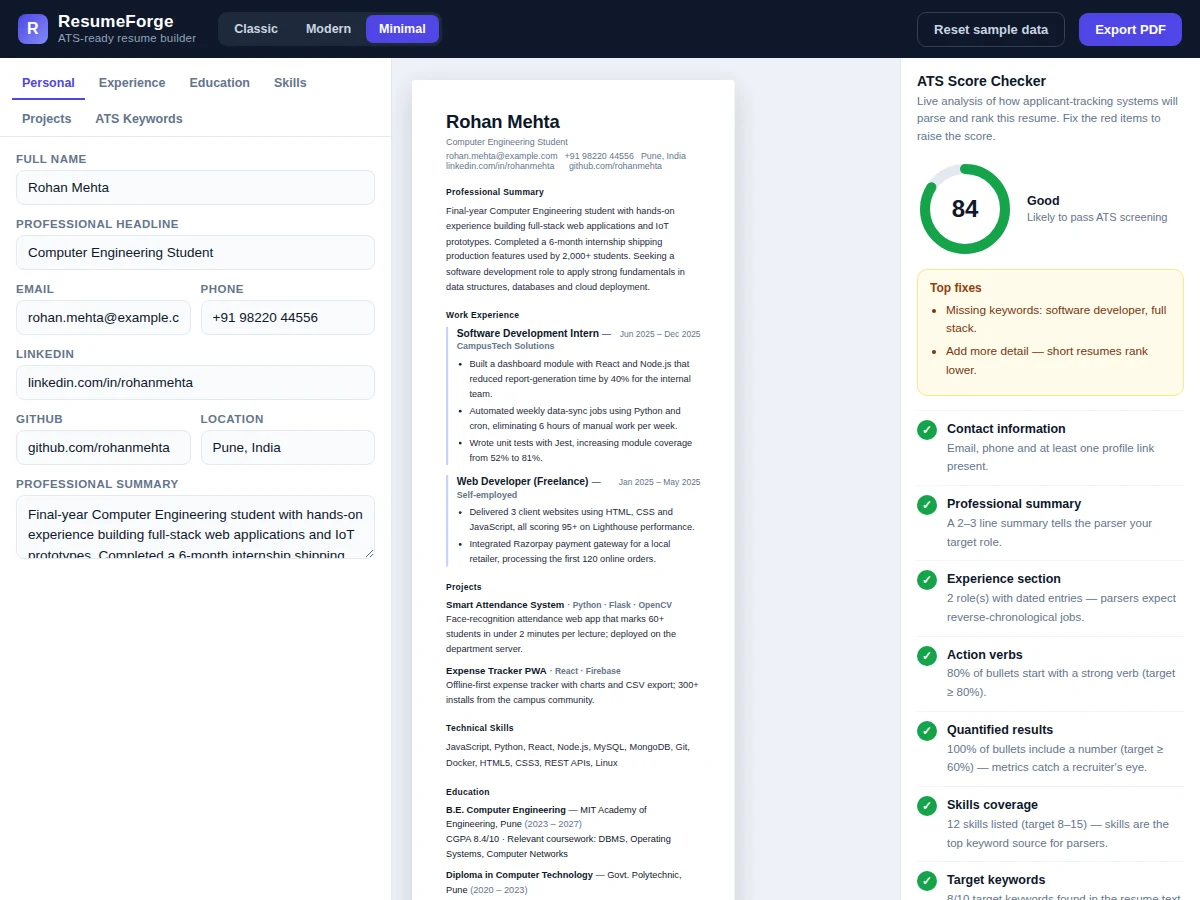
- [Live resume preview] A print-ready A4-style preview renders beside the editor in real time, so formatting decisions are visible immediately with no save-and-refresh cycle.
- [Rule-based ATS score checker] Eight transparent checks — contact completeness, summary, experience structure, action verbs, quantified results, skills coverage, keyword match and length — scored 0–100 with a live gauge.
- [Keyword-gap analysis] Paste keywords from a target job description; the checker reports exactly which keywords appear in the resume and which are missing, with the missing ones listed as fixes.
- [Three professional templates] Classic (serif, centered), Modern (sidebar layout) and Minimal (clean single-column) — switchable in one click without losing any content.
- [One-click PDF export] A dedicated print stylesheet renders only the resume page for the browser's print dialog, producing a clean A4 PDF with no editor chrome.
- [Sample data with one-click reset] A complete realistic sample resume ships pre-loaded so every feature is demonstrable immediately; one click restores it after experimentation.
- [Zero-backend single-file build] The whole application is one HTML file — no server, no database, no build tools — so it runs offline from a double-click and the full codebase is reviewable in one sitting.
What is included
- Complete single-file web app source (HTML + CSS + JavaScript)
- Three resume templates with the one-click switcher
- Rule-based ATS score checker with keyword-gap analysis
- Realistic sample resume data with one-click reset
- Project report PDF (background, design, implementation, testing, results)
- PPT presentation for final review
- Viva Q&A preparation document (DOM rendering, state management, print CSS, ATS heuristics)
- Setup and usage guide
Limitations & prerequisites
- The ATS checker is rule-based (keyword, verb and number heuristics), not an actual employer ATS — the score is guidance, not a guarantee of passing real screening.
- Keyword matching is literal text matching; it does not handle synonyms, stemming or paraphrases (e.g. "JS" will not match "JavaScript").
- PDF export uses the browser's print dialog, so the output depends on the user's print settings such as margins and background graphics.
- No backend is included: there are no user accounts, no cloud save and no shareable links — resume data lives in the page session only.
- The preview targets a single-page resume; there is no multi-page pagination control.
- Template layouts are fixed in code; adding a brand-new layout requires editing the render functions.
Frequently Asked Questions
Is this project suitable for a final-year project?
Yes — for Computer Science, IT and Web Development programs. It demonstrates state-driven DOM rendering, form handling, CSS print stylesheets, SVG graphics and practical text-analysis heuristics, all explainable line by line in a viva.
Does the ATS checker use AI or machine learning?
No. It uses transparent rule-based checks — verb lists, number detection, keyword matching and structural checks. This is stated honestly on the page; the scoring logic is fully visible in the source code.
How does PDF export work without a backend?
A dedicated @media print stylesheet hides the editor and panels and formats only the resume page, so the browser's own print-to-PDF produces a clean A4 document with no server involved.
Is my resume data saved or sent anywhere?
Nowhere. There is no backend and no network request — everything stays in the browser tab's memory. Closing the tab clears a fresh session; this is by design for the base version.
Can more templates or sections be added?
Yes. Templates are separate render functions applied to the same state object, so a new layout is one new function plus a button. Extra sections (certifications, languages) can be added on request as customization.
Can it be hosted online?
Yes — it is a static single file, so it deploys to any static host (GitHub Pages, Netlify, Hostinger) with no server configuration. Suitable for B.E./B.Tech final-year projects in Computer Science, IT and Web Development.
Components & software requirements
- HTML5
- CSS3 · Flexbox & Grid
- Vanilla JavaScript (ES6)
- CSS print stylesheet (@media print)
- Inline SVG (score gauge)
- System font stack (zero external requests)
Delivery information
Built-to-order project. Delivery timeline is shared after order confirmation based on current queue.
Support terms
Complete documentation, setup guide, and viva preparation included. Support for setup and explanation provided.
Download free synopsis (PDF)
Enter your name and email — the synopsis PDF downloads immediately. We may send occasional project updates; no spam, unsubscribe anytime.