
More project photos (2)
The problem
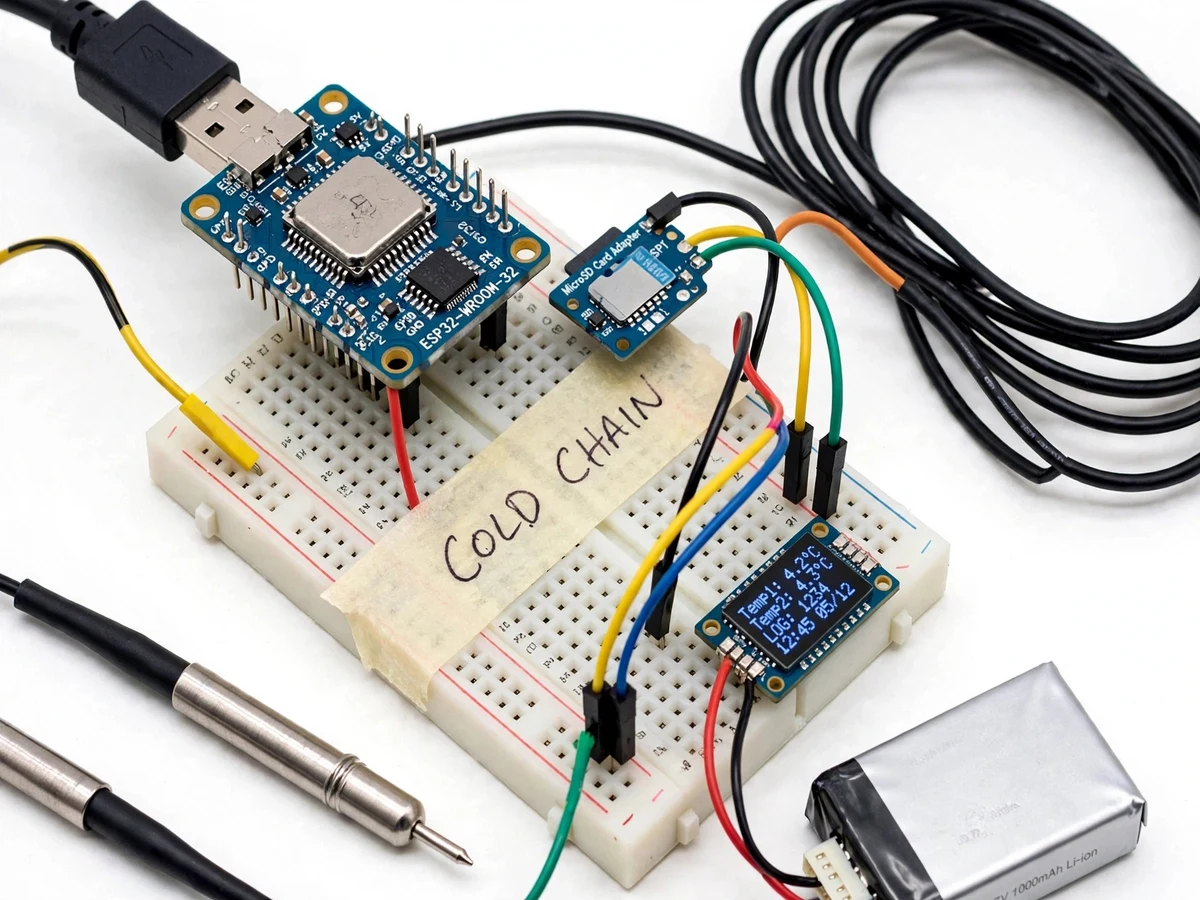
Vaccines lose potency, and food and blood products spoil, when they drift outside their required temperature window — the WHO-recommended 2–8 °C for most vaccines — during storage or transport. The failure is usually invisible: a fridge door left ajar overnight, a delivery van parked in the sun, a power cut nobody logged. Manual twice-daily thermometer checks miss all of it. Continuous electronic logging is the established answer in the pharmaceutical world, but commercial loggers are expensive black boxes that teach a student nothing. This project builds the same capability from open parts: an ESP32 with calibrated digital temperature probes, MQTT telemetry to a live dashboard, local SD-card buffering for connectivity gaps, and instant excursion alerts. It demonstrates the full IoT loop — sense, publish, visualize, alert, recover — on hardware cheap enough for a student bench.
How it works
- The two DS18B20 probes are placed at the monitored points (e.g. inside the cool box and near its door); the ESP32 reads both over the 1-Wire bus each sampling interval.
- The firmware timestamps each reading via NTP, packages probe ID, temperature and battery voltage into a JSON payload, and publishes it over MQTT with QoS 1.
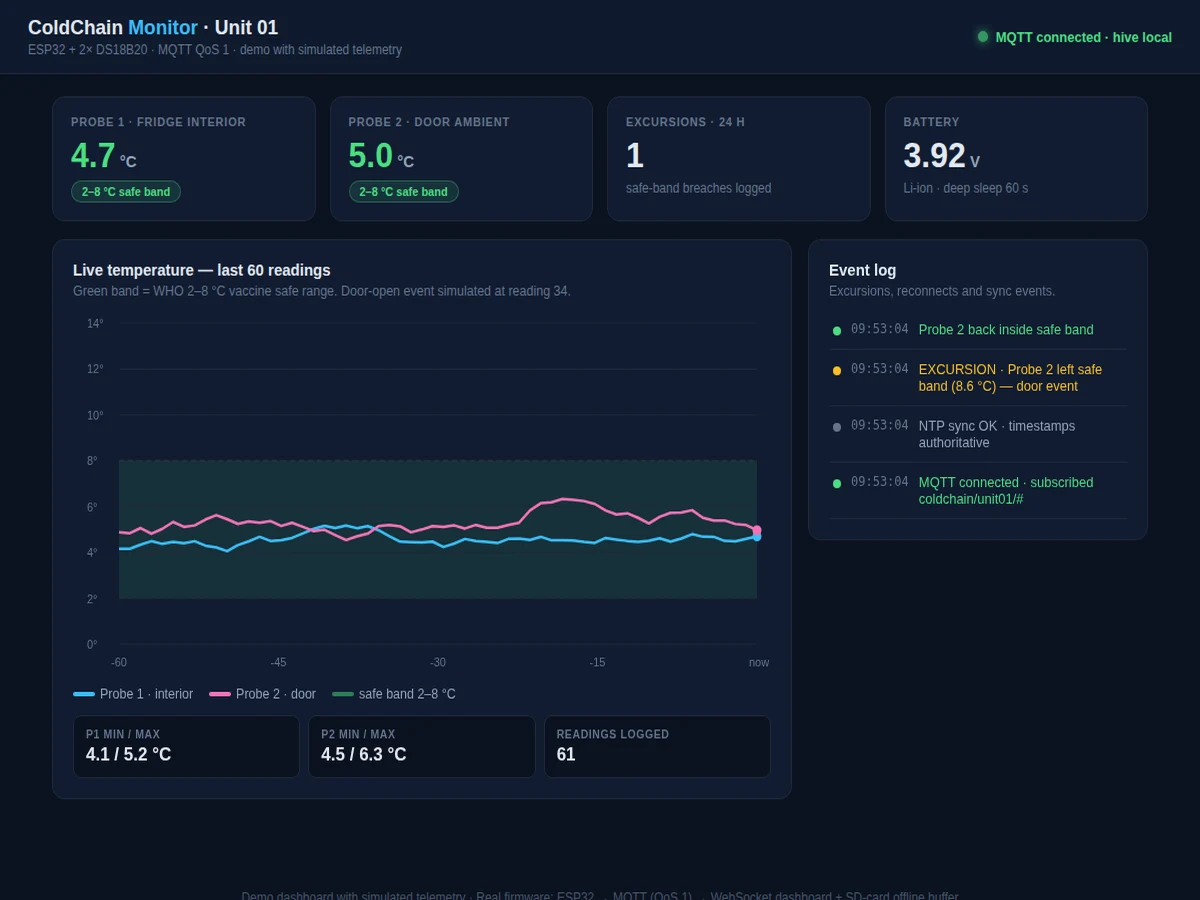
- The web dashboard, subscribed over MQTT WebSockets, appends each reading to the live chart inside the shaded 2–8 °C safe band and updates the statistics panel.
- If a reading falls outside the configured safe window, the firmware immediately publishes to the alert topic and the dashboard raises a visible excursion flag with the timestamp.
- If Wi-Fi or the broker is unreachable, readings are written to the SD card's CSV log instead; on reconnect the backlog publishes in order and the dashboard backfills the chart.
- Between intervals the ESP32 enters deep sleep, waking on its timer — the current budget in the report shows how the sampling interval trades freshness against battery life.
- A front-panel button forces an immediate reading and publish, useful for demonstrating the full sense-to-dashboard loop live in front of examiners.
Tech stack:
- ESP32 DevKit (Wi-Fi + Bluetooth, deep-sleep capable)
- 2x DS18B20 waterproof digital temperature probes (±0.5 °C per datasheet)
- PubSubClient MQTT library with QoS 1 publishing
- Mosquitto local broker or public HiveMQ broker for demos
- Web dashboard (MQTT over WebSockets, live charting)
- MicroSD card module for offline CSV buffering
- NTP time synchronization for trustworthy timestamps
- Arduino IDE / PlatformIO firmware with configurable thresholds
| Parameter | Value |
|---|---|
| Controller | ESP32 DevKit with Wi-Fi |
| Sensors | 2x DS18B20 waterproof probes, ±0.5 °C accuracy (–10 °C to +85 °C) per Maxim datasheet |
| Safe band | 2–8 °C default (vaccine cold chain), configurable in firmware |
| Telemetry | MQTT, JSON payloads, QoS 1, topic hierarchy coldchain/unit01/# |
| Dashboard | Browser-based, MQTT over WebSockets, live chart with safe-band shading |
| Offline storage | MicroSD CSV log with NTP timestamps; bulk sync on reconnect |
| Sampling | Configurable interval, default 60 s; deep sleep between readings |
| Power | Li-ion cell with on-board charging (design target: multi-day operation at 60 s interval; buyer verifies) |
| Alerts | MQTT alert topic on safe-band excursion; email/SMS gateway as optional customization |
Project features
- [Dual DS18B20 temperature probes] Two waterproof digital probes (±0.5 °C accuracy from –10 °C to +85 °C per the Maxim datasheet) monitor, for example, fridge interior and door-ambient, so gradients and door-open events are both visible.
- [MQTT telemetry] Every reading is published as a timestamped JSON payload over MQTT (QoS 1) to a topic hierarchy like coldchain/unit01/temperature, using either the public HiveMQ broker for demos or a local Mosquitto broker.
- [Live web dashboard] A browser dashboard subscribes over MQTT WebSockets and plots both probes against a shaded 2–8 °C safe band, with current values, min/max/24 h statistics and connection status.
- [Excursion alerts] The moment either probe leaves the configured safe window, the firmware publishes an alert message and the dashboard flags it; the alert topic is ready to wire into email/SMS gateways as an optional customization.
- [SD-card offline buffering] When Wi-Fi is unavailable, readings are appended to a CSV log on the SD card with NTP-synced timestamps and bulk-published on reconnect, so no gap goes unrecorded.
- [Deep-sleep power design] The ESP32 sleeps between configurable sampling intervals (default 60 s), giving multi-day operation from a small Li-ion cell — the report includes the duty-cycle current calculation.
- [Configurable thresholds and intervals] Safe-band limits, sampling interval and MQTT topics are set in a config header (and documented), so the same logger adapts from vaccine fridges to food transport demos.
What is included
- Assembled cold chain logger prototype (ESP32, probes, SD module, battery, enclosure)
- ESP32 firmware (Arduino sketch) with MQTT, SD buffering, deep sleep and alert logic
- Web dashboard source (subscribe, chart, statistics, excursion flags)
- Mosquitto broker setup notes plus public-broker demo configuration
- Circuit schematic and wiring diagram with probe placement guide
- Project report PDF (background, cold chain standards, firmware design, power budget, test procedure)
- PPT presentation for final review
- Viva Q&A preparation document (MQTT QoS, 1-Wire, NTP, deep sleep, cold chain norms)
- Setup and demo guide (broker setup, dashboard launch, demonstrating an excursion safely)
Limitations & prerequisites
- The logger depends on Wi-Fi for live telemetry; without connectivity it records locally to SD card but the dashboard and alerts go stale until reconnect — the report documents this behavior explicitly.
- The public HiveMQ broker is convenient for demos but is a shared public service: it must not carry sensitive or production pharmaceutical data, and broker availability is outside the project's control.
- DS18B20 accuracy is ±0.5 °C per the datasheet; the logger is an academic monitoring prototype, not a pharma-validated instrument, and the report states it cannot replace certified cold chain qualification.
- Timestamps need NTP at boot: without internet at startup, logged times fall back to relative millis until the first successful sync, which the firmware flags in the CSV.
- Battery life is a design-target calculation from the duty cycle, not a measured multi-day field test; the buyer verifies runtime on their own cell per the included procedure.
- The 2–8 °C default suits vaccines; frozen goods (–18 °C and below) are outside the DS18B20's sweet spot and outside this project's scope.
Frequently Asked Questions
Is this project suitable for a final-year project?
Yes — it fits Electronics, IoT and Computer Science programs and demonstrates the complete IoT loop examiners look for: sensing, MQTT telemetry, a live dashboard, alerting and offline recovery, on a socially meaningful application.
Which controller and sensors are used?
An ESP32 DevKit reads two waterproof DS18B20 digital probes over 1-Wire (±0.5 °C per the Maxim datasheet). A microSD module buffers readings when Wi-Fi drops.
Does it need internet to work?
Live dashboard and instant alerts need Wi-Fi and an MQTT broker, but logging never stops: without connectivity the firmware writes timestamped readings to SD card and bulk-syncs them when the link returns.
Which MQTT broker does it use?
The public HiveMQ broker for quick demos, or a local Mosquitto broker installed per the setup notes for private, offline-capable operation. Switching is a configuration change.
What are the main limitations?
Wi-Fi dependence for live features, shared-public-broker caveats, ±0.5 °C sensor accuracy, and academic-prototype status — it demonstrates cold chain monitoring faithfully but is not a certified pharmaceutical logger.
What will I receive with the project?
The assembled logger prototype, ESP32 firmware, dashboard source, broker setup notes, schematics, project report PDF, PPT, viva Q&A document and the setup/demo guide. Suitable for B.E./B.Tech final-year projects in Electronics, IoT and Computer Science.
Components & software requirements
- ESP32 DevKit (Wi-Fi + Bluetooth, deep-sleep capable)
- 2x DS18B20 waterproof digital temperature probes (±0.5 °C per datasheet)
- PubSubClient MQTT library with QoS 1 publishing
- Mosquitto local broker or public HiveMQ broker for demos
- Web dashboard (MQTT over WebSockets, live charting)
- MicroSD card module for offline CSV buffering
- NTP time synchronization for trustworthy timestamps
- Arduino IDE / PlatformIO firmware with configurable thresholds
Delivery information
Built-to-order project. Delivery timeline is shared after order confirmation based on current queue.
Support terms
Complete documentation, setup guide, and viva preparation included. Support for setup and explanation provided.