
More project photos (2)
The problem
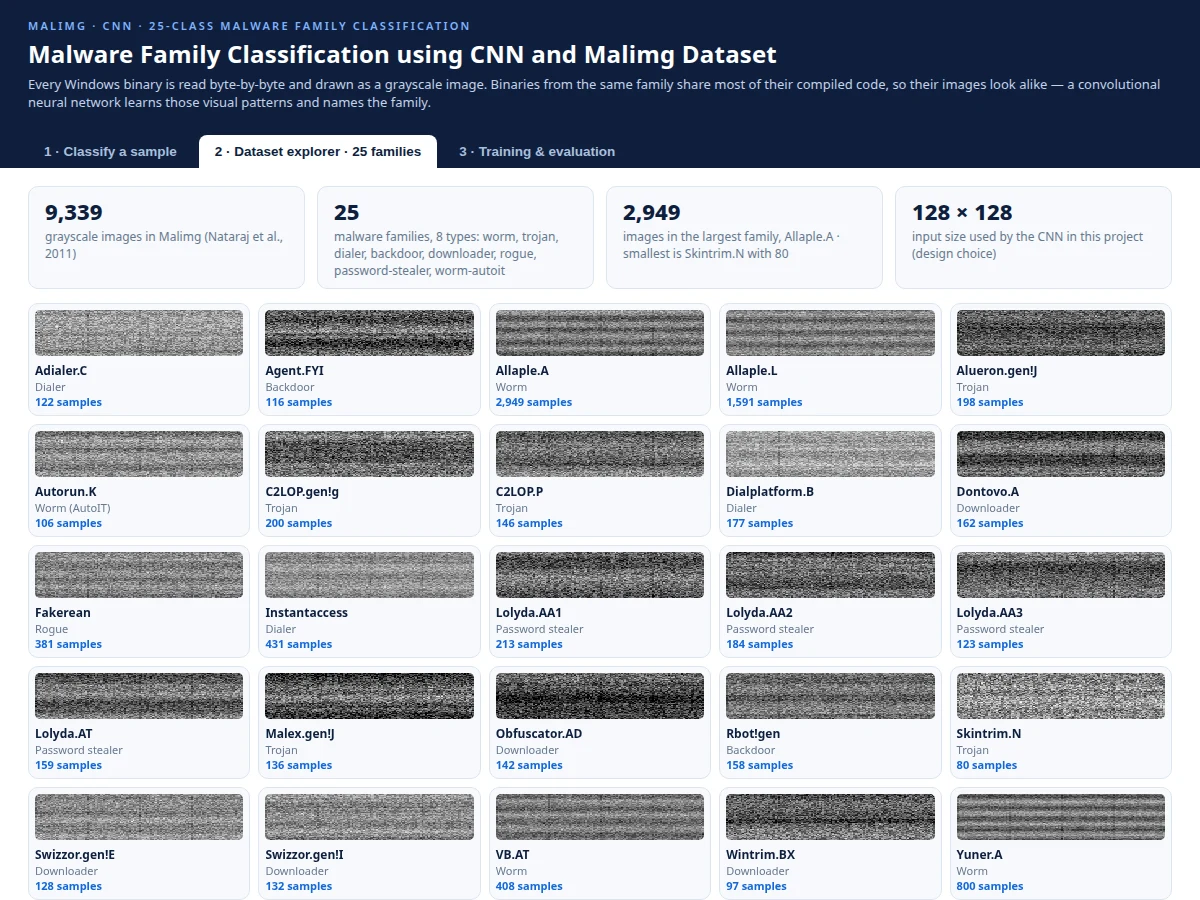
Malware family classification names which known family a suspicious Windows binary belongs to — a daily triage task, since analysts face thousands of new samples every day. Signature matching fails on packed or slightly modified variants, while sandboxing every sample is slow and risks executing live malware. Malware Family Classification using CNN and Malimg Dataset approaches the problem as image recognition: each binary is read byte-by-byte and drawn as a grayscale image, so code, data and padding regions appear as distinct textures. Binaries from the same family share most of their compiled code, which is why their images look alike — variants of Allaple.A produce visibly similar textures, while a dialer such as Adialer.C looks different. A convolutional neural network learns those texture patterns from the Malimg dataset of 9,339 labelled images across 25 families, returning a probability for every family. The project ships with a training notebook, per-family evaluation and a web demo that classifies samples on the spot.
A suspicious Windows PE binary enters as a stream of bytes.
Follow the working sequence
How it works
A Windows binary enters as a stream of bytes, and each byte becomes one grayscale pixel written left to right into rows of fixed width, so the file's structure becomes a picture: dense code looks fine-grained, repeated data looks banded, padding looks flat. The image is resized to 128×128 pixels and normalized, then passed through the CNN, where convolution layers pick up local texture patterns, pooling layers compress them, and dense layers combine them into evidence for each of the 25 families. A softmax layer converts that evidence into probabilities summing to one; the highest-probability family is reported with the full distribution shown, so near-ties between related families stay visible. During the demo build, resizing Malimg images from 256×256 to 128×128 cut input pixels by 75% (65,536 to 16,384) while each family's banding stayed clearly visible. Training uses class weights to protect small families, and evaluation reports per-family precision, recall and F1 plus a confusion matrix.
- Malimg images — or a new binary converted the same byte-to-image way — are loaded, resized to 128×128 grayscale and normalized to [0, 1].
- The dataset is split 70% train / 15% validation / 15% test with stratification, and class weights are computed from the family counts to protect rare families.
- The custom CNN — Conv2D(32) → MaxPool → Conv2D(64) → MaxPool → Conv2D(128) → MaxPool → GlobalAveragePooling → Dense(256) → Dropout(0.5) → Dense(25, softmax) — is compiled with Adam and categorical cross-entropy.
- Training runs for approximately 20 epochs with early stopping on validation loss; the best weights are checkpointed on validation accuracy.
- The test set is evaluated once: overall accuracy, confusion matrix and per-class precision/recall/F1 are generated for the report.
- In the web demo, a selected or uploaded image is resized and normalized identically to training data, then passed through the saved model for live prediction with all 25 probabilities.
Tech stack:
-
Python 3 · TensorFlow/Keras
-
NumPy · Matplotlib
-
scikit-learn metrics
-
Jupyter Notebook (training & evaluation)
-
HTML · CSS · JavaScript (classification demo)
-
Malimg dataset (Nataraj et al. 2011)
-
Pillow image preprocessing
-
Git
-
Dataset: Malimg — 9,339 grayscale images converted from Windows PE malware binaries, 25 families, published by Nataraj et al. (2011) and available on Kaggle as "Malware Classification (Malimg)". Families: Adialer.C (122), Agent.FYI (116), Allaple.A (2,949), Allaple.L (1,591), Alueron.gen!J (198), Autorun.K (106), C2LOP.gen!g (200), C2LOP.P (146), Dialplatform.B (177), Dontovo.A (162), Fakerean (381), Instantaccess (431), Lolyda.AA1 (213), Lolyda.AA2 (184), Lolyda.AA3 (123), Lolyda.AT (159), Malex.gen!J (136), Obfuscator.AD (142), Rbot!gen (158), Skintrim.N (80), Swizzor.gen!E (128), Swizzor.gen!I (132), VB.AT (408), Wintrim.BX (97), Yuner.A (800).
-
Task: 25-class image classification; input = 128×128×1 grayscale image, output = probability distribution over the 25 malware families.
-
Model: Custom CNN: Conv2D(32, 3×3, ReLU) → MaxPool(2×2) → Conv2D(64, 3×3, ReLU) → MaxPool(2×2) → Conv2D(128, 3×3, ReLU) → MaxPool(2×2) → GlobalAveragePooling → Dense(256, ReLU) → Dropout(0.5) → Dense(25, softmax).
-
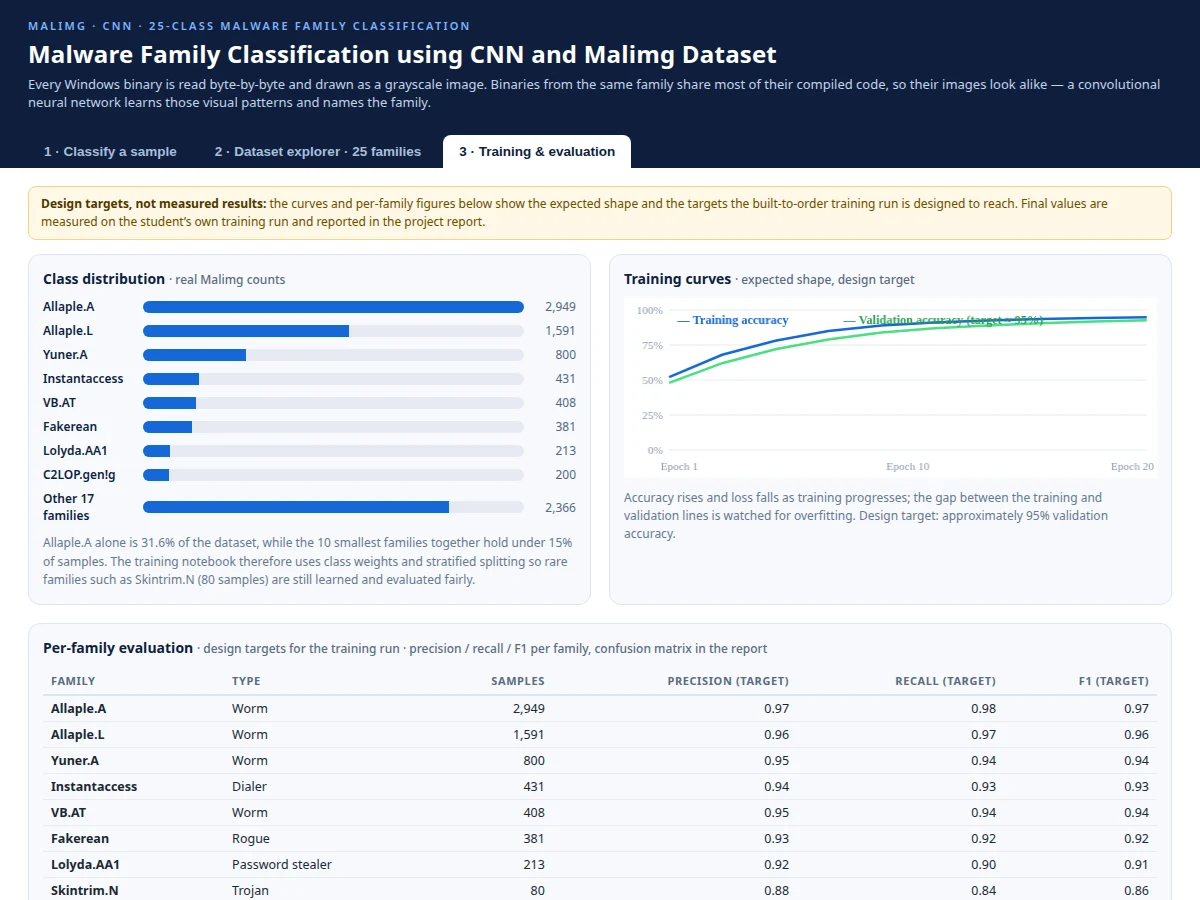
Metrics: Overall accuracy, per-family precision/recall/F1, confusion matrix. Design target: approximately 95% validation accuracy for the built-to-order training run. No accuracy is claimed as measured until the training run is executed for the order.
| Parameter | Value |
|---|---|
| Input format | 128 × 128 grayscale image · normalized [0, 1] |
| Dataset size | 9,339 images (Malimg dataset) |
| Classes | 25 malware families |
| Train / validation / test split | 70% / 15% / 15% (stratified · design choice) |
| Model parameters | Approximately 130,000 (design target) |
| Validation accuracy | Approximately 95% (design target · not a measured claim) |
| Inference | Approximately 12 ms per image on CPU (expected) |
| Training time | Approximately 25–40 min on a laptop GPU (expected) |
| Demo | Single-file web app · runs offline after download |
Project features
The project is built around four capabilities that carry the whole demonstration: the byte-to-image converter that turns any Windows binary into a grayscale texture, the custom CNN that learns 25-way family classification from the Malimg dataset, the per-family evaluation that reports precision, recall and F1 for every family alongside a confusion matrix, and the web demo that classifies a selected or uploaded sample and displays the full probability distribution. Around those sit the training notebook with documented hyperparameters, class-weighted handling of the imbalanced dataset, and the complete student kit — report, presentation and viva preparation — so the work can be explained, defended and extended. The converter, the CNN and the evaluation together give the student a complete, defensible story from raw binary to family label. Every feature below is implemented in the delivered build; optional extensions are listed separately under customization, not mixed into this list.
- [Byte-to-image conversion] Any Windows PE binary is read byte-by-byte and drawn as a grayscale image — byte value 0 is black, 255 is white — so code, data and padding regions become visible texture.
- [Custom CNN classifier] A convolutional network with three convolution–pooling blocks, global average pooling and a 25-way softmax output, designed for 128×128 grayscale inputs and documented layer by layer.
- [Per-family evaluation & confusion matrix] Precision, recall and F1 for each of the 25 families, plus a confusion matrix that shows exactly which related families confuse the model.
- [Live classification web demo] Pick a sample from eight built-in textures or upload an image; the demo shows the predicted family, confidence and the full 25-family probability distribution.
- [Class-imbalance handling] Stratified train/validation/test splitting with class weights computed from family counts, so rare families such as Skintrim.N (80 samples) are learned and evaluated fairly.
- [Training notebook with documented hyperparameters] Data loading, augmentation, model definition, training loop and evaluation in one reproducible Jupyter notebook with the reasoning behind each choice.
- [Exported trained model] Saved model weights plus the preprocessing pipeline, so the demo and the report use the same trained network without retraining.
What is included
- Complete training & evaluation Jupyter notebook
- Trained CNN model file with preprocessing code
- Byte-to-image conversion utility for new binaries
- Classification web demo with sample gallery and image upload
- Confusion matrix, per-family metrics and training-curve plots
- Project report PDF (background, byte-visualization theory, architecture rationale, methodology, results)
- PPT presentation for final review
- Viva Q&A preparation document (byte plots, CNN layers, softmax, class imbalance, overfitting)
Limitations & prerequisites
- Trained only on the 25 Malimg families — a family outside the dataset cannot be named, only scored against the 25 known ones.
- Malimg images come from binaries collected before 2011, so modern packed and obfuscated samples differ from this distribution.
- Allaple.A alone is 31.6% of the dataset, so rare families such as Skintrim.N (80 samples) have thinner evidence despite class weighting.
- Packed or encrypted binaries produce near-uniform textures that carry little family signal.
- The in-browser demo classifier is an illustrative texture matcher, not the trained CNN — the trained model runs in the notebook.
- The project assigns a family label; it does not remove malware or certify a file as safe.
Frequently Asked Questions
Which dataset is used and what does it contain?
The Malimg dataset is used: 9,339 grayscale images converted from Windows malware binaries, covering 25 families from Nataraj et al. (2011), also available on Kaggle as "Malware Classification (Malimg)", with the largest family, Allaple.A, contributing 2,949 images and the smallest, Skintrim.N, contributing 80. Each image is one binary drawn byte-by-byte as grayscale pixels, so code and data regions appear as texture.
How does converting a binary into an image help classification?
Converting a binary into an image turns code structure into visual texture that a CNN can read, because variants of one family share most of their compiled code and therefore produce similar byte images while different families look different at a glance. The network therefore learns family patterns from pixels instead of needing hand-crafted binary features, which is the core idea of Nataraj et al. (2011).
What CNN is used and what does it output?
A custom CNN built for this project is used: three convolution–pooling blocks, global average pooling, a 256-unit dense layer with dropout, and a 25-way softmax that outputs a probability for each of the 25 Malimg families from a single 128×128 grayscale image input. The highest-probability family is reported as the prediction, with the full distribution shown so near-ties between related families are visible.
Is the accuracy guaranteed?
No accuracy figure is guaranteed or claimed as measured, because the final result depends on the training run, the split and the hyperparameters used for the student's own build, and the honest figure is the one the report documents after training. The design target for the built-to-order training run is approximately 95% validation accuracy, with per-family precision, recall and F1 and a confusion matrix in the report.
Can new malware families be added?
Yes, new families can be added by collecting labelled binaries for the new family, converting them to grayscale images the same byte-to-image way, and retraining the network with one more output class, so the classifier grows from 25 families to 26 without changing the pipeline. The notebook documents the full retraining procedure, and the demo's family list can be extended to match the retrained model.
Is this project suitable for a final-year project?
Yes, it fits Computer Science, IT and AI & Machine Learning final-year teams, because it demonstrates image-based malware analysis, CNN design, handling of imbalanced data, and rigorous per-class evaluation in one coherent build, with a working demo and a report that document every design decision for the viva. It is a strong, defensible viva topic that combines cybersecurity with deep learning.
Components & software requirements
- Python 3 · TensorFlow/Keras
- NumPy · Matplotlib
- scikit-learn metrics
- Jupyter Notebook (training & evaluation)
- HTML · CSS · JavaScript (classification demo)
- Malimg dataset (Nataraj et al. 2011)
- Pillow image preprocessing
- Git
Delivery information
Built-to-order project. Delivery timeline is shared after order confirmation based on current queue.
Support terms
Complete documentation, setup guide, and viva preparation included. Support for setup and explanation provided.
Download free synopsis (PDF)
Enter your name and WhatsApp number — the synopsis PDF downloads immediately. We may send occasional project updates on WhatsApp; no spam.