
More project photos (3)

The problem
A local business directory web app helps people find nearby services without scrolling through unrelated social-media posts or outdated forum threads. This project builds exactly that kind of directory: a searchable web app where visitors type what they need and where they need it, filter by category, and compare real listings by rating, timings and reviews. Each business gets a detail page with its address, contact details, opening hours, services and a rating summary, and visitors can submit their own star rating and written review. The demo ships with seeded listings for one city, so every feature works end to end from the first run. Built with HTML, CSS and vanilla JavaScript over a JSON data layer, the project is deliberately free of heavy frameworks, which keeps the full codebase readable for a student explaining it in a review.
Small businesses in a neighbourhood often have no website of their own, so customers discover them by word of mouth or by chance. A directory collects those businesses in one searchable place, which helps visitors and gives small owners visibility they would otherwise miss. This project demonstrates that idea with working software rather than slides: search that actually filters, ratings that actually recompute, and a map-style view that actually places listings. Because the data layer is plain JSON, the student can explain every part of the pipeline, from a keystroke in the search box to a re-rendered result list.
The visitor searches for a service in a chosen location.
Follow the working sequence
How it works
A visitor's journey through this local business directory web app runs end to end in six stages: they search, they filter, they compare, they inspect a detail page, they check the map, and they leave a review that feeds back into the ratings. The app loads its listings from a JSON data layer when the page opens, renders each listing as a card with its rating, timings and distance, and re-renders the list whenever the search text or the selected category changes. Opening a listing shows its detail page with the about section, hours, rating breakdown and recent reviews, while the map-style panel places a labelled pin for each visible listing. Submitting a review stores the new entry with the listing and recomputes its average rating, so the next visitor immediately sees the updated score. Every stage runs in the browser with no server round-trip in the demo build, which keeps the whole flow easy to trace and explain.
- The app loads its listings, categories and reviews from a JSON data layer when the page opens, and renders each listing as a card with its star rating, review count, open status, timings and distance.
- The visitor types a keyword and a location into the 2 search inputs (keyword plus location, design target); the app matches the keyword against business names, categories and services and narrows the visible cards.
- Tapping one of the 8 category chips (demo dataset) filters the results to that category only, and tapping All clears the filter and restores the full list.
- The visitor compares cards by rating, review count, timings and distance, optionally ordering results by highest rating first, then opens a listing for its full detail page.
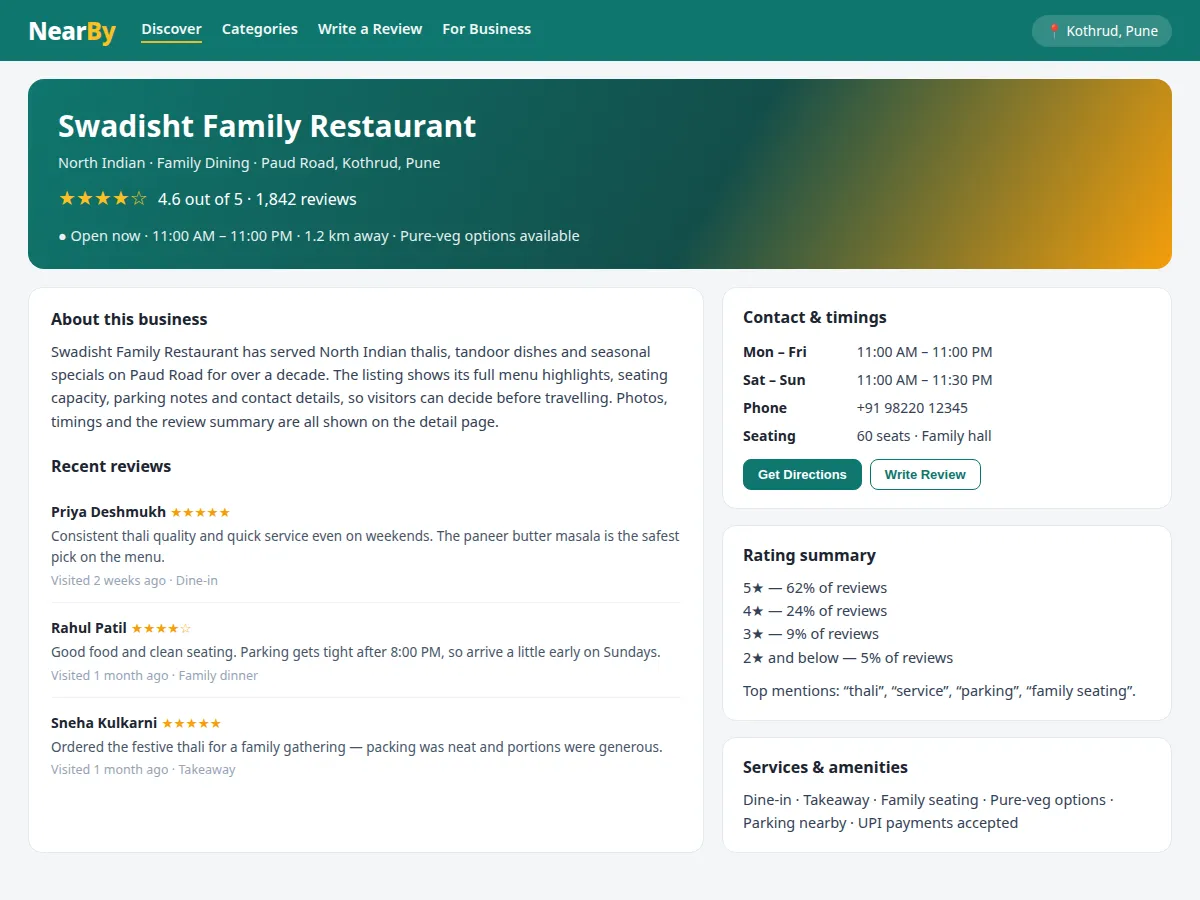
- The detail page shows the about section, contact details, opening hours, rating breakdown by star level and recent reviews, while the map-style panel places a labelled pin for each visible listing.
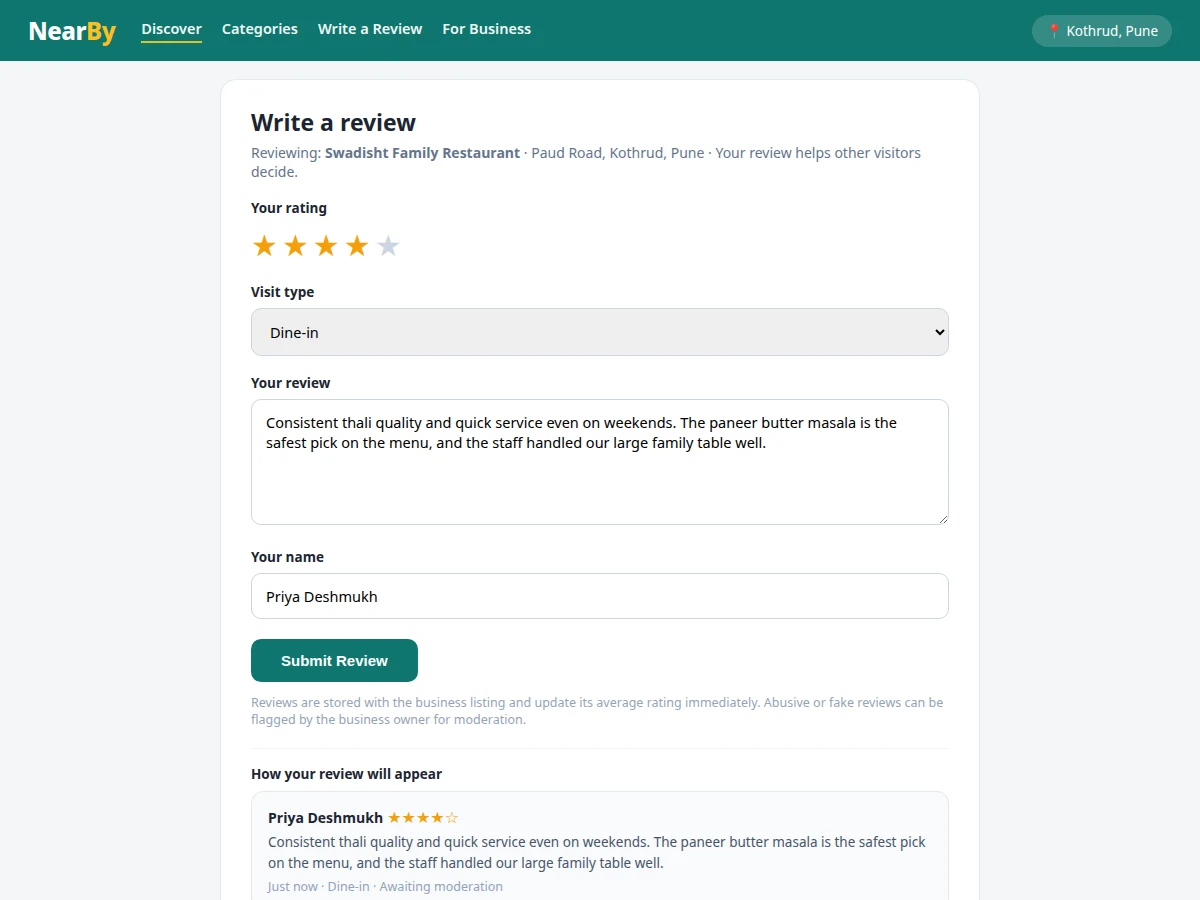
- The visitor submits a review through the form with 4 fields (rating, visit type, review text and reviewer name, design target); the review joins the listing's review list and its average rating is recomputed immediately.
Tech stack:
- HTML5, CSS3 and vanilla JavaScript (single-file demo)
- JSON data layer (listings, categories and reviews)
- SVG and CSS map illustration (map-style panel)
- Star-rating component (5-star scale)
- Browser-native form handling (review submission)
| Parameter | Value |
|---|---|
| Demo views | 3 views (search results, business detail, write review — design target) |
| Listings in demo | 6 businesses (demo dataset) |
| Categories in demo | 8 categories (demo dataset) |
| Search inputs | 2 inputs (keyword plus location, design target) |
| Review form fields | 4 fields (rating, visit type, review text and reviewer name, design target) |
| Rating scale | 5 stars (1 star minimum to 5 stars maximum) |
| Average rating | Arithmetic mean of stored reviews, rounded to 1 decimal place |
| Map panel | Illustrated street layout with labelled pins (CSS and SVG, not a live map API) |
| Demo file size | Approximately 17 KB (measured from the built demo file) |
| Data layer | JSON file with listings, categories and reviews (demo dataset) |
| Runs in | Modern evergreen browsers (design target, no build step) |
Project features
A local business directory web app stands or falls on four capabilities: search that finds the right listing fast, filters that narrow a long list to what matters, ratings and reviews that build trust, and a map-style view that shows where each business sits. This project implements all four, plus detailed business pages and a review submission flow, in a single readable codebase. The search combines a keyword field with a location field, category chips filter the results in one click, and every listing card shows its star rating, review count, open status, timings and distance. Business detail pages add an about section, a rating breakdown and recent reviews, while the review form captures a star rating, visit type, review text and reviewer name. Together these features cover the full visitor journey from discovery to decision.
- [Keyword and location search] Two search inputs (keyword plus location, design target) filter the listing set as the visitor types, matching business names, categories and services, so a query like a trade plus a neighbourhood returns only relevant listings.
- [Category filter chips] Eight category chips (demo dataset) — including Home Services, Restaurants, Cafés and Bakeries, Salons, Clinics, Electronics Repair and Gyms and Fitness — narrow results to one category in a single click, with an All option to reset.
- [Star ratings with rating summary] Every listing shows an average rating on a 5-star scale with its review count, and each detail page breaks the average down by star level with the most-mentioned review topics, so visitors judge a business at a glance.
- [Written reviews with submission form] Visitors submit a review through a form with 4 fields (rating, visit type, review text and reviewer name, design target); the submitted review appears in the listing's review list with a moderation note.
- [Business detail pages] Each listing opens a detail page with an about section, contact details, opening hours, seating or service notes, a rating summary and recent reviews, giving visitors everything needed to decide before travelling.
- [Map-style listings view] A map-style panel beside the results places labelled pins for each listed business over a stylised street layout, so visitors see at a glance which options sit nearest to them.
- [Sorting by rating] Results can be ordered by highest rating first, which surfaces the best-reviewed listings for a query without hiding the rest of the list.
- [Future scope: owner dashboard and live maps] Business-owner login with listing editing, and a live map provider with real directions, are documented as future scope — the demo uses seeded data and an illustrated map panel instead of a paid map API.
What is included
- Working single-file demo web app (search results, business detail and review views)
- Seeded demo dataset (6 businesses across 8 categories, demo dataset)
- Project report PDF (problem, design, data model, search and rating logic, testing, limitations, future scope)
- PPT presentation for final review
- Viva Q&A preparation document (search filtering, rating computation, JSON data layer, map illustration vs live map APIs)
- Setup guide (how to run the demo and add a new listing to the JSON data layer)
Limitations & prerequisites
- The demo uses seeded data for one city — it is not connected to a live business database or a live map provider, and directions are shown as buttons rather than routed navigation.
- There is no login or owner dashboard in the demo build; owner-side listing editing is documented future scope, not shipped code.
- Reviews in the demo are not verified against real visits, and no spam or fake-review detection is implemented.
- The map panel is an illustrated layout, not a geographic map — pin positions are illustrative and do not encode real coordinates.
- Search matches names, categories and services only; it does not rank by distance from the visitor's live location.
Frequently Asked Questions
How does search and filtering work in this directory?
Search and filtering work by matching the visitor's keyword against business names, categories and services, narrowing the visible cards to the selected category chip, scoping results to the demo city, and ordering results by highest rating first when chosen for the query. Matching runs entirely in the browser over the JSON data layer, so each keystroke re-renders the list without a server round-trip, which keeps the interaction instant and the code easy to trace.
How is a business's star rating calculated?
A business's star rating is the arithmetic mean of all its stored review ratings, rounded to 1 decimal place, on a 5-star scale from 1 star to 5 stars, and every submitted review joins the listing's review list so the average is recomputed immediately. The detail page also shows the share of reviews at each star level and the most-mentioned review topics, so visitors see both the headline score and its spread.
Does the app use a live map service?
No, the demo uses an illustrated map panel built with CSS and SVG, with labelled pins placed over a stylised street layout, rather than a paid live map provider, which keeps the demo free to run with no API key and no usage billing. A live map provider with real directions is documented as future scope for a production version, and the illustrated nature of the panel is stated honestly on the page.
Can business owners manage their own listings?
Not in the demo build, where owner login and listing editing are documented future scope and the demo instead ships with seeded listings that are managed through the JSON data layer by editing one entry per business, with its name, category, address, timings and services. The setup guide walks through adding such an entry step by step. An owner dashboard would add authentication, an edit form and a moderation queue for reviews.
Is this project suitable for a final-year project?
Yes, it fits Web Development and Computer Science final-year work because it combines a real user-facing product with explainable fundamentals such as DOM rendering, client-side filtering, JSON data modelling, rating computation and form handling in one readable codebase for review. The single-file demo keeps the whole codebase readable for a review, and the report documents the design decisions, testing and limitations honestly.
Components & software requirements
- HTML5, CSS3 and vanilla JavaScript (single-file demo)
- JSON data layer (listings, categories and reviews)
- SVG and CSS map illustration (map-style panel)
- Star-rating component (5-star scale)
- Browser-native form handling (review submission)
Delivery information
Built-to-order project. Delivery timeline is shared after order confirmation based on current queue.
Support terms
Complete documentation, setup guide, and viva preparation included. Support for setup and explanation provided.
Download free synopsis (PDF)
Enter your name and WhatsApp number — the synopsis PDF downloads immediately. We may send occasional project updates on WhatsApp; no spam.