
More project photos (3)

The problem
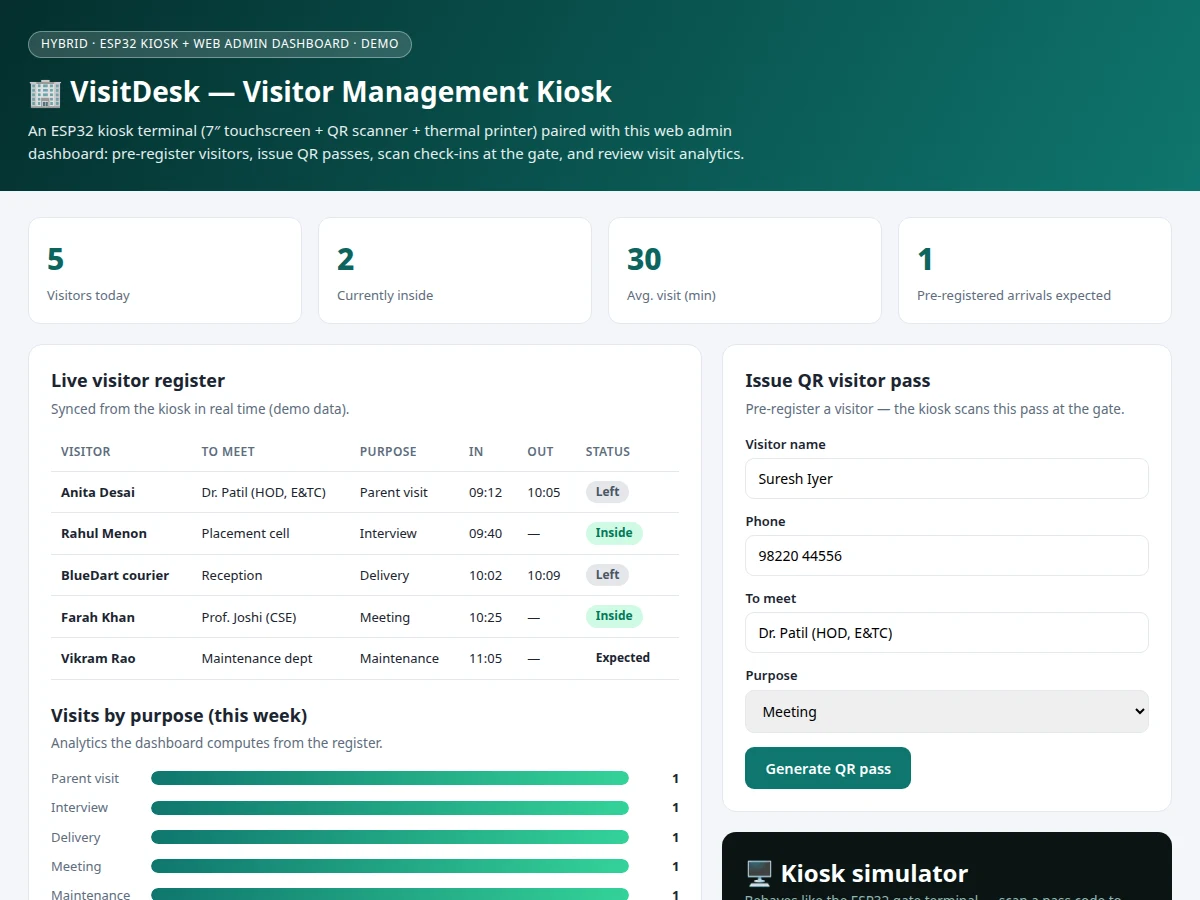
College gates, offices and apartment societies still manage visitors in paper registers: entries are illegible, nobody knows who is currently inside, and there is no record of visit patterns. Commercial visitor management systems exist but are priced for enterprises. This project builds the same capability as a student-buildable hybrid: a low-cost ESP32 kiosk terminal at the gate handles the physical interaction (scan a QR pass, print a badge slip), while a web dashboard handles everything administrative (pre-registration, pass issuance, live register, analytics). The split is the engineering point — the kiosk is a thin client that validates scans against the backend over Wi-Fi, so all logic and data live in one place. The demo dashboard runs the full workflow in the browser: issue a QR pass, simulate the kiosk scan, and watch the live register and analytics update.
Presents the QR pass at the gate kiosk and is checked in or out by the guard flow.
Follow the working sequence
How it works
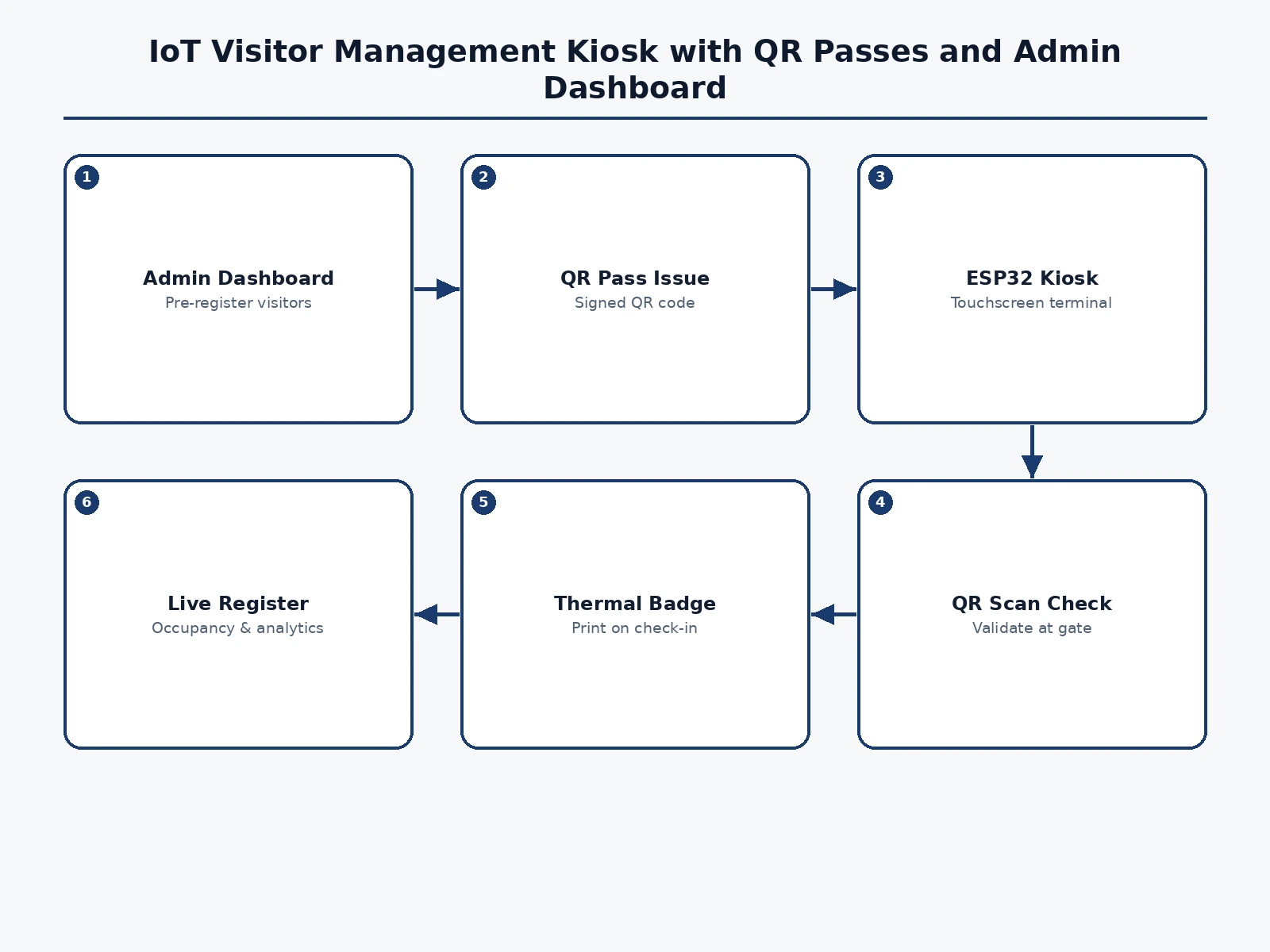
- An admin pre-registers a visitor on the dashboard (name, phone, person to meet, purpose); the backend generates a signed QR pass code.
- At the gate, the ESP32 kiosk scans the visitor's QR pass and validates the code against the backend over Wi-Fi.
- On valid scan, the kiosk's thermal printer prints a badge slip and the check-in time is logged to the live register.
- When the visitor leaves, the guard taps check-out on the kiosk; the visit duration is recorded.
- The dashboard continuously shows who is inside, today's visitor count, average visit duration and visits by purpose.
- Invalid or expired pass codes are rejected at the kiosk with an on-screen message, and the rejection is logged.
Tech stack:
- ESP32 (kiosk firmware, Arduino framework)
- 7-inch touchscreen display, QR scanner module, thermal printer module
- Node.js/Express + MongoDB backend (REST API)
- React web admin dashboard
- Wi-Fi (kiosk-to-backend communication)
- HTML/CSS/JavaScript interactive demo (single-file)
| Parameter | Value |
|---|---|
| Kiosk controller | ESP32 dev board (Wi-Fi, adequate GPIO for peripherals) |
| Kiosk display | 7-inch touchscreen (design target) |
| Pass validation | Signed code checked against backend over Wi-Fi (expected latency < 2 s on local network) |
| Badge printer | Thermal printer module, QR + visitor details slip |
| Dashboard | Live register, occupancy, duration & purpose analytics |
| Demo | Single-file web app with kiosk simulator, runs in browser |
Project features
- [ESP32 kiosk terminal] Gate hardware with a 7-inch touchscreen, QR scanner module and thermal printer: scans passes, validates over Wi-Fi, prints badge slips on check-in.
- [QR pass issuance] Admins pre-register visitors from the dashboard; each pass carries a signed code that the kiosk validates — expired or forged codes are rejected at the gate.
- [Live visitor register] Check-ins and check-outs sync to the dashboard in real time, with per-visitor status (inside / left / expected).
- [Occupancy & visit analytics] Currently-inside count, average visit duration and visits-by-purpose charts computed from the register.
- [Check-in/check-out flow] Guard-facing kiosk flow for entry and exit, so visit durations are measured rather than guessed.
- [Kiosk simulator in demo] The web demo includes a simulated gate terminal so the full scan-to-register workflow can be exercised without hardware.
- [Hardware + software documentation] Wiring diagrams, firmware with API client code, backend API docs and the dashboard source — the complete hybrid build record.
What is included
- ESP32 kiosk prototype (assembled, wired, with enclosure)
- Kiosk firmware source with backend API client
- Complete web dashboard application (backend API + admin frontend)
- Wiring diagrams and hardware bill of materials
- Interactive single-file demo with kiosk simulator
- Project report PDF (background, system architecture, hardware design, API docs, testing)
- PPT presentation for final review
- Viva Q&A preparation document (ESP32 peripherals, REST APIs, QR validation, Wi-Fi reliability)
Limitations & prerequisites
- The kiosk needs continuous Wi-Fi to validate passes; offline operation with cached passes is future scope, not implemented.
- The thermal printer prints text/QR badge slips — photo ID capture is out of scope.
- QR pass delivery (email/SMS to the visitor) is listed as future scope; the demo shows passes on screen.
- Visit-duration analytics depend on guards performing check-outs; missed check-outs are flagged, not auto-resolved.
- The build is a campus/office-scale prototype, not a hardened enterprise access-control product.
Frequently Asked Questions
What does the kiosk hardware actually do?
It is the gate terminal: a 7-inch touchscreen for the check-in UI, a QR scanner module that reads visitor passes, and a thermal printer that prints a badge slip on successful check-in. An ESP32 runs the firmware and talks to the backend over Wi-Fi.
How are fake or expired passes handled?
Every pass code is signed by the backend. The kiosk validates each scan against the backend; invalid or expired codes are rejected on screen and the rejection is logged for the admin.
What does the dashboard show?
A live visitor register (who is inside right now), today's visitor count, average visit duration, expected pre-registered arrivals, and visits-by-purpose analytics.
Does it need internet?
It needs the kiosk and the backend on the same reliable Wi-Fi network. Internet is only needed if the backend is hosted remotely rather than on a local server.
Can it print photo badges?
Not as shipped — the thermal printer produces text + QR badge slips. Photo capture is listed as future scope.
Is this project suitable for a final-year project?
Yes — for Computer Science, IT, Web Development and IoT programs. It demonstrates embedded firmware, peripheral interfacing, backend APIs and a full-stack dashboard in one coherent system. Suitable for B.E./B.Tech final-year projects in Computer Science, IT and Web Development.
Components & software requirements
- ESP32 (kiosk firmware, Arduino framework)
- 7-inch touchscreen display, QR scanner module, thermal printer module
- Node.js/Express + MongoDB backend (REST API)
- React web admin dashboard
- Wi-Fi (kiosk-to-backend communication)
- HTML/CSS/JavaScript interactive demo (single-file)
Delivery information
Built-to-order project. Delivery timeline is shared after order confirmation based on current queue.
Support terms
Complete documentation, setup guide, and viva preparation included. Support for setup and explanation provided.
Download free synopsis (PDF)
Enter your name and WhatsApp number — the synopsis PDF downloads immediately. We may send occasional project updates on WhatsApp; no spam.