
More project photos (3)
The problem
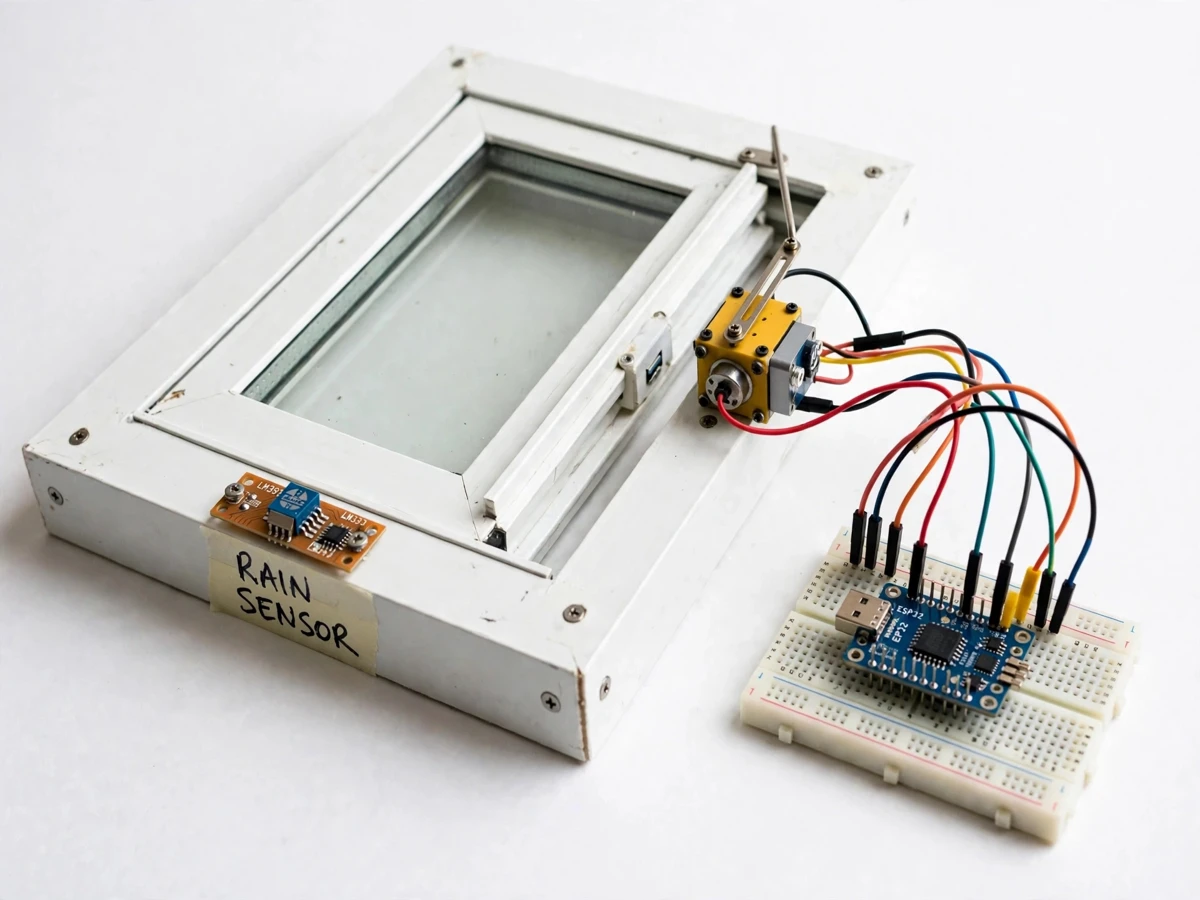
A window left open for fresh air turns into a wet floor, soaked curtains and a damp wall the moment a sudden shower arrives while nobody is home or nobody is watching the sky. Clothes near the sill, books on a desk and bedding beside the window can all be spoiled before anyone notices the change in weather, and the damage is worse in rooms that face driving rain. The IoT Smart Window with Rain Sensing Auto Close removes that watchfulness from the occupant: a rain sensor mounted outside the window watches for rain, an ESP32 controller judges the reading against a calibrated threshold, and a servo-driven actuator closes the sash before much rain can enter. A dashboard keeps the window status, the rain reading and a log of closures visible from a phone, so the occupant always knows why the window moved.
This is a built-to-order hybrid project: the window prototype, firmware, dashboard demo, report, abstract and presentation material are prepared fresh for you.
IoT Smart Window with Rain Sensing Auto Close answers a household gap: open windows invite air, but they also invite rain whenever a shower arrives unannounced. Occupants who step out, fall asleep or sit in another room cannot guard every window, and a curtain controller that follows sunlight or a clock cannot know that rain has started. Rain, not light and not a schedule, is therefore the trigger here: water landing on an outdoor sensor board changes its electrical behaviour, and the controller acts only when that change passes a calibrated threshold, so a passing splash or morning dew does not slam the sash shut. Once the sash closes it stays closed until the occupant releases it by hand or from the dashboard, a deliberate choice that keeps a half-dried sensor from reopening the window into lingering drizzle. The window protects a room on its own while leaving the final decision to reopen with its owner.
Rainwater bridges its tracks and the reading falls.
Follow the working sequence
How it works
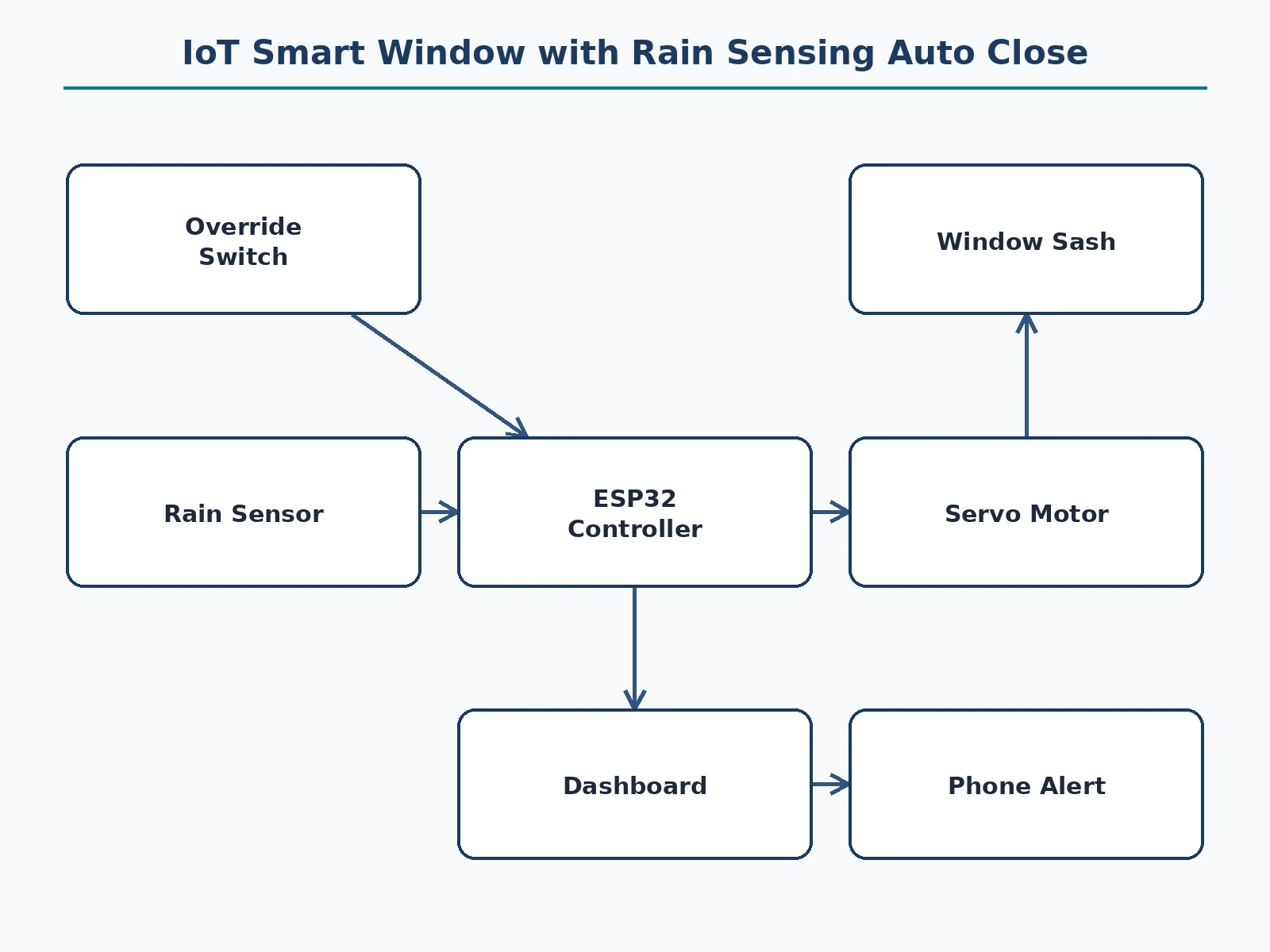
IoT Smart Window with Rain Sensing Auto Close runs as one end-to-end loop from rain on the sensor to a closed sash, an alert and a log entry, with the occupant in control of reopening. The outdoor rain board feeds an analogue reading to the ESP32, which compares it with a calibrated threshold over several consecutive readings before acting, so a brief splash or morning dew does not close the window. When rain is confirmed, the controller drives the servo linkage to swing the sash shut, updates the dashboard status, records the closure in the event log and sends a phone alert. The sash then stays shut, regardless of how quickly the sensor dries, until the occupant presses the manual override switch or the dashboard release, which reopens the window and clears the hold.
- The rain board is mounted outside the window where rain lands on it directly. When rainwater bridges the nickel tracks on the rain board, the resistance between them falls, so the analogue voltage read by the ESP32 falls with it.
- The ESP32 samples the analogue reading and applies a dew guard: only several consecutive readings below 2000 ADC counts count as rain, so a brief splash or a film of morning dew does not close the window.
- Once rain is confirmed, the controller drives the MG996R servo from 0 degrees (open) to 90 degrees (closed), and the linkage pulls the sliding sash shut in under 10 seconds (design target, buyer-run timed test).
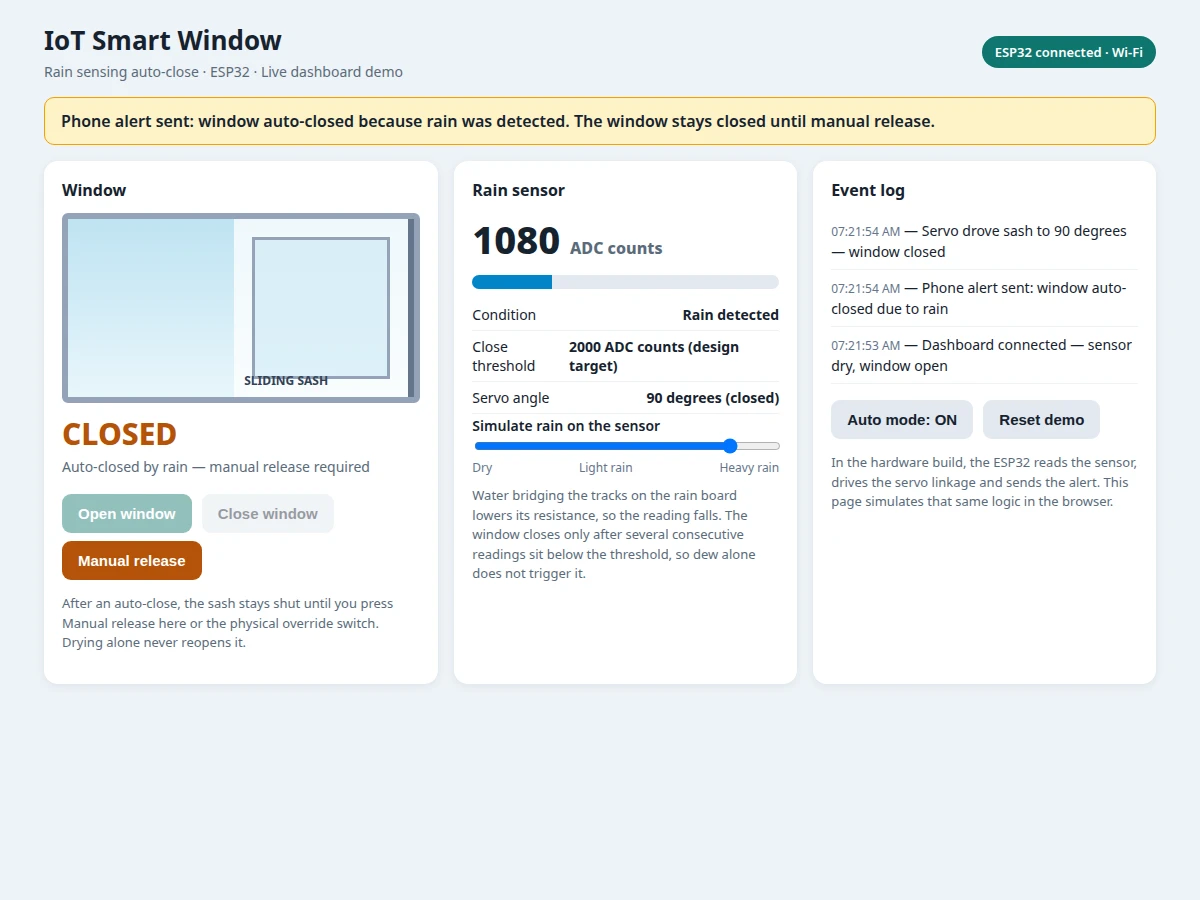
- The dashboard updates at once, showing the window as closed, the servo angle and the latest rain reading, and the event log records the closure with rain as its cause.
- A phone alert is issued through the connected dashboard on every auto-close, so the occupant learns that rain closed the window even from another room.
- The sash stays closed after the auto-close, regardless of how quickly the sensor dries. The occupant reopens it by pressing the manual override switch or the dashboard release, which clears the hold until the next confirmed rain event.
- At install, the builder calibrates the threshold on the finished unit: wipe the board dry and note the dry reading near 3800 ADC counts, wet the board and note the wet reading near 1200 ADC counts, then set the threshold between them at 2000 ADC counts (design target) and retest with a light spray to check the dew guard.
Tech stack:
- ESP32 microcontroller with Wi-Fi
- Rain sensor board with LM393 comparator module
- MG996R servo motor with linkage arm
- Manual override push-button switch
- HTML · CSS · JavaScript dashboard
- ESP32 firmware in the Arduino IDE
- Local Wi-Fi dashboard link with event log
| Parameter | Value |
|---|---|
| Controller | ESP32 development board · 3.3 V logic level |
| Rain sensor | Rain board with LM393 comparator module · analogue output |
| Close threshold | 2000 ADC counts (design target, between dry and wet readings) |
| Dry and wet reference readings | Approximately 3800 ADC counts dry · approximately 1200 ADC counts wet (calibration reference values, design target) |
| Actuator | MG996R servo · 9.4 kg·cm torque (datasheet value at 4.8 V) · 0 degrees open to 90 degrees closed (design target travel) |
| Prototype frame width | Approximately 60 cm (design target) |
| Sash travel | Approximately 30 cm (design target) |
| Closing time | Under 10 seconds (design target, buyer-run timed test) |
| Power supply | 5 V DC · 3 A adapter (design target) |
| Dashboard refresh | Every 2 seconds (design target) over Wi-Fi on the 2.4 GHz band |
Project features
IoT Smart Window with Rain Sensing Auto Close is built around rain-triggered closure, a stay-closed release rule, a live dashboard and a phone alert, capabilities that carry the whole build from sensing to occupant action. Rain-triggered closure watches the outdoor sensor continuously and drives the sash shut when the reading passes its calibrated threshold, instead of following light levels or a timetable. The stay-closed rule then holds the sash shut after an auto-close until the occupant releases it, so a sensor that is still drying cannot reopen the window into drizzle. The dashboard shows window status, the live rain reading, the threshold and an event log, while the phone alert tells the occupant exactly why the window moved, even from another room. Together, these four capabilities mean the occupant never has to watch the sky, rush home, or guess why the sash moved.
- [Rain-triggered auto-close] The outdoor rain board watches continuously, and the ESP32 drives the servo linkage to close the sash once rain is confirmed past the calibrated threshold. Rain is the trigger, not light levels and not a timetable. Implemented in the base build.
- [Stay-closed manual release] After an auto-close the sash stays shut until the occupant presses the manual override switch or the dashboard release, even if the sensor dries in the meantime. This keeps a half-dried sensor from reopening the window into lingering drizzle. Implemented in the base build.
- [Manual override switch] A physical push-button switch beside the window lets the occupant open or close the sash by hand at any time, and it also serves as the release after an auto-close. Manual control is never locked out by the automatic logic. Implemented in the base build.
- [Live dashboard status] The dashboard shows the window status, the live rain reading in ADC counts, the close threshold and the servo angle, so the occupant can see exactly what the controller sees. The view refreshes over local Wi-Fi while the window logic itself runs on the ESP32. Implemented in the base build.
- [Phone alert on auto-close] Every auto-close issues a phone alert through the connected dashboard, naming the closure as rain-triggered, so the occupant learns why the window moved even from another room. The alert and the log entry carry the same cause. Implemented in the base build.
- [Adjustable rain threshold] The threshold is set with the comparator control and the firmware value, tuned to the installed board rather than fixed in advance. The setup guide walks through measuring a dry reading and a wet reading first, then placing the threshold between them. Implemented in the base build.
- [Event log] Each closure, release and mode change is recorded in an event log with its cause, holding recent entries up to a 20-entry log capacity (design target). The log lets reviewers trace a closure back to the rain reading that caused it. Implemented in the base build.
Optional and future scope (not in the base build): a second window channel, a rain-gauge reading in millimetres per hour, and a battery-backed supply for power cuts. These can be developed on request and are not claimed as included.
What is included
- Working window prototype with ESP32, rain sensor, servo linkage and manual override switch
- Firmware source code with threshold calibration and dew guard logic
- Working dashboard demo with window status, rain reading and event log
- Wiring diagram and component list
- Project report, abstract PDF with the full section set matching this page, and presentation material
- Setup guide with the calibration procedure and a viva Q&A preparation document
Limitations & prerequisites
- The rain board must sit where rain actually lands on it; a sheltered mounting delays detection and can miss the first minutes of a shower.
- The servo linkage suits the prototype sash size at approximately 60 cm frame width (design target); a heavier sash needs a stronger actuator and a fresh timed closing check.
- The dashboard view and the phone alert need a Wi-Fi connection, although the sensing and auto-close logic runs on the ESP32 itself and does not wait for the network.
- The threshold must be recalibrated after a sensor board replacement or a change in mounting angle, since the dry and wet readings shift with the installation.
- The prototype is a demonstration build for a single window unit, not a sealed commercial window system, and it does not weatherproof the frame edges against driving rain.
- Closing time and threshold figures are design targets, not measured results; a buyer-run timed test at handover confirms the actual closing time on the finished unit.
Frequently Asked Questions
Is this project suitable for a final-year project?
Yes, it fits B.E. and B.Tech programmes in Electronics, Electrical and IoT, because it combines sensor interfacing, threshold calibration, actuator control and a networked dashboard in a single build that reviewers can test directly with water on the sensor. The build also gives a clear demonstration story, from rain detection to closure to a logged alert, on a single window unit, without needing a large installation. Reviewers can check the threshold, the dew guard and the manual release in one sitting, and the dashboard log shows each closure with its cause.
How does the system tell rain apart from dew?
It does not react to a single wet reading. The ESP32 treats a reading as rain only after several consecutive readings stay below 2000 ADC counts, so a brief splash or a film of morning dew that dries quickly is far less likely to close the window. When rainwater bridges the nickel tracks on the rain board, the resistance between them falls, so the analogue voltage read by the ESP32 falls with it. The calibration procedure sets the threshold between the dry reading and the wet reading measured on the installed board, which is what keeps dew on the right side of the line.
Does the window reopen by itself when the rain stops?
No, the window stays closed after an auto-close even when the rain stops and the sensor dries completely, because reopening on a drying sensor could let lingering drizzle back into the room. The occupant must press the manual override switch or the dashboard release, which reopens the sash and clears the hold until the next confirmed rain event. This stay-closed rule is deliberate: a sensor that is still damp would otherwise flap the sash open and shut as it dries. Manual release puts the decision to reopen back with the occupant, who can see whether the rain has truly passed.
Does the window still close if the Wi-Fi connection drops?
The sensing and auto-close logic runs on the ESP32 itself, so the window still closes on rain if the Wi-Fi connection drops. The dashboard view and the phone alert need a Wi-Fi connection, so a dropped connection means the occupant will not see the live status or the alert until the connection returns. In other words, protection does not depend on the network, but visibility does. Once the connection returns, the dashboard shows the current window status and the event log entry for the closure.
Can the rain threshold or the actuator be changed later?
Yes, the threshold is adjustable through the comparator control and the firmware value, and the servo linkage can be refitted to a different sash size after recalibration. Any change to the sensor position, the board or the actuator means the dry and wet readings must be measured again before the window is left to run on its own. A heavier sash needs a stronger actuator and a fresh timed closing check, and a moved sensor needs a fresh dry reading and wet reading. Recalibration after any hardware change is part of the setup guide, not an afterthought.
Components & software requirements
- ESP32 microcontroller with Wi-Fi
- Rain sensor board with LM393 comparator module
- MG996R servo motor with linkage arm
- Manual override push-button switch
- HTML · CSS · JavaScript dashboard
- ESP32 firmware in the Arduino IDE
- Local Wi-Fi dashboard link with event log
Delivery information
Built-to-order project. Delivery timeline is shared after order confirmation based on current queue.
Support terms
Complete documentation, setup guide, and viva preparation included. Support for setup and explanation provided.
Download free synopsis (PDF)
Enter your name and WhatsApp number — the synopsis PDF downloads immediately. We may send occasional project updates on WhatsApp; no spam.