
More project photos (3)
The problem
Household belongings are usually documented only after something goes wrong — a theft, a fire or water damage — when owners must reconstruct from memory what was in each room, what it cost and what it was worth. Memory-based lists miss serial numbers, purchase dates and proof of ownership, which weakens insurance claims and makes replacement planning guesswork. This project builds a native Android app in Kotlin that keeps a structured, photo-backed inventory before any loss occurs: every item is recorded under its room with a photograph, purchase date, purchase price, estimated current value, serial number, warranty date and notes, all stored locally in a Room (SQLite) database. A dashboard totals value per room and for the whole home, search and filters locate any record quickly, and an insurance export generates a PDF summary and a CSV item list on the device for sharing with an insurer or family members.
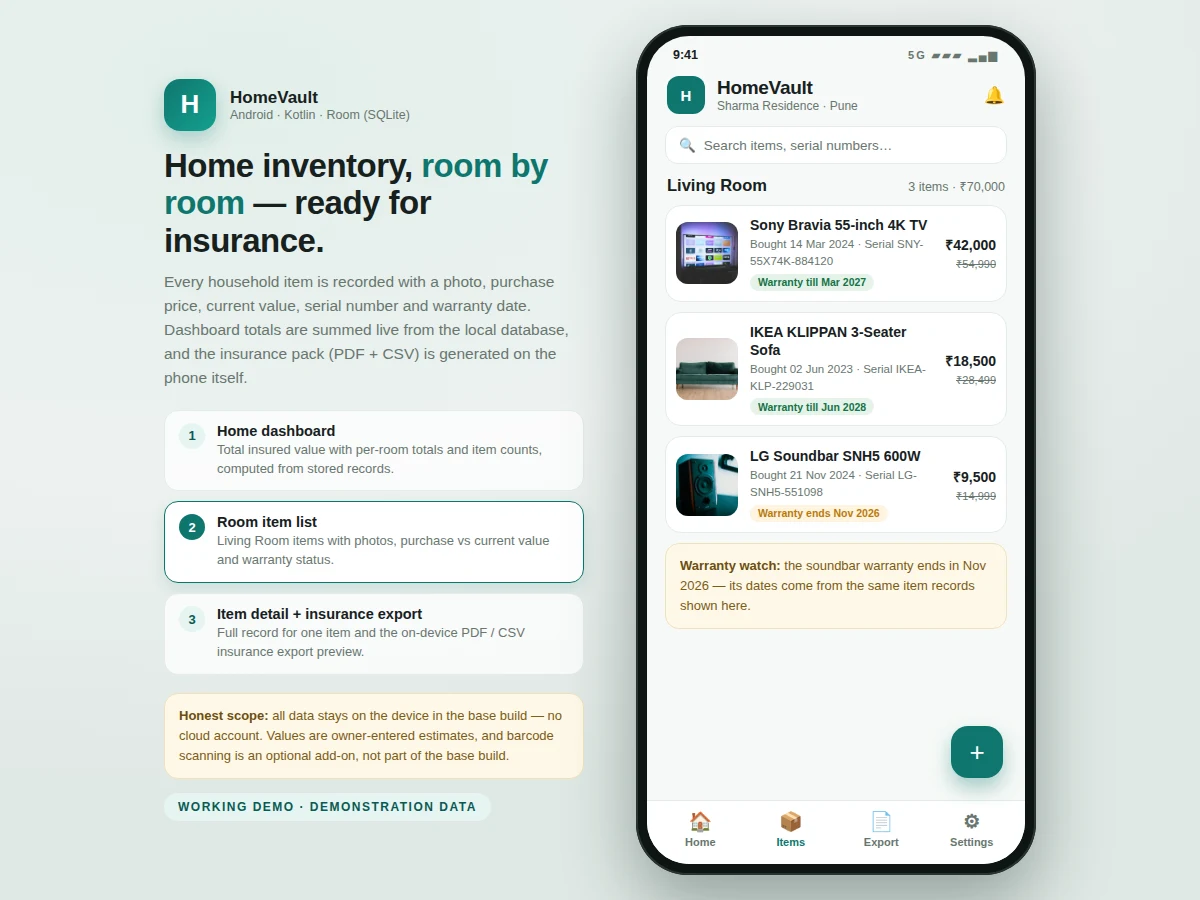
Creates rooms and records each household item with a photo and purchase details.
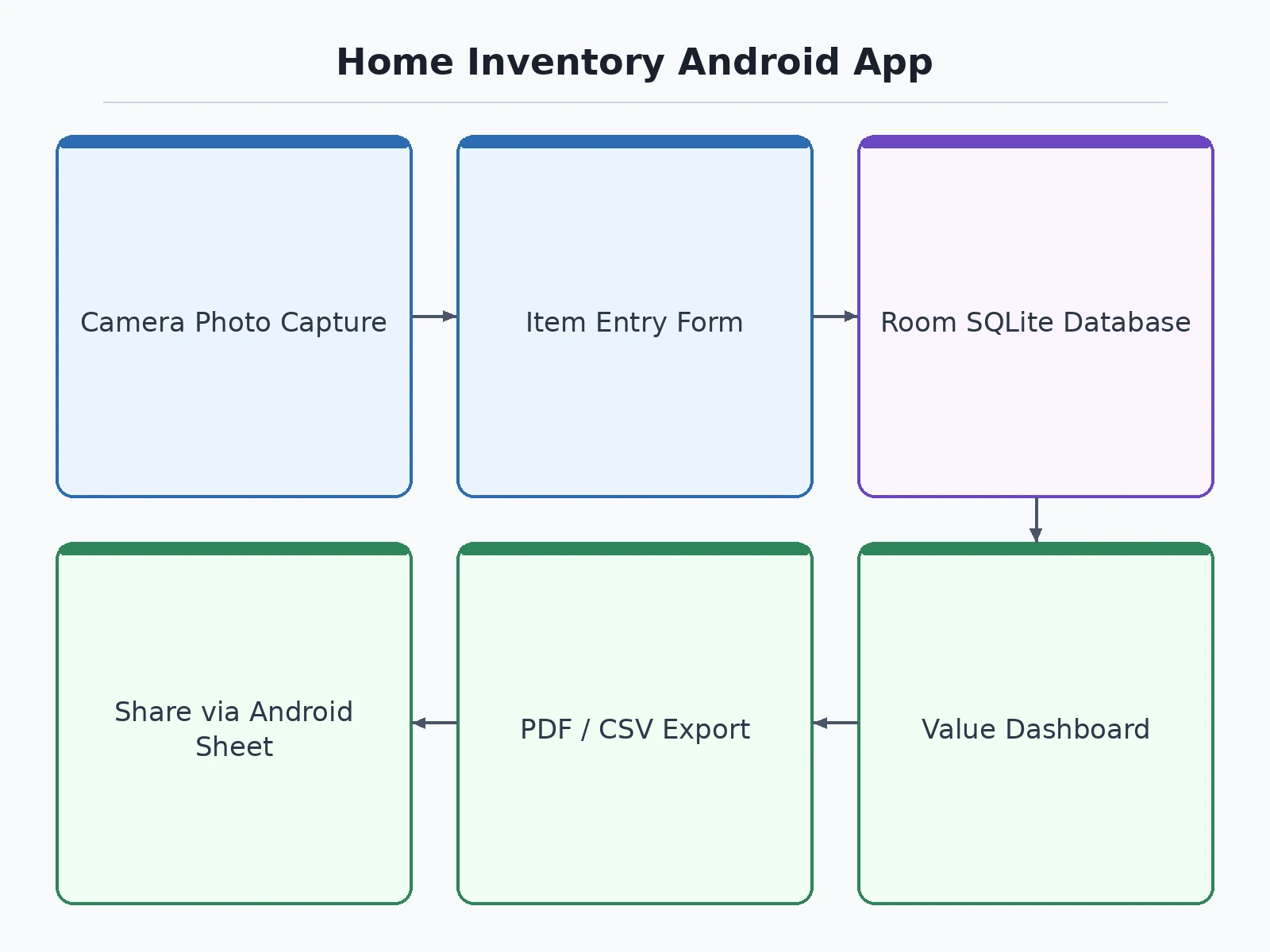
Follow the working sequence
How it works
- The user creates rooms for the home — for example Living Room, Kitchen, Bedroom and Study — which are stored as rows in the rooms table of the Room database.
- Inside a room, the user adds an item by photographing it with the camera or gallery, then entering its name, purchase date, purchase price, estimated current value, serial number, warranty date and notes; the entry is saved as a row in the items table linked to that room.
- The dashboard runs aggregate queries over the items table to sum the estimated current value per room and across the whole home, and displays each room total with its item count.
- Search queries match the entered text against item name, serial number and notes, while the room filter restricts the list query to one room; results open the same item detail screen used for editing.
- When an item is edited or deleted, the change is written to the database and the dashboard, room list and search results all read the updated data, so totals never need manual recalculation.
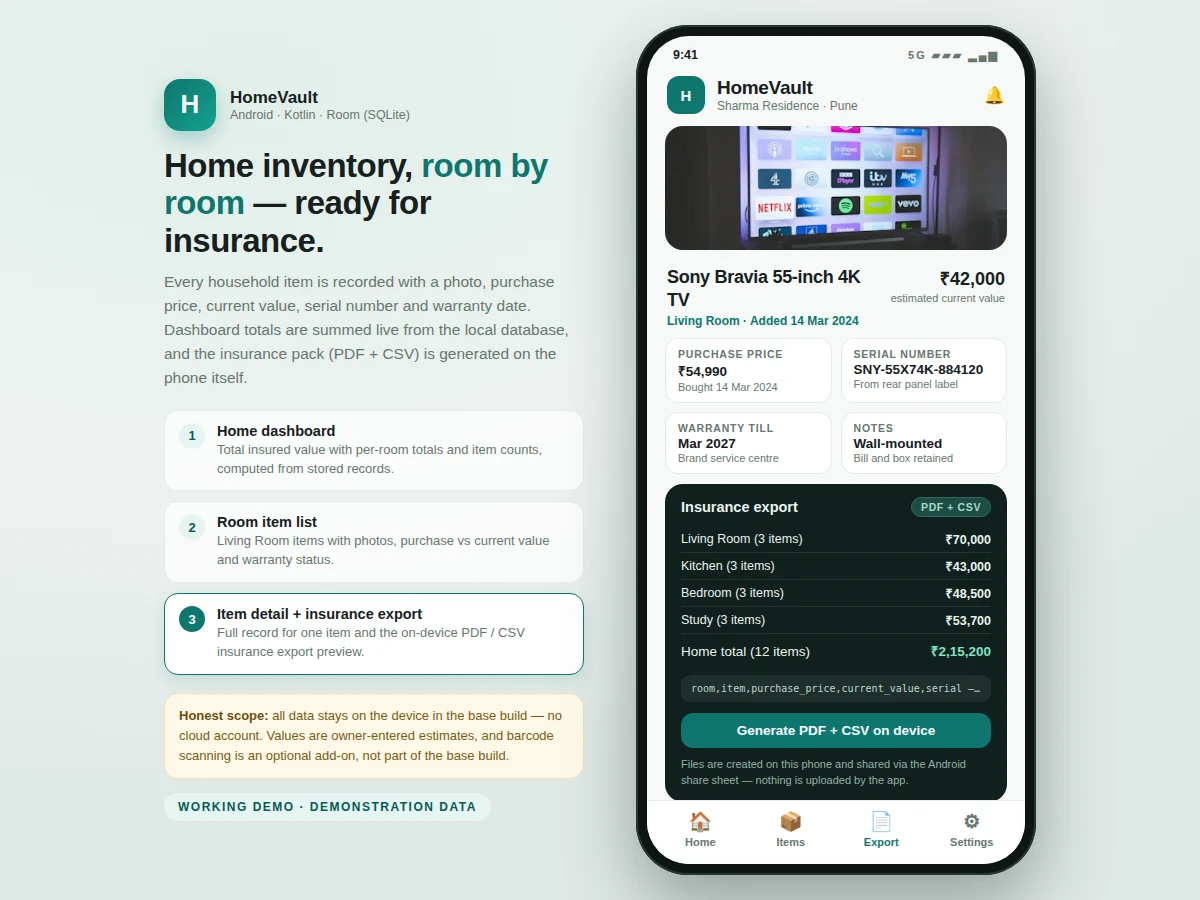
- For the insurance export, the app reads every room and item, writes a PDF summary document with grouped items and totals, and writes a CSV file with one row per item and all recorded fields.
- The generated PDF and CSV files are handed to the Android share sheet via a FileProvider URI, so the user can send them to an insurer, save them to Drive, or print the PDF — the choice stays with the user.
Tech stack:
- Kotlin
- Android Jetpack · Room · ViewModel
- SQLite (via Room)
- Material 3 UI components
- CameraX · gallery image picker
- Android PdfDocument API · CSV writer
- Android share sheet · FileProvider
- Gradle · Android Studio
| Parameter | Value |
|---|---|
| Platform | Android version 8.0 and above (design target) |
| Local database | Room (SQLite) with 2 tables — rooms and items (design target) |
| Fields per item | 8 fields per item — photo, room, purchase date, purchase price, current value, serial number, warranty date, notes (design target) |
| Photos per item | 1 photo per item in the base build (design target) |
| Rooms supported | Up to 20 rooms per home (design target) |
| Items supported | Up to 2,000 items per home (design target) |
| Export formats | 2 formats — PDF summary and CSV item list (design target) |
| Export generation time | Under 5 seconds for 500 items (expected, device-dependent) |
| Internet required | None for the base build — 0 cloud accounts required (design target) |
| App storage use | Approximately 1–2 MB per 100 items excluding photos (expected) |
Project features
- [Room-by-room organisation] Items are grouped under rooms such as Living Room, Kitchen, Bedroom and Study, so the inventory mirrors how a home is actually arranged. Rooms can be added, renamed or removed, and every item belongs to exactly one room.
- [Photo record for every item] Each item entry stores a photograph captured with the device camera or picked from the gallery, shown as a thumbnail in lists and full-size on the detail screen. The photo acts as visual proof of the item and its condition.
- [Purchase and value tracking] Every record holds purchase date, purchase price, estimated current value, serial number, warranty expiry date and free-text notes alongside the photo. Keeping purchase price and current value as separate fields shows depreciation honestly instead of hiding it.
- [Home value dashboard] The home screen totals the estimated current value for each room and for the whole home, with the item count per room, computed live from the database. Any add, edit or delete updates the dashboard figures immediately.
- [Search and room filters] A search box matches item names, serial numbers and notes, and room chips filter the list to a single room. This locates a warranty date or serial number in seconds during a service visit or claim call.
- [Insurance export in PDF and CSV formats] One action generates an insurance pack on the device: a PDF summary grouped by room with per-room and overall totals, and a CSV file listing every item with all its fields. Both files are shared through the standard Android share sheet.
- [Fully offline local storage] All rooms, items and photos stay on the device in a Room (SQLite) database with no cloud account, server or internet connection required for the base build. Inventory work continues in homes with poor connectivity and no data leaves the phone unless the user shares an export.
What is included
- Complete Android source code (Kotlin) with Room database, dashboard and export code
- Installable demo build (APK) of the inventory app
- Setup instructions covering Android Studio, camera permission and sample data entry
- Sample exported insurance PDF and CSV generated from demo data
- Project report PDF (background, database design, export workflow, methodology)
- PPT presentation for final review
- Viva Q&A preparation document (Room entities and relations, aggregate queries, on-device document generation, offline-first design)
Limitations & prerequisites
- Values are user-entered estimates, not insurer valuations — an insurer may still ask for purchase receipts or a professional valuation for high-value items during a claim.
- All data lives only on the phone in the base build; if the device is lost or reset without a shared export, the inventory is lost with it. Regular PDF and CSV exports are the manual backup route.
- The base build covers a single home on a single device — there is no multi-user editing, family sharing or cloud sync; those would be separate customizations.
- Estimated current value does not change automatically over time; the user edits it manually, so totals are only as current as the last edit.
- Barcode and QR scanning for serial-number entry is not part of the base build; it is available as an optional customization using the device camera.
- The export is documentation support for a claim, not a guarantee of claim acceptance — coverage decisions remain with the insurer and the policy terms.
Frequently Asked Questions
Does the app need internet or a cloud account?
No. The base build stores every room, item and photo on the device in a Room (SQLite) database and needs no account, server or internet connection for recording, searching or exporting. The only network use is optional and user-initiated, when the generated PDF or CSV file is shared through the Android share sheet to mail or messaging apps.
What exactly is in the insurance export?
The export contains a PDF summary grouped by room with the item count and total estimated current value for each room plus the overall home total, and a CSV file listing every item with its room, purchase date, purchase price, current value, serial number and warranty date. Both files are generated on the device and can be shared or printed.
How are the dashboard totals calculated?
Totals are calculated directly from the stored item records. Each item carries a purchase price and a separate estimated current value entered by the user; the dashboard sums current values per room using a database aggregate query and adds the room totals for the overall figure. Editing or deleting an item updates every total immediately, with no manual recalculation step.
Can barcode or QR scanning be added?
Yes, as an optional customization that is not part of the base build. A barcode and QR scanning screen using the device camera can be added so a serial number or model code is captured instead of typed, with the scanned value saved into the same item record. The base build uses manual entry, which keeps the core project simpler to explain.
Is this project suitable for a final-year project?
Yes. The project demonstrates native Android development in Kotlin, relational database design with rooms and items tables in Room, camera-based photo capture and storage, aggregate queries for dashboard totals, and on-device generation of PDF and CSV documents. Each layer can be explained and modified independently, which maps well to typical university evaluation and demonstration requirements.
What will I receive with the project?
The complete Kotlin source code with the Room database and export code, an installable demo build, setup instructions for Android Studio, a project report covering database design and the export workflow, a presentation for the final review, and a viva question-and-answer document. A sample exported PDF and CSV generated from demo data are also included for reference.
Components & software requirements
- Kotlin
- Android Jetpack · Room · ViewModel
- SQLite (via Room)
- Material 3 UI components
- CameraX · gallery image picker
- Android PdfDocument API · CSV writer
- Android share sheet · FileProvider
- Gradle · Android Studio
Delivery information
Built-to-order project. Delivery timeline is shared after order confirmation based on current queue.
Support terms
Complete documentation, setup guide, and viva preparation included. Support for setup and explanation provided.
Download free synopsis (PDF)
Enter your name and email — the synopsis PDF downloads immediately. We may send occasional project updates; no spam, unsubscribe anytime.