
More project photos (2)
The problem
A Gemini 3 personal diet coach is a web app that turns a student's age, sex, weight, height, activity level, goal, diet preference and daily food budget into a calorie target and an Indian meal plan. Most people who want to eat better face two tools that never talk to each other: a calorie calculator that prints one number and stops, and a diet app that hands out a fixed menu with no idea what the user can spend. Generic chatbots fill the gap badly, inventing dishes, ignoring budgets and producing day totals that do not add up. This project closes that gap by pairing Gemini 3 Pro — Google's model announced on 18 November 2025 and released in preview as gemini-3-pro-preview — with a verified calculation layer and a 12-dish Indian food database, so every plan carries a target the student can recompute by hand and a day total that equals the sum of its dishes.
Enters age, weight, height, goal and food budget.
Follow the working sequence
How it works
The Gemini 3 personal diet coach works end to end in six stages. The user enters a profile — age, sex, weight, height, activity level, goal, diet preference and daily food budget — and the app computes the calorie target deterministically: BMR from the Mifflin-St Jeor equation, TDEE by multiplying by the activity factor, then the goal adjustment. That target, the macro split and the food database go into a structured prompt sent to Gemini 3 Pro through the Gemini API. The model reasons about the constraints together, picking dishes that fit the calories, protein share and budget, and returns a day plan as JSON. A validation layer then checks the reply: dish calories must sum to within 20 kcal of the target and total cost must stay under budget. Only a plan that passes both checks is rendered; a failed plan is regenerated, and any meal swap recomputes every total from the dishes on screen.
- The user enters age, sex, weight (kg), height (cm), activity level, goal, diet preference and daily food budget (₹).
- The app computes BMR with the Mifflin-St Jeor equation — for the worked example (22 years, 62 kg, 165 cm, female) BMR is 1380.25 kcal/day — and multiplies by the activity factor to get TDEE of 2139 kcal/day.
- The goal adjustment sets the daily target: TDEE minus 400 kcal for weight loss (1740 kcal/day in the example — 1739 rounded to the nearest 10 kcal), plus 300 kcal for weight gain, or TDEE unchanged for maintenance.
- The macro split is derived from the target — 15% protein, 55% carbohydrate and 30% fat in the demo — giving 65 g protein, 239 g carbohydrate and 58 g fat per day for the 1740 kcal target.
- The app sends the profile, target, macros and the 12-dish food database to Gemini 3 Pro (gemini-3-pro-preview) as a structured JSON prompt and receives a day plan.
- The validation layer checks the reply: dish calories must sum to within 20 kcal of the target and total cost must stay under budget; a failed plan is regenerated before anything is shown.
- The plan renders with per-meal calories, protein and cost, and any swap recomputes the day total, protein total and cost from the dishes shown.
How this build compares
| Approach | Personal calorie target | Day total verified to add up | Budget-aware meals | Indian food database |
|---|---|---|---|---|
| This build (Gemini 3 coach) | Yes — Mifflin-St Jeor, shown step by step | Yes — ±20 kcal validation rule | Yes — cost checked per plan | Yes — 12 dishes, editable |
| Generic diet app | Yes — usually a fixed formula | Not shown — totals are pre-set menus | Rarely — premium menus ignore budgets | Sometimes — often Western dishes |
| Plain Gemini chat | No — the user must ask for it | No — totals are often wrong | No — no cost data | No — dishes are invented freely |
| Nutritionist consultation | Yes — measured and personalised | Yes — professionally checked | Yes — built around the client's budget | Yes — tailored to the client |
Tech stack:
- Gemini 3 Pro API · gemini-3-pro-preview
- Python 3 · Flask
- HTML · CSS · JavaScript
- Mifflin-St Jeor calorie engine
- Indian food database · 12 dishes
- SQLite
- Gemini API JSON request builder
- Git
Dataset & model details
- Dataset: Indian food database — 12 standard Indian dishes with calories, protein and cost per typical serving, compiled from standard food-composition values; every value is labelled Approximate and the set is sample demo data, not measured from any user's own cooking.
- Task: Constrained meal-plan generation; input = user profile + calorie target + macro split + budget + food database, output = a 1-day plan (4 meals) as JSON with per-dish calories, protein and cost.
- Model: Gemini 3 Pro in preview (model id gemini-3-pro-preview, announced by Google on 18 November 2025), called through the Gemini API; a built-in rule engine in the demo generates plans from the same prompt and food data when no API key is present.
- Metrics: Day-total arithmetic check (dishes must sum to within 20 kcal of the target), budget check (plan cost under the daily budget), and macro-split check (protein, carbohydrate and fat shares against the design target). No accuracy figure is claimed — the model is not evaluated on a benchmark, and the report states this plainly.
| Parameter | Value |
|---|---|
| Model | Gemini 3 Pro in preview (gemini-3-pro-preview, announced 18 November 2025) |
| BMR formula | Mifflin-St Jeor (women: 10 × weight + 6.25 × height − 5 × age − 161) |
| Worked-example BMR | 1380.25 kcal/day (calculated, not measured) |
| Worked-example TDEE | 2139 kcal/day (calculated, activity factor 1.55) |
| Daily calorie target | 1740 kcal/day (design target: TDEE 2139 − 400 = 1739, rounded to 1740) |
| Macro split | 15% protein · 55% carbohydrate · 30% fat (design target) |
| Demo-day totals | 1760 kcal from dishes shown (Approximate, within 20 kcal of target) |
| Food database | 12 dishes (sample demo data, values Approximate) |
| Validation rule | Dish calories must sum within ±20 kcal of target; cost under budget |
| Demo food budget | ₹200 per day (demo default) |
| Plan generation time | Approximately 2–5 seconds per plan via the API (expected, network-dependent) |
| Demo mode | Single-file web app, runs offline with no API key |
Project features
The Gemini 3 personal diet coach is built around four capabilities. Personal calorie targets come first: the app computes BMR with the Mifflin-St Jeor equation and multiplies it by an activity factor to get TDEE, then applies a 400 kcal deficit for weight loss, a 300 kcal surplus for weight gain, or no change for maintenance — every step shown on screen. Gemini 3 meal generation comes second: the model receives the profile, the target and the food database and returns a full day of Indian meals with per-dish calories. Budget-aware planning comes third: every plan must fit the user's daily food budget in rupees, and the model swaps dishes when a choice is too expensive. Finally, a validation layer checks the reply before it is shown — the dishes must sum to within 20 kcal of the target and the cost must stay under budget — so a plan that fails arithmetic never reaches the user.
- [Personal calorie target (Mifflin-St Jeor)] Enter age, sex, weight, height and activity level and the app computes BMR and TDEE step by step, then derives the daily target from the chosen goal — a 400 kcal deficit for weight loss, a 300 kcal surplus for weight gain, or TDEE itself for maintenance.
- [Gemini 3 meal generation] The app sends the profile, calorie target, macro split and food database to Gemini 3 Pro (gemini-3-pro-preview) and receives a full day of Indian meals — breakfast, lunch, snack and dinner — with per-dish calories and protein.
- [Budget-aware Indian meal plans] Every plan is built inside the user's daily food budget in rupees (₹200 per day in the demo), with dish costs shown beside each meal and a day cost total that must stay under the budget.
- [Day-total validation] Before any plan is displayed, the app checks that the dishes sum to within 20 kcal of the daily target and that the cost fits the budget; a plan that fails either check is regenerated instead of shown.
- [Meal swapping] Any meal can be swapped for another dish from the database, and the day total, protein total and cost recompute immediately from the dishes actually shown.
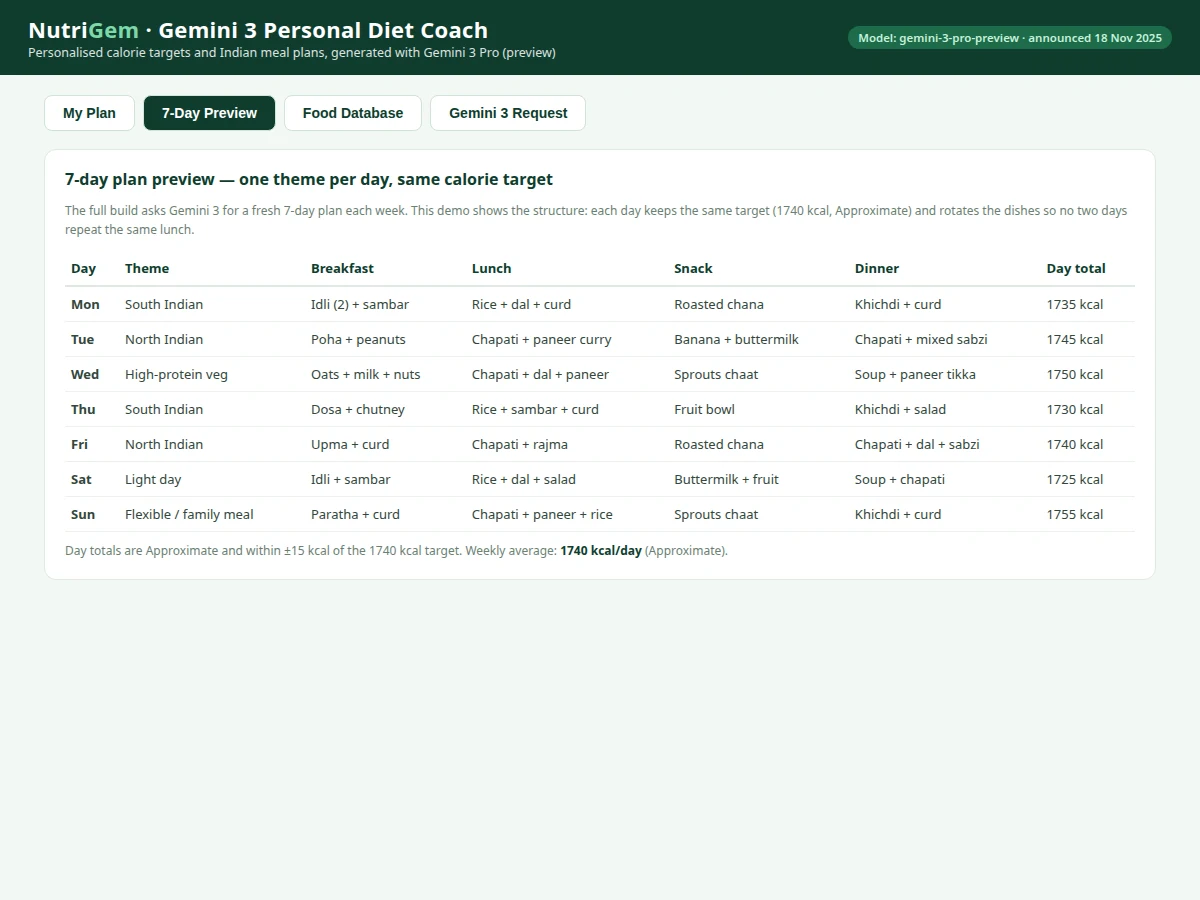
- [7-day plan preview] A weekly view rotates dishes across 7 days so no two days repeat the same lunch, with each day held within 15 kcal of the same daily target (Approximate).
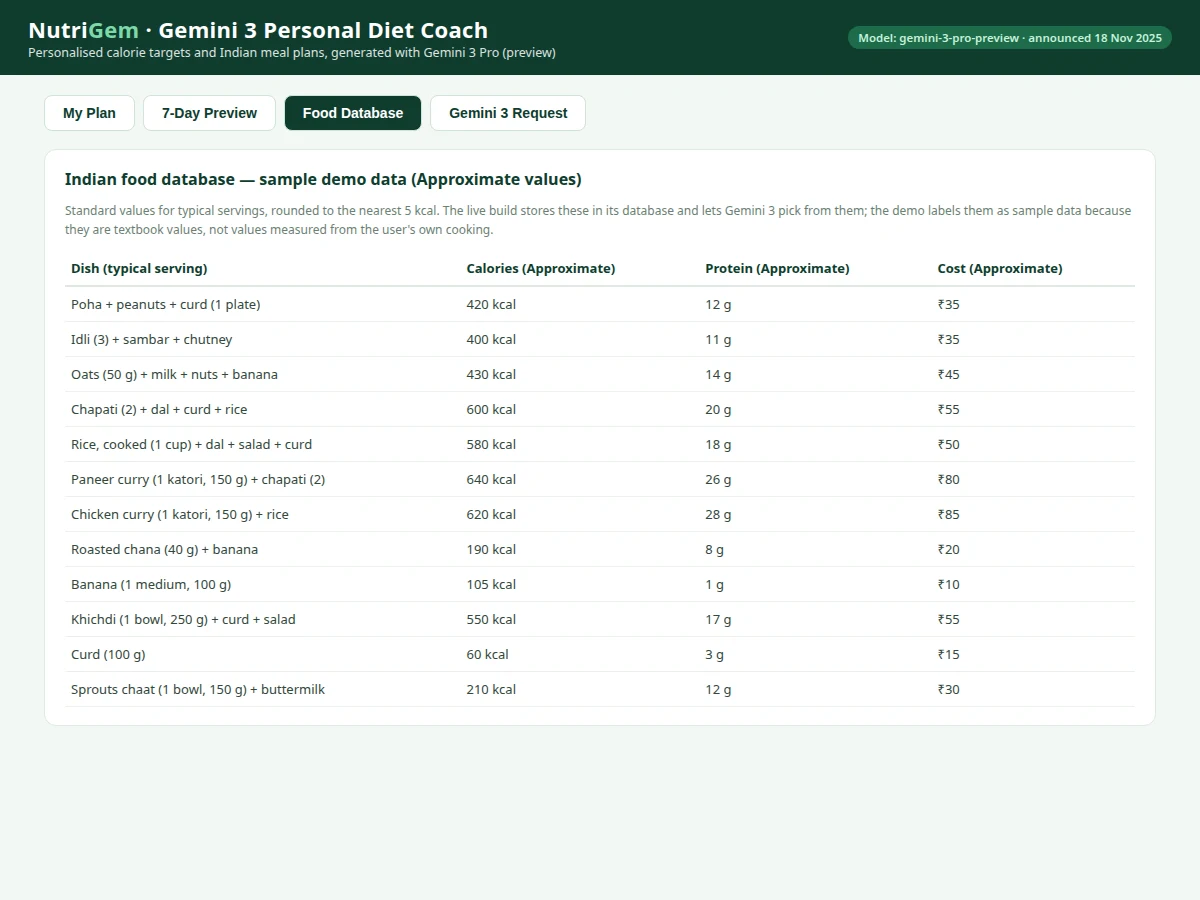
- [Indian food database] A 12-dish database of standard Indian meals with calories, protein and cost per typical serving, all labelled Approximate and editable so the student can add family dishes.
What is included
- Complete source code (Flask backend, Gemini API integration, calorie engine, validation layer)
- Working web demo: profile form, calorie targets, day plan with swaps, 7-day preview, food database and the Gemini request view
- Indian food database (12 dishes) with calories, protein and cost per serving, labelled Approximate
- Project report PDF (background, Gemini 3, Mifflin-St Jeor method, architecture, worked example, results)
- PPT presentation for final review
- Viva Q&A preparation document (Gemini API, prompt design, Mifflin-St Jeor, validation logic, limitations)
Timeline
- Week 1 (5 days): Requirements, Mifflin-St Jeor calorie engine and the 12-dish Indian food database.
- Week 2 (5 days): Gemini 3 API integration, structured prompt design and the validation layer.
- Week 3 (5 days): Demo web app (profile, plan, swaps, 7-day preview), testing of day-total arithmetic and budget checks.
- Week 4 (5 days): Report, PPT, abstract PDF and viva Q&A preparation.
Support
- Setup guidance for installing the app and connecting a Gemini API key, over call or chat.
- One round of corrections to the report and demo within 30 days of delivery (support period).
Limitations & prerequisites
- This is an academic prototype, not a certified dietitian or a medical device — it must not be used for children, pregnancy, eating disorders or any medical condition, and a large calorie deficit needs a qualified professional.
- All dish values are Approximate standard values for typical servings; home cooking, oil quantity and portion size change the real calories, so the plan is a guide, not a measurement.
- The demo food database holds 12 dishes only; a wider diet (regional cuisines, allergies beyond the profile field, Jain or keto) needs the database extended.
- Gemini 3 meal generation needs internet access and a valid Gemini API key; without a key the demo runs its built-in rule engine instead, which follows the same prompt and food data but does not call the model.
- The Mifflin-St Jeor equation estimates BMR from population averages; an individual's true maintenance calories can differ by a few hundred kcal per day, so the target is a starting point to adjust from observed weight change.
- API usage is billed by Google on the student's own key and is not included in the project price; the demo mode avoids this cost entirely.
Frequently Asked Questions
Is this project suitable for a final-year project?
Yes — for Computer Science, IT and AI & Machine Learning programs, it demonstrates API integration with a frontier model, prompt design with structured JSON output, deterministic calculation with the Mifflin-St Jeor equation, and a validation layer that checks generated output before display. The worked example gives the student exact numbers to defend in the viva, and the diet-coach framing is distinct from a plain calorie tracker or recipe app.
How is the calorie target calculated?
The target is calculated deterministically with the Mifflin-St Jeor equation, not guessed by the model: BMR equals 10 times weight in kg plus 6.25 times height in cm minus 5 times age, plus 5 for men or minus 161 for women. TDEE is BMR times the activity factor, and the goal adjusts it — minus 400 kcal for weight loss, plus 300 kcal for weight gain. For the worked example (22 years, 62 kg, 165 cm, female, moderately active) BMR is 1380.25 kcal/day, TDEE is 2139 kcal/day and the weight-loss target is 1740 kcal/day (1739 rounded to the nearest 10 kcal).
Does it need a Gemini API key and internet?
Yes for live Gemini 3 generation — the model call needs internet access and the student's own Gemini API key, entered in the app, never stored on a server. Without a key, the demo still works offline: its built-in rule engine generates the plan from the same prompt and the same food database, so the full flow works in a classroom with no connection and no API cost.
How is this different from a calorie tracker or a recipe app?
A calorie tracker only records what the user already ate, and a recipe app only lists dishes — neither sets a personal target nor builds a day that fits it. This coach starts from the user's own calorie target, asks Gemini 3 to build a full day of Indian meals inside that target and the daily budget, and verifies the dishes add up before showing the plan.
Are the nutrition values accurate?
The dish values are Approximate standard values for typical servings, rounded to the nearest 5 kcal, and they are labelled as such throughout the app and the report. They are not measured from anyone's cooking, and real calories vary with oil, portion size and recipe, so the plan is a guide for demonstrating the system rather than a medical prescription.
Can it be customised?
Yes — the food database can be extended with regional dishes or family recipes, the deficit and surplus sizes can be changed, the macro split can be adjusted, and a non-vegetarian or vegan database can be added. A weekly shopping list, weight-logging with target adjustment, and a mobile view are listed as future scope and can be developed on request.
Components & software requirements
- Gemini 3 Pro API · gemini-3-pro-preview
- Python 3 · Flask
- HTML · CSS · JavaScript
- Mifflin-St Jeor calorie engine
- Indian food database · 12 dishes
- SQLite
- Gemini API JSON request builder
- Git
Dataset & model details
- Dataset: Indian food database — 12 standard Indian dishes with calories, protein and cost per typical serving, compiled from standard food-composition values; every value is labelled Approximate and the set is sample demo data, not measured from any user's own cooking.
- Task: Constrained meal-plan generation; input = user profile + calorie target + macro split + budget + food database, output = a 1-day plan (4 meals) as JSON with per-dish calories, protein and cost.
- Model: Gemini 3 Pro in preview (model id gemini-3-pro-preview, announced by Google on 18 November 2025), called through the Gemini API; a built-in rule engine in the demo generates plans from the same prompt and food data when no API key is present.
- Metrics: Day-total arithmetic check (dishes must sum to within 20 kcal of the target), budget check (plan cost under the daily budget), and macro-split check (protein, carbohydrate and fat shares against the design target). No accuracy figure is claimed — the model is not evaluated on a benchmark, and the report states this plainly.
Delivery information
Built-to-order project. Delivery timeline is shared after order confirmation based on current queue.
Support terms
Complete documentation, setup guide, and viva preparation included. Support for setup and explanation provided.
Download free synopsis (PDF)
Enter your name and WhatsApp number — the synopsis PDF downloads immediately. We may send occasional project updates on WhatsApp; no spam.