
More project photos (3)
The problem
Fruit grading in retail shops, mandis and small processing units is still done by eye: a worker glances at each batch and decides what stays on the shelf. That judgment is inconsistent — it varies with lighting, fatigue and experience — and mistakes cost money in both directions, with rotten fruit reaching customers or good fruit thrown away. Computer vision offers a repeatable alternative, and freshness classification is an ideal teaching problem because the visual cues (discoloration, spots, mold, shriveling) are exactly what convolutional networks learn well. This project builds that classifier properly: a MobileNetV2 backbone fine-tuned on the public Fruits Fresh and Rotten dataset (six classes across apples, bananas and oranges), with documented preprocessing, augmentation, training and evaluation. A web demo makes the model tangible — select a fruit photo and watch the network return its verdict with confidence scores.
Selects a fruit photo in the web demo to check freshness.
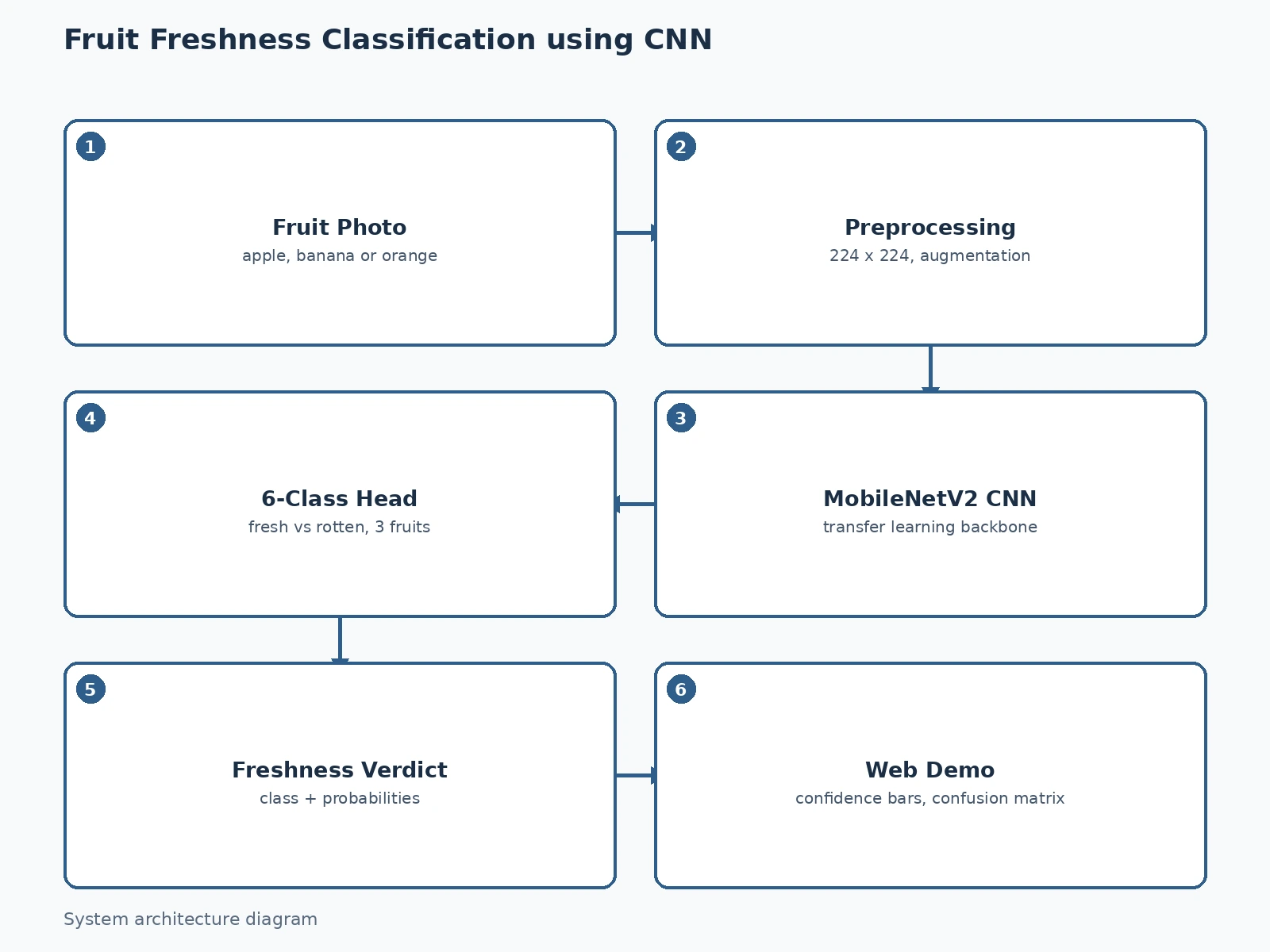
Follow the working sequence
How it works
- The Fruits Fresh and Rotten dataset (~13,600 images, 6 classes) is loaded and split into training (~10,900) and held-out test (~2,700) sets, with a validation split carved from training.
- Every image is resized to 224×224×3 and normalized; augmentation (random flips, ±20° rotations, brightness/zoom jitter) is applied during training.
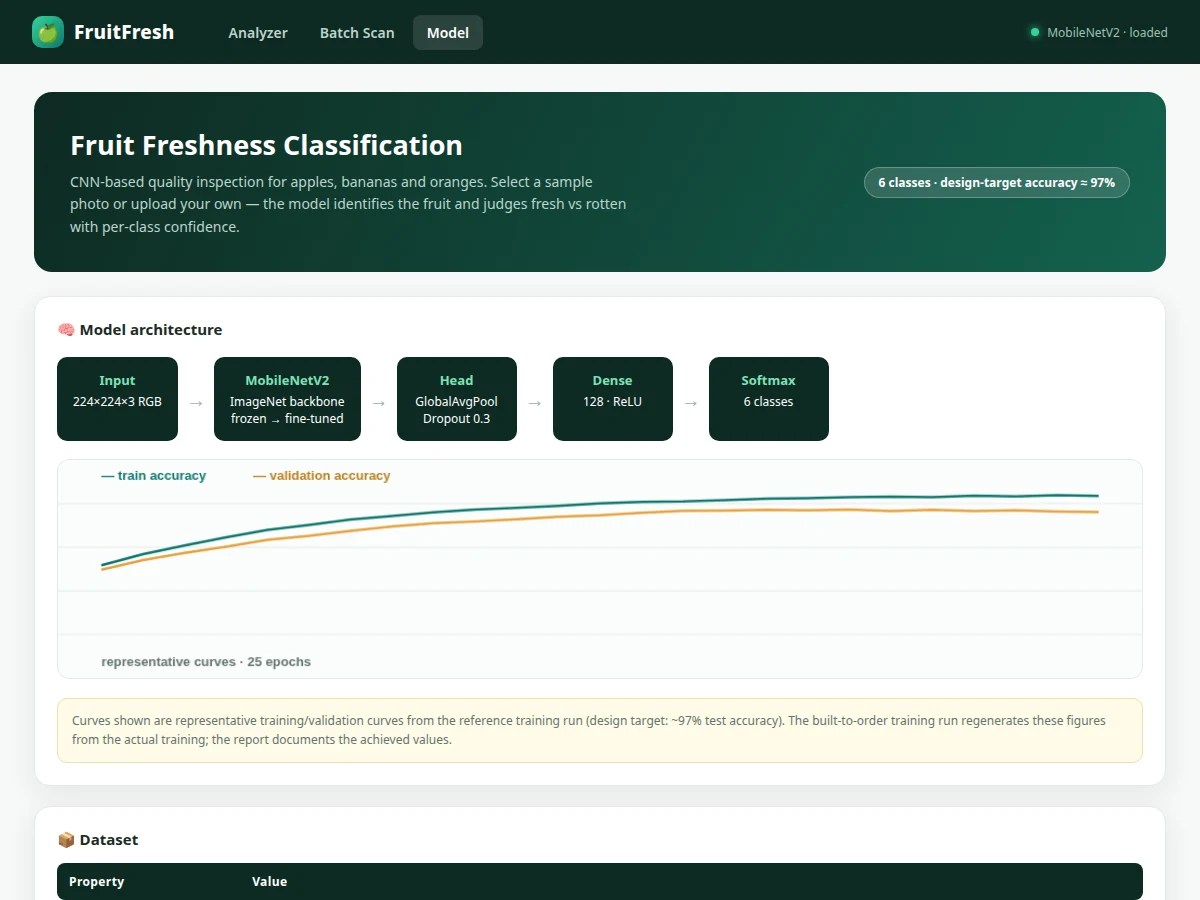
- A MobileNetV2 backbone pretrained on ImageNet is attached to a new head (GlobalAveragePooling → Dropout → Dense(128) → Softmax(6)); the head trains first, then the top backbone blocks are unfrozen for fine-tuning.
- Training uses Adam with a low learning rate and early stopping on validation loss; the best checkpoint is kept.
- The held-out test set is evaluated once: overall accuracy, confusion matrix and per-class precision/recall/F1 are generated for the report.
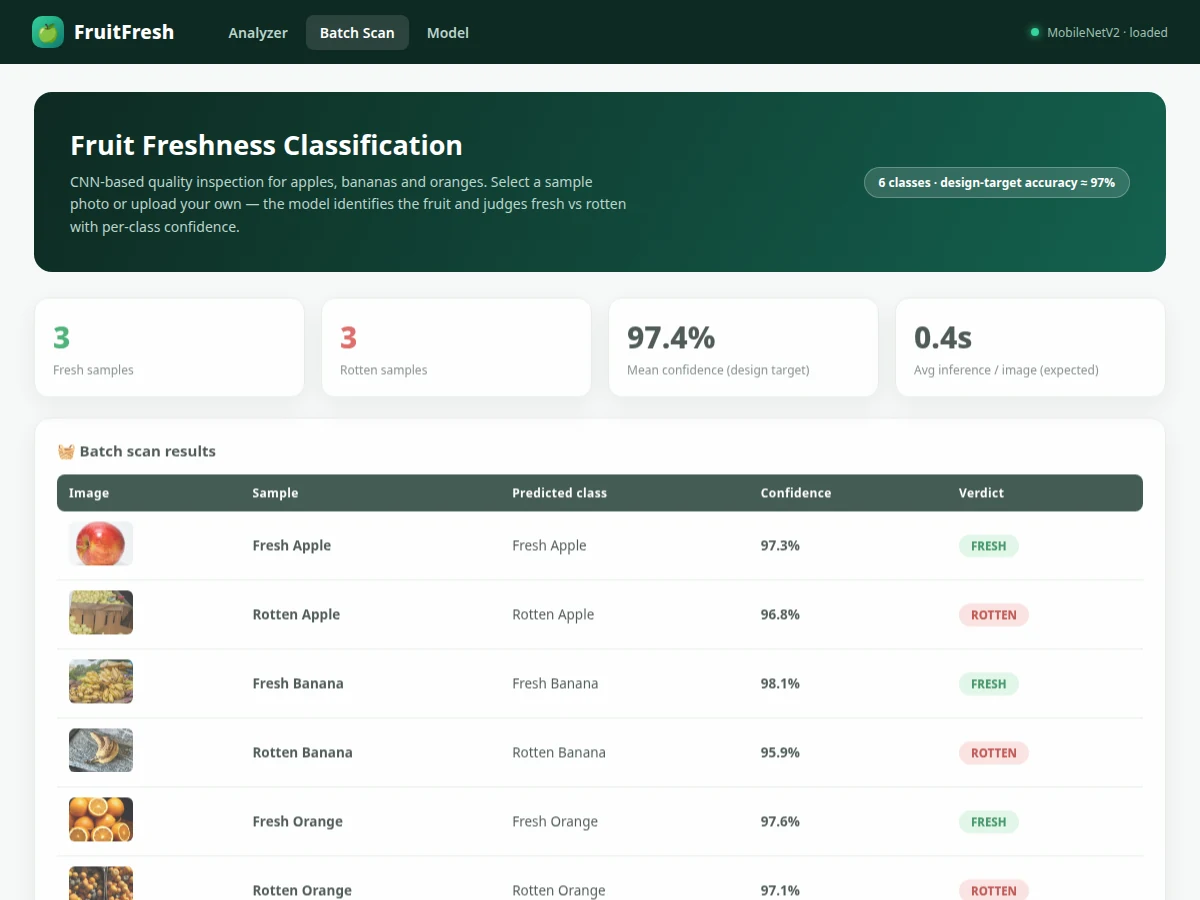
- In the web demo, a selected photo passes through the identical preprocessing and the saved model, and the app renders the predicted class with its full probability distribution and a fresh/rotten verdict.
Tech stack:
- Python 3, TensorFlow/Keras
- MobileNetV2 (transfer learning)
- NumPy, OpenCV (preprocessing)
- Matplotlib, scikit-learn (evaluation)
- Jupyter Notebook (training)
- HTML/CSS/JavaScript (web demo)
- Fruits Fresh and Rotten dataset (Kaggle)
Dataset & model details
- Dataset: Fruits Fresh and Rotten for Classification — Kaggle (Sriram R.). Approximately 13,600 images in 6 classes: freshapples, freshbanana, freshoranges, rottenapples, rottenbanana, rottenoranges; pre-split into ~10,900 train / ~2,700 test.
- Task: 6-class image classification; input = 224×224×3 RGB image, output = probability distribution over the 6 classes, mapped to a fresh/rotten verdict.
- Model: MobileNetV2 backbone (ImageNet pretrained) → GlobalAveragePooling → Dropout(0.3) → Dense(128, ReLU) → Dense(6, softmax); two-phase training (head first, then fine-tune top blocks).
- Metrics: Test accuracy (design target ≈ 97%), per-class precision/recall/F1, confusion matrix. No accuracy is claimed as measured until the training run is executed for the order.
| Parameter | Value |
|---|---|
| Input format | 224 × 224 × 3 RGB, normalized [0, 1] |
| Classes | 6 (fresh/rotten × apple, banana, orange) |
| Model parameters | Approximately 3.6M (backbone + head) |
| Test accuracy | ≈ 97% (design target, not a measured claim) |
| Training time | Approximately 30–45 min on a free Colab GPU (expected) |
| Inference | Approximately 40 ms per image on CPU (expected) |
| Model file | Approximately 14 MB (.h5, expected) |
| Demo | Single-file web app, runs offline after download |
Project features
- [6-class CNN classifier] MobileNetV2 backbone (ImageNet weights) with a custom classification head — distinguishes fresh vs rotten for apples, bananas and oranges in one model.
- [Live web demo] Select any of the built-in sample photos (or upload your own) and get the predicted class, freshness verdict and full per-class probability bars.
- [Full training notebook] Dataset loading, 224×224 preprocessing, augmentation (flips, rotations, brightness shifts), transfer-learning setup, fine-tuning schedule and evaluation in one reproducible Jupyter notebook.
- [Confusion matrix & per-class report] Precision, recall and F1 for all six classes, so the viva can discuss exactly which classes confuse the model (typically fresh vs rotten oranges at the boundary).
- [Training curves] Accuracy and loss plots for train vs validation across epochs, with interpretation notes in the report.
- [Augmentation pipeline] Documented augmentation policy that teaches the model to tolerate varied lighting and backgrounds instead of memorizing the training set.
- [Exported trained model] Saved weights plus the preprocessing pipeline, so the demo runs the real network without retraining.
What is included
- Complete training & evaluation Jupyter notebook
- Trained MobileNetV2-based model file with preprocessing code
- Web demo wired to the trained model (sample photos + upload)
- Confusion matrix, per-class metrics and training-curve plots
- Project report PDF (background, CNN theory, architecture rationale, methodology, results)
- PPT presentation for final review
- Viva Q&A preparation document (transfer learning, augmentation, softmax, overfitting)
Limitations & prerequisites
- Trained on apples, bananas and oranges only — other fruits are out of scope and will be misclassified.
- Dataset photos are mostly clean studio-style shots; cluttered market backgrounds reduce accuracy and are called out in the report.
- ≈ 97% is a design target for the training run, stated honestly — the report documents the actual achieved figure after training.
- This is a quality-grading aid, not a food-safety certification tool; it cannot detect internal spoilage or contamination.
- The demo expects one dominant fruit per photo; mixed baskets are not segmented.
Frequently Asked Questions
Which dataset is used and why?
The Kaggle "Fruits Fresh and Rotten for Classification" set — about 13,600 labeled images across 6 fresh/rotten classes for apples, bananas and oranges. It is large enough for transfer learning, pre-split into train/test, and every result is comparable with published student work.
Why MobileNetV2 instead of training from scratch?
With 13k images, a from-scratch CNN underfits; transfer learning reuses ImageNet-learned visual features and fine-tunes them for fruit texture and discoloration. It also trains in under an hour on a free Colab GPU, which the report documents.
How does the web demo work?
Select a sample photo (or upload one); the app applies the exact training preprocessing (224×224 resize, normalization), runs the saved model, and shows the predicted class, the fresh/rotten verdict and all six class probabilities.
Which classes does it confuse most?
Typically fresh vs rotten oranges near the ripeness boundary, and occasionally fresh apples vs fresh oranges under warm lighting. The confusion matrix in the report shows this explicitly — a strong viva talking point.
Can it grade fruit on a conveyor belt?
As shipped, no — it classifies single photos. The report lists a real-time sorting extension (camera + segmentation stage) as future scope.
Is this project suitable for a final-year project?
Yes — for Computer Science, IT and AI/ML programs. It demonstrates transfer learning, data augmentation, evaluation discipline and a working deployment demo. Suitable for B.E./B.Tech final-year projects in Computer Science, IT and AI & Machine Learning.
Components & software requirements
- Python 3, TensorFlow/Keras
- MobileNetV2 (transfer learning)
- NumPy, OpenCV (preprocessing)
- Matplotlib, scikit-learn (evaluation)
- Jupyter Notebook (training)
- HTML/CSS/JavaScript (web demo)
- Fruits Fresh and Rotten dataset (Kaggle)
Dataset & model details
- Dataset: Fruits Fresh and Rotten for Classification — Kaggle (Sriram R.). Approximately 13,600 images in 6 classes: freshapples, freshbanana, freshoranges, rottenapples, rottenbanana, rottenoranges; pre-split into ~10,900 train / ~2,700 test.
- Task: 6-class image classification; input = 224×224×3 RGB image, output = probability distribution over the 6 classes, mapped to a fresh/rotten verdict.
- Model: MobileNetV2 backbone (ImageNet pretrained) → GlobalAveragePooling → Dropout(0.3) → Dense(128, ReLU) → Dense(6, softmax); two-phase training (head first, then fine-tune top blocks).
- Metrics: Test accuracy (design target ≈ 97%), per-class precision/recall/F1, confusion matrix. No accuracy is claimed as measured until the training run is executed for the order.
Delivery information
Built-to-order project. Delivery timeline is shared after order confirmation based on current queue.
Support terms
Complete documentation, setup guide, and viva preparation included. Support for setup and explanation provided.
Download free synopsis (PDF)
Enter your name and WhatsApp number — the synopsis PDF downloads immediately. We may send occasional project updates on WhatsApp; no spam.