
More project photos (2)
The problem
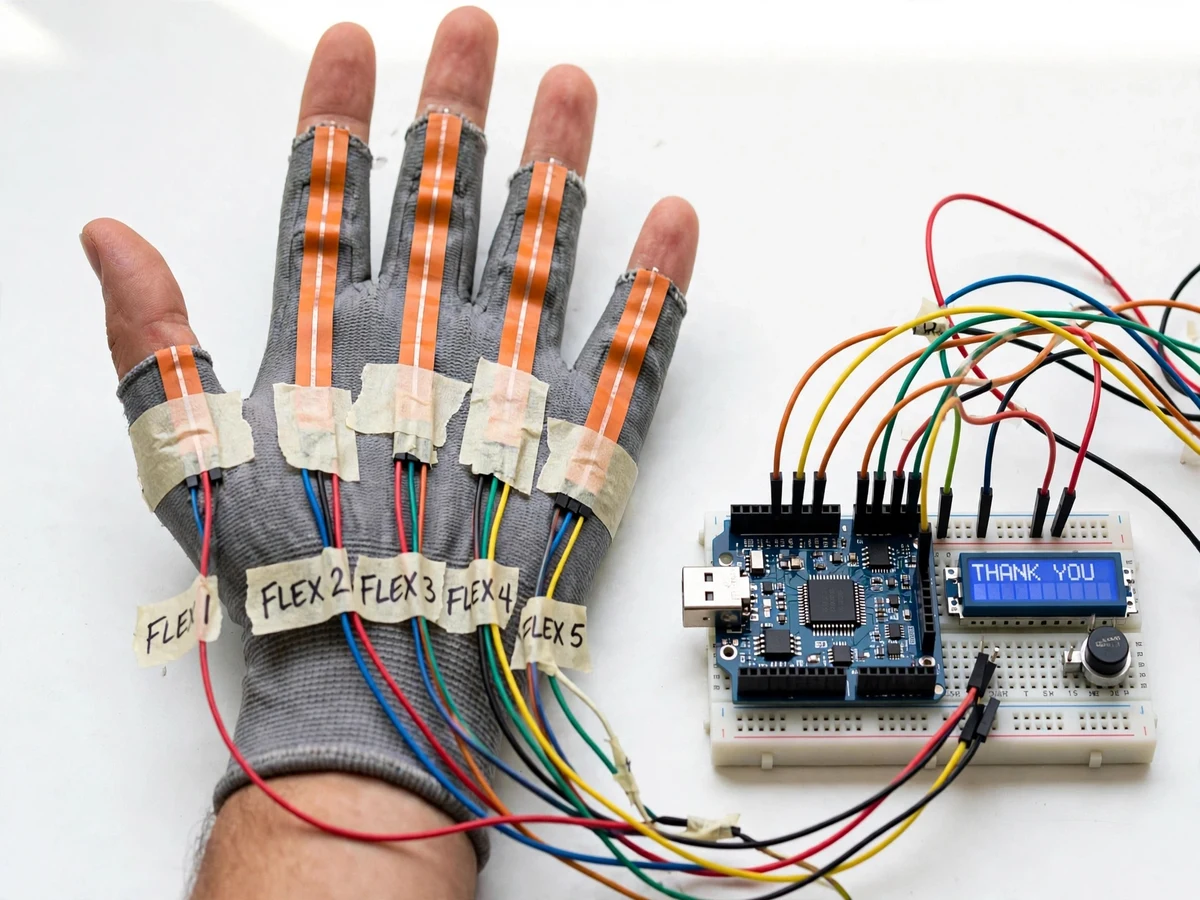
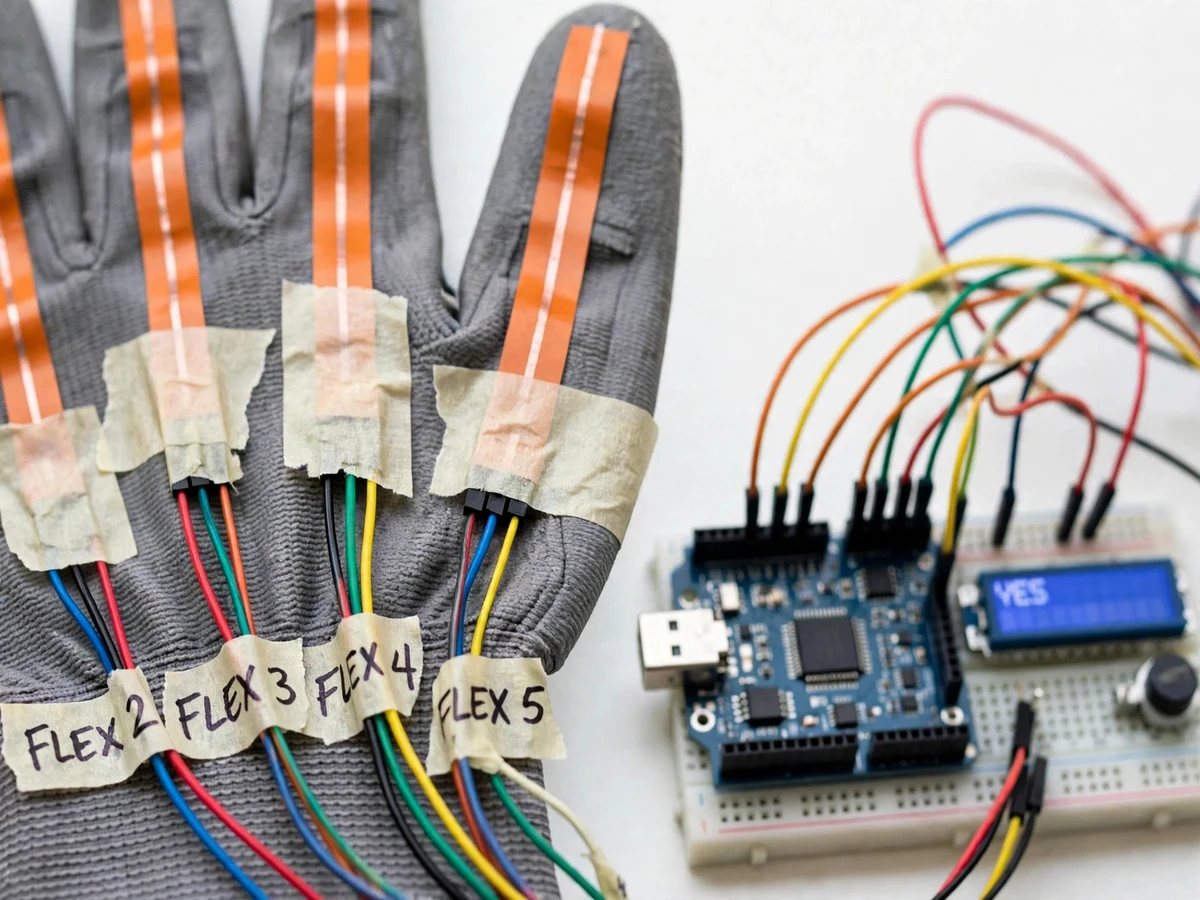
A flex-sensor sign language glove turns hand gestures into readable words for people who cannot speak. Five flex sensors, one taped along each finger of a fabric glove, change electrical resistance as the fingers bend, and an Arduino Uno reads those changes through five voltage dividers and matches the resulting bend pattern to a stored word, which appears on a 16×2 LCD display with a buzzer beep. The glove recognises six words — HELLO, YES, NO, THANK YOU, HELP and WATER — covering the most common everyday needs of a person who cannot speak. Spoken conversation is fast and effortless for most people, but a person who cannot speak must rely on a listener who knows sign language, and that listener is often absent. This project shows how a simple bend sensor, a microcontroller and a display can bridge that gap for a small, defined set of words, while teaching sensor interfacing, analog conversion, calibration and pattern matching.
Makes a sign with the glove hand.
Follow the working sequence
How it works
A finger bend starts the chain: the flex sensor along that finger is a printed strip of conductive ink, and bending it pulls the conductive particles further apart, which raises its electrical resistance — from about 10 kΩ flat to more than twice that value when fully bent (datasheet). Each sensor sits in a voltage divider with a 10 kΩ fixed resistor, so each bend becomes a voltage the Arduino Uno reads as a 10-bit value from 0 to 1023. The firmware compares each of the five readings against the flat and bent thresholds recorded during that user's calibration, builds a five-way bent-or-straight pattern, and looks it up in the six-word table. When a pattern matches, the word is printed on the 16×2 LCD and the buzzer beeps once; when no pattern matches, the display asks the wearer to repeat the gesture. The loop repeats continuously, always listening for the next gesture.
- Five 2.2-inch flex sensors are taped along the back of the glove's fingers, each forming a voltage divider with a 10 kΩ fixed resistor on a breadboard.
- The Arduino Uno reads the five divider voltages on analog pins A0–A4 with its 10-bit ADC, giving values from 0 to 1023 for each finger.
- The firmware compares each reading with the flat-hand and fist thresholds stored during the wearer's calibration, and classifies each finger as bent or straight.
- The five bent-or-straight results form a pattern that is looked up in the six-word table: HELLO, YES, NO, THANK YOU, HELP or WATER.
- When a pattern matches, the word is printed on the 16×2 LCD and the 5 V buzzer sounds a short beep to confirm the recognition.
- If no pattern matches, the LCD shows "TRY AGAIN" and the wearer repeats the gesture; nothing is displayed as a false word.
- During calibration, the wearer holds a flat hand and presses a button, then makes a fist and presses it again; the Arduino stores both sets of readings in EEPROM as the thresholds for that user.
Tech stack:
- Arduino Uno R3
- Flex sensor · 2.2-inch · 5 nos.
- 16×2 LCD display
- Arduino IDE · C++
- Voltage divider circuit
- 5 V active buzzer
- Breadboard · jumper wires
- 9 V battery · USB power
| Parameter | Value |
|---|---|
| Controller | Arduino Uno R3 — ATmega328P · 16 MHz · 5 V operating · 6 analog inputs · 10-bit ADC (datasheet) |
| Sensors | 5× flex sensors · 2.2-inch (55 mm) · flat resistance 10 kΩ ±30% · bend resistance more than 2× flat value at a 180° bend (datasheet) |
| Fixed resistors | 5× 10 kΩ (design) |
| Display | 16×2 LCD · 5 V (design) |
| Vocabulary | 6 words (design) — HELLO · YES · NO · THANK YOU · HELP · WATER |
| Power | 9 V battery or 5 V USB (design) · recommended input 7–12 V (datasheet) |
| Buzzer | 5 V active buzzer (design) |
| Sensor life | More than 1 million bend cycles (datasheet) |
| Response | Word displayed within approximately 1 s of a stable gesture (design target) |
| Calibration storage | Thresholds stored in 1 KB EEPROM (datasheet) |
Project features
Five-finger bend sensing, a six-word gesture vocabulary, an LCD text display with a buzzer beep, and per-user calibration are the four capabilities that define this glove. One flex sensor on each finger measures how far that finger bends, so the five readings together describe the hand's shape; the Arduino compares that shape with a stored table and picks one of six words — HELLO, YES, NO, THANK YOU, HELP or WATER. The chosen word appears on a 16×2 LCD where anyone nearby can read it, and a buzzer beep confirms that a gesture was recognised. Because every hand bends differently and every sensor sits slightly differently on the glove, a calibration routine records each user's flat-hand and fist readings before use, so the thresholds match the person wearing the glove instead of an assumed average. Together they make a simple assistive device: it does not translate a language, it turns six clear gestures into six readable words.
- [Five-finger bend sensing] Five 2.2-inch flex sensors, one taped along the back of each finger, each wired as a voltage divider with a 10 kΩ fixed resistor, so every finger's bend becomes a separate analog voltage the Arduino can read.
- [Six-word gesture vocabulary] Six defined gestures map to HELLO, YES, NO, THANK YOU, HELP and WATER, stored as a bend-pattern table in the firmware; each gesture is a distinct combination of bent and straight fingers.
- [LCD text display] A 16×2 LCD shows the recognised word in large characters as soon as a gesture is matched, so the message is readable by anyone nearby without any phone or app.
- [Per-user calibration mode] A push-button routine records each user's flat-hand and fist readings for all five sensors and stores the thresholds in the Arduino's EEPROM, so the glove adapts to different hand sizes and sensor placements.
- [Buzzer confirmation beep] A 5 V active buzzer sounds a short beep when a gesture is recognised, giving the wearer audible feedback that the word was displayed.
- [Stable-gesture hold check] A word is displayed only after the same bend pattern holds steady for a short debounce interval, so a hand moving between gestures does not flash false words on the display.
- [Serial monitor debug output] Live analog readings for all five sensors are printed over USB, so calibration values and faulty sensors can be checked directly during testing and the viva demonstration.
What is included
- Working glove prototype (fabric glove, 5 flex sensors, Arduino Uno, 16×2 LCD, buzzer, breadboard)
- Complete firmware source code (Arduino IDE, C++)
- Circuit and wiring documentation with component list
- Calibration procedure and six-gesture table
- Setup and demonstration instructions
- Project report PDF (background, sensor working, methodology, results)
- PPT presentation for final review
- Viva Q&A preparation document (flex sensors, voltage dividers, ADC, calibration)
- Project abstract PDF
Limitations & prerequisites
- Only 6 words are recognised; the glove does not translate full sign language, ASL or ISL, and it forms no sentences or grammar.
- Every new wearer needs a short calibration; thresholds recorded for one hand do not transfer reliably to another hand.
- Flex sensors drift with temperature and repeated bending, and show hysteresis — readings after a bend do not return to exactly the same value, so recalibration is needed over time.
- Glove fit affects readings: a loose glove lets the sensor slide and weakens the bend signal, while a tight glove can pre-bend a sensor.
- Each sensor detects bending in one direction only, away from the printed ink side; bending it the other way gives no reliable reading and can damage the strip.
- Recognition is fixed pattern matching, not machine learning, so two similar gestures can collide and produce the wrong word.
- The prototype is wired: the glove is tethered to the Arduino by jumper wires, so the wearer's hand cannot move far from the board.
- No accuracy figure is claimed; recognition depends on calibration quality, glove fit and how consistently the wearer repeats each gesture.
Frequently Asked Questions
Is this project suitable for a final-year project?
Yes — for Electronics & Telecommunication and IoT & Embedded programs, as a final-year project. It demonstrates flex-sensor interfacing, voltage dividers, analog-to-digital conversion, threshold calibration and pattern matching in one build, and each of those maps to a clear viva topic. The demonstration is easy to show in a review room: wear the glove, make a gesture, and the word appears on the display.
Which gestures and words does the glove recognise?
Six words: HELLO, YES, NO, THANK YOU, HELP and WATER. Each word is one distinct combination of bent and straight fingers across the five sensors — for example, an open flat hand reads as HELLO and a closed fist as NO. The exact gesture for each word is listed in the gesture table supplied with the project, and the six words were chosen because they cover the most common everyday needs of a person who cannot speak.
Why does the glove need calibration for each user?
Because no two hands bend alike and no two sensors sit identically on a glove. Calibration records each wearer's own flat-hand and fist readings for all five sensors, and the firmware sets its thresholds from those readings instead of assuming fixed values. Without it, a small hand would under-bend the sensors and a large hand would over-bend them, and gestures would be misread. The routine takes under a minute with a push button.
Does it translate full sign language?
No — it recognises six defined gestures only, and it forms no sentences or grammar. Full sign languages such as ASL and ISL use two hands, facial expressions, movement and hundreds of signs, which a five-sensor glove on one hand cannot capture. The project is honest about this limit: it is an assistive communication aid for six everyday words, and extending the vocabulary is listed as future scope.
What power supply does it need?
A 9 V battery or a 5 V USB connection. The Arduino Uno accepts a recommended 7–12 V on its barrel jack or 5 V over USB (datasheet), and the whole prototype — board, five sensors, LCD and buzzer — runs from that single supply. A 9 V battery keeps the demo portable for a viva room, while USB power is convenient on the bench and also carries the serial monitor output.
Can more words be added later?
Yes — each new word needs one more distinct bent-or-straight pattern across the five fingers and one more row in the firmware's lookup table, plus a calibration check that the new gesture does not collide with an existing one. With five fingers there are 32 possible patterns, so the vocabulary can grow well beyond six words, though similar gestures will confuse the matcher.
Components & software requirements
- Arduino Uno R3
- Flex sensor · 2.2-inch · 5 nos.
- 16×2 LCD display
- Arduino IDE · C++
- Voltage divider circuit
- 5 V active buzzer
- Breadboard · jumper wires
- 9 V battery · USB power
Delivery information
Built-to-order project. Delivery timeline is shared after order confirmation based on current queue.
Support terms
Complete documentation, setup guide, and viva preparation included. Support for setup and explanation provided.
Download free synopsis (PDF)
Enter your name and WhatsApp number — the synopsis PDF downloads immediately. We may send occasional project updates on WhatsApp; no spam.