
More project photos (2)
The problem
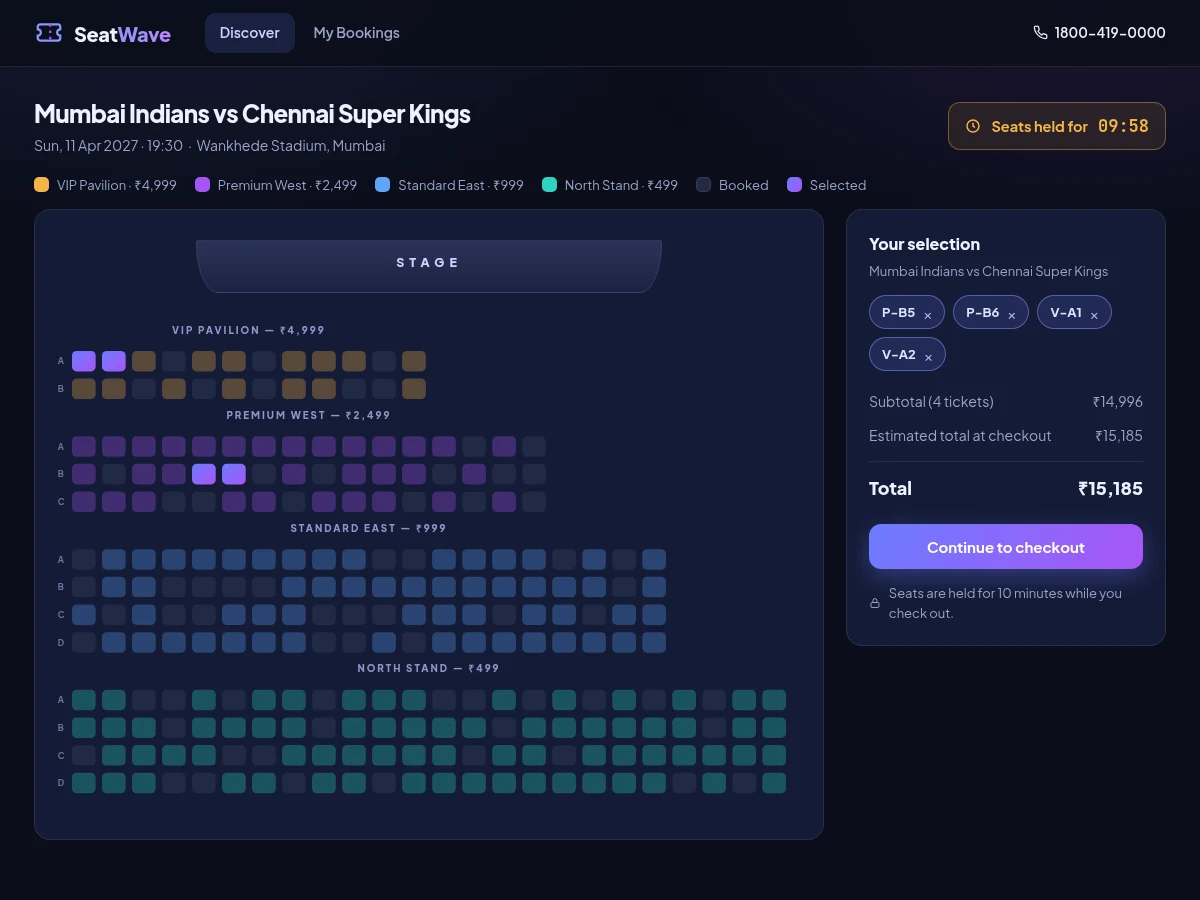
Booking an event ticket looks simple to the user, but the engineering underneath is genuinely tricky: the seat map must stay in sync with the order total, two buyers must never confirm the same seat, and the price shown has to itemize every fee exactly. This project builds a complete event ticketing platform around those problems. Customers browse a catalogue of events, open any event to pick an exact seat — section, row and number — on an interactive SVG seat map with category-wise pricing, and complete a guided checkout with validation, a working promo code, and a simulated payment step that issues a booking reference. While seats are selected, a 10-minute countdown hold protects them and releases them automatically on expiry — the same hold-and-release pattern real ticketing carts use against double-booking races. The demo build re-renders its full 248-seat map in about 6 milliseconds per repaint (measured during the build), so the map stays fluid even at stadium scale. Everything runs from a single self-contained HTML file with no backend, which makes it easy to demo, explain and extend in a viva.
How it works
- The app loads a catalogue of events defined as plain JavaScript data (title, venue, showtimes, priced sections), rendered as cards with live search and category filters.
- Choosing an event and showtime opens the seat-map view, where a deterministic generator lays out 248 seats across priced sections and marks about 28% as already booked, so the demo behaves like a live event.
- Clicking a seat toggles it in a single selection set; the SVG map is fully re-rendered from that set in about 6 ms per repaint (measured), so the map, the selection tray and the totals can never disagree with each other.
- The first selected seat starts a 10-minute countdown hold shown in the header; if the timer expires, the selection is released automatically and the map re-renders.
- Checkout validates the name, email and a 10-digit Indian mobile number, applies the STUDENT10 promo if entered, and shows an itemized bill — tickets, ₹40-per-ticket convenience fee and 18% GST on the fee — before the mock payment step.
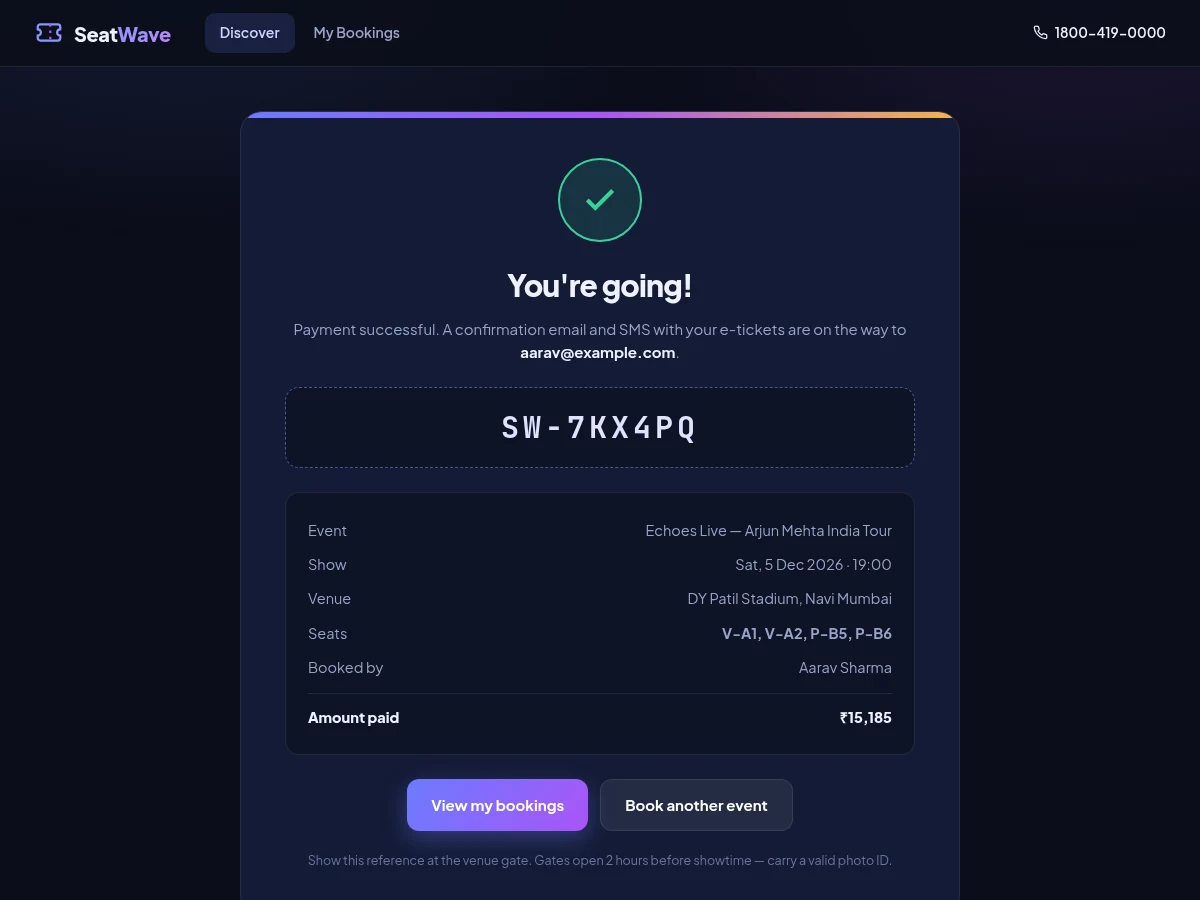
- On payment, the app generates a booking reference, saves the order to browser localStorage, and shows a confirmation screen; the order then appears in My Bookings, where it can be cancelled.
Tech stack:
- HTML5, CSS3, vanilla JavaScript (single-file SPA, no build step)
- SVG seat-map renderer (no external graphics library)
- Hash-based client-side routing
- Web Storage API (localStorage) for booking persistence
- Embedded woff2 webfonts (Plus Jakarta Sans, JetBrains Mono)
- Responsive flexbox and grid layouts
| Parameter | Value |
|---|---|
| Seat-map capacity | 248 seats across 4 priced sections (design target per event) |
| Map re-render time | Approximately 6 ms per full repaint (measured in the demo build, desktop Chrome) |
| Seat-hold duration | 10 minutes, countdown-based (configurable) |
| Maximum seats per order | 10 seats (design limit) |
| Convenience fee | ₹40 per ticket + 18% GST on the fee (demo pricing model) |
| Promo code | STUDENT10 — 10% off the ticket subtotal (demo code) |
| Booking reference | 9-character code, e.g. SW-7KX4PQ (generated per order) |
| Persistence | Browser localStorage, per device (no backend in the demo) |
| Demo file size | Approximately 280 KB single HTML file (measured) |
| Checkout flow | 3 screens: seats → details and payment → confirmation |
Project features
- [Interactive SVG seat map] Every seat is a clickable element in a rendered venue map — section, row and seat number with category-wise pricing and color coding. Already-booked seats are visibly locked, and selecting or deselecting any seat updates the order instantly.
- [Event catalogue with search and filters] Six realistic events across concerts, sports, theatre, comedy, conferences and classical music, with live search, category chips, showtime selection and per-event price lists.
- [10-minute seat-hold countdown] Selected seats are protected by an in-browser countdown timer that releases them automatically on expiry — no server polling is needed for the demo's hold semantics. One order is capped at 10 seats, the same ceiling real carts use to stop bulk-hold abuse.
- [Guided checkout with validation] Name, email and Indian mobile-number validation, a working STUDENT10 promo code worth 10% off tickets, and an itemized order summary showing ticket prices, a ₹40-per-ticket convenience fee and 18% GST before payment.
- [Simulated payment and booking reference] A mock payment step issues a unique booking reference (for example SW-7KX4PQ) and a confirmation screen with the full itinerary; bookings persist in the browser and appear in a My Bookings view with cancellation.
- [Measured render performance] The demo's full 248-seat map re-renders in about 6 ms per repaint (measured in the demo build on desktop Chrome), so seat selection stays fluid at stadium scale.
- [Optional: admin event manager] (Scope decided at order time.) A small admin view to add events, set prices and mark seats blocked — useful if the student wants a two-sided story in the report.
- [Future scope: real backend and payments] Documented extension path — seat inventory moved to a real database with transactional holds, plus a payment-gateway integration and e-ticket QR codes.
What is included
- Working single-file demo web app (the SeatWave build) with the complete booking flow
- Full source code with commented seat-map, hold-timer and pricing logic
- Project report PDF (problem, design, seat-map rendering approach, hold semantics, test cases)
- Abstract PDF (10-section structure)
- PPT presentation for the final review
- Viva Q&A preparation document (SVG rendering, state management, race conditions, pricing math)
- Report-ready screenshots (the three gallery images)
Limitations & prerequisites
- No real backend: seat inventory and holds live in the browser, so two devices could "book" the same seat — a real deployment needs server-side transactional holds.
- No real payment: the payment step is simulated; no money moves and no gateway is integrated.
- Seat occupancy is generated by a deterministic demo algorithm (about 28% of seats marked booked), not live inventory.
- Bookings persist only in the device's browser localStorage; clearing browser data wipes My Bookings.
- The demo is tuned for desktop widths; on small phones the seat map scrolls horizontally instead of reflowing.
- Prices, fees and the STUDENT10 code are demo constants, not a real pricing engine.
Frequently Asked Questions
How does the seat map stay in sync with the order total?
There is only one selection set in the app's state. Every click toggles a seat in that set and the whole SVG map re-renders from it in about 6 ms (measured), so the map, the selection tray and the totals are always three views of the same data and can never disagree.
How does the demo stop two people booking the same seat?
Selected seats are protected by a 10-minute countdown hold that releases them automatically on expiry, and one order is capped at 10 seats. This is the same hold-and-release idea real carts use — but in the demo the hold lives in the browser, so a production build would move it to server-side transactional holds.
What is the STUDENT10 promo code?
A demo promo code worth 10% off the ticket subtotal, applied live at checkout with the discount shown as its own line item. It demonstrates how coupon logic plugs into the pricing pipeline; the report documents where a real coupon table would replace it.
Can this connect to a real payment gateway later?
Yes — the mock payment step is isolated in one function, so swapping it for a gateway integration (for example Razorpay) is a documented future-scope item. The order summary already computes the exact payable amount the gateway would charge.
Is this project suitable for a final-year project?
Yes — for Computer Science, IT and Web Development programs. It demonstrates frontend state management, SVG rendering at scale, form validation, pricing logic and race-condition thinking around seat holds, all in a working app the student can demo live and explain line by line.
Components & software requirements
- HTML5, CSS3, vanilla JavaScript (single-file SPA, no build step)
- SVG seat-map renderer (no external graphics library)
- Hash-based client-side routing
- Web Storage API (localStorage) for booking persistence
- Embedded woff2 webfonts (Plus Jakarta Sans, JetBrains Mono)
- Responsive flexbox and grid layouts
Delivery information
Built-to-order project. Delivery timeline is shared after order confirmation based on current queue.
Support terms
Complete documentation, setup guide, and viva preparation included. Support for setup and explanation provided.
Download free synopsis (PDF)
Enter your name and WhatsApp number — the synopsis PDF downloads immediately. We may send occasional project updates on WhatsApp; no spam.