
More project photos (2)

The problem
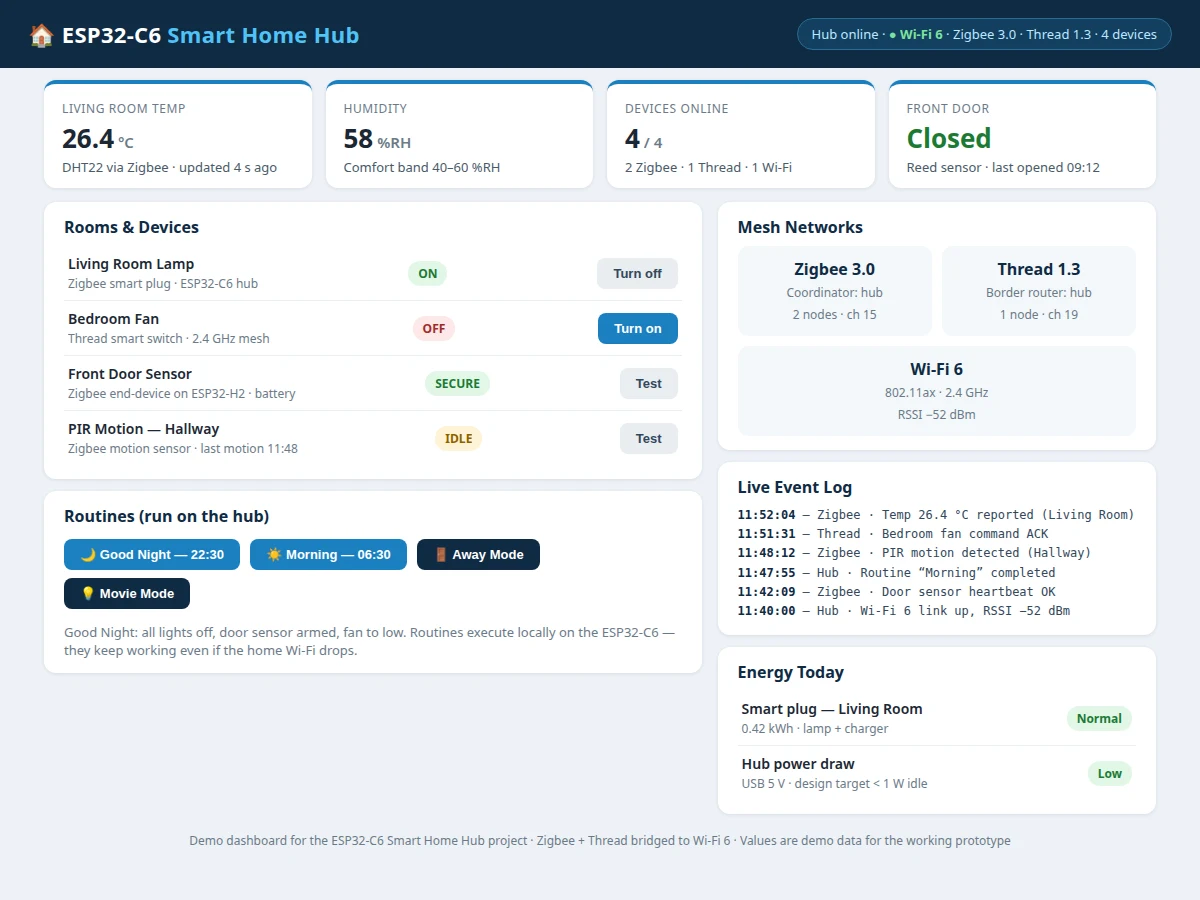
The ESP32-C6 Smart Home Hub is a central home-automation controller built on Espressif's ESP32-C6 system-on-chip, a single chip that carries 2.4 GHz Wi-Fi 6, Bluetooth 5, Zigbee 3.0 and Thread 1.3 radios. It solves the protocol problem of the modern smart home: door sensors speak Zigbee, smart switches speak Thread, and phones speak Wi-Fi, so a house normally needs three separate bridges. This hub replaces them with one board that acts as Zigbee coordinator and Thread border router, forwarding every sensor reading and command to a single dashboard over Wi-Fi 6. The dashboard shows temperature, humidity, door and motion status, switches lights and fans, and sets routines such as Good Night that run locally on the hub even when the internet drops. A Zigbee door sensor built on a second ESP32-C6 or ESP32-H2 proves the mesh end to end, and the dashboard is a working web app that runs on any phone or laptop.
Door reed switch, DHT22 temperature and humidity, PIR motion.
Follow the working sequence
How it works
A sensor event travels four hops: the Zigbee or Thread end-device transmits it over the 802.15.4 mesh, the ESP32-C6 hub receives it on the matching radio stack, the hub translates it into a local dashboard update and checks it against the active routines, and the dashboard shows the result while the routine fires its action. The door sensor, for example, sends a reed-switch change over Zigbee to the hub, the hub marks the door OPEN in the dashboard and logs the timestamp, and if Away Mode is armed it also raises an alert. Commands flow the other way: a tap on the dashboard sends a Wi-Fi request to the hub, which forwards it over the correct mesh to the lamp or fan. Because routines live on the hub, Good Night still switches everything off when the broadband link is down; only remote access from outside the home needs the internet.
- Zigbee sensors (door reed switch, DHT22 temperature/humidity, PIR motion) and a Thread smart switch join their meshes through the ESP32-C6 hub.
- The hub runs the Zigbee coordinator and Thread border-router stacks side by side on its single 2.4 GHz radio, on separate 802.15.4 channels.
- Sensor readings arrive at the hub as 802.15.4 frames and are translated into a common device model (device, room, value, timestamp).
- The hub serves the dashboard over Wi-Fi 6 and pushes live readings, device states and the event log to it.
- Routines stored on the hub evaluate each new reading (for example, door opened while Away Mode is armed) and fire their actions locally.
- Dashboard commands travel back over Wi-Fi to the hub, which forwards them over the correct mesh to switch a lamp or fan.
- The OLED on the hub mirrors the current home status, and the event log keeps a timestamped record for the report and viva.
Builder note from the demo build: Zigbee and Thread share the hub's single 2.4 GHz radio and antenna, so the two stacks were given different 802.15.4 channels (Zigbee channel 15, Thread channel 19). With both stacks on one channel the Thread node failed to join reliably; separating the channels fixed it, and the channel plan is documented in the build notes.
Tech stack:
- ESP32-C6 development board (hub)
- ESP32-H2 or second ESP32-C6 (Zigbee door sensor)
- Zigbee 3.0 and Thread 1.3 meshes
- Wi-Fi 6 (802.11ax) and Bluetooth 5.3 LE
- ESP-IDF with Arduino IDE support
- DHT22, PIR motion and reed-switch sensors
- 0.96-inch OLED status display
- HTML, CSS and JavaScript dashboard
| Parameter | Value |
|---|---|
| Hub controller | ESP32-C6, 32-bit RISC-V up to 160 MHz (datasheet) |
| Radios | Wi-Fi 6 802.11ax 2.4 GHz up to 150 Mbps · Bluetooth 5.3 LE · Zigbee 3.0 · Thread 1.3 (datasheet) |
| 802.15.4 data rate | 250 Kbps (datasheet) |
| Memory | 512 KB SRAM · 320 KB ROM (datasheet) |
| Hub GPIOs | 23 GPIOs on ESP32-C6-WROOM-1 module (datasheet) |
| End-device | ESP32-H2 or second ESP32-C6 with reed switch (Zigbee) |
| Sensors | DHT22 temperature/humidity · PIR motion · reed-switch door sensor |
| Mesh channels | Zigbee channel 15 · Thread channel 19 (build configuration) |
| Dashboard | Single-file HTML/CSS/JS web app over local Wi-Fi |
| Routines | 4 demo routines, executed locally on the hub |
| Hub power | 5 V USB · design target under 1 W idle |
| Event-to-dashboard latency | Design target under 2 s on the local network |
| Demo range | Room-scale mesh demonstrated in the build; range is environment-dependent |
Project features
The hub's three strongest capabilities are its quad-radio ESP32-C6 core, its dual-mesh bridging, and its local routines. The quad-radio core puts Wi-Fi 6, Bluetooth 5, Zigbee 3.0 and Thread 1.3 on one chip, so a single board replaces the separate coordinators a multi-protocol home would otherwise need. Dual-mesh bridging lets the hub act as Zigbee coordinator and Thread border router at the same time, joining battery sensors and mains switches into one network the dashboard can see. Local routines run on the hub itself, so Good Night and Morning automations keep working when the home internet drops. Around those three sit live multi-sensor telemetry, a working dashboard with an event log, and an OLED status display on the hub hardware. The dashboard also exposes every device, routine and event in one place, so the student can demonstrate the whole system from a phone during the viva.
- [Quad-radio ESP32-C6 hub] One ESP32-C6 chip carries 2.4 GHz Wi-Fi 6, Bluetooth 5.3 LE, Zigbee 3.0 and Thread 1.3 radios (Espressif datasheet v1.6), so a single board replaces separate Zigbee and Thread coordinators.
- [Zigbee coordinator + Thread border router] The hub joins Zigbee sensors and Thread switches into one system, forwarding readings and commands between the two meshes and the Wi-Fi dashboard.
- [Live web dashboard] A working single-file HTML/CSS/JS dashboard shows room temperature and humidity, door and motion status, device on/off controls, mesh-network status, a live event log and daily energy use.
- [Local routines] Four routines (Good Night, Morning, Away Mode, Movie Mode) execute on the hub itself, so automation keeps working even when the home internet connection drops.
- [Zigbee door-sensor end-device] A battery-powered door sensor built on a second ESP32-C6 or ESP32-H2 with a reed switch reports open/closed state to the hub over Zigbee, proving the mesh end to end.
- [Multi-sensor telemetry] A DHT22 temperature/humidity sensor and a PIR motion sensor report over Zigbee, with readings timestamped in the dashboard event log.
- [OLED status display] A 0.96-inch OLED on the hub shows live home status at a glance without opening the dashboard.
What is included
- Working hub prototype (ESP32-C6 board, OLED display, breadboard wiring)
- Zigbee door-sensor end-device (ESP32-H2 or second ESP32-C6, reed switch, magnet)
- Hub and end-device firmware (ESP-IDF / Arduino IDE)
- Working single-file dashboard demo with routines and event log
- Wiring diagram, component list and channel-plan build notes
- Project report PDF (background, ESP32-C6 radios, mesh architecture, methodology, results)
- PPT presentation for final review
- Viva Q&A preparation document (Zigbee vs Thread, Wi-Fi 6, border routers, mesh routing)
Limitations & prerequisites
- Wi-Fi 6 on the ESP32-C6 is 2.4 GHz only, 20 MHz in non-AP mode (datasheet); it is not a 5 GHz radio.
- Zigbee and Thread share one 2.4 GHz radio and antenna, so the two meshes must run on different 802.15.4 channels and heavy simultaneous traffic can contend.
- Mesh range is environment-dependent; walls and interference reduce it, and no range figure is claimed as measured.
- The door-sensor battery life depends on the sleep configuration chosen; no runtime figure is claimed without a measured test.
- The hub is a mains/USB-powered prototype, not a certified consumer product, and has no enclosure rated for permanent installation.
- Routines are a fixed demo set of four; new routines need firmware changes.
- Remote access from outside the home needs port forwarding or a cloud relay, which is not part of the base build.
Frequently Asked Questions
Is this project suitable for a final-year project?
Yes, for IoT & Embedded, Electronics & Telecommunication and Computer Science programs. It demonstrates multi-protocol IoT on a current chip, Zigbee and Thread mesh networking, a border-router design and a working dashboard, which together give a strong viva story. The report documents the channel plan, mesh join procedure and commissioning checks, so the build is easy to defend.
What makes the ESP32-C6 different from an ESP32 or ESP32-S3?
The ESP32-C6 is the first ESP32 with Wi-Fi 6, Bluetooth 5, Zigbee 3.0 and Thread 1.3 in one chip (Espressif datasheet v1.6). Older ESP32 boards have Wi-Fi and Bluetooth only, so a Zigbee or Thread network needs extra coordinator hardware that this hub does not.
How do Zigbee and Thread work together on one board?
The hub runs the Zigbee coordinator and Thread border-router stacks side by side on the ESP32-C6's single 2.4 GHz radio, on separate 802.15.4 channels (15 and 19). The hub translates both meshes into one device model for the dashboard. The dashboard then shows both meshes as one device list, so a Zigbee door event and a Thread fan command appear side by side.
Does the hub need the internet to work?
No, not for local control. Routines, sensor readings and dashboard access all run on the home Wi-Fi network through the hub itself. Internet is only needed for remote access from outside the home, which is not part of the base build.
What will I receive with the project?
The working hub prototype and Zigbee door-sensor node, both firmwares, the dashboard demo, wiring and channel-plan notes, the report, PPT and viva Q&A. The kit is built to order, so the buyer runs the documented commissioning checks on their own build.
Can more sensors or rooms be added?
Yes. Extra Zigbee sensors (temperature, motion, contact) join the hub's mesh without new coordinator hardware, and extra Thread switches join the Thread side. Each addition is a firmware and dashboard configuration change, quoted as customization. The hub already runs both stacks, so adding a node is a join procedure and a dashboard entry rather than new coordinator hardware.
Components & software requirements
- ESP32-C6 development board (hub)
- ESP32-H2 or second ESP32-C6 (Zigbee door sensor)
- Zigbee 3.0 and Thread 1.3 meshes
- Wi-Fi 6 (802.11ax) and Bluetooth 5.3 LE
- ESP-IDF with Arduino IDE support
- DHT22, PIR motion and reed-switch sensors
- 0.96-inch OLED status display
- HTML, CSS and JavaScript dashboard
Delivery information
Built-to-order project. Delivery timeline is shared after order confirmation based on current queue.
Support terms
Complete documentation, setup guide, and viva preparation included. Support for setup and explanation provided.
Download free synopsis (PDF)
Enter your name and WhatsApp number — the synopsis PDF downloads immediately. We may send occasional project updates on WhatsApp; no spam.