
More project photos (2)
The problem
Aquaponics combines fish farming with soilless plant growing in one recirculating loop: fish waste feeds the plants, and the plants filter the water. The loop only works while the water chemistry stays inside narrow bands — when pH drifts, temperature swings, or the water level drops, fish stress quickly and die-offs follow. In student and hobby rigs, water quality is usually checked by hand with test strips once a day at best, so drift between checks goes unnoticed until fish float. Manual feeding is the other weak link: missed or doubled feedings foul the water and starve the biofilter. This project builds a closed-loop IoT answer to both problems. An ESP32-based rig continuously monitors pH, water temperature, dissolved solids and tank level, dispenses feed automatically on a schedule with a servo-driven feeder, runs an aerator pump on a relay, and publishes every reading to a cloud dashboard over MQTT with threshold alerts. The result is a working model of precision aquaculture that a student can demonstrate, measure and explain.
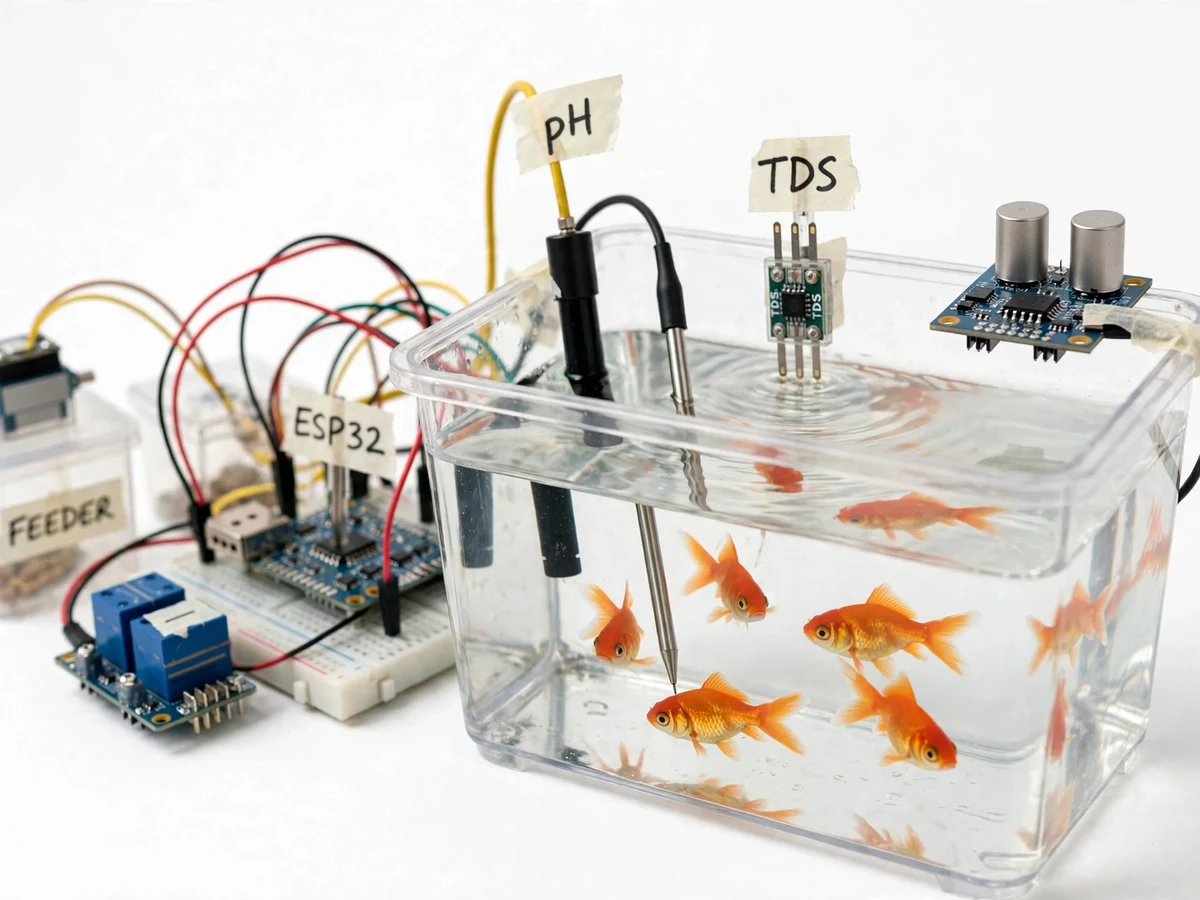
Analog pH probe with conditioning module, read through the ESP32 ADC.
Follow the working sequence
How it works
- The ESP32 runs its sensor loop every 10 seconds: the pH probe voltage is read through the conditioning module, the DS18B20 reports over 1-Wire, the TDS sensor reads analog, and the HC-SR04 measures the distance to the water surface for level.
- Each reading is compared against the configured bands (pH 6.8–7.2 default, a configurable species temperature band, and a 30% level floor) after conversion with the calibration constants.
- The firmware checks the feeding schedule against network time; at each scheduled time it drives the servo through its dispense cycle (10–14 g per cycle, design target) and records the event.
- The aerator relay follows its day/night schedule and is forced on if temperature exceeds the high threshold; the second relay channel is available for a grow-bed flood valve.
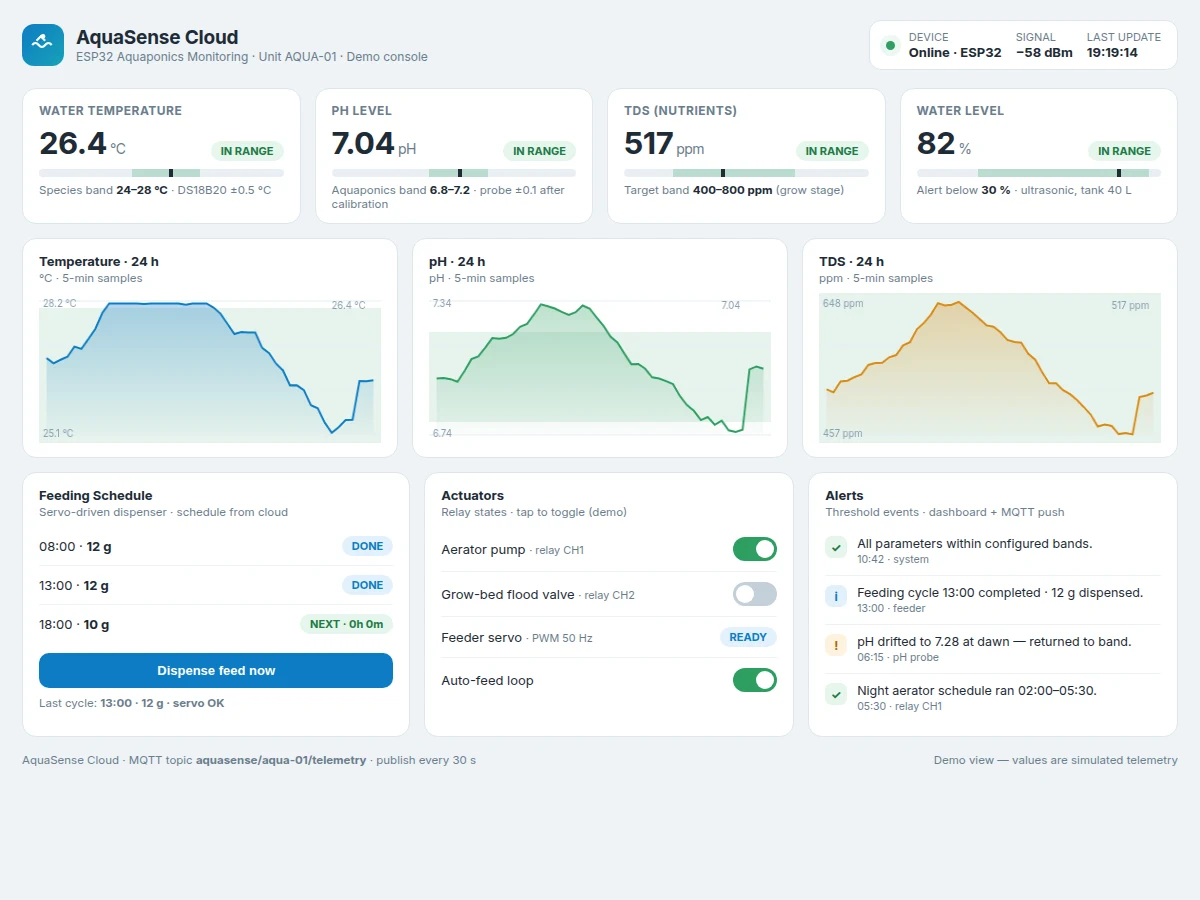
- Every 30 seconds the ESP32 publishes a JSON telemetry packet — all four readings, actuator states, feed count and Wi-Fi signal strength — to the MQTT broker.
- The cloud dashboard subscribes to the telemetry topic and renders live gauges, 24-hour history charts and the alert feed; it publishes commands back (feed now, relay on/off) which the ESP32 executes on receipt.
- Any threshold crossing generates an alert entry on the dashboard and an MQTT alert message identifying which parameter drifted and in which direction.
Tech stack:
- ESP32 DevKit V1
- Arduino IDE · ESP32 core
- pH probe + analog conditioning module
- DS18B20 · 1-Wire
- Gravity analog TDS sensor
- HC-SR04 ultrasonic sensor
- MQTT · Mosquitto broker
- HTML · CSS · JS dashboard
| Parameter | Value |
|---|---|
| Controller | ESP32 DevKit V1 (dual-core, built-in Wi-Fi) |
| Sensors | pH probe (analog) · DS18B20 · TDS (analog) · HC-SR04 |
| pH accuracy | ±0.1 typical after two-point calibration (expected) |
| Temperature accuracy | ±0.5 °C (DS18B20 datasheet) |
| Sensor loop | Every 10 s (configurable) |
| Telemetry interval | 30 s over MQTT (configurable) |
| Feed portion | 10–14 g per cycle (design target, servo-dependent) |
| Actuation | 2-channel relay (aerator + spare) · SG90 servo feeder |
| Power | 5 V / 2 A USB supply (expected); relay loads need a separate supply |
| Dashboard | Single-file HTML/JS app, MQTT over WebSocket |
| Alert bands (defaults) | pH 6.8–7.2 · temperature configurable · level floor 30% |
Project features
- [Four-sensor water monitoring] A pH probe with analog conditioning module, a DS18B20 digital temperature probe, an analog TDS sensor and an HC-SR04 ultrasonic level sensor are sampled by the ESP32 on a timed loop; each reading is converted to engineering units with the calibration constants and checked against its configured band before publishing.
- [Scheduled servo auto-feeder] A servo-driven dispenser releases measured feed portions at configurable times each day; a "feed now" button on the dashboard triggers one cycle remotely, and every cycle is written to the feeding log with its timestamp.
- [Aerator pump control] A 2-channel relay drives the aerator pump on a day/night schedule and forces it on when water temperature crosses the high band, since warm water holds less dissolved oxygen; the second channel is available for a grow-bed flood valve.
- [MQTT cloud dashboard] Telemetry publishes every 30 seconds to an MQTT broker; the dashboard shows live gauges, 24-hour trend charts, actuator states and the feeding log, and publishes commands back (feed now, relay on/off) that the ESP32 executes on receipt.
- [Threshold alerts] pH outside 6.8–7.2, temperature outside the configured species band, or level below 30% raises a visible dashboard alert plus an MQTT alert message, so drift is caught before it becomes a die-off.
- [Single-file configuration] Bands, feed times, portion counts, pump schedule and Wi-Fi/MQTT credentials all live in one config header — routine tuning needs no firmware recompile, which keeps viva demonstrations flexible.
- [Buyer-run calibration procedure] A two-point pH calibration routine (pH 7.0 and 4.0 buffer solutions) plus a TDS reference-solution check is documented step by step, so the student calibrates the actual built rig and reports real calibration results.
What is included
- Working aquaponics monitor + auto-feeder prototype (tank, sensors, ESP32 rig, feeder)
- ESP32 firmware source with single-file configuration
- MQTT cloud dashboard (single-file web app)
- Wiring diagram and sensor connection guide
- Two-point pH calibration procedure (buyer-run)
- Project report PDF (background, methodology, architecture, results framework)
- PPT presentation for final review
- Viva Q&A preparation document (sensors, MQTT, aquaponics chemistry, calibration)
Limitations & prerequisites
- The pH probe needs two-point calibration with buffer solutions before readings are trustworthy, and re-calibration every few weeks — uncalibrated pH readings drift and should not be trusted.
- This is an academic prototype, not aquaculture-certified equipment; it monitors and alerts but does not automatically dose chemicals or correct water chemistry.
- The cloud dashboard, charts and remote commands need Wi-Fi; if the network drops, local sensing, feeding and aeration continue on schedule but no new data reaches the cloud.
- Feed portions are approximate (servo timing, not a scale) — portion size should be verified by weighing during setup.
- The rig is sized for a single demonstration tank (approximately 30–50 L); scaling to multiple tanks or ponds needs additional hardware.
- Temperature and pH bands are standard reference ranges for common aquaponics species, not veterinary advice; species-specific bands must be confirmed from aquaculture references.
Frequently Asked Questions
Which controller is used and why ESP32?
The ESP32 DevKit V1 — it has built-in Wi-Fi for the MQTT cloud link, enough ADC and digital pins for all four sensors plus the servo and relays, and a mature Arduino-core ecosystem, so the whole rig runs on one board with no extra communication module.
Does it work without Wi-Fi?
Partly. Sensing, scheduled feeding and the aerator schedule all run locally on the ESP32 and continue without a network. The cloud dashboard, remote commands and new chart data pause until Wi-Fi returns; nothing already scheduled is lost.
Which fish and plants suit the demo tank?
The prototype is demonstrated with hardy species such as goldfish or guppy in a 30–50 L tank and leafy greens in a small grow bed. The temperature and pH bands are configurable, so the rig adapts to other species — confirm species-specific bands from aquaculture references before stocking.
What maintenance does it need?
Rinse and re-calibrate the pH probe every few weeks with pH 7.0 and 4.0 buffer solutions, wipe biofilm off the TDS probe, keep the ultrasonic sensor dry and clear of the tank rim, and refill the feeder hopper. The calibration procedure ships with the project.
Is this project suitable for a final-year project?
Yes — for Electronics, Electrical, IoT and Instrumentation programs. It demonstrates sensor interfacing, analog conditioning and calibration, embedded scheduling, MQTT cloud integration and a real application domain in precision aquaculture. Suitable for B.E./B.Tech final-year projects in Electronics, Electrical, IoT and Instrumentation.
Components & software requirements
- ESP32 DevKit V1
- Arduino IDE · ESP32 core
- pH probe + analog conditioning module
- DS18B20 · 1-Wire
- Gravity analog TDS sensor
- HC-SR04 ultrasonic sensor
- MQTT · Mosquitto broker
- HTML · CSS · JS dashboard
Delivery information
Built-to-order project. Delivery timeline is shared after order confirmation based on current queue.
Support terms
Complete documentation, setup guide, and viva preparation included. Support for setup and explanation provided.
Download free synopsis (PDF)
Enter your name and email — the synopsis PDF downloads immediately. We may send occasional project updates; no spam, unsubscribe anytime.