
More project photos (2)
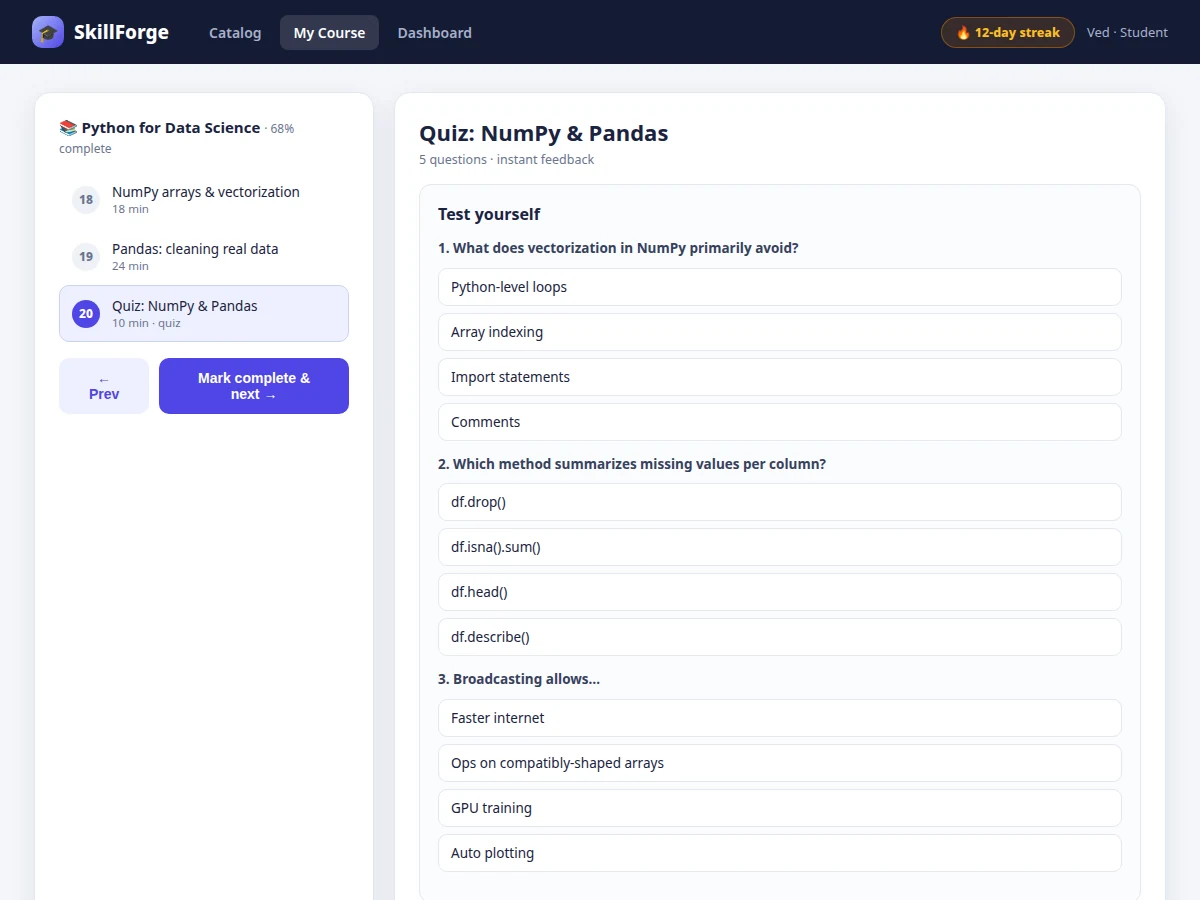

The problem
Online learning platforms look simple from the outside — a list of videos — but the engineering underneath is a strong final-year topic: user accounts and roles, a course/lesson content model, video streaming that supports seeking, quiz engines with instant grading, and progress state that must stay consistent across devices. Most student "course website" projects are static pages; this one is a real platform. Instructors can structure courses into lessons with video, notes and quizzes; students get resume-where-you-left-off playback, scored quizzes with explanations, progress rings per course, weekly activity charts, streaks and achievements, and a PDF certificate when a course is completed. An admin dashboard covers course publishing and enrollment analytics.
How it works
- Users register and authenticate with JWT; roles (student, instructor, admin) gate the catalog, course builder and analytics views.
- Instructors create courses as ordered lessons — each lesson holds a video file, rich-text notes and an optional quiz — then publish through a draft/review flow.
- The video endpoint serves files with HTTP Range support, so seeking jumps without re-downloading; the client reports playback position every 10 seconds.
- Students enroll, watch lessons (positions persist per user), and take quizzes; correct answers are graded instantly with explanations.
- A lesson counts complete at 90% watched or on quiz pass; course progress aggregates lesson states and drives the dashboard rings and charts.
- At 100%, the server renders a PDF certificate; streaks increment on days with ≥1 completed lesson and achievements unlock on rule triggers.
Tech stack:
- Node.js, Express
- MongoDB (courses, users, progress)
- JWT authentication
- HTTP range-request video streaming
- PDFKit (certificates)
- HTML/CSS/JavaScript frontend
- bcrypt (password hashing)
- Docker (deployment)
| Parameter | Value |
|---|---|
| Video streaming | HTTP Range requests, seekable playback |
| Resume granularity | Playback position saved every 10 s |
| Lesson completion | 90% watched or quiz pass |
| Quiz grading | Instant, client + server validated |
| Certificate | PDF, generated on 100% completion |
| Auth | JWT, bcrypt-hashed passwords, 3 roles |
| Concurrent streams | Approximately 100 (design target) |
| Deployment | Docker Compose (app + MongoDB) |
Project features
- [Course catalog] Searchable, category-filtered catalog with ratings, durations, difficulty levels and instructor profiles.
- [Video lessons with resume] HTML5 video with HTTP range-request streaming (seeking works), playback-position saved per user per lesson.
- [Lesson quizzes] Multiple-choice quizzes with instant right/wrong feedback and score tracking toward course completion.
- [Progress tracking] Per-lesson completion, per-course progress rings, and a dashboard showing all enrollments at a glance.
- [Streaks & achievements] Daily learning streaks and unlockable badges (quiz master, bookworm, finisher) for engagement.
- [Certificates] Auto-generated PDF completion certificates with the student name, course and date.
- [Instructor & admin tools] Course builder (lessons, ordering, quizzes), publishing workflow and enrollment analytics.
What is included
- Complete full-stack source code (platform + admin)
- Course/lesson/quiz data model and seed content
- Video streaming and progress-tracking implementation
- Certificate PDF generator
- Deployment guide (VPS, storage sizing, HTTPS)
- Project report PDF (background, streaming design, data model, testing)
- PPT presentation for final review
- Viva Q&A preparation document (range requests, JWT, data modeling, progress state)
Limitations & prerequisites
- Video is progressive HTTP download, not adaptive bitrate (HLS/DASH) — listed as future scope for large catalogs.
- 100 concurrent streams is a design target, stated honestly — the report documents the load test actually run for the order.
- Quizzes are multiple-choice only in this build; code-evaluation questions are future scope.
- Certificates are self-issued by the platform, not accredited credentials.
- Payment/enrollment gating is out of scope; all courses are free in this build.
Frequently Asked Questions
How does resume-playback work?
The video element reports its current time every 10 seconds (and on pause); the server stores it per user per lesson. Reopening the lesson seeks straight to the saved position.
Why HTTP Range requests for video?
Without them, seeking would force re-downloading from the start. Range requests let the browser fetch only the needed byte range, so scrubbing is instant — the report explains the request/response headers involved.
How is progress kept consistent?
Lesson completion is computed server-side from watch events and quiz results, stored per user, and aggregated into course percentages — so the dashboard, rings and certificates always agree.
Can instructors add their own courses?
Yes — the course builder supports creating lessons (video + notes + quiz), reordering them, and publishing through a draft → review → published flow.
How are certificates generated?
On 100% completion the server renders a PDF with the student name, course title and date using PDFKit; the download link appears on the dashboard.
Is this project suitable for a final-year project?
Yes — for Computer Science, IT and Web Development programs. It demonstrates full-stack development, media streaming, data modeling and a complete usable product. Suitable for B.E./B.Tech final-year projects in Computer Science, IT and Web Development.
Components & software requirements
- Node.js, Express
- MongoDB (courses, users, progress)
- JWT authentication
- HTTP range-request video streaming
- PDFKit (certificates)
- HTML/CSS/JavaScript frontend
- bcrypt (password hashing)
- Docker (deployment)
Delivery information
Built-to-order project. Delivery timeline is shared after order confirmation based on current queue.
Support terms
Complete documentation, setup guide, and viva preparation included. Support for setup and explanation provided.