
More project photos (2)
The problem
A digital signature is the electronic equivalent of a handwritten signature, but stronger: it proves both who signed a message and that the message has not been changed since it was signed. Without it, a receiver cannot tell whether a document is genuine or was edited after it was sent — anyone can copy text, and an edited file looks identical to the original. This project solves that problem with public-key cryptography: the sender hashes the message with SHA-256, signs that hash with a private RSA key to create the signature, and the receiver checks it with the public key by comparing hashes. A match proves authenticity and integrity; one changed character produces a completely different hash, so verification fails and the tampering is exposed. The system is a working browser demo using the Web Crypto API: students generate real 2048-bit key pairs, sign real messages and watch tamper detection live, instead of only reading the theory.
Types a message or picks a sample document: an order note, admission letter or payment receipt.
Follow the working sequence
How it works
The system works in four stages that mirror how real digital signatures work: key generation, hashing, signing and verification. First, the browser generates an RSA key pair — a private key that only the signer holds and a public key anyone may have. Second, the message is hashed with SHA-256, compressing it into a fixed 256-bit digest that changes completely if even one character changes. Third, the private key signs that digest with RSA-PSS, producing a 256-byte signature that is bound to this exact message. Fourth, anyone with the public key can verify: they recompute the hash of the message they received and check the signature, and the two hashes must match exactly for the message to be accepted as authentic and unaltered. Because signing always operates on the fixed-size hash rather than the message itself, signing time stays the same no matter how long the message is.
- The user types a message or picks one of the three sample documents (order note, admission letter, payment receipt) in the demo.
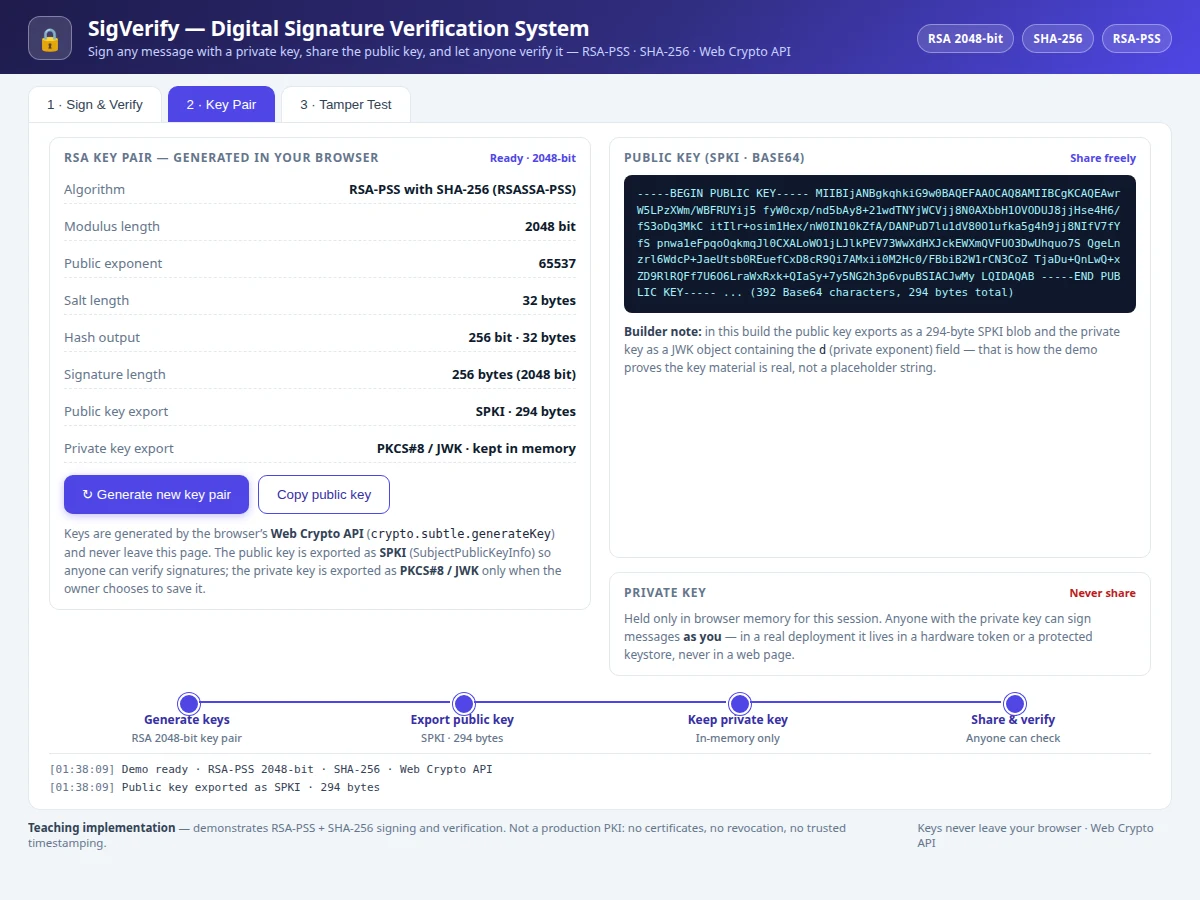
- The browser generates a 2048-bit RSA key pair with the Web Crypto API, or reuses the pair already generated for the session.
- The message is hashed with SHA-256, producing a fixed 256-bit digest (32 bytes) displayed as 64 hexadecimal characters.
- The private key signs the digest with RSA-PSS (32-byte salt), producing a 256-byte signature shown in Base64.
- Verification recomputes the SHA-256 hash of the received message and checks the signature with the public key; matching hashes give a VALID verdict.
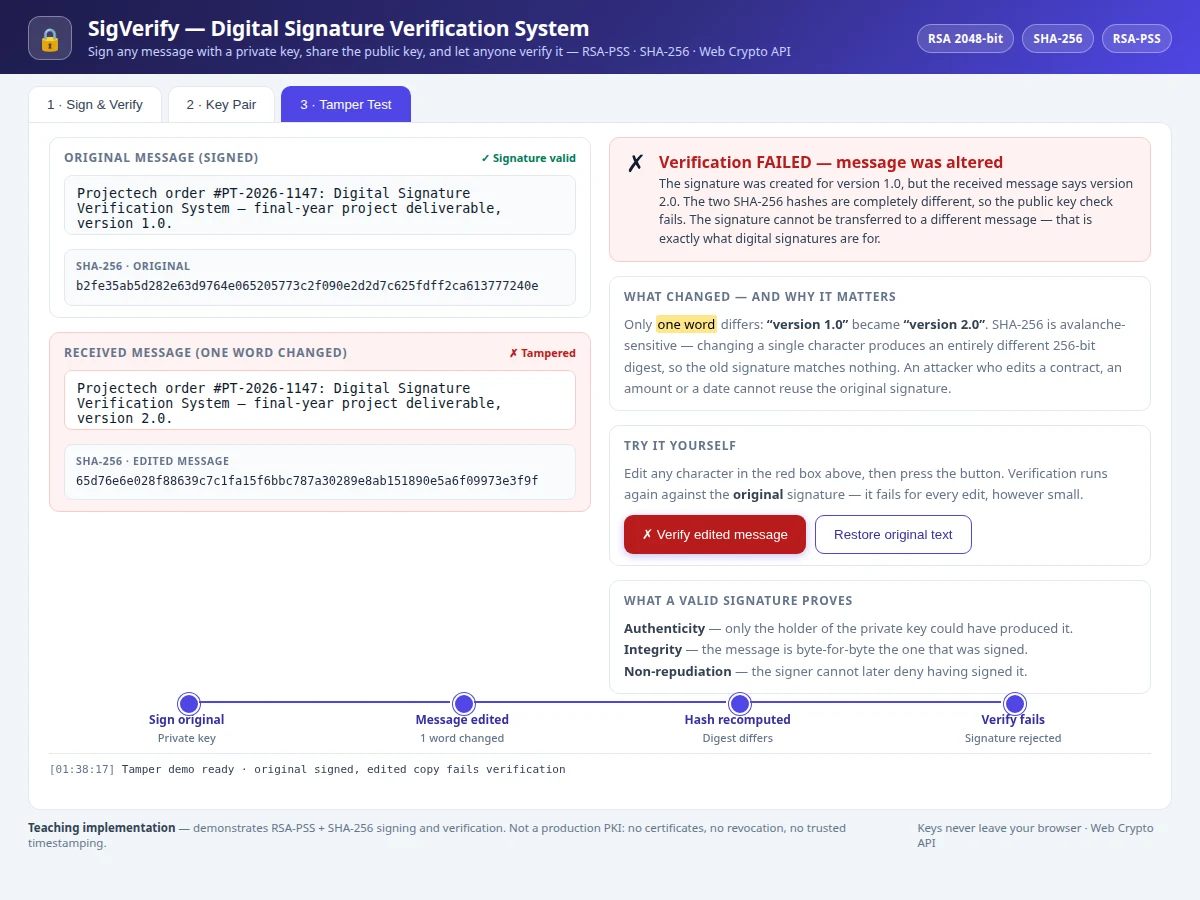
- In the tamper test, the same signature is checked against an edited message (one word changed); the hashes differ completely, so verification fails and the tampering is exposed.
Tech stack:
- HTML5 · CSS3 · JavaScript (ES6)
- Web Crypto API (crypto.subtle)
- RSA-PSS with SHA-256
- SHA-256 hash function
- 2048-bit RSA key pair
- SPKI public-key export
- PKCS#8 · JWK private-key export
- Base64 · PEM key encoding
| Parameter | Value |
|---|---|
| Signature algorithm | RSA-PSS (RSASSA-PSS) with SHA-256 |
| Key size | 2048 bit (design target) |
| Hash function | SHA-256 · 256-bit output · 32 bytes |
| Salt length | 32 bytes |
| Public exponent | 65537 (standard value) |
| Signature size | 256 bytes |
| Public-key export | SPKI · 294 bytes (measured in demo build) |
| Demo message length | 116 characters (sample order note) |
| Key generation time | 70.2 ms (measured in demo build · single run) |
| SHA-256 hashing time | 0.84 ms (measured in demo build · single run) |
| Signing time | 2.67 ms (measured in demo build · single run) |
| Verification time | 0.55 ms (measured in demo build · single run) |
| Tamper test | 1 word changed (version 1.0 to version 2.0) · verification fails |
| Runtime | Fully offline in the browser · no server · no internet needed |
Project features
The system is built around four capabilities that work together end to end: RSA-PSS key-pair generation in the browser, SHA-256 hashing of any message, signing with the private key, and verification with the public key that fails visibly when a message is tampered with. The demo makes each step visible — the 64-character hash, the 256-byte Base64 signature, the exported public key and live timings for every operation — so the cryptography is something students can watch and measure, not a black box. A dedicated tamper-test view signs one version of a message and verifies an edited copy, showing two completely different hashes side by side, and sample documents (an order note, an admission letter and a payment receipt) let students test realistic messages immediately. Students can regenerate keys at any time and read live timings for every operation, which makes the demo usable as a classroom demonstration as well as a project.
- [RSA-PSS key-pair generation — Implemented] Generates a real 2048-bit RSA key pair in the browser with the Web Crypto API (crypto.subtle.generateKey), with a 32-byte salt length and public exponent 65537; a new pair can be generated at any time.
- [SHA-256 message hashing — Implemented] Hashes any typed message with SHA-256 and displays the full 64-character digest (256-bit output, 32 bytes), so students see that hashing is deterministic and that one changed character changes the whole digest.
- [Sign with the private key — Implemented] Signs the message hash with the private key using RSA-PSS, producing a 256-byte signature shown in Base64, with the signing time measured live for every run.
- [Verify with the public key — Implemented] Recomputes the SHA-256 hash and checks the signature against the public key, showing a clear VALID or INVALID verdict with the reason, and the verification time measured live.
- [Tamper detection — Implemented] A dedicated tamper-test view signs the original message and verifies an edited copy (one word changed), displaying both hashes side by side so the avalanche effect of SHA-256 is visible and the failure is explained.
- [Public-key export — Implemented] Exports the public key as a 294-byte SPKI blob in PEM/Base64 form with a copy button, while the private key stays in browser memory only; the builder note in the demo records the export detail from the actual build.
- [Sample documents and live timings — Implemented] Three realistic sample messages (order note, admission letter, payment receipt) can be signed in one click, and key generation, hashing, signing and verification timings are measured and displayed live.
- [File signing and certificate support — Future scope] Signing uploaded files (PDFs, documents) and X.509 certificate handling are not in the base build; both are documented as future scope and can be developed on request.
What is included
- Complete single-file demo application (HTML · CSS · JavaScript) with real Web Crypto signing and verification
- Full source code with comments explaining key generation, hashing, signing and verification
- Project report (background, RSA and SHA-256 theory, methodology, results, limitations)
- Project abstract PDF (10 sections, matching this page)
- PPT presentation for final review
- Viva Q&A preparation document (public vs private keys, hashing, RSA-PSS, salt, tamper detection, PKI limits)
- Setup and demo guidance (how to run the demo and present the tamper test)
Limitations & prerequisites
- This is a teaching implementation, not a production PKI: it has no certificates, no certificate authority, no revocation list and no trusted timestamping.
- Verification proves the holder of the private key signed the message; it does not prove the real-world identity of that holder without a certificate binding the key to a person.
- The private key is held only in browser memory for the session; there is no secure key storage, hardware token or password-protected keystore in the base build.
- RSA-PSS uses a random 32-byte salt, so signing the same message twice gives two different valid signatures; this is expected behaviour, not a fault.
- 2048-bit keys are the design target for this teaching build; long-lived production keys use larger sizes, so the key size is a teaching choice, not a lifetime security claim.
- The base build signs typed messages only; signing uploaded files (PDFs, documents) is future scope, not included.
- The demo runs entirely in the browser, so signatures and keys are not shared between devices or users unless the public key is exported and sent separately.
Frequently Asked Questions
How does the system prove a message was not changed?
It hashes the received message with SHA-256 and checks the signature against that hash using the sender's public key. The signature was created from the hash of the original message, so if even one character was edited, the recomputed hash is completely different and verification fails. The tamper-test view demonstrates this by changing one word — version 1.0 to version 2.0 — and showing the two unrelated hashes side by side.
What is the difference between RSA-PSS and textbook RSA signing?
Textbook RSA signing encrypts the hash directly with the private key, which is fragile if implemented naively. RSA-PSS adds a random 32-byte salt and a structured encoding step before the RSA operation, which is why it is the recommended scheme in current standards. The demo uses RSA-PSS with SHA-256 through the browser's Web Crypto API, and the same message signed twice produces two different valid signatures because the salt is random each time.
Is this project suitable for a final-year project?
Yes — for Computer Science and IT programs, and for any branch covering cryptography or network security. It demonstrates public-key cryptography end to end: key generation, hashing, signing, verification and tamper detection, with a working demo that signs and verifies real messages in the browser. The theory (RSA, SHA-256, RSA-PSS, salt, key sizes) maps directly to standard cryptography syllabus topics.
Does it need a server or an internet connection?
No — the whole system runs in the browser using the Web Crypto API, and no server is involved at all. Key generation, hashing, signing and verification all happen locally, and the demo works offline once the single HTML file is opened, with no data uploaded anywhere. The only requirement is a modern browser, because the Web Crypto API needs a secure context (a local file or an HTTPS page).
Can it sign files or PDFs instead of typed messages?
Not in the base build, which signs typed messages only — but file signing uses exactly the same flow, so it can be added on request. The file bytes are hashed with SHA-256 and the hash is signed, just like a typed message, and any change to the file afterwards makes verification fail. The demo's tamper test already shows the key idea: changing one word in a message produces a completely different hash and a failed verification.
What will I receive with the project?
The complete single-file demo application with real Web Crypto signing and verification, the full commented source code, a project report, the 10-section abstract PDF, a PPT for final review, a viva Q&A document and setup plus demo guidance. The demo includes key-pair generation, SHA-256 hashing, signing, verification, a tamper test and public-key export, all working in the browser.
Components & software requirements
- HTML5 · CSS3 · JavaScript (ES6)
- Web Crypto API (crypto.subtle)
- RSA-PSS with SHA-256
- SHA-256 hash function
- 2048-bit RSA key pair
- SPKI public-key export
- PKCS#8 · JWK private-key export
- Base64 · PEM key encoding
Delivery information
Built-to-order project. Delivery timeline is shared after order confirmation based on current queue.
Support terms
Complete documentation, setup guide, and viva preparation included. Support for setup and explanation provided.
Download free synopsis (PDF)
Enter your name and WhatsApp number — the synopsis PDF downloads immediately. We may send occasional project updates on WhatsApp; no spam.