
More project photos (2)
The problem
A desktop typing speed test app with WPM tracking and accuracy analytics is a Python desktop application that measures how fast and how accurately a user types a given passage. It presents a passage on screen, records every keystroke against the expected text, and converts the result into two headline numbers: words per minute and accuracy percentage. Many students type for hours every day — assignments, code, reports — yet never measure the skill, so weak keys and error habits go unnoticed for years. Existing browser typing tests need an internet connection, show advertising, and store results on someone else's server, which makes them awkward for classroom use and for a viva demonstration. A local desktop app solves this directly: it works fully offline, keeps all session history on the student's own machine, and exposes the scoring formula openly so every number on the results screen can be explained, reproduced, and defended.
The user types the shown passage on the keyboard during a timed test.
Follow the working sequence
How it works
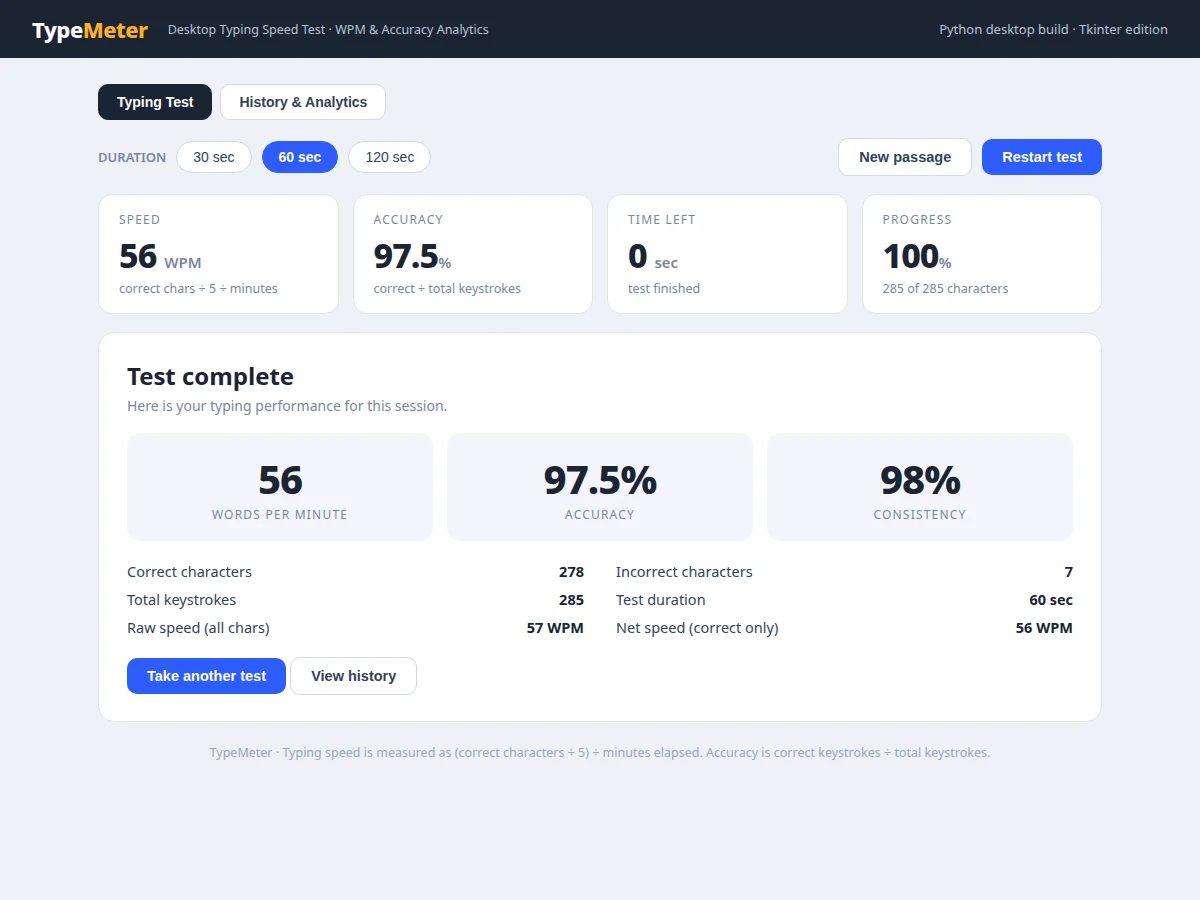
The typing test app works end to end like this: the user picks a test duration, clicks the passage, and starts typing; the timer begins on the first keystroke and the app compares each keystroke with the expected character live. Correct keystrokes advance the progress count and feed the WPM calculation, while incorrect keystrokes are highlighted and counted against accuracy; backspace lets the user correct a mistake, and corrected errors still count in the raw keystroke total so the accuracy figure stays honest. When the timer reaches zero or the passage is finished, the app stops the test and computes the final numbers from the recorded counts: net WPM from correct characters only, raw WPM from all keystrokes, accuracy from correct divided by total keystrokes, and a consistency score from the error rate. The session is saved to the local history store, and the history view updates its trend bars alongside earlier sessions.
- The user selects a test duration (30, 60 or 120 seconds) and a practice passage from the built-in library.
- Clicking the passage focuses the input; the timer stays idle until the first keystroke, so preparation time never counts against the score.
- Each keystroke is compared with the expected character at the current position and coloured correct or incorrect immediately.
- Live stats update on every keystroke: current WPM from correct characters so far, running accuracy, time left and passage progress.
- Backspace removes the last typed character so a mistake can be corrected, while the raw keystroke total keeps the original error on record.
- When the timer reaches zero or the passage is complete, the test stops and the results screen is computed from the recorded counts.
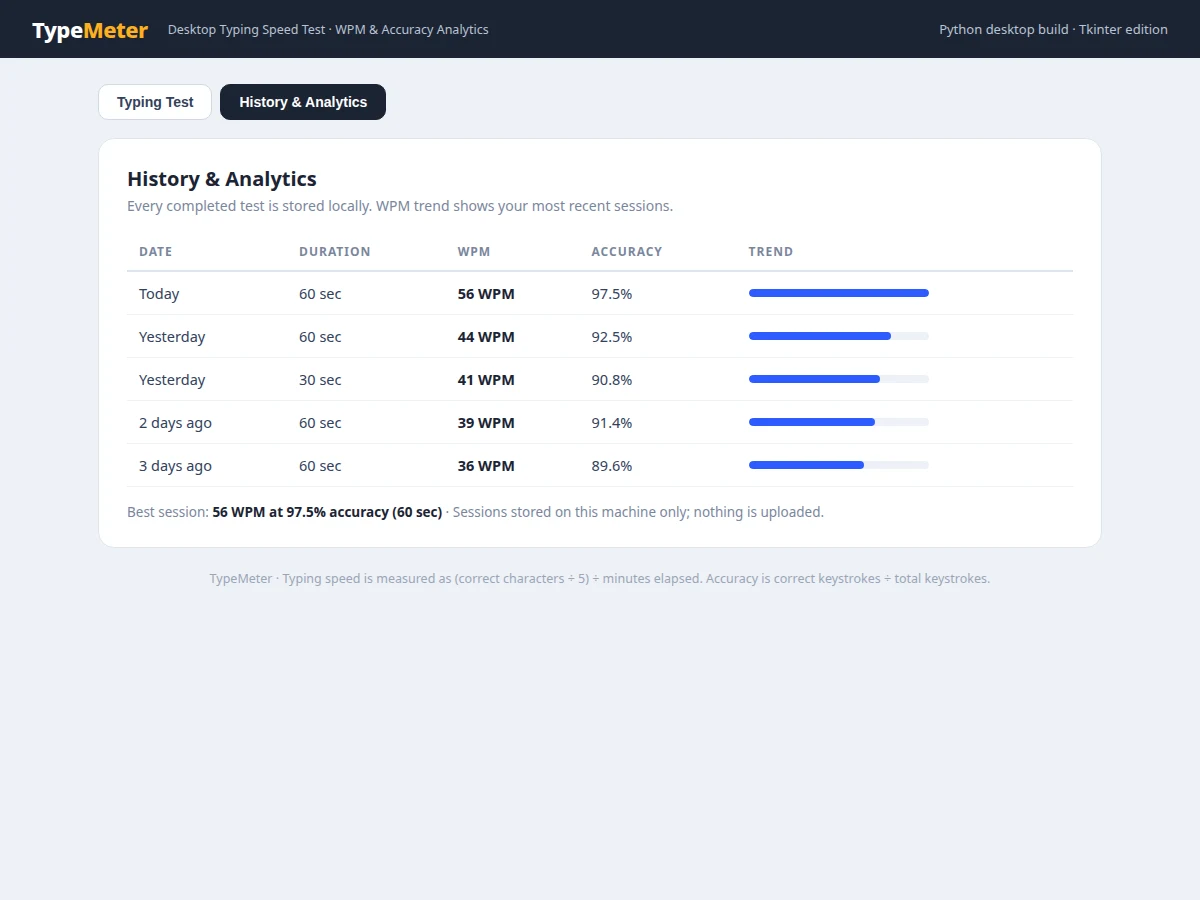
- The session is written to the local SQLite history store, and the history view refreshes its trend bars and top-session line.
Tech stack:
- Python 3
- Tkinter · desktop UI
- SQLite · local session history
- JSON passage library
- CSV · session history export
- PyInstaller · standalone executable
| Parameter | Value |
|---|---|
| Test durations | 30 seconds · 60 seconds · 120 seconds (selectable) |
| WPM formula | Correct characters ÷ 5 ÷ minutes elapsed (standard formula) |
| Demo-run result | 56 WPM at 97.5% accuracy (scripted 60-second demo run, not a benchmark) |
| Demo-run keystrokes | 278 correct characters · 7 incorrect characters · 285 total keystrokes (demo run) |
| Sample passage length | 285 characters (sample passage 1, counted) |
| History storage | Local SQLite file on the user's machine (no cloud upload) |
| Platform | Windows · macOS · Linux desktops running Python 3 (expected) |
| Packaged executable size | Approximately 15–25 MB (expected) |
| App startup time | Approximately under 2 seconds on a typical laptop (design target) |
Project features
The app's core capabilities are live WPM and accuracy tracking, timed tests with selectable durations, and a local session history with per-session analytics. Live tracking updates speed and accuracy on every keystroke, so the user sees performance change in real time instead of waiting for a final score. Timed tests run for 30, 60 or 120 seconds, and the timer starts on the first keystroke, matching how real typing tests behave. After each test, a results screen reports net speed, raw speed, accuracy, consistency and a correct-versus-incorrect character breakdown. Every completed session is stored locally and shown in a history view with a WPM trend, so progress across days and weeks is visible without any account or internet connection. A first-principles scoring rule keeps the numbers honest: WPM equals correct characters divided by 5, divided by minutes elapsed.
- [Live WPM and accuracy tracking] Speed and accuracy update on every keystroke during the test, with correct characters shown in dark text and mistakes highlighted immediately. Implemented in the base build.
- [Timed tests with selectable durations] Tests run for 30, 60 or 120 seconds, and the timer starts on the first keystroke rather than on page load. Implemented in the base build.
- [Results breakdown screen] Each finished test reports net WPM, raw WPM, accuracy, a consistency score, and the counts of correct, incorrect and total keystrokes. Implemented in the base build.
- [Local session history and trend view] Every completed session is saved to a local SQLite store and shown in a history table with a WPM trend bar per session. Implemented in the base build.
- [Backspace correction with honest scoring] Backspace corrects a mistake, but corrected errors still count in the raw keystroke total, so accuracy cannot be inflated by retyping. Implemented in the base build.
- [Passage library and CSV export] Multiple built-in practice passages are included, and session history can be exported as a CSV file for the project report. Implemented in the base build.
- [Custom passages (optional customization)] Loading the user's own passages from a text file can be added on request; it is not part of the base build.
- [Per-key error heatmap (future scope)] A keyboard heatmap showing which keys produce the most errors is a possible extension, not included in the base build.
What is included
- Complete Python source code (Tkinter desktop app)
- Standalone packaged executable for the student's machine
- Built-in practice passage library (JSON)
- Local SQLite history store with schema documentation
- CSV export of session history
- Project report PDF (background, WPM mathematics, methodology, demo-run results)
- PPT presentation for final review
- Viva Q&A preparation document (WPM formula, accuracy definition, timer design, local storage)
Delivery timeline
- Requirement confirmation and passage selection: Approximately 1–2 working days.
- App build (typing engine, timer, results screen, history store): Approximately 4–5 working days.
- Documentation and viva kit (report, PPT, Q&A): Approximately 2–3 working days.
- Total delivery window: Approximately 1–2 weeks from confirmed requirements, subject to feedback rounds.
Support
- Setup help on the student's machine (Python environment or packaged executable) is included with delivery.
- Bug fixes for the delivered build are covered for 30 days after delivery.
- Small customizations (extra passages, duration options, colour theme) can be added on request after delivery.
- A walkthrough of the code and the WPM calculation is included so the student can explain the app in the viva.
Limitations & prerequisites
- Scores depend on passage difficulty: a passage with unusual words or punctuation produces lower WPM than plain prose, so sessions are only comparable on similar passages.
- The 30-second test varies more between runs than the 60-second or 120-second test, because a single error moves the percentage further on fewer keystrokes.
- Accuracy counts keystrokes only; it does not judge typing posture, finger placement or technique.
- The base build is desktop-only: there is no mobile version and no online leaderboard or multiplayer mode.
- All history lives on one machine: sessions are not synced between computers unless the SQLite file is copied manually.
- Reported figures are practice metrics for learning and demonstration, not a certified typing certificate.
- The app measures typing on its own passages; it does not grade free-form documents or code typed elsewhere.
Frequently Asked Questions
How is WPM calculated?
WPM is calculated with the standard formula: correct characters divided by 5, divided by minutes elapsed. A "word" is defined as 5 characters including spaces, so a 60-second test with 278 correct characters gives 278 ÷ 5 ÷ 1 = 55.6, reported as 56 WPM.
Does the app need an internet connection?
No. The app runs fully offline on the student's own machine, with no internet connection required at any point. Passages are bundled locally, history is stored in a local SQLite file, and no account, upload or server is involved, which also makes classroom and viva demonstrations straightforward.
What does the history view store?
The history view stores one row per completed test: date, test duration, WPM, accuracy and keystroke counts, all in a local SQLite file. Sessions stay on the student's own machine only and are never uploaded, and the full history can be exported as a CSV file for inclusion in the project report.
Can I add my own passages?
Custom passage upload is available as an optional customization, not in the base build. The base build ships with a built-in passage library covering plain prose passages, and custom passages supplied as a text file can be added on request for a specific class or practice goal.
Is this project suitable for a final-year project?
Yes, for Computer Science and Information Technology programmes. It demonstrates desktop UI development, event-driven input handling, timer design, local data storage and a transparent scoring formula, and the student can explain every number on the results screen in the viva.
Components & software requirements
- Python 3
- Tkinter · desktop UI
- SQLite · local session history
- JSON passage library
- CSV · session history export
- PyInstaller · standalone executable
Delivery information
Built-to-order project. Delivery timeline is shared after order confirmation based on current queue.
Support terms
Complete documentation, setup guide, and viva preparation included. Support for setup and explanation provided.
Download free synopsis (PDF)
Enter your name and WhatsApp number — the synopsis PDF downloads immediately. We may send occasional project updates on WhatsApp; no spam.