
More project photos (3)
The problem
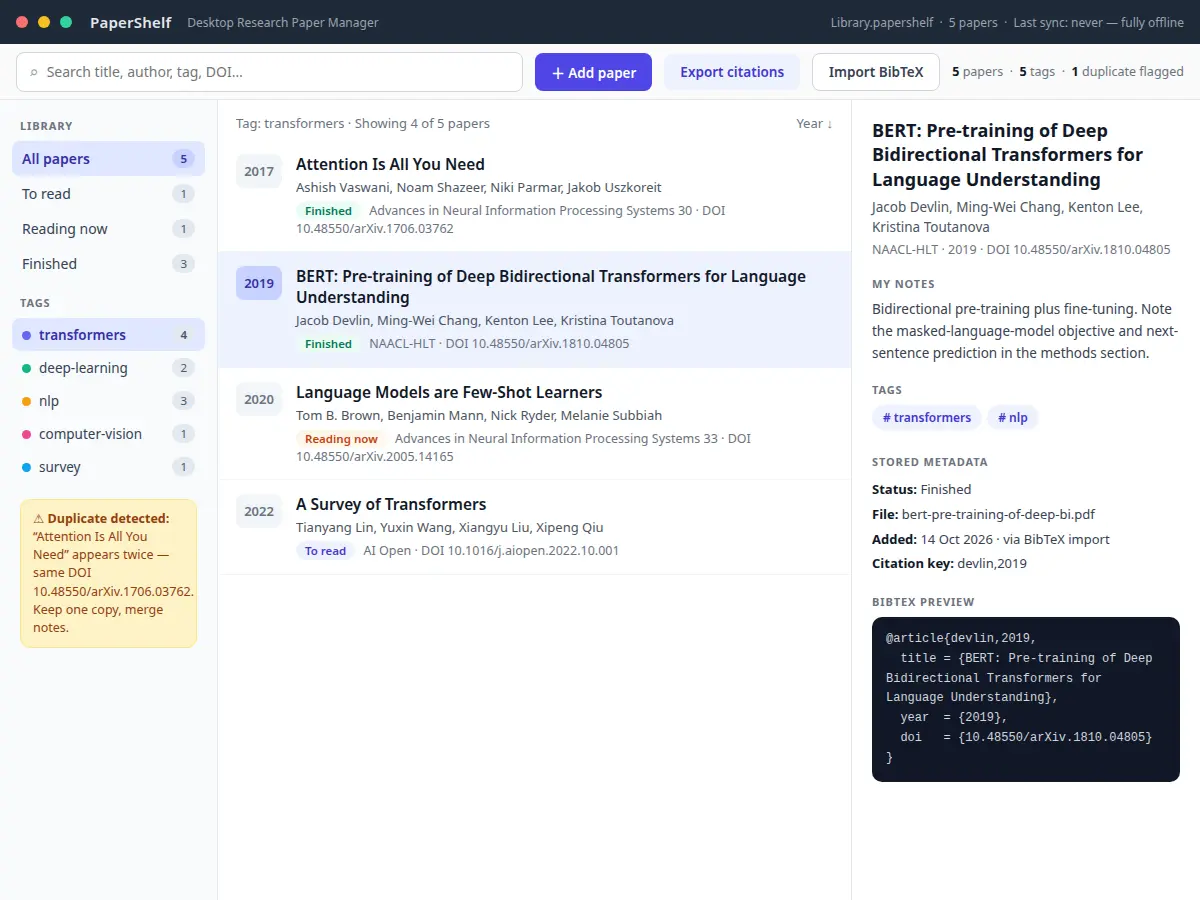
The Desktop Research Paper Manager is a desktop application that keeps a student's entire research-paper collection in one searchable offline library. Students preparing a literature review typically scatter dozens of PDFs across download folders, browser tabs and chat attachments, then waste hours re-finding papers, re-checking which ones they have already read, and re-typing references by hand for their report. References typed by hand invite errors: a wrong year, a misspelled author name or a missing DOI can survive into the final report unnoticed. This project answers that problem directly: papers are imported from BibTeX files or added manually, organized with tags and a reading status, annotated with personal notes, and searched instantly across titles, authors, tags and notes. Duplicate imports are flagged by DOI or normalized title, and citations export in BibTeX, APA and IEEE formats straight from the stored metadata, so the bibliography is generated rather than re-typed.
Imports a BibTeX file or adds a paper manually.
Follow the working sequence
How it works
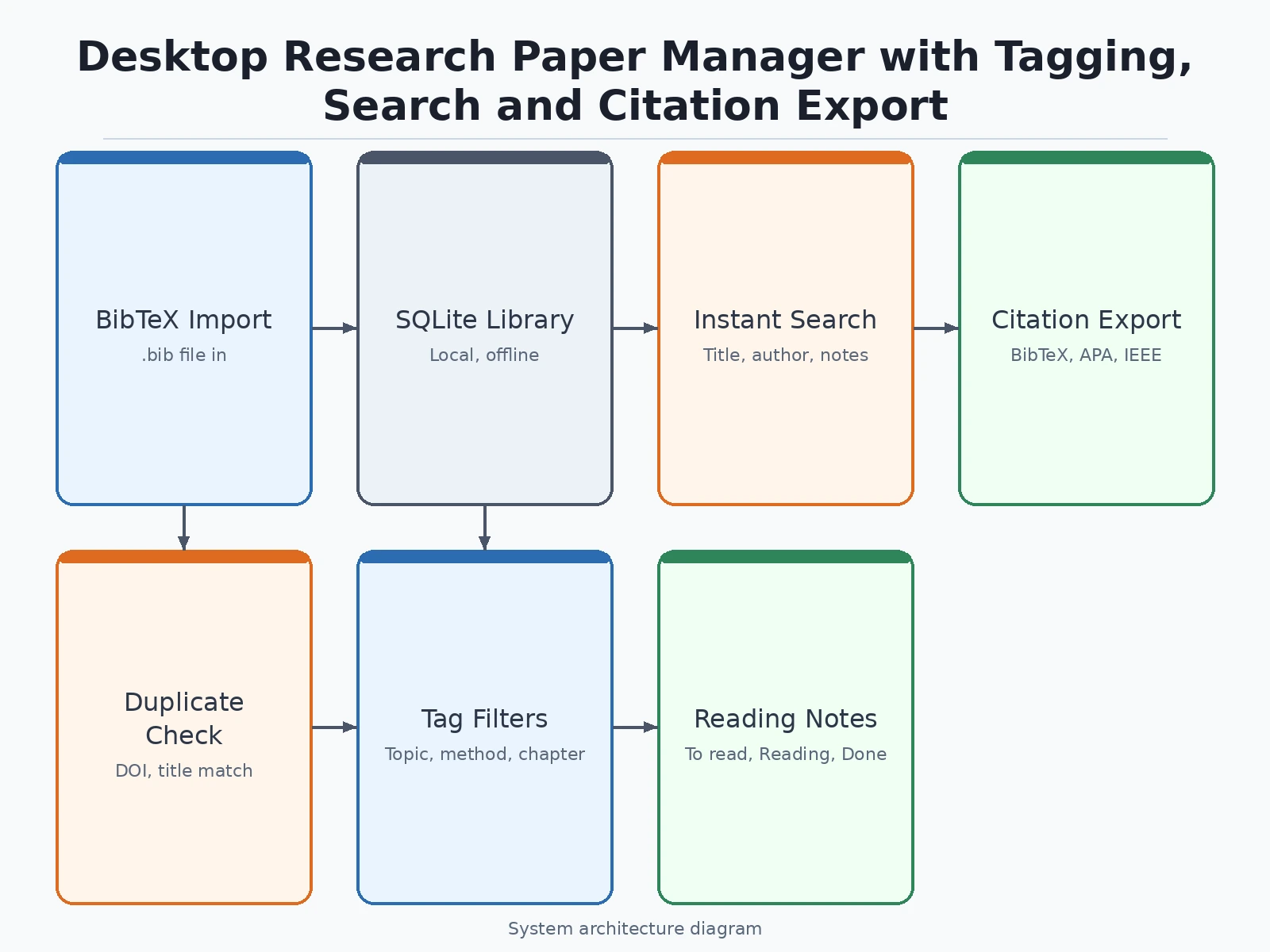
A paper travels from import to bibliography in seven steps without ever leaving the student's machine. The student imports a BibTeX file or adds a paper manually, and the app parses each entry into structured fields — title, authors, venue, year and DOI — instead of storing raw text. Each paper is then tagged by topic or chapter, given a reading status and annotated with personal notes in the detail pane. On every import the app checks for duplicates by comparing DOIs and normalized titles, flagging a repeat before it pollutes the library. Searching and tag filters narrow the library instantly, and clicking a paper opens its full record. When the bibliography is needed, the student selects papers and exports citations in BibTeX, APA 7th or IEEE format, generated from the stored metadata. The library itself is saved locally, so the whole workflow runs offline.
- The student imports a .bib file or adds a paper manually with its title, authors, venue, year and DOI.
- The BibTeX parser splits each entry into structured fields and stores them in the local library database.
- The student tags the paper by topic or chapter, sets its reading status and writes personal notes in the detail pane.
- On every import, the duplicate check compares DOIs and normalized titles against existing entries and flags repeats before saving.
- The student searches across titles, authors, tags and notes, or clicks a tag to filter the library to one slice.
- Clicking a paper opens its detail pane: full metadata, tags, notes, reading status and the linked PDF.
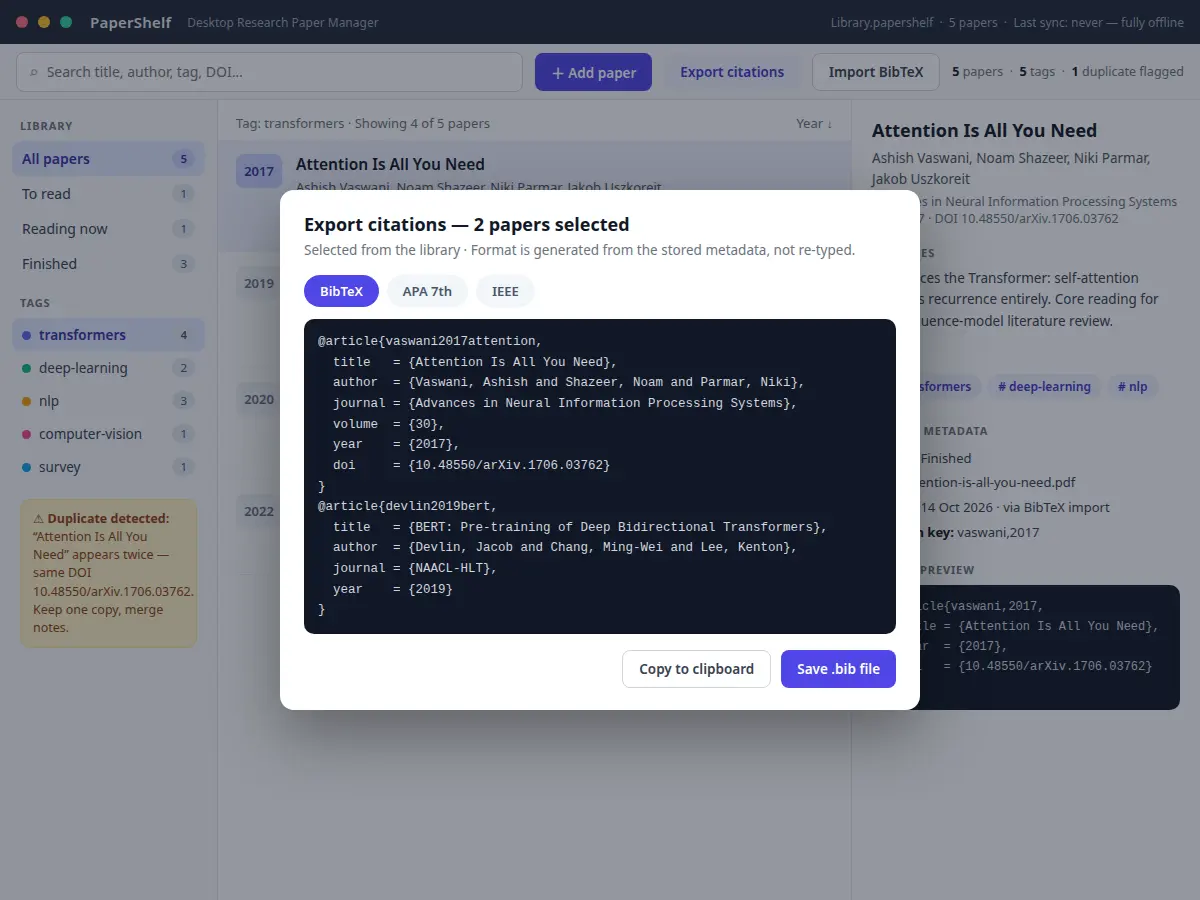
- The student selects papers and exports citations in BibTeX, APA 7th or IEEE format, generated from the stored metadata.
Tech stack:
- HTML · CSS · JavaScript
- Electron desktop shell
- SQLite local database
- BibTeX import parser
- Client-side full-text search index
- Node.js runtime (Electron main process)
- Citation formatters (BibTeX · APA · IEEE)
| Parameter | Value |
|---|---|
| Platform | Windows · macOS · Linux desktop (no server required) |
| Import format | BibTeX (.bib) files, plus manual entry |
| Export formats | 3 formats: BibTeX · APA 7th · IEEE |
| Search fields | 4 fields: title · author · tags · notes |
| Reading statuses | 3 statuses: To read · Reading now · Finished |
| Duplicate-check signals | 2 signals: DOI match · normalized-title match |
| Library storage | Single local SQLite database file |
| Demo library | 5 sample papers (in the working demo) |
| Installed size | Under 100 MB (design target) |
| Search response | Under 1 second for a 1,000-paper library (design target) |
Project features
The manager's most useful capabilities are its BibTeX import, its tag-based organization, its instant search and its one-click citation export. BibTeX import turns a reference file exported from a reference tool or a publisher page into structured library entries — title, authors, venue, year and DOI — without re-typing. Tags group papers by topic, method or chapter, and clicking a tag filters the whole library to that slice in one step. Search runs across titles, authors, tags and the student's own notes, so a half-remembered paper is found by any fragment the student recalls. Citation export generates BibTeX, APA 7th and IEEE references directly from the stored metadata, which removes the transcription errors that creep in when references are typed by hand. Around these four capabilities sit reading statuses, personal notes, duplicate detection and a fully offline local library.
- [BibTeX import] Paste or load a .bib file and the app parses each entry into structured fields — title, authors, venue, year and DOI — instead of storing raw text. Implemented.
- [Tagging and tag filters] Every paper carries free-form tags such as a chapter name or a method; clicking a tag filters the library to that slice instantly. Implemented.
- [Instant search] One search box covers titles, authors, tags and personal notes, so a paper is found from any fragment the student remembers. Implemented.
- [Reading status and notes] Each paper is marked To read, Reading now or Finished, and the detail pane holds the student's own notes on what the paper contributes. Implemented.
- [Duplicate detection] On import, each paper is checked against the library by DOI and by normalized title, and repeats are flagged before they are saved. Implemented.
- [Citation export] Selected papers export as BibTeX, APA 7th or IEEE references, generated from the stored metadata — never re-typed. Implemented.
- [Offline local library] The whole collection lives in a local database file on the student's machine: no account, no sign-in, no cloud upload. Implemented.
- [Linked PDF files] Each entry links to the paper's PDF on disk, so opening the paper is one click from its record. Implemented.
What is included
- Complete desktop application source code (Electron shell + library UI)
- Working single-file HTML demo of the paper library
- Sample library with 5 papers, tags and notes
- Setup guide for Windows, macOS and Linux
- Project report PDF (problem, design, parsing logic, testing)
- PPT presentation for final review
- Viva Q&A preparation document (BibTeX format, citation styles, local storage, search indexing)
Limitations & prerequisites
- No cloud sync: the library lives on one machine, and moving to another machine needs a manual copy of the database file and PDF folder.
- No automatic metadata fetching: DOI lookup from the web is not included — metadata comes from the BibTeX file or from manual entry.
- Duplicate detection needs a DOI or a near-identical title; two differently-titled versions of the same paper can slip through undetected.
- Citation styles are limited to 3 formats (BibTeX, APA 7th, IEEE); other journal-specific styles are future scope, not included.
- Search covers stored metadata and personal notes only; full-text search inside PDF file contents is not included.
- The app manages papers the student already has; it does not download papers or bypass publisher paywalls.
- A library of thousands of papers is a design target (under 1 second search), not a tested load — the working demo ships with 5 sample papers.
Frequently Asked Questions
Is this project suitable for a final-year project?
Yes — this project fits Computer Science and Information Technology final-year work, because it combines desktop application development, local data storage, text search and file-format parsing in one complete, demonstrable system that a student can explain end to end in a review. It demonstrates parsing, indexing, local persistence and UI design without depending on any external service, and the report can walk through the BibTeX parser, the duplicate check and the citation formatters as distinct, explainable modules.
What does the citation export cover?
The app exports citations in 3 formats — BibTeX, APA 7th edition and IEEE — and every reference is generated from the paper's stored metadata, so titles, author names, years and DOIs are never re-typed. Changing a stored field and re-exporting updates the reference automatically. Other journal styles can be added later as new formatter modules, since each format is generated from the same stored fields.
Does it work without internet?
Yes — the entire library runs offline on the student's own machine, with no account, no sign-in and no cloud upload, so papers, notes and tags stay private and the app works without internet. The only online step is obtaining papers or BibTeX files in the first place. This also means there is no subscription, no server cost and nothing to configure before first use.
How does duplicate detection work?
On every import the app compares each incoming paper against the library using 2 signals — an exact DOI match, or a normalized title match after lowercasing, stripping punctuation and collapsing whitespace — and flags repeats before they are saved. Builder note from the demo build: title normalization catches the common case of one paper imported twice with different capitalization. A flagged duplicate is shown with its matching DOI so the student can merge notes and keep one copy.
Can I add my own papers and tags?
Yes — papers can be added manually with any title, authors, venue, year and DOI, and tags are free-form, so a student can invent tags for chapters, methods or supervisors without being limited to a fixed list. Tags can be renamed or removed at any time. Manual entry is also the route for papers that arrive without a BibTeX record, such as a PDF shared by a guide.
What do I need to run it?
The app runs on a standard Windows, macOS or Linux desktop with no server, database setup or paid service — the library is a single local database file plus the student's own PDF folder. Installation is a single desktop installer, and the demo runs from one HTML file. No programming knowledge is needed to use it; the code is there for the student to study and explain.
Components & software requirements
- HTML · CSS · JavaScript
- Electron desktop shell
- SQLite local database
- BibTeX import parser
- Client-side full-text search index
- Node.js runtime (Electron main process)
- Citation formatters (BibTeX · APA · IEEE)
Delivery information
Built-to-order project. Delivery timeline is shared after order confirmation based on current queue.
Support terms
Complete documentation, setup guide, and viva preparation included. Support for setup and explanation provided.
Download free synopsis (PDF)
Enter your name and WhatsApp number — the synopsis PDF downloads immediately. We may send occasional project updates on WhatsApp; no spam.