
More project photos (3)
The problem
A desktop PDF annotator is a program that runs on a personal computer and lets a reader mark up a PDF document directly: selecting passages to highlight or underline, attaching notes to those passages, and keeping every mark tied to its page so the marked document can be reviewed later. Unlike a plain viewer that only displays pages, this annotator treats the document as a working surface, where highlights in three colours, underlines, and sticky notes pinned to selections build a readable record of what mattered and why. Students reading papers, reports, and lecture notes face a familiar problem: highlights made in one viewer vanish when the file moves, and notes kept in a separate notebook carry no link back to the passage they came from. This project answers that problem with an offline-first desktop application that stores annotations locally, lists them in reading order, searches the document text, and exports an annotation summary grouped by page.
| Feature | Desktop PDF annotator | Browser PDF viewer | PDF merge/split toolkit |
| Annotation tools | Highlights in 3 colours, underlines, sticky notes pinned to selections | Highlighting varies by browser, notes usually not stored with the file | None — it joins or splits pages |
| Offline use | Yes, runs on the computer with local storage | Needs a browser and, for most tools, an upload | Usually yes, but it offers no annotation |
| Export | Annotation summary grouped by page, plus annotated PDF export in the full build | Print or download, with annotations often lost | A new merged or split PDF file |
Reader opens a document to annotate.
Follow the working sequence
How it works
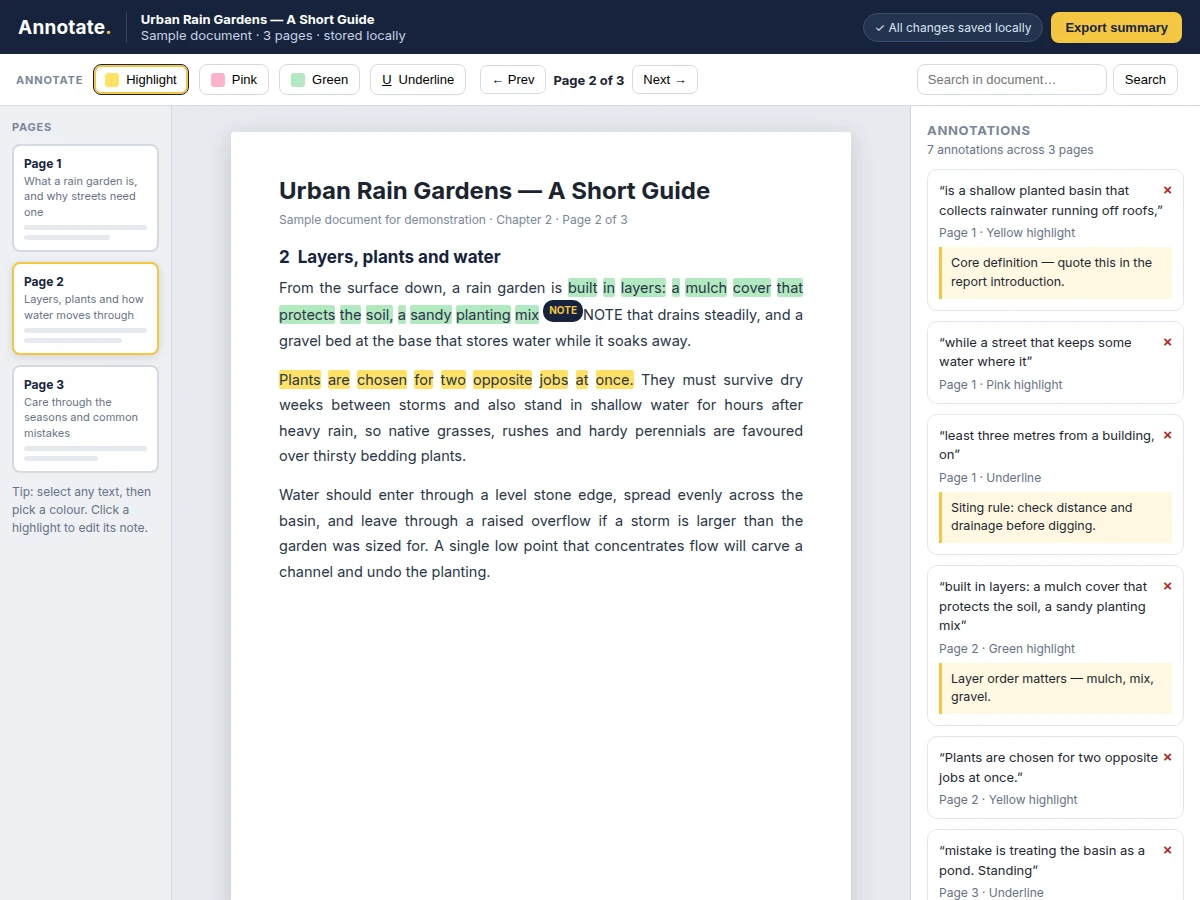
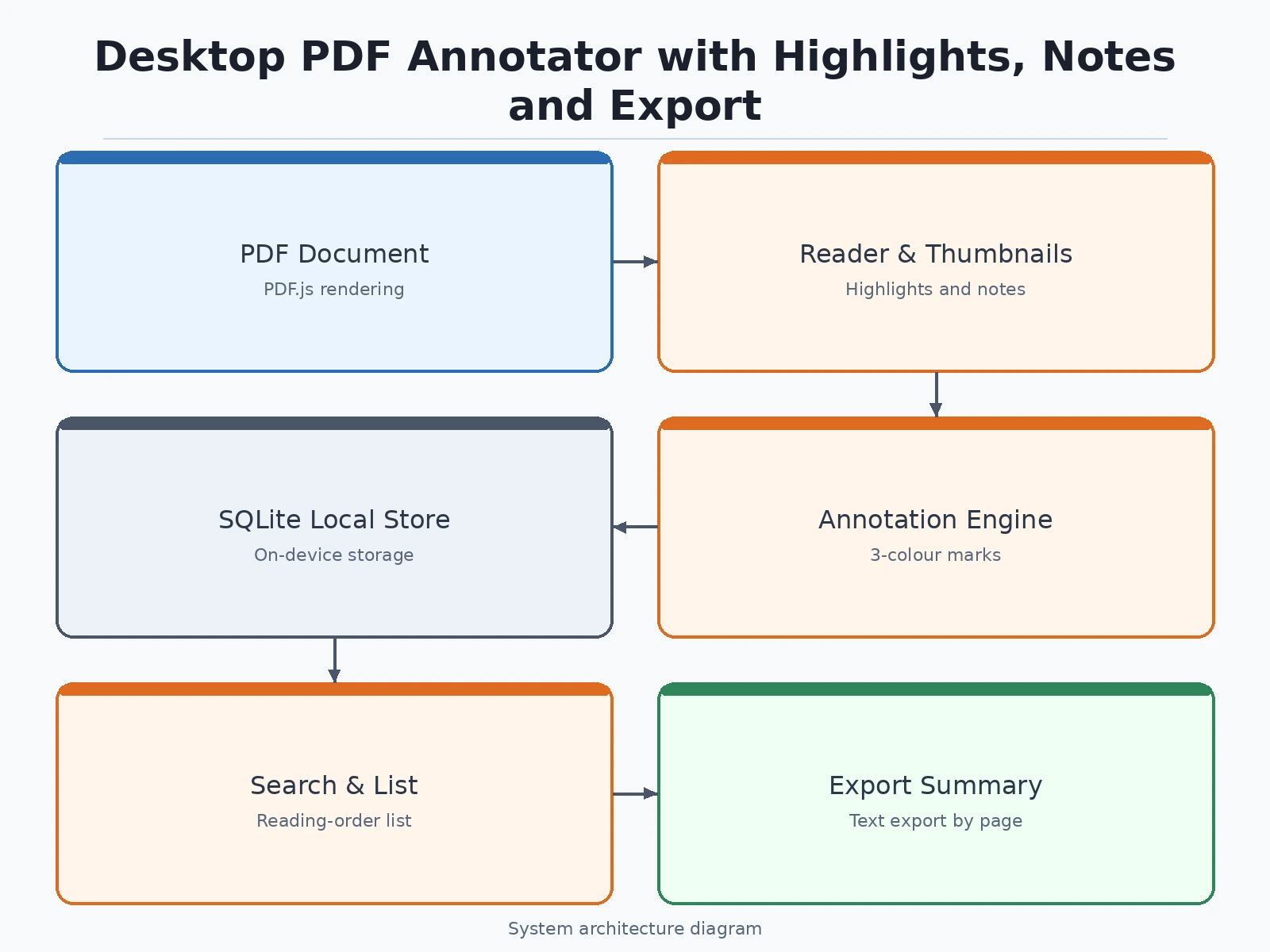
The application opens a document and renders its pages one at a time, with a thumbnail strip on one side and an annotation list on the other, so the reader always sees both the page and the marks made on it. When the reader selects a passage, the application records the selection as a page number, a paragraph position, and a word range inside that paragraph, rather than as a screen position, which is why an annotation survives page navigation and reopening the document: the same words are found again and the same mark is drawn over them. Notes attach to that same record, the list rebuilds itself from those records in reading order, search scans the same words for matches, and export walks the records page by page to produce the summary. In the full desktop build, the same record is converted into a real PDF annotation when the annotated file is exported.
- The reader opens a document, and the application renders its pages with selectable text and a thumbnail for each page.
- The reader selects a passage with the mouse and picks a highlight colour or underline from the toolbar.
- The application stores the annotation as a page number, paragraph position, and word range, and draws the mark over the selected words.
- The reader clicks a marked passage and types a note, which is pinned to that annotation and shown as a marker on the passage.
- The annotation list updates in reading order, showing the quoted passage, page number, mark type, and note for every mark.
- The reader searches the document text, and matching words are outlined with a match count while the view jumps to the first match.
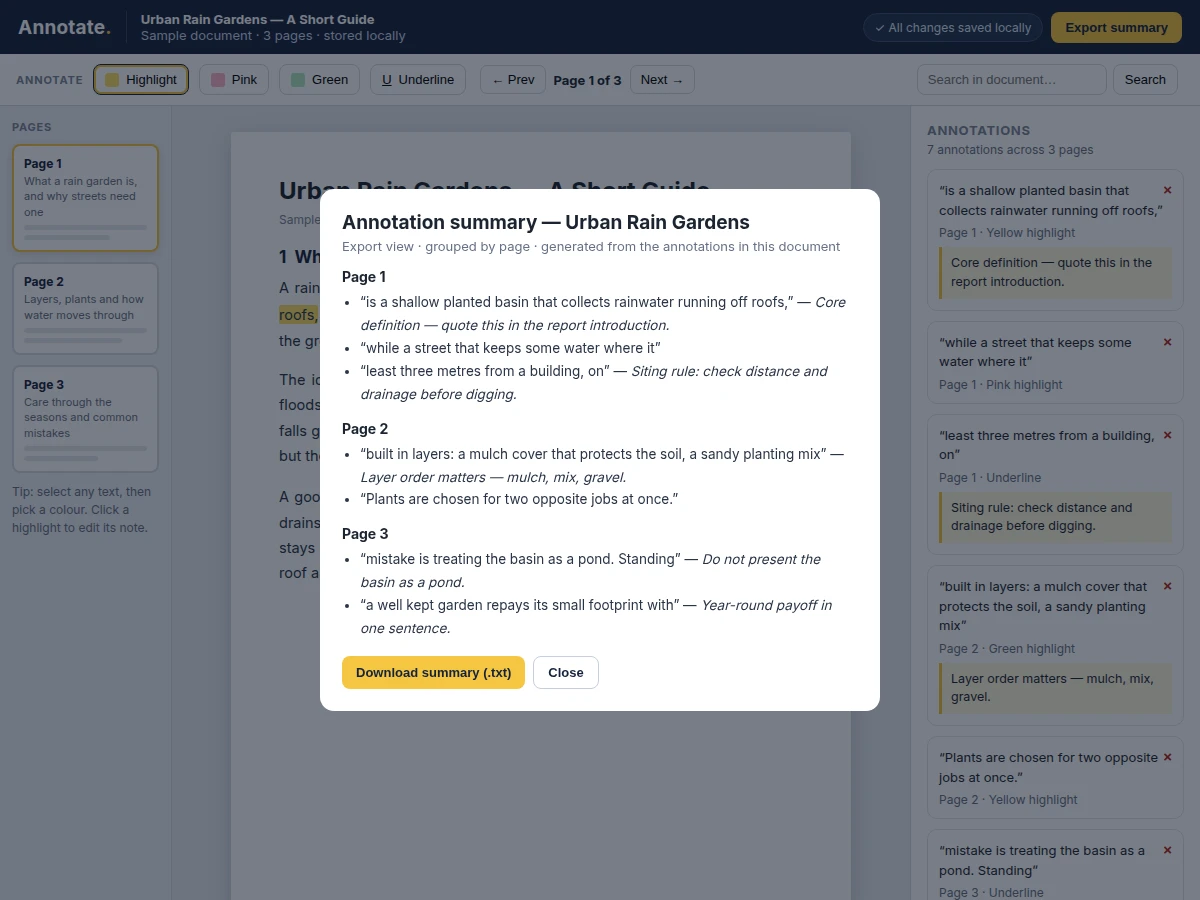
- The reader opens the export view, reviews the annotations grouped by page, and downloads the summary as a plain-text file; the full desktop build additionally exports an annotated PDF.
Tech stack:
- Electron · desktop packaging
- PDF.js · in-browser PDF rendering
- pdf-lib · annotated PDF export
- HTML · CSS · JavaScript
- SQLite · local annotation storage
- Node.js · desktop file access
| Parameter | Value |
|---|---|
| Platform | Windows, macOS, and Linux installers (design target, via Electron packaging) |
| PDF rendering | PDF.js, the Mozilla open-source PDF renderer (library fact) |
| Highlight colours | 3 colours in the demo: yellow, pink, and green (demo count) |
| Sample document in demo | 3 pages (demo count) |
| Pre-seeded annotations in demo | 7 annotations (demo count) |
| Annotation anchor | Page number · paragraph position · word range (demo design) |
| Storage in full build | Local SQLite database file on the reader's computer |
| Storage in demo | Local browser storage on the reader's computer |
| Export in demo | Plain-text annotation summary grouped by page |
| Export in full build | Annotated PDF through pdf-lib, plus the plain-text summary |
| Search scope | All pages of the open document (demo: 3 sample pages) |
| Internet requirement | None for annotating, searching, or exporting (offline-first design) |
| Document size | Dependent on the host computer's memory (expected) |
Project features
The annotator is built around four capabilities that work together: three-colour highlights and underlines for marking passages, sticky notes pinned to individual selections so a thought stays attached to the exact words it refers to, an annotation list that gathers every mark in reading order with its page number, and search plus export so the reader can find a passage again and carry their notes out of the application. Around those four, page thumbnails give fast navigation through a document, local storage keeps every annotation on the reader's own computer without an account, and the full desktop build adds annotated PDF export, so the marked document itself can be shared. Nothing in the base project needs a server, and nothing in the demo pretends to edit a real PDF file byte for byte.
- [Three-colour highlights and underlines] Select any passage and mark it in yellow, pink, or green, or underline it instead, so different kinds of importance stay visually distinct across a long document.
- [Sticky notes pinned to selections] Attach a short note to any highlight or underline; the note appears as a marker on the passage and in the annotation list, so the reasoning behind a mark is never separated from the text.
- [Page thumbnails and navigation] A sidebar shows one thumbnail per page with its opening line, and previous/next controls move through the document while every annotation stays attached to its own page.
- [Annotation list in reading order] Every mark is listed with its quoted passage, page number, mark type, and note, in the order it appears in the document, giving a complete revision trail at a glance.
- [Full-text search with match navigation] Search terms are outlined across the document with a match count, and the view jumps to the first match, so a passage found once can be found again.
- [Export summary grouped by page] One export view gathers all annotations under their page headings and downloads them as a plain-text summary, ready to paste into revision notes.
- [Local storage and offline use] Annotations are stored on the reader's own computer in the delivered build, so the application works without an internet connection and without uploading documents anywhere.
- [Desktop packaging] The delivered build is packaged as a desktop application, so it opens like any other program on the computer instead of living inside a browser tab.
Implemented in the demo, delivered in the full build, and future scope, kept separate: the HTML demo already implements highlights in three colours, underlines, sticky notes, page thumbnails, the annotation list, search, and the export summary view on a three-page sample document with seven pre-seeded annotations. The delivered desktop build adds real PDF rendering through PDF.js, a local SQLite store, Electron packaging, and annotated PDF export through pdf-lib. Cloud sync, shared annotations, and a mobile companion app are future scope only, and are not part of the base project.
What is included
- Complete desktop application source code with the annotation, search, and export features above
- Electron packaging setup for a desktop installer
- Single-file HTML demo of the annotator on a three-page sample document
- Setup instructions for running the application and opening a document
- Project report PDF covering background, design, implementation, and limitations
- PPT presentation for the final review
- Viva Q&A preparation document covering PDF rendering, annotation anchoring, local storage, and export
To request a quotation, message Projectech on WhatsApp with the project name, the scope you want (the base annotator, or the base annotator plus annotated PDF export), and your delivery date; Projectech replies with a quotation covering scope, price, and delivery timeline.
Limitations & prerequisites
- The HTML demo annotates rendered sample pages; it does not edit a real PDF file byte for byte, and that step belongs to the full desktop build through pdf-lib.
- Scanned or image-only PDFs carry no selectable text layer, so highlights need real text; optical character recognition is not part of the base project.
- Annotations are stored locally in the base project, so there is no sharing, syncing, or multi-device access without the future-scope cloud work.
- Very large documents render and search at a speed that depends on the host computer's memory and processor (expected), and no speed figure is claimed here.
- Annotation appearance can vary slightly between PDF viewers, because viewers render standard annotations with their own rules.
- This is an academic project build, not a replacement for a commercial PDF editor, and it does not include form filling, digital signatures, or document editing beyond annotation.
Frequently Asked Questions
Is this project suitable for a final-year project?
Yes, for Computer Science and IT programmes, because it combines a real desktop application with document rendering, local storage, and an export feature that a reviewer can open and test directly. The work demonstrates user-interface design, data modelling for annotations, file handling, and desktop packaging, and the report can explain each of those decisions from the working demo rather than from slides alone. A reviewer can also trace a single annotation from its highlighted words through its stored record to its line in the export summary.
Does the demo edit a real PDF file?
No, the HTML demo annotates rendered sample pages and stores each annotation as a page number, paragraph position, and word range, which is enough to demonstrate the full workflow honestly. The delivered desktop build goes further: it renders real PDF files through PDF.js and writes real annotations into an exported PDF through pdf-lib, and the documentation states which of the two you are looking at. That split is deliberate: the demo proves the interaction design, while the desktop build proves the file handling.
What is the main technology used?
PDF.js renders the document pages and provides the selectable text layer that highlights and search work on, while Electron packages the same web interface as a desktop application. The annotation records themselves are plain structured data stored locally, and pdf-lib is used in the full build to write annotations into an exported PDF file. Together those two libraries cover the two hard parts of the project, namely showing a real PDF and writing marks back into one.
Can it work without an internet connection?
Yes, the application is offline-first, because annotations are stored on the reader's own computer and no document is uploaded to any server for annotating, searching, or exporting. An internet connection is only needed once, to download the application itself and any library files it ships with, after which daily use is fully local. Your documents never leave the computer, which also keeps private study material out of any third-party service.
Can the annotation set be customised?
Yes, the highlight colours, the note field, and the export format can all be adjusted to a college's requirements, and extra mark types such as strike-through can be added as a customisation. Customisation changes the delivered build, not the demo, so the quotation states the exact scope before work starts. One example customisation is a subject tag on each note, so revision summaries can be filtered by topic.
What will I receive with the project?
You receive the complete desktop application source code, the Electron packaging setup, the single-file HTML demo, setup instructions, the project report, the review presentation, and the viva Q&A document. The quotation on WhatsApp confirms the exact scope, price, and delivery timeline before work starts, so there is no ambiguity about what is included. Delivery also includes a short walkthrough of the demo, so the features can be shown confidently at review time.
Components & software requirements
- Electron · desktop packaging
- PDF.js · in-browser PDF rendering
- pdf-lib · annotated PDF export
- HTML · CSS · JavaScript
- SQLite · local annotation storage
- Node.js · desktop file access
Delivery information
Built-to-order project. Delivery timeline is shared after order confirmation based on current queue.
Support terms
Complete documentation, setup guide, and viva preparation included. Support for setup and explanation provided.
Download free synopsis (PDF)
Enter your name and WhatsApp number — the synopsis PDF downloads immediately. We may send occasional project updates on WhatsApp; no spam.