
More project photos (2)
The problem
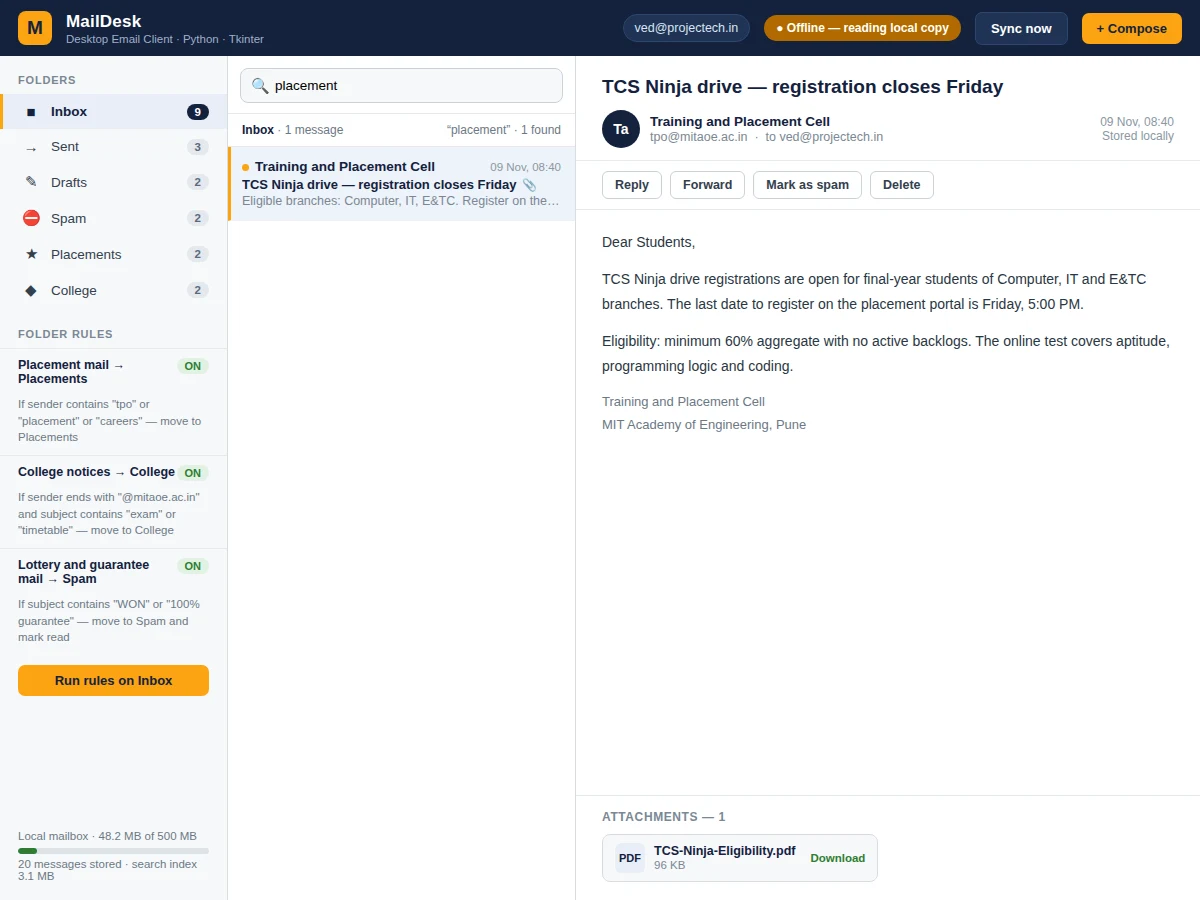
A desktop email client with offline search, folder rules and attachments is a Python application that gives a student their own mailbox on their own computer: it fetches mail from any IMAP provider, saves every message and attachment in a local SQLite database, and keeps the whole mailbox readable and searchable when the internet is gone. Webmail fails exactly when it is needed most — on a train, in a laboratory with weak Wi-Fi, or on a metered connection — and it forces the user to retype the same search for every old message. This project solves that by indexing every downloaded message in an SQLite FTS5 full-text index, so a search across subjects, senders and message bodies returns results from the local copy instead of waiting on a server. Folder rules sort new mail automatically by sender or subject, attachments are stored beside the database, and compose with attachments queues in the Outbox until the connection returns.
Placement notices, guide feedback and internship alerts pile up across inboxes; a local client keeps them searchable and filed.
IMAP/SMTP provider holding the mailbox
Follow the working sequence
How it works
Mail moves through the client in a short chain that a student can trace end to end. On sync, the app connects over IMAP with SSL on port 993 and downloads messages it has not seen before. Each message is parsed with Python's email package, stored in a local SQLite database, and its text is added to an FTS5 full-text index covering subject, sender and body. Folder rules then move each new message to its destination folder by sender or subject. When the user searches, the app issues one MATCH query against the index and displays the ranked results from the local copy, with no network call. Reading a message pulls the body and attachment list from the database, and sending goes the other way: compose writes to the Outbox, and SMTP on port 465 or 587 delivers it when the connection is available.
- The user enters the mail server, address and app password once; credentials go to the OS keyring, never to a plain-text file.
- On sync, imaplib connects over IMAP with SSL on port 993, selects each folder, and lists message IDs the local database has not seen.
- New messages are fetched and parsed with Python's email package; headers, body text and attachment metadata are stored in SQLite.
- The message text is added to an FTS5 virtual table covering subject, sender and body, so one MATCH query searches all three fields.
- Folder rules run over the new arrivals and move each message to its destination folder by sender, subject or attachment type.
- The Tkinter interface reads from the local database only, so browsing, searching and reading work with no connection at all.
- Sending uses smtplib over SMTP on port 465 or 587; a message composed offline waits in the Outbox and is sent on the next successful connection.
Tech stack:
- Python 3.10 or later
- Tkinter desktop UI
- imaplib · smtplib
- SQLite · FTS5 full-text index
- email · email.policy parsing
- keyring credential store
- PyInstaller packaging
- HTML · CSS · JavaScript web demo
| Parameter | Value |
|---|---|
| Platform | Windows, macOS and Linux desktops (expected) |
| Language and UI | Python 3.10 or later (expected) with Tkinter |
| Mail fetch | IMAP over SSL, port 993 (verified, Python documentation) |
| Mail send | SMTP over SSL/TLS, ports 465 or 587 (verified, Python documentation) |
| Local store | SQLite database, 1 file per account (expected) |
| Search index | SQLite FTS5 virtual table over subject, sender and body (verified, SQLite documentation) |
| Demo mailbox | 20 messages in the web demo (measured) |
| Search time | About 1–3 ms per query over the 20-message demo mailbox (measured in the web demo) |
| Design-target search | Under 1 second for a 500-message local mailbox (design target, unmeasured) |
| Attachment limit | 25 MB per file (design target) |
| Credentials | App password in the OS keyring, never stored in plain text (implemented) |
| Packaging | Single-file executable via PyInstaller, approximately 25 MB (expected) |
Project features
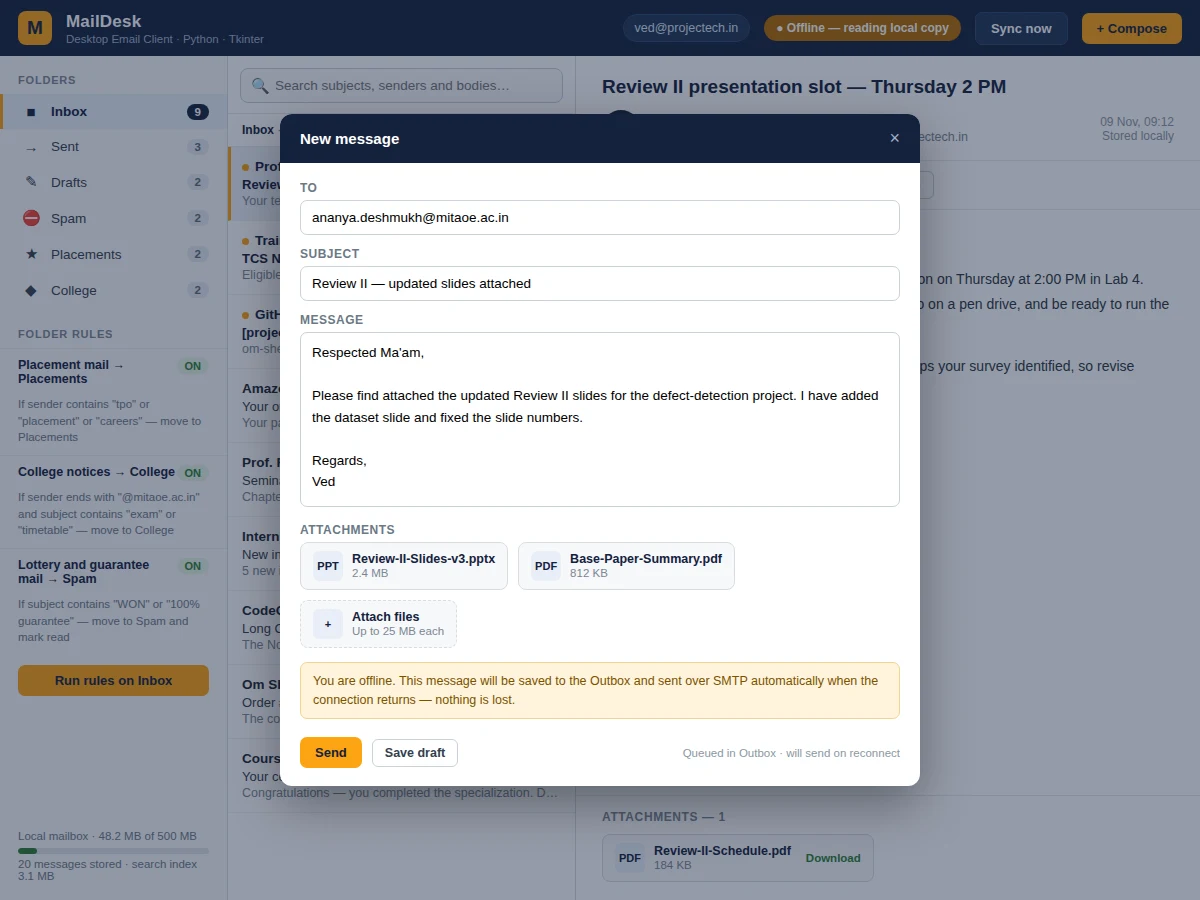
The client is built around four capabilities that matter most to a student. Offline full-text search indexes every downloaded message — subject, sender and body — in a single SQLite FTS5 virtual table, so one MATCH query covers all three fields and a search across the 20-message demo mailbox returns in about 1–3 ms (measured in the web demo). Folder rules run on every sync and on demand, moving mail by sender, subject or attachment type into folders the student defines, including a spam rule for obvious junk. Attachment handling downloads files beside the database, shows name and size before opening, and blocks oversized files at a 25 MB per-file design limit. Compose works offline too: a message written without a connection is saved to the Outbox and sent over SMTP automatically when the connection returns.
- [Offline full-text search] Every downloaded message is indexed by subject, sender and body in an SQLite FTS5 virtual table, so searches run against the local copy with no network call and return ranked results.
- [Folder rules] Rules match sender, subject or attachment type and move new mail automatically — placement mail to Placements, college notices to College, obvious junk to Spam — and can be re-run on the Inbox on demand.
- [Attachment download and preview] Attachments are saved beside the database with their original names, listed with file type and size before opening, and a 25 MB per-file design limit keeps the local store under control.
- [Offline compose with Outbox queue] A message written without a connection is saved to the Outbox with its attachments and sent over SMTP automatically when the connection returns.
- [Local SQLite mailbox store] Messages, folders and read state live in one local SQLite file per account, so the mailbox survives restarts and works fully offline after the first sync.
- [Secure credential handling] The account password is never stored in plain text; the app uses an app-specific password saved in the operating system's keyring, and the connection uses IMAP over SSL.
- [Optional: multiple accounts] Support for a second account with a unified inbox can be added as a customization; the base build ships with a single account.
What is included
- Complete Python source code (Tkinter UI, IMAP/SMTP sync, SQLite store, FTS5 search, folder rules, attachments)
- Working web demo of the client with a 20-message sample mailbox
- Project report PDF (background, protocols, architecture, methodology, results)
- PPT presentation for final review
- Viva Q&A preparation document (IMAP/SMTP, SQLite FTS5, credential handling, offline design)
- Setup guide with provider settings for common mail services
Limitations & prerequisites
- Sending mail and syncing new mail need an internet connection; only reading, searching and composing work offline.
- Gmail and similar providers require an app-specific password; the account password alone will not connect.
- Attachments over 25 MB per file are rejected by design; larger files must be shared by link.
- Search covers downloaded messages only — mail that has never been synced is never searchable.
- HTML mail renders as plain text in the base build; rich HTML rendering is an optional customization.
- The client is a teaching build, not a replacement for a production mail service — it does not implement spam filtering beyond the user's own rules.
Frequently Asked Questions
Does this email client work without internet?
Yes — reading, searching, organising and composing all work offline, because every downloaded message lives in a local SQLite database on your own computer. Only two actions need a connection: downloading new mail over IMAP and sending mail over SMTP. A message composed offline is saved to the Outbox and sent automatically when the connection returns, so no work is lost.
How does offline search work?
Every downloaded message is indexed in an SQLite FTS5 virtual table covering subject, sender and body, so one MATCH query searches all three fields against the local copy. FTS5 is SQLite's own full-text search module, and the demo build stores the three fields in a single table so a search needs no network call and no scan of every message row.
How are my email credentials stored?
They are not stored in plain text anywhere. The app asks for an app-specific password — the kind Gmail and similar providers issue for desktop apps — and saves it in the operating system's keyring, the same store browsers use. The connection itself runs over IMAP with SSL on port 993, and SMTP over SSL/TLS on port 465 or 587.
Can it handle attachments?
Yes — attachments are downloaded beside the database with their original file names, listed with file type and size before you open them, and a 25 MB per-file design limit keeps the local store under control, so you can open them without a connection. Files can be attached while composing offline, and they travel with the message when it is sent from the Outbox.
Can I add more accounts or change the rules?
Yes, both are realistic customizations available on request. A second account with a unified inbox can be added, and folder rules are plain sender, subject and attachment-type conditions that can be edited, enabled or disabled without touching the rest of the app. The base build ships with one account and three sample rules.
Is this project suitable for a final-year project?
Yes — for Computer Science and Information Technology programs. It demonstrates network protocols (IMAP/SMTP), local database design with full-text search, desktop UI development in Tkinter, and secure credential handling, all in one working application with a clear offline-versus-online boundary and a working demo to show the panel.
Components & software requirements
- Python 3.10 or later
- Tkinter desktop UI
- imaplib · smtplib
- SQLite · FTS5 full-text index
- email · email.policy parsing
- keyring credential store
- PyInstaller packaging
- HTML · CSS · JavaScript web demo
Delivery information
Built-to-order project. Delivery timeline is shared after order confirmation based on current queue.
Support terms
Complete documentation, setup guide, and viva preparation included. Support for setup and explanation provided.
Download free synopsis (PDF)
Enter your name and WhatsApp number — the synopsis PDF downloads immediately. We may send occasional project updates on WhatsApp; no spam.