
More project photos (3)
The problem
Most students read email in a web browser, so they never see how an email client works underneath: how a message is composed and handed to an SMTP server, how an inbox is fetched over IMAP, or where a message lives after download. A desktop email client makes all of that visible and buildable in one project. This project builds a desktop email client in Java that connects to the user's own mail account — Gmail or any provider supporting standard protocols — and shows it in a three-pane window with folders, a message list and a reading pane. It sends mail through SMTP, reads mail through IMAP or POP3, stores messages locally for offline reading, and supports attachments, search, and an address book. In short: IMAP keeps mail on the server and syncs flags, while POP3 downloads messages and removes them from the server by default — that one difference decides whether a second device still sees the mail.
Builder note from the demo build: the demo ships with 12 realistic messages across 4 folders, and the inbox renders from local data with no server round-trip, which is why search feels instant. The client is honest about its scope: it connects to the user's own account with an app password and never hosts mail itself.
Holds the mailbox on IMAP port 993 or POP3 port 995.
Follow the working sequence
How it works
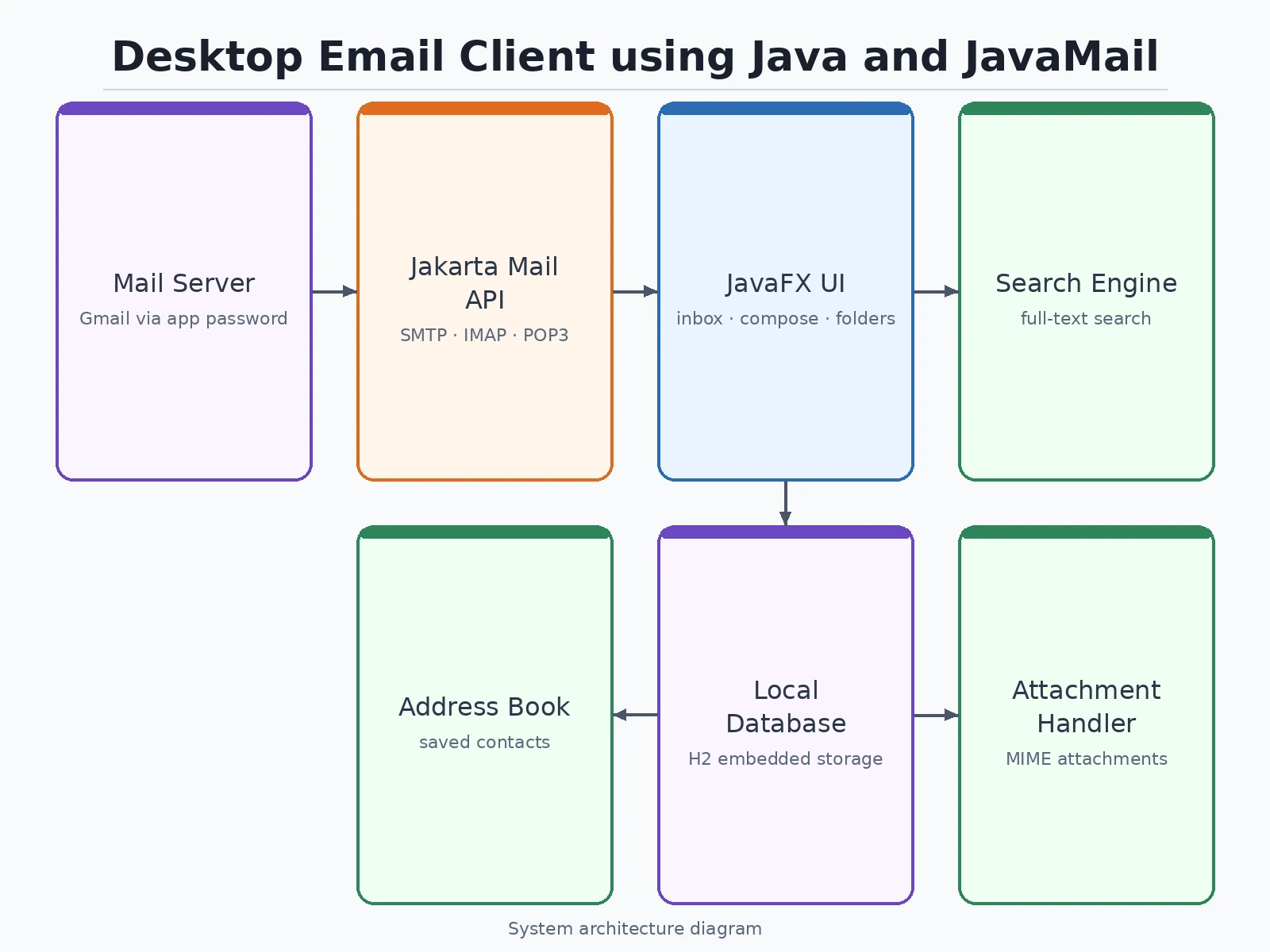
Mail moves through the client in a line from the user to the mail server and back. The user types in the JavaFX interface — a three-pane window with folders, a message list and a reading pane — and every action becomes a call into the Jakarta Mail service layer. To send, the compose window builds a MIME message with the subject, body and any attachments, then Jakarta Mail opens an SMTP session to the provider's server on port 587 with STARTTLS (or 465 with SSL) and hands the message over after login with an app password. To read, the client opens an IMAP session on port 993, fetches message headers and bodies, and writes them into a local embedded database, so the inbox is rendered from local storage and stays readable offline. Flags read, starred and deleted are written back to the server over the same IMAP session, and search runs against the local database rather than the network.
- The user adds an account in the settings window: name, email address, provider servers, ports and an app password, stored locally with the password kept in the operating system's credential store.
- On launch the JavaFX interface opens the three-pane layout and loads folders and messages from the local embedded database.
- On refresh, Jakarta Mail opens an IMAP session on port 993 with SSL, fetches new message headers and bodies, and writes them into the local database.
- Clicking a message shows its full body and attachments in the reading pane and marks it read; the read flag syncs back to the server over IMAP.
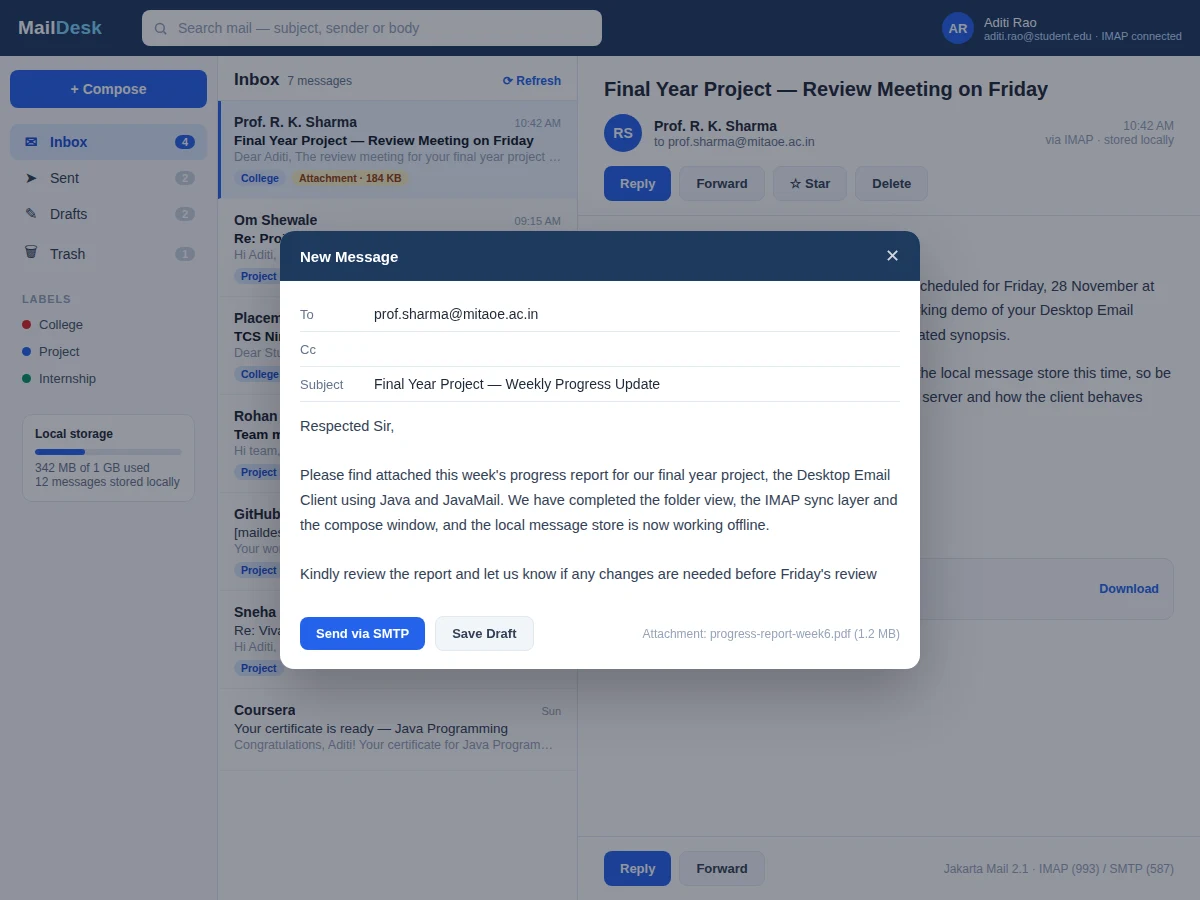
- The compose window builds a MIME message from the To, Cc, Bcc, subject and body fields, attaching any selected files as MIME parts.
- On send, Jakarta Mail opens an SMTP session on port 587 with STARTTLS (or 465 with SSL), authenticates with the app password, and hands the message to the provider's server; a copy is saved in Sent.
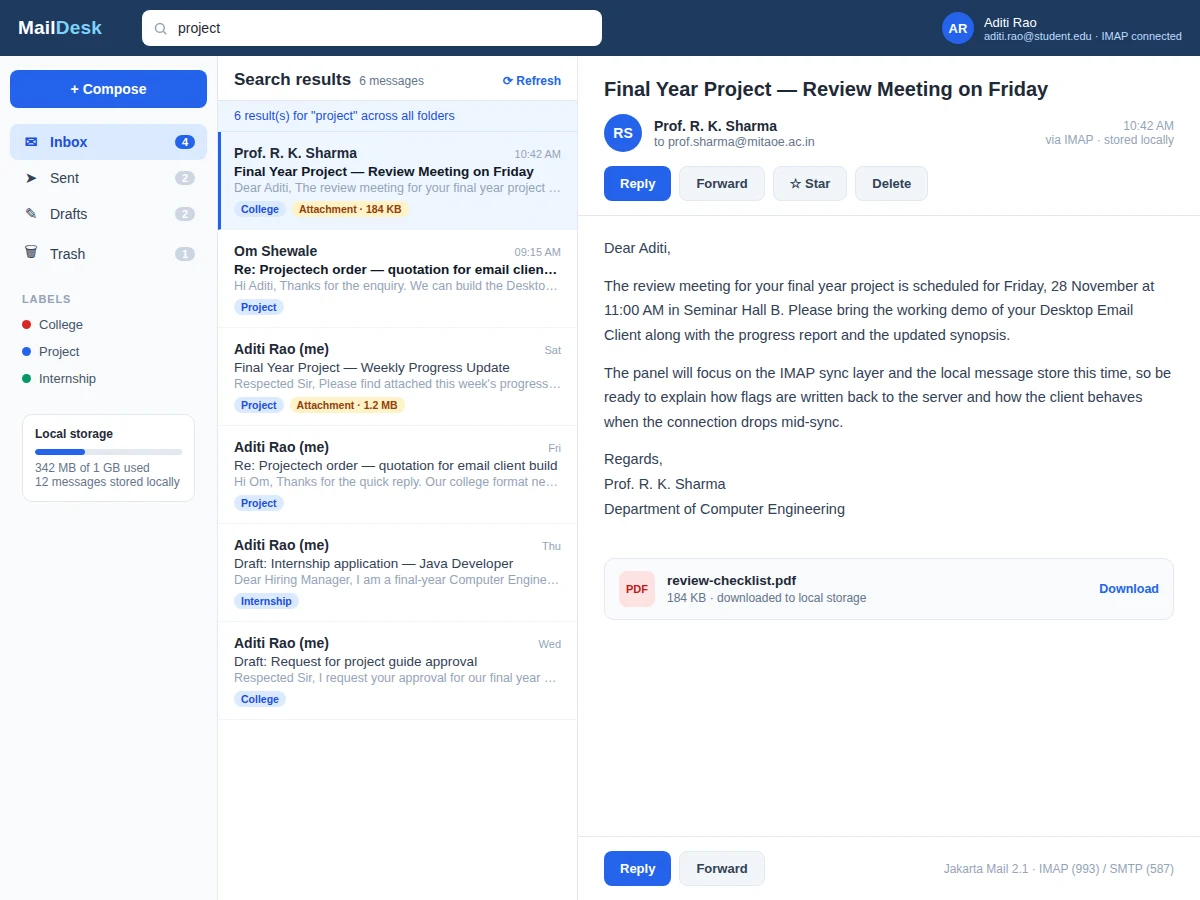
- Search runs against the local database across subject, sender and body, and drafts are autosaved locally until sent or discarded.
Tech stack:
- Java 21 LTS
- JavaFX 21 LTS · OpenJFX
- Jakarta Mail 2.1 · Angus Mail
- H2 embedded database
- Maven
- JavaFX CSS styling
- JUnit 5
- Git
| Parameter | Value |
|---|---|
| Platform | Desktop application for Windows · macOS · Linux |
| Language | Java 21 LTS |
| UI toolkit | JavaFX 21 LTS (OpenJFX) |
| Mail API | Jakarta Mail 2.1 with Angus Mail provider |
| Send protocol | SMTP — port 587 with STARTTLS, or port 465 with SSL (standard ports) |
| Read protocol | IMAP — port 993 with SSL, or POP3 — port 995 with SSL (standard ports) |
| Local storage | H2 embedded database, approximately 10 MB per 1,000 messages (design target) |
| Folders | 4 built-in folders (Inbox · Sent · Drafts · Trash) plus custom folders |
| Attachments | Up to 25 MB per message (design target; provider limit applies) |
| Demo mailbox | 12 sample messages across 4 folders (demo build) |
| Search | Full-text search across subject · sender · body |
| Build | Maven, single executable JAR (design target) |
Project features
The client is built around four capabilities that cover the whole daily email workflow. First, a folder-based inbox with Inbox, Sent, Drafts and Trash plus custom folders, so messages are organised the way every desktop mail application organises them. Second, compose and send through SMTP, with a rich-text editor, file attachments, and a copy saved automatically in Sent. Third, reading through IMAP or POP3 with messages stored locally in an embedded database, so mail can be read and searched offline and read, starred and deleted flags sync back to the server. Fourth, search and an address book: full-text search across subject, sender and body finds any message in seconds, and contacts are saved once and reused in every compose window. Together these four make the project a complete, working mail client rather than a send-only demo, and each one maps to a concrete Java and Jakarta Mail concept the student can explain in a viva.
- [Folder-based inbox] Inbox, Sent, Drafts and Trash folders plus custom folders the user can create, rename and delete, with unread counts shown beside each folder name.
- [Compose and send via SMTP] A compose window with To, Cc, Bcc, subject and a rich-text body, file attachments, and automatic saving of the sent copy in the Sent folder.
- [Read mail via IMAP or POP3] Messages are fetched from the provider's server with Jakarta Mail and stored in a local embedded database, so the inbox opens from local storage.
- [Full-text search] Search across subject, sender and body finds any downloaded message, with results shown in the same message list as the inbox.
- [Attachments] Send files as MIME attachments and download attachments from received messages to the local machine.
- [Address book] Contacts are saved with name and email address, with auto-complete in the To field and one-click compose from any contact.
- [Offline reading and flags] Downloaded messages can be read offline; read, starred and deleted flags sync back to the server over IMAP when the connection returns.
What is included
- Complete Java source code (JavaFX interface + Jakarta Mail service layer)
- Working demo build with a 12-message sample mailbox
- Account setup guide (provider servers, ports, app-password creation)
- Project report (background, protocols, architecture, methodology, results)
- Presentation for final review
- Viva question-and-answer document
- Project abstract PDF
Limitations & prerequisites
- This is a mail client, not a mail server: it cannot send or receive mail without the user's own provider account.
- Gmail and most providers reject the normal account password from desktop clients; sign-in needs a 16-character app password or OAuth 2.0, and OAuth 2.0 is listed as future scope.
- No calendar, no end-to-end encryption and no spam filtering of its own; those are the provider's job.
- Local storage is per-machine; multi-device sync is only what IMAP itself provides.
- Initial sync time depends on mailbox size and connection speed; very large mailboxes take longer on first run.
- Attachments are limited by the provider (Gmail allows up to 25 MB per message).
- The client is an academic build, not a hardened production mail application; it has no enterprise-grade security audit.
Frequently Asked Questions
Is this project suitable for a final-year project?
Yes. It fits Computer Science and Information Technology final-year work because it combines a real desktop interface in JavaFX, the Jakarta Mail API, standard email protocols (SMTP, IMAP, POP3), local database storage and multithreaded background sync — five distinct concepts a student can demonstrate and defend. The report and viva kit map each concept to the code that implements it.
Does this project need its own mail server?
No. The client connects to the user's existing mail account — Gmail, Outlook, Yahoo or a college mail server — using the provider's standard IMAP and SMTP servers, so no server is built or hosted, and setup is only a matter of entering the provider's server addresses in the settings file. The student only needs an email account and, for Gmail, a 16-character app password, because Google no longer accepts a normal account password from desktop mail apps.
Which protocols and ports does it use?
It sends mail with SMTP on port 587 using STARTTLS, or port 465 with implicit SSL, and reads mail with IMAP on port 993 with SSL, or POP3 on port 995 with SSL. These are the standard ports every mail provider publishes, and the client reads them from a settings file so switching providers means changing configuration, not code.
Can I use it with Gmail?
Yes. Gmail works through its standard servers — imap.gmail.com on port 993 and smtp.gmail.com on port 587 — but sign-in needs a 16-character app password created in the Google account, since Gmail rejects the normal account password from third-party mail clients. The setup guide walks through creating the app password step by step.
Can the client work offline?
Partly. Messages already downloaded can be read, searched and organised offline because they live in the local embedded database, and drafts can be written offline too, so the client stays useful on a train or in a hostel with no Wi-Fi. Sending, receiving new mail and syncing read flags all need an internet connection, since those actions talk to the provider's SMTP and IMAP servers.
What will I receive with the project?
You receive the complete Java source code for the JavaFX interface and the Jakarta Mail service layer, a working demo build with a sample mailbox, the account setup guide, the project report, a presentation, and a viva question-and-answer document for your review. The abstract PDF is included, and the code is delivered ready to run with Maven.
Components & software requirements
- Java 21 LTS
- JavaFX 21 LTS · OpenJFX
- Jakarta Mail 2.1 · Angus Mail
- H2 embedded database
- Maven
- JavaFX CSS styling
- JUnit 5
- Git
Delivery information
Built-to-order project. Delivery timeline is shared after order confirmation based on current queue.
Support terms
Complete documentation, setup guide, and viva preparation included. Support for setup and explanation provided.
Download free synopsis (PDF)
Enter your name and WhatsApp number — the synopsis PDF downloads immediately. We may send occasional project updates on WhatsApp; no spam.