
More project photos (3)
The problem
Finding one phone number in a long, unsorted list is slow when contacts live in scattered notes, phone memories, and old spreadsheets, and copying them between devices usually means retyping entries or losing fields along the way. The Desktop Contact Book App with Search and CSV Export (Python) answers that problem with a single offline desktop app: every contact lives in one local SQLite database, a search box filters the list as each character is typed, and the whole list exports to a standard CSV file that any spreadsheet app can open. Building it teaches the complete desktop-data loop — a graphical window, a local database, and a portable file format — without needing a server, an account, or an internet connection. Because the database is a single file on the student's own computer, the project stays easy to demonstrate and easy to explain in a review, while the CSV export proves the data is never locked inside the app.
The scope is deliberately narrow, and that narrowness is the point. Search and CSV exchange are the core of this build, and nothing else competes with them: there is no group organisation and no birthday-reminder system in the base build, so the code, the report, and the demonstration all stay focused on storing contacts well, finding them fast, and moving them in and out through CSV. All contacts shown in the demo are sample data, clearly labelled as such, and no real person's details are used anywhere in the build.
The student opens the desktop contact book app.
Follow the working sequence
How it works
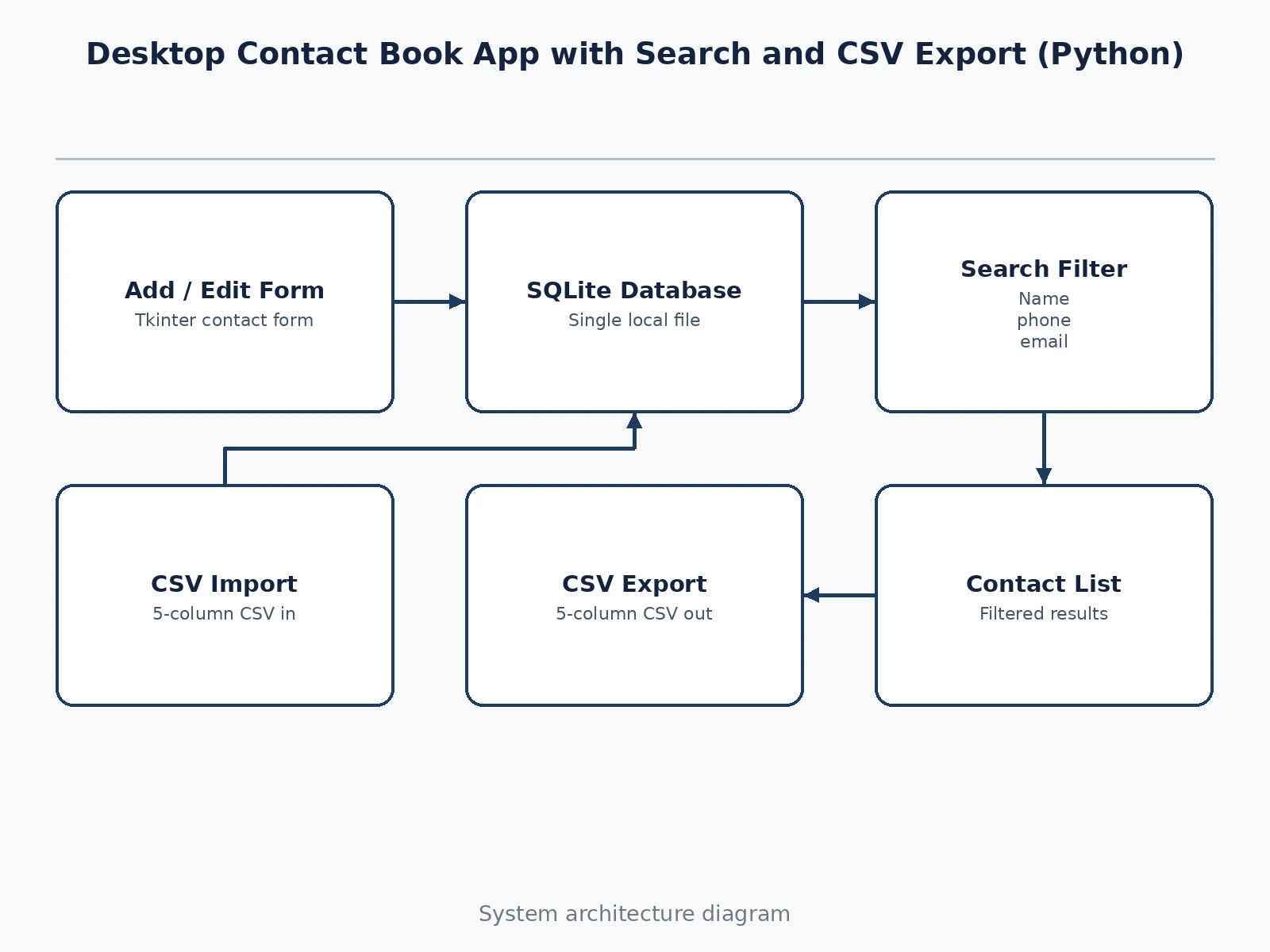
A contact's journey through this app follows one short, complete loop: it is typed into a form, saved as a row in a local SQLite database, found again in seconds through the search box, and carried out of the app as a line in a CSV file that any spreadsheet can read. Adding stores the five fields — name, phone, email, address, and notes — as one database row, editing updates that same row, and deleting removes it. Searching reads the stored rows and keeps only the ones whose name, phone, or email contains the typed text, so the list narrows on each keystroke. Exporting walks the stored rows in order and writes each one as a CSV line, quoting any field that contains a comma or a quote, and importing reverses that walk by reading a CSV file back into rows.
- The user opens the desktop app, which creates the local SQLite database file on first run if it does not already exist.
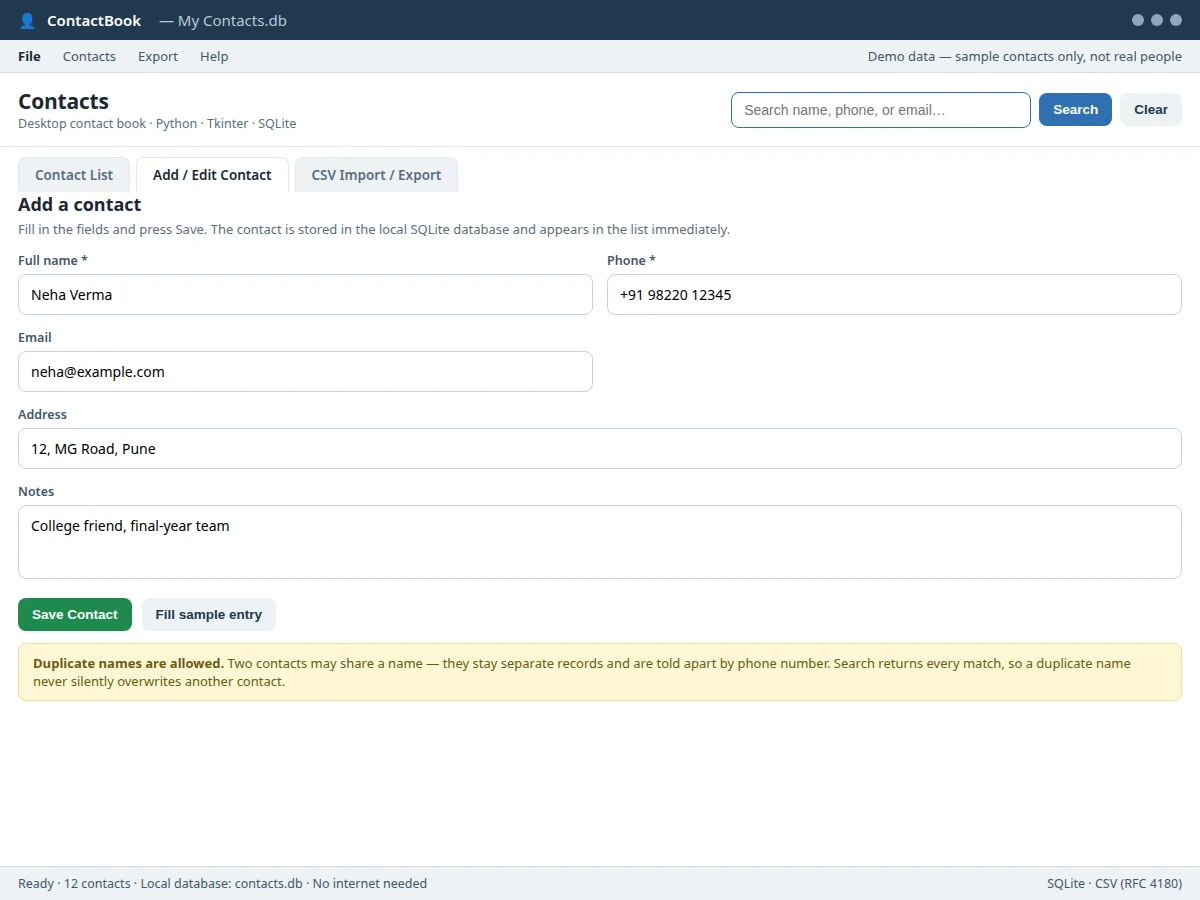
- The user adds a contact through the form, and the app saves the 5 fields as one new row in the database.
- The contact list reads all stored rows and shows them in a table, with the newest or selected contact visible immediately.
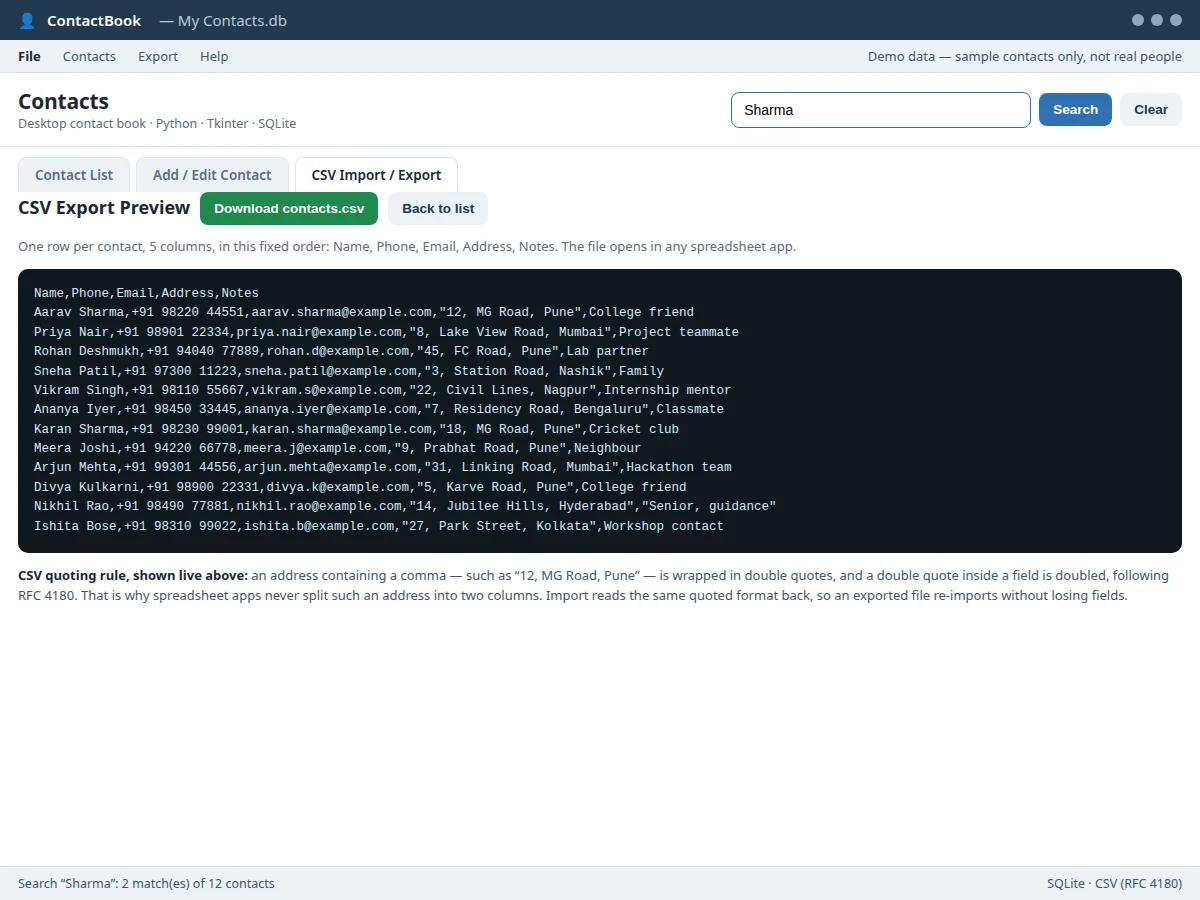
- The user types into the search box, and the list filters on each keystroke to only the rows whose name, phone, or email contains the typed text.
- The user edits a contact to correct a number or address, and the app updates that row in place without touching any other contact.
- The user exports the list, and the app writes every row to a CSV file with 5 columns in a fixed order, quoting fields that contain commas or quotes.
- The user imports a CSV file in the same 5-column order, and the app reads each line back into a new database row, skipping the header line.
Builder note from the demo build: this page's demo build ships 12 sample contacts across 5 CSV columns, and its search was checked live — typing "Sharma" narrows the 12-contact list to 2 matching contacts. SQLite plus CSV was chosen over a spreadsheet file because a single-file database gives proper add, edit, and delete behaviour while CSV keeps the data portable, and the demo's duplicate-name rule and comma-quoting rule both come from edge cases found while building that demo.
Tech stack:
- Python 3
- Tkinter · standard-library GUI toolkit
- sqlite3 · standard-library database module
- csv module · standard-library CSV reader and writer
- SQLite · single-file local database
- RFC 4180 CSV format
| Parameter | Value |
|---|---|
| Contact fields | 5 fields per contact: name · phone · email · address · notes (design) |
| Demo contacts | 12 sample contacts in the demo build (demo build) |
| CSV columns | 5 columns in fixed order: Name · Phone · Email · Address · Notes (design) |
| Database | 1 SQLite file stored locally · no server required (design) |
| Search fields | Name · phone · email searched as typed text (design) |
| Search behaviour | List filters on each keystroke over the loaded contacts (demo build) |
| CSV quoting | RFC 4180: comma fields quoted · embedded quotes doubled (standard) |
| Duplicate names | Allowed · separate records distinguished by phone number (design) |
| Internet needed | None for local use · all core functions offline (design) |
| Platform | Desktop · runs with Python on Windows · macOS · Linux (design) |
| Import format | CSV file with the same 5-column order · header line skipped (design) |
Project features
This contact book is built around four capabilities that work together: instant search across names, phone numbers, and email addresses; full add, edit, and delete handling for every contact; a local SQLite database that needs no server; and CSV import and export that moves the whole list in and out of spreadsheet apps without losing fields. Duplicate names are handled as separate records rather than overwriting each other, and every screen works offline, so the app is usable and demonstrable anywhere. Search is the capability students demonstrate first, because a typed query narrows the list on every keystroke; storage is the second, because one local file holds the whole book; and CSV exchange is the third, because it proves the data can leave the app intact and come back again. The features below describe exactly what the base build contains, with optional customisation and future scope kept separate at the end of the list.
- [Instant multi-field search] Typing in the search box filters the contact list on each keystroke across the name, phone, and email fields, and a count line shows how many contacts match out of the full list.
- [Add, edit, and delete contacts] A form adds a new contact, an edit action updates any field of an existing contact, and a delete action removes a contact after confirmation, with the list refreshing immediately after every change.
- [Local SQLite storage] Every contact is stored as one row in a single local SQLite database file, so the app needs no server, no account, and no internet connection, and the whole address book can be backed up by copying one file.
- [CSV export] The full contact list exports to a CSV file with 5 columns in a fixed order — Name, Phone, Email, Address, Notes — ready to open in any spreadsheet app.
- [CSV import] A CSV file in the same 5-column order imports back into the database, so a list exported from a spreadsheet can be loaded into the app without retyping.
- [Duplicate-name handling] Two contacts may share the same name and remain separate records, told apart by their phone numbers, so saving a second person with an existing name never overwrites the first.
- [RFC 4180 CSV quoting] Fields containing commas, such as an address like "12, MG Road, Pune", are wrapped in double quotes on export, and a double quote inside a field is doubled, so spreadsheet apps never split one field into two columns.
- [Fully offline desktop operation] The app runs as a desktop window on the student's own computer, with no cloud service and no network dependency for any of its core functions.
Optional customisation (not in the base build, available on request): extra contact fields, a different field order in the CSV file, and a packaged desktop executable. Future scope (not implemented): group organisation, birthday reminders, and cloud synchronisation.
What is included
- Complete Python source code for the desktop app (Tkinter window, SQLite storage, CSV import and export)
- Local SQLite database file with the schema and 12 sample contacts for demonstration
- Setup instructions for running the app with a standard Python installation
- Project report covering the design, the database schema, the search logic, and the CSV format rules
- Project abstract PDF matching this page
- Demo walkthrough showing add, search, edit, export, and import
- Presentation slides for the project review
- Request a quotation on WhatsApp: share this project name, any extra fields or CSV order you need, and your needed delivery date, and Projectech will confirm the scope, the price and the delivery timeline before the build starts.
Limitations & prerequisites
- Single-user local app: there is no login system, no multi-user access, and no cloud synchronisation in the base build.
- Search matches typed substrings in the name, phone, and email fields; it does not correct spelling or guess a name the user mistypes.
- CSV import expects the same 5-column order as the export; a file with different columns or extra columns needs its columns mapped first.
- Phone and email entries are checked only for basic format; the app does not verify that a number or address genuinely belongs to the contact.
- No performance figure is claimed for very large contact lists, since the build was tested with the 12-contact demo list and not measured at larger sizes.
- Group organisation and birthday reminders are not in the base build; they are future scope only.
- Desktop only: there is no mobile app version in the base build.
Frequently Asked Questions
Is this project suitable for a final-year project?
Yes — Computer Engineering and Information Technology final-year students can use this project, because it demonstrates a complete desktop application: a Tkinter graphical interface, a SQLite database supporting create, read, update, and delete operations, and file handling through the CSV format. The scope stays contained enough to build, test, and explain fully, while the search logic and CSV quoting rules give the review discussion genuine technical depth.
What is the main technology used?
Python with its standard library is the main technology throughout: Tkinter builds the desktop window, sqlite3 stores the contacts in a local database file, and the csv module reads and writes the export files, and no external framework and no server are required for any part of the build. It therefore runs from a standard Python installation on the student's own computer.
Does this project need an internet connection?
No — every core function, including adding, editing, deleting, searching, importing, and exporting contacts, runs locally on the student's own computer without any network connection, because the database is a local file and the CSV files are written to the same computer. An internet connection is only needed once, to download Python itself if it is not already installed.
How does CSV export handle commas inside an address?
It follows the RFC 4180 quoting rule: a field containing a comma is wrapped in double quotes, and a double quote inside a field is written as two double quotes, so a spreadsheet app keeps an address such as "12, MG Road, Pune" in one column. The app's own import reads the same quoted format back, so an exported file re-imports without losing fields.
How is this different from a contact manager with groups and birthday reminders?
This build deliberately leaves groups and birthday reminders out of its core, so its code, report, and demonstration stay focused on one job: storing contacts well, finding them fast, and exchanging them through CSV, rather than spreading effort across reminder scheduling and group management that the brief never asked for. Groups and reminders can be added later as customisation, but they are not claimed as part of the base build.
Can this project be customised?
Yes — extra contact fields can be added to the form and the database, the CSV column order can be changed to match a college format, and a packaged desktop executable can be produced for the finished app on request. Larger additions such as group organisation, birthday reminders, or cloud synchronisation are possible as separate development work, with scope and timeline agreed before the build starts.
Components & software requirements
- Python 3
- Tkinter · standard-library GUI toolkit
- sqlite3 · standard-library database module
- csv module · standard-library CSV reader and writer
- SQLite · single-file local database
- RFC 4180 CSV format
Delivery information
Built-to-order project. Delivery timeline is shared after order confirmation based on current queue.
Support terms
Complete documentation, setup guide, and viva preparation included. Support for setup and explanation provided.
Download free synopsis (PDF)
Enter your name and WhatsApp number — the synopsis PDF downloads immediately. We may send occasional project updates on WhatsApp; no spam.