
More project photos (2)
The problem
A desktop bulk email sender is a standalone application that turns one message template into individually addressed emails for a whole contact list, sends them through a standard SMTP server at a controlled rate, and keeps a per-recipient record of what happened to each message. This project builds exactly that in Python: a template editor with placeholders such as first name, college and event date, a CSV contact importer that validates addresses and drops duplicates, a send queue that respects a configurable hourly rate limit, and a delivery log that records the SMTP reply code for every recipient. Everything runs on the user's own machine with no cloud subscription, and the app is built for sending to people who opted in — it is honest about its limits, because delivery tracking records SMTP acceptance, not inbox placement.
The problem it solves is practical — clubs, departments and small teams regularly need to invite hundreds of people to a workshop, share a newsletter or distribute certificates, and doing that from a personal inbox means copy-pasting addresses, losing track of bounces and tripping the provider's spam filters. A dedicated desktop tool keeps the list, the template and the send history in one place, on one machine, with no monthly subscription, so the organiser can prove afterwards exactly which addresses accepted the mail and which bounced.
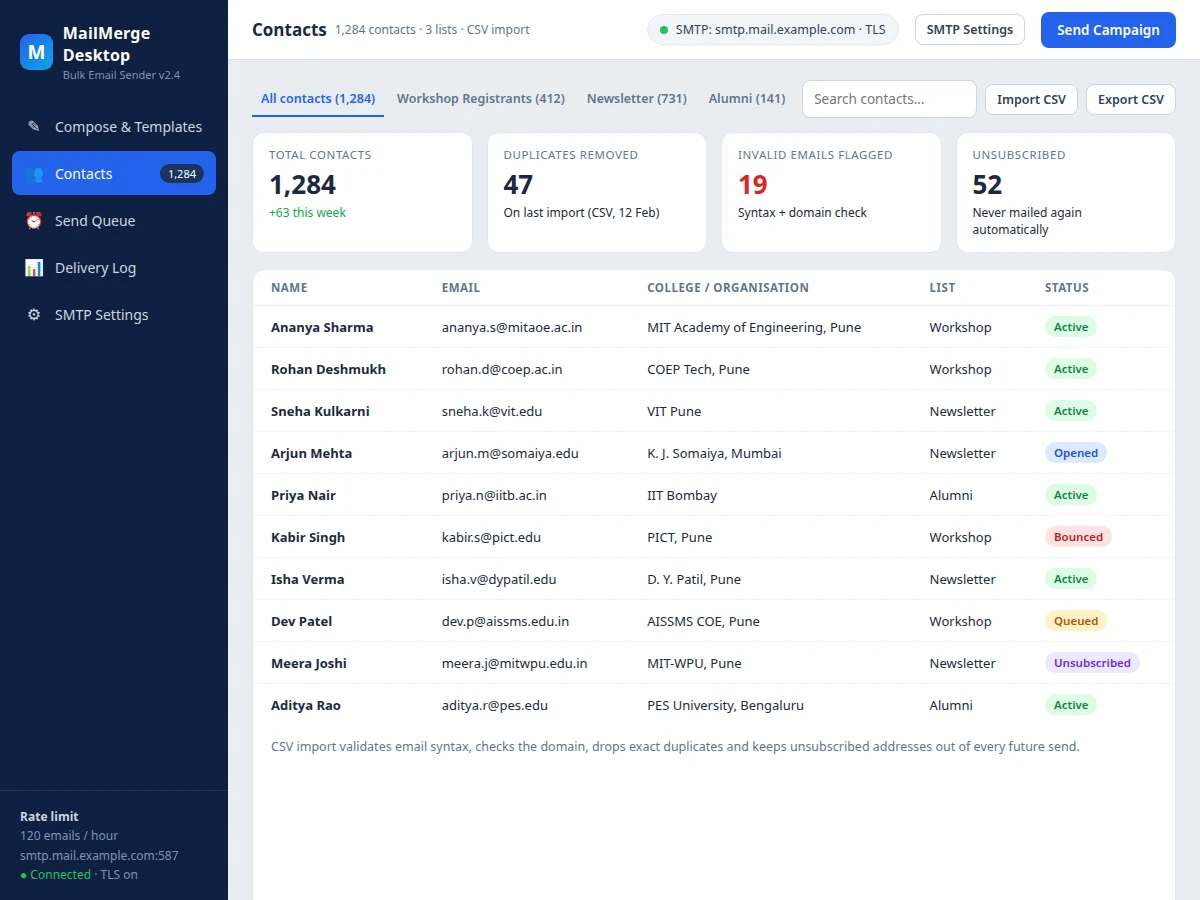
Imports contacts and writes one template for all.
Follow the working sequence
How it works
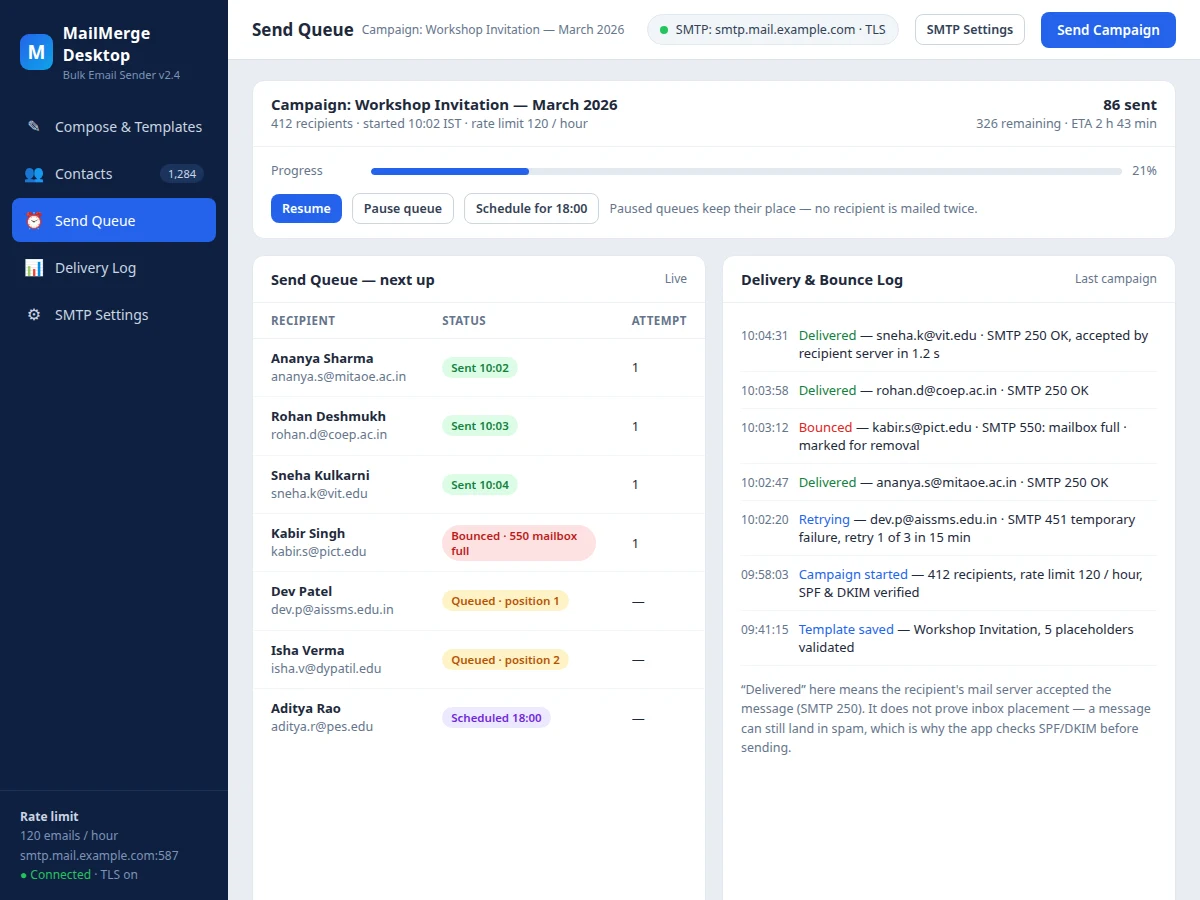
The campaign runs end to end in seven stages. First the sender's SMTP account is configured once and the app tests the connection, checking that SPF and DKIM records exist for the sending domain. Contacts are then imported from a CSV file, validated, de-duplicated and split into lists. The message is written in the template editor with placeholders, and the preview is checked against two or three real contacts. When the campaign starts, the queue takes recipients one by one, substitutes their fields into the template, and hands each finished message to the SMTP server at the configured rate, never faster. For every recipient the server's reply is logged: 250 means the message was accepted, 550 means it bounced, and 451 means a temporary failure that the app retries up to three times. The campaign ends with a summary of accepted and bounced messages, and bounced addresses are flagged so the next campaign starts from a cleaner list.
- Configure the SMTP account once (server, port 587, STARTTLS, username and password) and run the built-in connection test; the app also checks SPF and DKIM for the sending domain.
- Import contacts from a CSV file — the app validates email syntax, checks domains, removes exact duplicates and excludes unsubscribed addresses.
- Write the message in the template editor using placeholders ({{first_name}}, {{college}}, {{event_date}}) and save it as a reusable template.
- Preview the finished email for two or three real contacts to confirm every placeholder fills correctly before anything is sent.
- Start or schedule the campaign; the send queue releases messages at the configured rate (120 per hour by default) and can be paused and resumed safely.
- For each recipient, the app records the SMTP reply — 250 accepted, 550 bounced, 451 temporary failure with up to 3 automatic retries 15 minutes apart.
- Review the delivery log and campaign summary, export the log to CSV for the report, and remove hard-bounced addresses from the list.
Tech stack:
- Python 3 (Tkinter desktop GUI)
- smtplib · email.message (SMTP sending)
- SQLite (contacts + campaign log storage)
- CSV module (contact import/export)
- Threading + queue (throttled send queue)
- TLS / STARTTLS (encrypted SMTP, port 587)
- ReportLab (campaign log export to PDF)
- Git
| Parameter | Value |
|---|---|
| Platform | Windows desktop application (Python) |
| Language | Python 3 with Tkinter GUI |
| Email protocol | SMTP, port 587 with STARTTLS (design target) |
| Default rate limit | 120 emails per hour, user-configurable |
| Contact import | CSV file, approximately 10,000 contacts per list (design target) |
| Placeholders | 5 built-in fields in the demo template (first name, last name, college, event date, unsubscribe link) |
| Delivery record | SMTP reply code + timestamp + retry count per recipient |
| Retry policy | 3 retries, 15 minutes apart (configurable) |
| Local storage | SQLite database for contacts, templates and campaign logs |
| Attachment guidance | Keep attachments under 5 MB per email (design target) |
Project features
The strongest parts of this desktop bulk email sender are its template editor with live per-recipient preview, its CSV contact import with validation and de-duplication, and its delivery log that records the real SMTP reply for every address. The template editor supports five placeholders — first name, last name, college, event date and unsubscribe link — and the preview renders the finished message for any single recipient before anything is sent, so a missing field is caught early. Contacts arrive through CSV import, where the app checks email syntax, checks the domain, removes exact duplicates and excludes anyone who unsubscribed. Sending runs through a throttled queue with pause, resume and scheduling, and the log keeps the SMTP code, timestamp and retry count for each recipient. Together these four capabilities cover the whole campaign: write once, personalise for everyone, send safely and prove what happened.
- [Template editor with placeholders] Write one message with placeholders such as {{first_name}}, {{college}} and {{event_date}}; the app substitutes the correct value for each recipient at send time. Templates are saved, reused and edited without touching the code. (Implemented)
- [Per-recipient personalised preview] Before sending, the preview renders the finished email for any single contact — subject line included — so a wrong placeholder or a missing first name is visible before the campaign goes out. (Implemented)
- [CSV contact import with validation] Import contacts from a CSV file; the app checks email syntax, checks the domain, removes exact duplicates and keeps unsubscribed addresses out of every future send. (Implemented)
- [SMTP sending with rate limiting] Sends through any standard SMTP server (port 587, STARTTLS) at a configurable rate — 120 emails per hour by default — so a burst of hundreds of messages does not look like spam to the provider. (Implemented)
- [Delivery and bounce tracking log] Every recipient gets a status row: sent, delivered (SMTP 250 accepted), bounced with the server's reply code, or retrying after a temporary failure. Hard bounces are flagged for removal from the list. (Implemented)
- [Send scheduling and pause/resume] Campaigns can be scheduled for a later time, paused mid-send and resumed without mailing anyone twice; the queue keeps its place across a pause. (Implemented)
- [Open and click tracking] Optional customisation — a tracking pixel and link redirects can be added, but they need a small web endpoint to receive the hits, so they are not part of the base desktop build. (Optional customisation)
- [Multiple SMTP account rotation] Future scope — rotating between several SMTP accounts for larger campaigns, with per-account quotas and automatic failover when one account is throttled. (Future scope)
What is included
- Complete Python desktop application source code (Tkinter GUI + smtplib)
- Template editor with 5 placeholders and per-recipient preview
- CSV contact import with validation, de-duplication and unsubscribe handling
- Throttled send queue with scheduling, pause/resume and delivery/bounce log
- Sample contact CSV and 4 ready-made email templates
- SMTP setup guide (including SPF/DKIM notes) and user manual
- Project report PDF (background, architecture, methodology, results)
- PPT presentation for final review
- Viva Q&A preparation document (SMTP, SPF/DKIM, rate limiting, bounce handling)
Limitations & prerequisites
- Delivery tracking records SMTP acceptance (reply code 250), not guaranteed inbox placement — a message can still land in the spam folder.
- No open or click tracking in the base build; that needs a web endpoint and is listed as an optional customisation.
- A valid SMTP account is required; provider sending limits apply (for example, a free Gmail account caps at approximately 500 emails per day).
- Only opt-in contacts should be mailed — sending to purchased or scraped lists risks the SMTP account being suspended.
- SPF, DKIM and DMARC must be configured on the sending domain; the app checks them but cannot fix DNS records.
- The base build runs on one desktop machine — no multi-user access or cloud sync.
- Large attachments slow sending and can trigger provider blocks; keep them under 5 MB per email (design target).
Frequently Asked Questions
Is this project suitable for a final-year project?
Yes — for Computer Science, IT and Computer Engineering programs, because it demonstrates desktop application development, the SMTP email protocol, file handling with CSV, multithreaded queue design and database storage with SQLite, plus a real-world anti-spam problem with measurable outcomes such as delivery and bounce counts. The report can show the full send log as evidence.
What does "delivery tracking" actually prove?
It proves the recipient's mail server accepted the message, because the server answers each message with a numeric SMTP reply code — 250 means accepted and 550 means rejected — and the app logs that code, the timestamp and the retry count for every recipient, so the campaign summary is built from real server responses rather than guesses about the inbox.
Which SMTP server can I use?
Any standard SMTP server works, including Gmail, Outlook and a college or hosting-provider mailbox, as long as you have valid credentials and the provider allows app access, and the app is configured with the server address, port 587 and STARTTLS, with a built-in test that confirms the connection before the first campaign. If the test fails, the app shows the server's error message instead of failing silently.
Can it track email opens?
Not in the base build, because open tracking needs a tracking pixel that phones home to a web server when the image loads, and this is a desktop-only application with no web endpoint, so it is listed as an optional customisation while the delivery log's SMTP reply codes remain the honest measure of what was accepted.
Can I schedule a campaign for later?
Yes — a campaign can be scheduled for a chosen time, and the send queue can be paused and resumed without mailing anyone twice, because the queue keeps its place across a pause and the rate limit still applies, so a scheduled overnight send runs at the same safe pace as a manual one.
What will I receive with the project?
The complete Python desktop application with source code, the template editor and four ready-made templates, CSV import with a sample contact file, the throttled send queue with delivery and bounce logging, the SMTP setup guide, the project report PDF, a PPT and a viva Q&A document.
Components & software requirements
- Python 3 (Tkinter desktop GUI)
- smtplib · email.message (SMTP sending)
- SQLite (contacts + campaign log storage)
- CSV module (contact import/export)
- Threading + queue (throttled send queue)
- TLS / STARTTLS (encrypted SMTP, port 587)
- ReportLab (campaign log export to PDF)
- Git
Delivery information
Built-to-order project. Delivery timeline is shared after order confirmation based on current queue.
Support terms
Complete documentation, setup guide, and viva preparation included. Support for setup and explanation provided.
Download free synopsis (PDF)
Enter your name and WhatsApp number — the synopsis PDF downloads immediately. We may send occasional project updates on WhatsApp; no spam.