
More project photos (3)

The problem
A Desktop Bug Tracking System with Priority and Status Workflow is a single-user desktop application that records software defects, ranks them by priority and moves each one through a fixed four-step workflow from Open to Closed. It is built with Python, Tkinter for the interface and SQLite for storage, so it runs fully offline from a single database file with nothing to install beyond Python itself. Small teams usually track bugs in spreadsheets or chat messages, where defects get reported twice and nobody can say which bugs are still open. A spreadsheet enforces no workflow, so a bug can be marked closed without ever being fixed. This project replaces that with a structured bug record — title, description, priority, status, assignee, module and report date — plus enforced status transitions, search and filters, and reports computed from the same data. The demo carries 24 realistic bugs whose status, priority, assignee and module totals each add up to 24.
Developer or tester files a bug with priority, module and assignee.
How it works
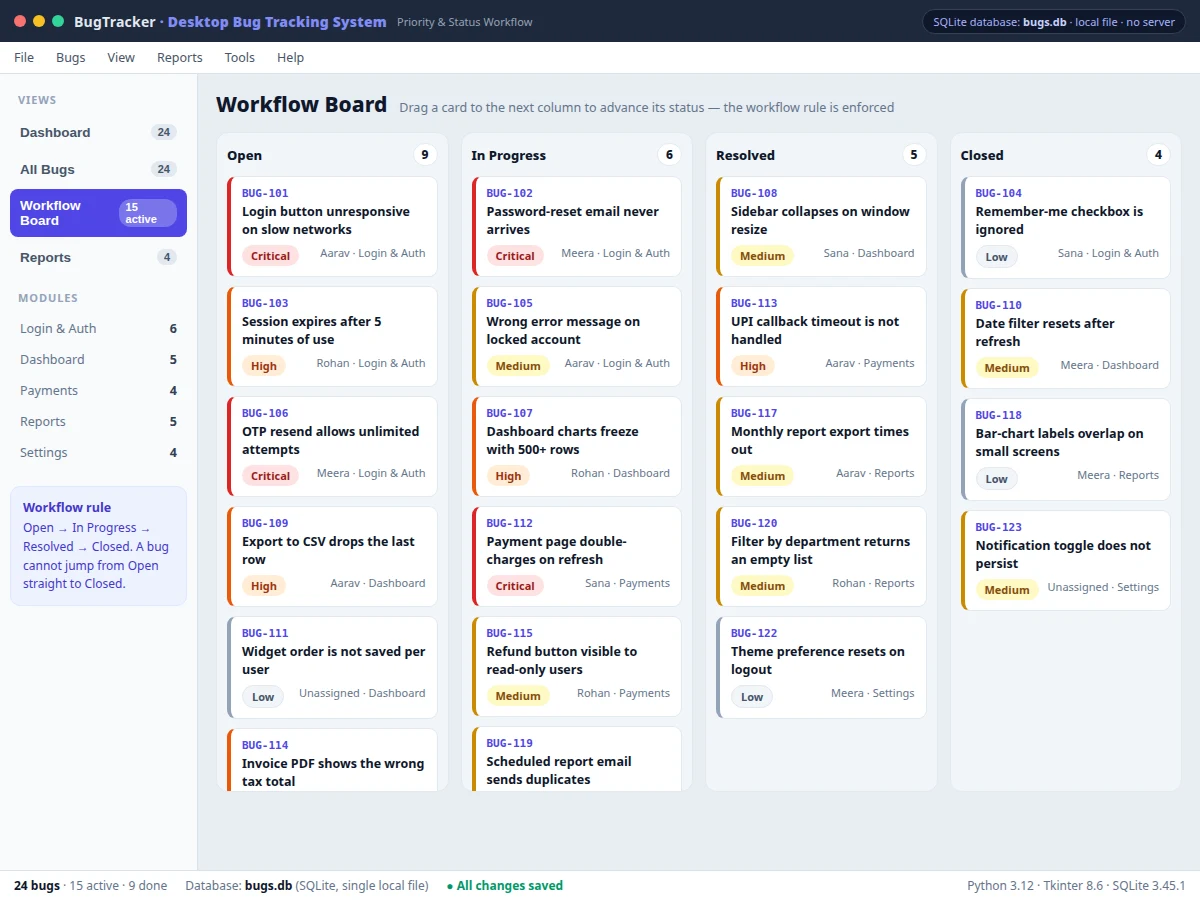
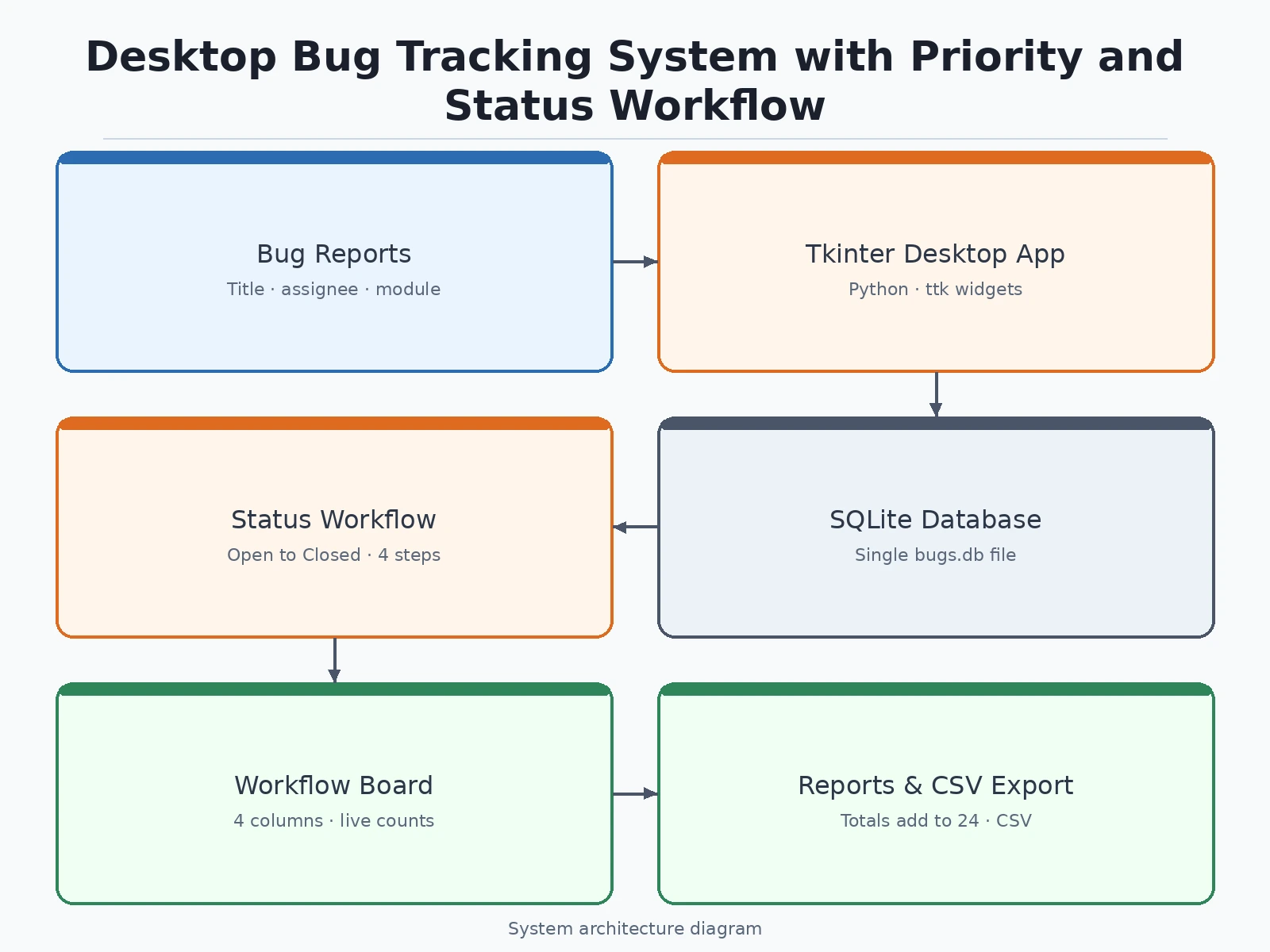
The application starts with an SQLite database file, bugs.db, holding one bugs table with columns for id, title, description, priority, status, assignee, module and report date. When the app launches, Tkinter builds the main window — a bug table, a detail panel, a workflow board and a reports view — and loads every record from the database. Reporting a bug writes a new row with status Open and a priority chosen from Critical, High, Medium or Low; the form rejects blank titles so incomplete records cannot be saved. Each bug advances one step at a time, and the app refuses any jump, such as Open straight to Closed, because the transition check runs before every update. Filters and search narrow the table without touching the data, the board groups the same records by status, and the reports count the same table four ways, so every view agrees. Export writes the full table to CSV for sharing or the project report.
- The user opens the app; Tkinter builds the main window and loads all bug records from the local bugs.db SQLite file.
- A new bug is reported through the New Bug form — title, description, module, priority and assignee — and saved as an Open bug with a unique BUG-xxx id.
- The triage view sorts Open bugs by priority so Critical items (4 in the demo) appear first.
- The assignee opens a bug, works on the fix, and advances it to In Progress, then to Resolved when the fix is ready.
- A second check verifies the fix; only then does the bug move to Closed. The app blocks any skipped step.
- Filters, search and the workflow board read the same table, so counts stay consistent in every view.
- Reports summarise the data by status, priority, assignee and module, and Export writes the full table to CSV.
How it compares
| Feature | This desktop tracker | Spreadsheet bug list | Cloud tracker (Jira etc.) |
|---|---|---|---|
| Works offline | Yes | Yes | No — needs internet |
| Enforced status workflow | Yes — Open → In Progress → Resolved → Closed | No — any cell can say anything | Yes |
| Setup needed | Python only, no server | None | Account + subscription |
| Cost to run | Free — standard library only | Free | Paid plans for teams |
| Multi-user / cloud sync | No — single user, one file | Shared file, no locking | Yes |
| Suits | Student and small-team projects | Quick ad-hoc lists | Large distributed teams |
Tech stack:
- Python 3.12
- Tkinter · ttk themed widgets
- SQLite 3 · single-file database
- sqlite3 standard-library module
- CSV export · Python csv module
- Tkinter Treeview · messagebox dialogs
| Parameter | Value |
|---|---|
| Application type | Single-user desktop application |
| Interface | Tkinter 8.6 · ttk themed widgets |
| Language | Python 3.12 (verified on the build machine) |
| Database | SQLite 3.45.1 · single local file bugs.db |
| Database size | 1 file — the whole database (per sqlite.org) |
| Workflow stages | 4 stages: Open → In Progress → Resolved → Closed |
| Priority levels | 4 levels: Critical · High · Medium · Low |
| Demo records | 24 bugs (counted and cross-checked four ways) |
| Active bugs in demo | 15 bugs (Open 9 + In Progress 6) |
| Completed bugs in demo | 9 bugs (Resolved 5 + Closed 4) |
| Search | Instant filter across title · id · assignee |
| Export | CSV file with all bug fields |
| Internet required | None — fully offline |
| Extra downloads | None — Python standard library only |
Project features
The strongest parts of this build are the enforced four-step workflow, the priority system and the single-source-of-truth reporting. The workflow rule is the core idea: a bug can only move one step at a time, so the status column always reflects real progress instead of whatever someone typed. Priorities follow the same discipline — four levels from Critical to Low, with Critical bugs listed first on the dashboard so the release-blocking items are impossible to miss. Search and filters work instantly across titles, ids and assignees, and the CSV export turns the whole table into a shareable file in one click. Because the dashboard, board and reports all count the same SQLite table, the numbers cannot disagree: 15 bugs are active, 9 are done, and every breakdown totals 24. Everything runs offline — there is no server, no account and no subscription.
- [Enforced status workflow] Every bug moves Open → In Progress → Resolved → Closed, one step at a time; the app refuses skipped steps such as Open straight to Closed.
- [Four priority levels] Critical, High, Medium and Low priorities with colour-coded badges; the dashboard lists Critical bugs first so release blockers stay visible.
- [Search and filters] Instant search across title, bug id and assignee, plus one-click filters by status — the demo filters 24 bugs down to the 9 Open ones in a single click.
- [Workflow board] A four-column board groups the same bugs by status with live counts (9 · 6 · 5 · 4), giving a visual picture of where work stands.
- [Reports that add up] Workload by assignee, bugs by module and totals by status and priority, all counted from the same table — every breakdown totals 24 in the demo.
- [CSV export] The full bug table exports to a CSV file with every field, ready to attach to the project report or share with a guide.
- [Offline SQLite storage] All data lives in one local bugs.db file — no server, no account and no internet needed; the file can be copied to any machine with Python installed.
- [Bug detail and history] Each bug opens a detail view with its full description, assignee, module, report date and a history trail of status changes.
All features above are implemented in the base build. Email notifications, multi-user login and file attachments on bug records are optional customisations, not included in the base build.
What is included
- Complete Python source code (Tkinter + sqlite3)
- SQLite database schema with 24 sample bug records
- Setup and run instructions (Python 3.12, no extra installs)
- Project report content and abstract PDF
- PPT presentation for final review
- Viva Q&A preparation document (workflow rules, SQLite design, Tkinter widgets)
Limitations & prerequisites
- Single-user design — no login, roles or multi-user sync; two people cannot safely edit the same database file at once.
- No email or chat notifications — status changes are visible only inside the app.
- SQLite allows one writer at a time per database file (per sqlite.org), so heavy concurrent use is out of scope.
- No file attachments on bug records in the base build; screenshots must be linked by path or added as a customisation.
- The ttk interface follows the host operating system's theme; it is functional rather than a modern web-style design.
- Reports are counts and lists only — no trend charts over time in the base build.
Frequently Asked Questions
Is this project suitable for a final-year project?
Yes. It fits Computer Science and Information Technology final-year projects because it demonstrates desktop application design, relational database use, GUI development with Tkinter and a real workflow rules engine in one build, and the report explains the workflow state machine, the SQLite schema and the design choices while the working demo gives examiners something concrete to test during the viva.
What is the main technology used?
Python 3.12 with Tkinter (ttk themed widgets) for the interface and SQLite 3 for storage, using only the Python standard library. Tkinter is Python's standard GUI interface to Tcl/Tk and ships with official Python releases, while SQLite stores the whole database in a single local file with no server to install or configure.
Does this project need an internet connection?
No. The application runs fully offline: the interface is local Tkinter, the data lives in a local SQLite file, and there is no cloud account, server or subscription involved, so it works during college demos and vivas without depending on lab Wi-Fi, and the database file can be copied to any machine with Python installed.
Can a bug skip a step in the workflow?
No. The workflow rule is enforced in code: a bug moves only to the next status — Open to In Progress, In Progress to Resolved, Resolved to Closed — and any other transition is rejected before the database is updated. This is the core rule of the project and the reason the status column can be trusted in reports.
Can this be extended into a web or multi-user system?
Yes, as optional customisation: the SQLite schema and workflow logic carry over directly, a Flask or Django front end can replace Tkinter, and the single-file database can move to PostgreSQL or MySQL for shared access, while email notifications, user logins and file attachments are also possible additions quoted separately from the base build.
What will I receive with the project?
The complete Python source code, the SQLite schema with 24 sample bug records, setup and run instructions, the project abstract PDF, a presentation for the final review and a viva Q&A document. Everything is prepared for your order, and the demo database is included so you can run the app and verify every screen before your review.
Components & software requirements
- Python 3.12
- Tkinter · ttk themed widgets
- SQLite 3 · single-file database
- sqlite3 standard-library module
- CSV export · Python csv module
- Tkinter Treeview · messagebox dialogs
Delivery information
Built-to-order project. Delivery timeline is shared after order confirmation based on current queue.
Support terms
Complete documentation, setup guide, and viva preparation included. Support for setup and explanation provided.
Download free synopsis (PDF)
Enter your name and WhatsApp number — the synopsis PDF downloads immediately. We may send occasional project updates on WhatsApp; no spam.