
More project photos (2)
The problem
Desktop Attendance Management System using Face Recognition and Python is a pure-software desktop application that replaces the paper attendance register with a webcam, OpenCV face recognition and a local SQLite database. A teacher enrols each student once with 3–5 photos taken from different angles, then starts a class session; as students face the laptop or desktop webcam, the app recognises them, stamps the time, and writes the row into the day's register — no cards to tap, no fingerprints to scan, and no hardware to install at the classroom door. Manual registers waste the first minutes of every lecture on roll call, and a paper sheet can be signed by a friend for an absent student. This desktop system needs only the teacher's own laptop and its webcam, so a college can run it in any classroom today, and the record stays on that PC in a database the teacher controls, exportable to CSV for the monthly defaulter list.
This is a built-to-order software project: the complete Python desktop application, the enrolment and recognition modules, the local SQLite database, the CSV reporting tools and the complete viva kit (report, PPT, Q&A) are prepared fresh for you.
| Approach | Hardware needed | Internet needed | Where records live | Best when |
|---|---|---|---|---|
| This desktop app (Python + OpenCV + SQLite) | Teacher's laptop + USB webcam only | None — fully offline | Local SQLite file on the same PC | One classroom, no new hardware, no Wi-Fi |
| IoT ESP32-CAM attendance system | ESP32-CAM module at the door + RFID reader + cloud account | Yes — Wi-Fi and cloud storage | Cloud dashboard | Fixed door installation with remote monitoring |
| Manual paper register | Paper sheet and pen | None | Paper file in the staff room | No computer available at all |
A student faces the teacher laptop webcam at the start of the lecture.
Follow the working sequence
How it works
From webcam frame to register row, the whole pipeline runs on one Windows PC in six steps. OpenCV first finds the face in the webcam frame with a Haar cascade detector, then crops it to a 100 × 100 greyscale image, the size the recogniser expects. The LBPH recogniser then compares the face's texture histogram with the histograms stored for every enrolled student and returns the closest match with a distance score; below the configured threshold of 60 counts as a recognition, anything above it is treated as unknown and ignored. The app writes the roll number, name and timestamp into the SQLite table for the current date and session, marking the student late if the time is past the configurable cut-off. The dashboard refreshes instantly, the register view lists every row, and the teacher exports the day or the month to CSV at any point. Enrolment is the only setup step: 3–5 photos per student through the same webcam.
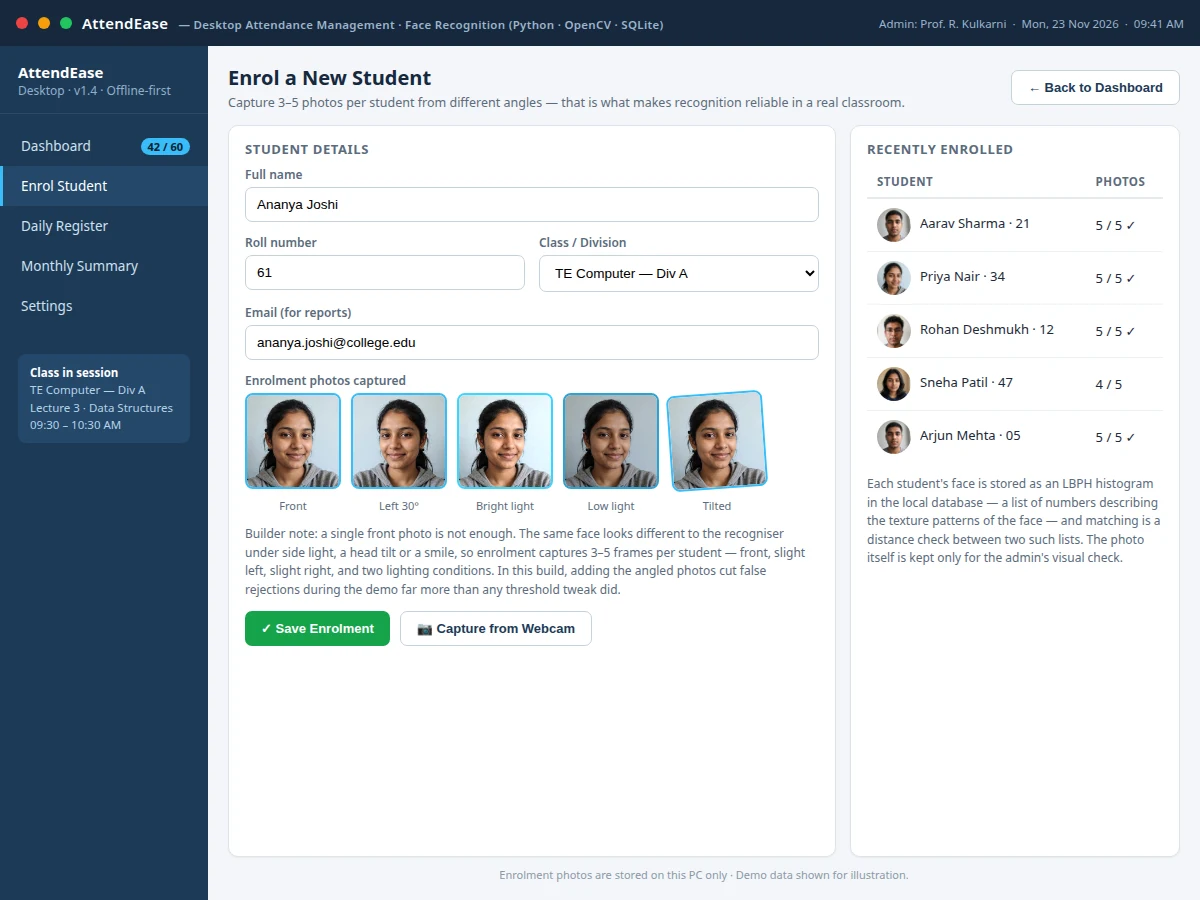
- The teacher enrols each student once, capturing 3–5 photos from different angles and lighting conditions through the USB webcam; the photos are stored with the student's roll number, name and class.
- At the start of a lecture the teacher opens the app, selects the class and session, and starts live marking; the webcam feed appears on the dashboard.
- OpenCV detects each face in the frame with a Haar cascade, crops it and converts it to a 100 × 100 pixel greyscale image.
- The LBPH recogniser compares the face's texture histogram with every enrolled student's histograms and returns the closest match with a distance score.
- A distance below the threshold of 60 (configurable) counts as a recognition: the student's name appears on the live feed and a timestamped row is written to the SQLite register.
- Students recognised after the late cut-off are marked Late automatically, and unknown faces are ignored rather than guessed.
- The teacher reviews the register, applies a manual override where needed, and exports the day or the month to CSV for the department record.
Tech stack:
- Python 3
- OpenCV · LBPH face recogniser
- Tkinter desktop UI
- SQLite local database
- NumPy
- Pillow image handling
- Haar cascade face detection
- PyInstaller · single-file exe packaging
Face recognition details
- Recogniser: OpenCV LBPH (Local Binary Patterns Histograms) — a classical computer-vision recogniser, not a deep-learning model; it runs on an ordinary laptop CPU with no GPU and no training server.
- Enrolment data: 3–5 photos per student, captured by the teacher through the same webcam; there is no public dataset — the "training set" is the class's own enrolment photos, stored locally.
- Task: Face identification against the enrolled class list; input = one detected face (100 × 100 px greyscale), output = matched roll number with an LBPH distance score, or "unknown".
- Metrics: No accuracy figure is claimed. Recognition quality depends on lighting, enrolment photo quality and camera resolution; the build is evaluated by the student running the included demo class (60 students, 20 days, 1,200 records) and recording the recognition outcome per session.
| Parameter | Value |
|---|---|
| Platform | Windows 10/11 desktop or laptop (design target) |
| Camera | USB webcam · 720p minimum (recommended) |
| Face detector | Haar cascade · OpenCV |
| Recogniser | OpenCV LBPH · 100 × 100 px greyscale faces |
| Enrolment photos | 3–5 photos per student (required) |
| Match threshold | LBPH distance 60 (configurable; lower is stricter) |
| Late cut-off | 09:40 AM (configurable) |
| Database | SQLite · 1 local file (attendance.db) |
| Demo dataset | 60 students × 20 days = 1,200 records (demo data) |
| Recognition time | Approximately 1 second per frame on a typical laptop (design target) |
| Internet needed | None — fully offline |
| Export | CSV · 1 file per day or per month |
Project features
Four capabilities carry this desktop attendance system: face recognition that works offline, one-click student enrolment, a live admin dashboard, and CSV export of the daily register. The OpenCV LBPH recogniser matches each webcam frame against the enrolled students stored in the local SQLite database, so a recognised face is marked present with a timestamp in approximately 1 second of processing per frame on a typical laptop (design target, not a measured claim). Enrolment captures 3–5 photos per student from different angles and lighting conditions, which is the single biggest factor in recognition quality. The Tkinter dashboard shows the live camera feed with the recognised name and match distance, the running present, late and absent counts, and the latest markings, while the register view and monthly summary turn the same SQLite rows into weekly percentages and a defaulter list. Because everything runs on one PC, the system works in classrooms with no Wi-Fi at all.
- [Offline face recognition (OpenCV LBPH)] The webcam frame is matched against enrolled students on the PC itself using the LBPH recogniser — no internet, no cloud API and no subscription is involved at any step.
- [Multi-photo student enrolment] Each student is enrolled with 3–5 photos from different angles and lighting conditions, captured through the same webcam; the enrolment panel shows the captured photos and the per-student photo count.
- [Live admin dashboard (Tkinter)] The desktop dashboard shows the live camera feed with a detection box and the recognised name, plus present, late and absent counts and the latest markings with timestamps.
- [Daily register with late cut-off] Every recognised face writes a timestamped row into the day's register in SQLite; students recognised after the configurable cut-off (09:40 AM by default) are marked Late automatically.
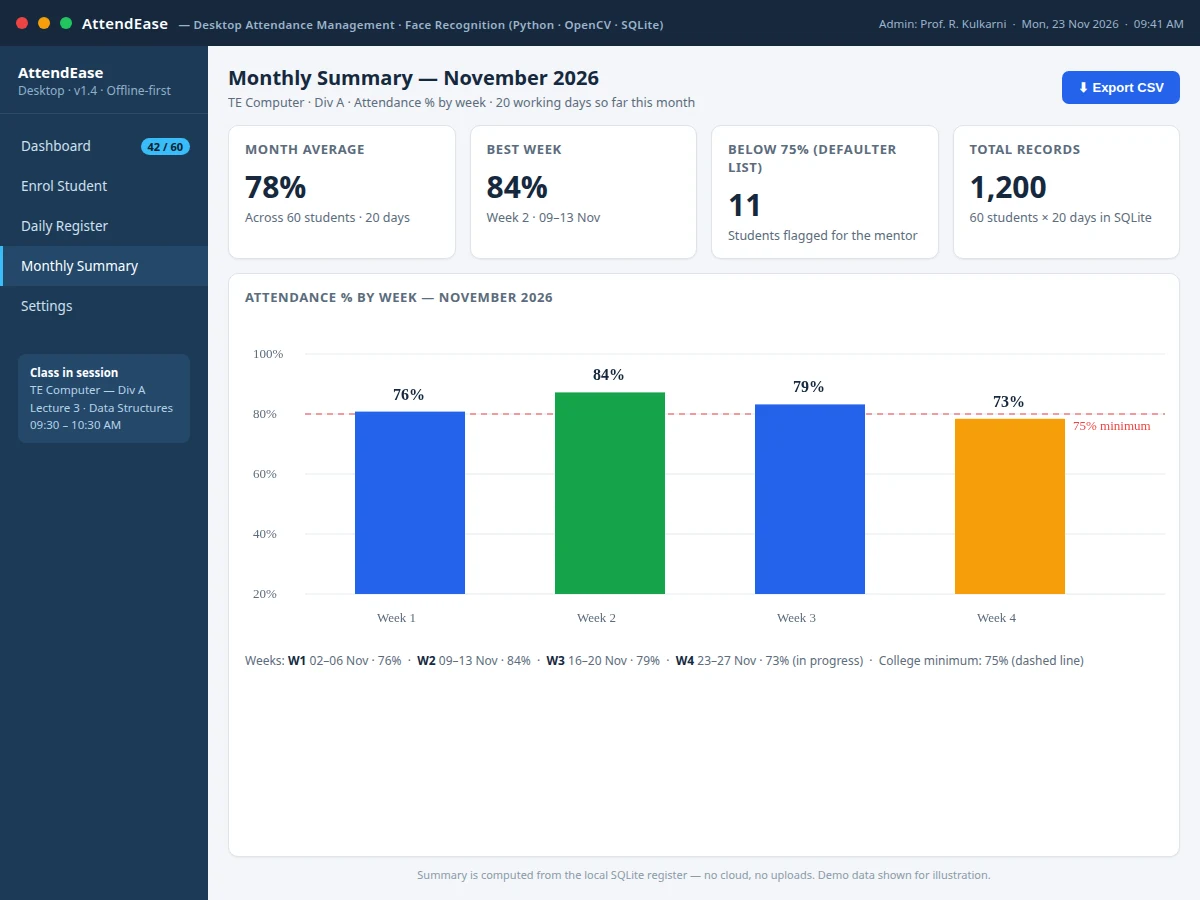
- [CSV export and monthly summary] One click exports the day's register or the month's summary to CSV, and the monthly view shows attendance percentage by week with a 75% minimum line and a defaulter list.
- [Manual override with audit note] A student the camera misses can still be marked present by the teacher, and the override is recorded as a manual entry rather than a recognition, so the register stays honest.
- [Local SQLite storage] All students, enrolment data and attendance rows live in a single SQLite file on the teacher's PC — nothing is uploaded anywhere, and the database can be copied as a backup file.
What is included
- Complete Python source code (Tkinter desktop app, OpenCV recognition, SQLite storage)
- Enrolment, recognition and register modules with a Windows setup guide
- Sample SQLite database with demo class data (60 students, 20 days, 1,200 records)
- CSV export templates and the monthly summary chart module
- Project report PDF (background, LBPH theory, methodology, testing procedure)
- PPT presentation for final review
- Viva Q&A preparation document (Haar cascades, LBPH histograms, SQLite design, offline architecture)
Limitations & prerequisites
- Recognition quality depends on lighting, enrolment photo quality and camera resolution; no accuracy figure is claimed or guaranteed.
- LBPH is a classical recogniser, not a deep-learning model — identical twins, heavy face coverings and extreme angles can confuse it.
- One camera covers one classroom at the teacher's desk; it is not a multi-camera campus-wide system.
- The app has no cloud sync and no mobile app; records live on one PC, so backups are the teacher's responsibility.
- Works offline by design — there is no remote monitoring and no SMS or email alert in the base build.
- Face data is biometric data: the college must take student consent and keep the PC secure; the app stores faces only locally.
- A student the camera misses must be marked by manual override; the system cannot recognise a face that was never enrolled.
Frequently Asked Questions
Is this project suitable for a final-year project?
Yes — for Computer Science and Information Technology final-year projects. It demonstrates computer vision with face detection and LBPH recognition, desktop application development with Tkinter, database design with SQLite, and a complete real-world workflow from enrolment to reporting, all in one build the student can demonstrate live. The project is scoped for one developer team and the viva discussion covers recogniser thresholds, enrolment design and offline architecture.
Which face recognition method is used — face_recognition or LBPH?
LBPH (Local Binary Patterns Histograms), OpenCV's built-in recogniser, is the method used in this build. It was chosen because it runs entirely on an ordinary laptop CPU with no GPU, no dlib install and no cloud API, which keeps the desktop app genuinely offline and easy to install. The face_recognition library (dlib-based 128-dimensional embeddings) is deliberately not used in this build.
LBPH turns each face into a histogram — a list of numbers describing local texture patterns — and matching compares two such lists by distance.
Does it need internet or any extra hardware?
No — the whole system needs nothing more than one Windows laptop or desktop plus an ordinary USB webcam. Recognition, storage, reports and CSV export all run on that PC with no internet connection, and there is no ESP32-CAM, no RFID reader and no cloud account in this build.
How accurate is the recognition?
No accuracy figure is claimed, because recognition quality depends on lighting, enrolment photo quality and camera resolution, and it changes with the classroom. The design target is reliable recognition in normal classroom lighting when each student is enrolled with 3–5 photos from different angles.
The build is evaluated honestly: the student runs the demo class, counts correct, missed and wrong recognitions per session, and reports those numbers instead of quoting a library benchmark.
Can attendance be exported and corrected?
Yes — one click exports the day's register or the month's summary to CSV, and the monthly view shows weekly attendance percentages with a 75% minimum line and a defaulter list. If the camera misses a student, the teacher marks them present with a manual override, and the register records that row as a manual entry so the correction stays visible and honest.
How is this different from an IoT face-recognition attendance system?
The IoT version mounts an ESP32-CAM at the classroom door, captures faces on the microcontroller and sends records to a cloud dashboard, which needs Wi-Fi, hardware installation and a cloud account. This project is pure desktop software: a Python app on the teacher's own PC, a USB webcam, and a local SQLite database, working fully offline with records that never leave the PC.
Choose this one when the college wants zero new hardware and no cloud dependency.
Components & software requirements
- Python 3
- OpenCV · LBPH face recogniser
- Tkinter desktop UI
- SQLite local database
- NumPy
- Pillow image handling
- Haar cascade face detection
- PyInstaller · single-file exe packaging
Face recognition details
- Recogniser: OpenCV LBPH (Local Binary Patterns Histograms) — a classical computer-vision recogniser, not a deep-learning model; it runs on an ordinary laptop CPU with no GPU and no training server.
- Enrolment data: 3–5 photos per student, captured by the teacher through the same webcam; there is no public dataset — the "training set" is the class's own enrolment photos, stored locally.
- Task: Face identification against the enrolled class list; input = one detected face (100 × 100 px greyscale), output = matched roll number with an LBPH distance score, or "unknown".
- Metrics: No accuracy figure is claimed. Recognition quality depends on lighting, enrolment photo quality and camera resolution; the build is evaluated by the student running the included demo class (60 students, 20 days, 1,200 records) and recording the recognition outcome per session.
Delivery information
Built-to-order project. Delivery timeline is shared after order confirmation based on current queue.
Support terms
Complete documentation, setup guide, and viva preparation included. Support for setup and explanation provided.
Download free synopsis (PDF)
Enter your name and WhatsApp number — the synopsis PDF downloads immediately. We may send occasional project updates on WhatsApp; no spam.