
More project photos (2)
The problem
Most college timetables are still assembled by hand in spreadsheets: the academic coordinator juggles faculty availability, room capacities and batch schedules across dozens of tabs, and conflicts surface only after the semester begins — a professor assigned to two classrooms at the same hour, one room promised to two divisions, or a 70-student batch squeezed into a 40-seat room. Fixing these mid-semester means emergency reshuffles, cancelled lectures and frustrated faculty. Existing spreadsheet checks are manual and error-prone, and generic scheduling tools do not understand academic constraints like batches, labs and faculty loads. This project gives the coordinator a purpose-built web app: enter or import the week's sessions once, and every faculty, room and batch conflict is detected automatically with a severity rank and a concrete suggested fix, before the timetable goes live.
How it works
- The admin registers rooms with their seating capacities and the faculty roster once; this is the reference data every check runs against.
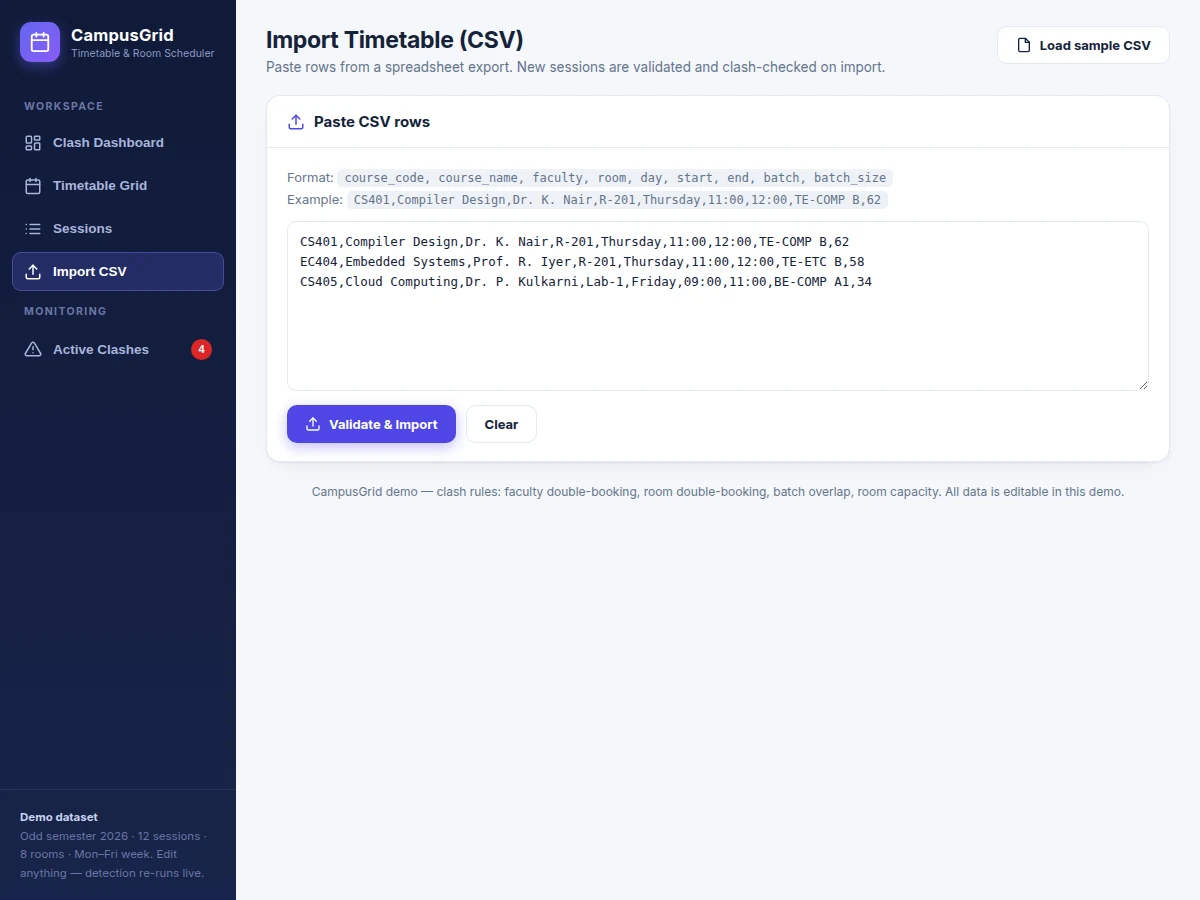
- Sessions are added through a form (course code, course name, faculty, room, day, start/end time, batch, batch size) or pasted as CSV rows; the importer validates room names, weekday values and time ranges and rejects malformed rows with a line number.
- On every save, edit or import, the detection engine compares all session pairs on the same day for time overlap using minute-level interval math.
- Four rules fire on overlaps: the same faculty member in two sessions at once (High), the same room booked twice (High), the same student batch in two places (Medium), and a batch size larger than the room's seating capacity (Low).
- Each hit becomes a clash card showing severity, the conflicting sessions and a plain-English explanation of what is wrong.
- The suggestion engine proposes a concrete fix: for room clashes it finds a free room with capacity at or above the batch size at the same slot; for faculty and batch clashes it scans the week for a slot where faculty, room and batch are all free.
- The admin applies a fix with one click; the entire timetable is re-validated instantly, and the stats, clash report and room utilization bars refresh to confirm the week is clean.
Tech stack:
- PHP 8 · MySQL 8
- JavaScript (ES6) · AJAX
- HTML5 · CSS3 responsive UI
- Bootstrap 5 admin dashboard
- CSV import · validation pipeline
- Apache · shared hosting
- phpMyAdmin database setup
- Git
| Parameter | Value |
|---|---|
| Detection rules | 4 rules: faculty, room, batch overlap, room capacity (design target) |
| User roles | 2 roles: Admin and Viewer (design target) |
| Timetable view | Monday–Friday week grid, clickable sessions |
| CSV import | 9-column format with per-line validation and error reporting |
| Re-validation | Runs on every save/edit/import; expected under 1 second for ~500 sessions on typical shared hosting (expected) |
| Room suggestion | First free room with capacity ≥ batch size at the clashing slot |
| Reschedule suggestion | First weekday slot where faculty, room and batch are all free |
| Utilization | Slot-hours per room per week with percentage bars |
| Data storage | MySQL 8 relational database with seeded demo timetable |
| Deployment | Any PHP 8 + MySQL 8 hosting (shared or VPS) |
Project features
- [Automatic clash detection] Four academic rules — faculty double-booking, room double-booking, batch overlap and room-capacity overflow — evaluated with minute-level overlap math on every save, edit and CSV import.
- [Severity-ranked clash report] Each conflict renders as a card with a High/Medium/Low badge, the sessions involved and a plain-English explanation, so the coordinator triages the worst problems first.
- [Room reassignment suggestions] For room clashes and capacity overflows, the engine proposes a specific free room whose seating fits the batch at the clashing slot, with a one-click Apply that rewrites the session and re-runs detection.
- [Reschedule suggestions] For faculty and batch clashes, the engine scans the Monday–Friday week for a slot where faculty, room and batch are all simultaneously free, and proposes moving the session there.
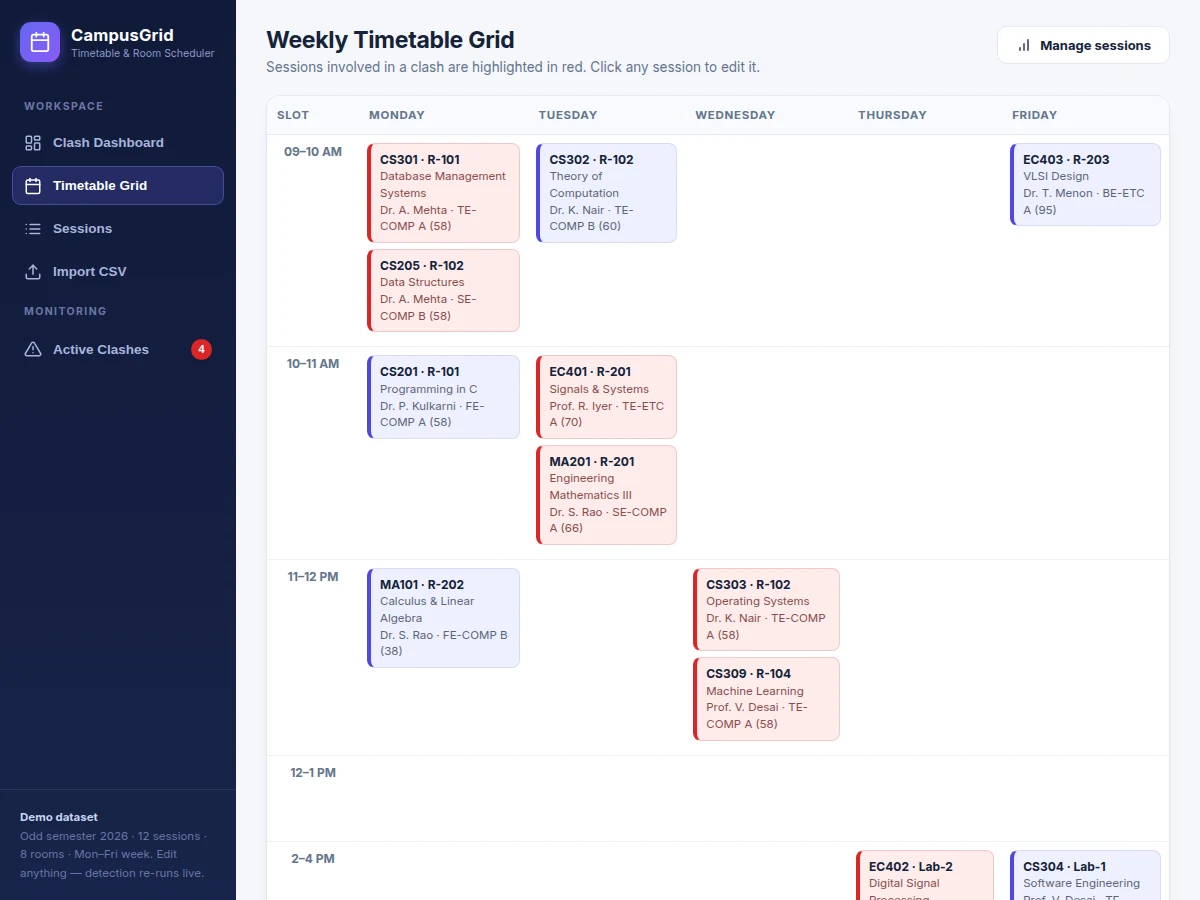
- [Weekly timetable grid] A day-by-slot grid where sessions involved in any clash are highlighted in red; clicking a session opens it for editing.
- [CSV timetable import] Paste spreadsheet rows in a documented 9-column format; the validator checks room names, days, time ranges and batch sizes, imports the clean rows and reports every rejected line.
- [Room utilization analytics] Per-room slot-hours per week with percentage bars, plus headline stats: total sessions, active clashes and the share of clash-free sessions.
- [Optional] Email alerts to the coordinator when a new clash appears after an edit — can be added on request using the buyer's own SMTP credentials, and is not part of the base build.
What is included
- Complete PHP + MySQL web application source code (admin panel, detection engine, weekly grid, CSV import, utilization analytics)
- Seeded database: rooms with capacities, faculty roster and a sample week timetable containing deliberate clashes for demonstration
- Single-file HTML/JavaScript interactive demo implementing the same four detection rules (the one shown in the project screenshots)
- Project report PDF (background, rule design, interval-overlap logic, schema, methodology)
- PPT presentation for final review
- Viva Q&A preparation document (scheduling constraints, overlap detection, suggestion heuristics, database design)
Limitations & prerequisites
- Detection is only as reliable as the entered data — misspelled faculty names or unentered sessions produce wrong results; the validator catches format errors, not typos.
- The engine compares sessions on the same day only; alternate-week patterns or split lab batches need explicit separate session entries.
- Room suggestions pick the first free room that fits the batch size — they do not optimize for walking distance, department preference or faculty seniority.
- Suggested fixes apply one clash at a time; fully automatic timetable generation from scratch (heuristic/genetic scheduling) is future scope, not in the base build.
- Capacity checks use the configured seating number; real usable seats depend on furniture layout, which the system does not model.
- Response-time and capacity figures are design targets, not measured load-test results.
Frequently Asked Questions
Is this project suitable for a final-year project?
Yes — for Computer Science, IT and Software Engineering programs. It demonstrates interval-overlap algorithms, rule-based reasoning, relational database design, CSV data pipelines and a real administrative problem colleges actually face, with a clean viva narrative.
Does the project include an admin panel?
Yes. The admin manages rooms and capacities, the faculty roster, sessions (add/edit/delete), CSV imports, the clash report with one-click fixes, and the utilization analytics — all through the web interface.
Can it be hosted online?
Yes. It runs on any standard PHP 8 + MySQL 8 hosting; shared hosting is enough for a department-scale demo. Setup instructions cover the database import and the one-time room/faculty seeding.
How are room reassignments suggested?
For a room clash or capacity overflow, the engine scans the room list for rooms free at the clashing day and time whose seating capacity is at or above the batch size, and proposes the first match. One click applies it and re-runs detection.
Can it generate a full timetable automatically?
Not in the base build — it detects conflicts in a human-entered timetable and suggests fixes. Automatic generation from constraints is listed as future scope and can be developed as a customization.
Can more clash rules be added?
Yes. The rule engine is structured so new checks (e.g. faculty daily-hour caps, lab-equipment conflicts, consecutive-lecture limits) can be added as separate rules, scoped per rule.
problem: Most college timetables are still assembled by hand in spreadsheets: the academic coordinator juggles faculty availability, room capacities and batch schedules across dozens of tabs, and conflicts surface only after the semester begins — a professor assigned to two classrooms at the same hour, one room promised to two divisions, or a 70-student batch squeezed into a 40-seat room. Fixing these mid-semester means emergency reshuffles, cancelled lectures and frustrated faculty. Existing spreadsheet checks are manual and error-prone, and generic scheduling tools do not understand academic constraints like batches, labs and faculty loads. This project gives the coordinator a purpose-built web app: enter or import the week's sessions once, and every faculty, room and batch conflict is detected automatically with a severity rank and a concrete suggested fix, before the timetable goes live. concept:
- The admin registers rooms with their seating capacities and the faculty roster once; this is the reference data every check runs against.
- Sessions are added through a form (course code, course name, faculty, room, day, start/end time, batch, batch size) or pasted as CSV rows; the importer validates room names, weekday values and time ranges and rejects malformed rows with a line number.
- On every save, edit or import, the detection engine compares all session pairs on the same day for time overlap using minute-level interval math.
- Four rules fire on overlaps: the same faculty member in two sessions at once (High), the same room booked twice (High), the same student batch in two places (Medium), and a batch size larger than the room's seating capacity (Low).
- Each hit becomes a clash card showing severity, the conflicting sessions and a plain-English explanation of what is wrong.
- The suggestion engine proposes a concrete fix: for room clashes it finds a free room with capacity at or above the batch size at the same slot; for faculty and batch clashes it scans the week for a slot where faculty, room and batch are all free.
- The admin applies a fix with one click; the entire timetable is re-validated instantly, and the stats, clash report and room utilization bars refresh to confirm the week is clean. features:
- [Automatic clash detection] Four academic rules — faculty double-booking, room double-booking, batch overlap and room-capacity overflow — evaluated with minute-level overlap math on every save, edit and CSV import.
- [Severity-ranked clash report] Each conflict renders as a card with a High/Medium/Low badge, the sessions involved and a plain-English explanation, so the coordinator triages the worst problems first.
- [Room reassignment suggestions] For room clashes and capacity overflows, the engine proposes a specific free room whose seating fits the batch at the clashing slot, with a one-click Apply that rewrites the session and re-runs detection.
- [Reschedule suggestions] For faculty and batch clashes, the engine scans the Monday–Friday week for a slot where faculty, room and batch are all simultaneously free, and proposes moving the session there.
- [Weekly timetable grid] A day-by-slot grid where sessions involved in any clash are highlighted in red; clicking a session opens it for editing.
- [CSV timetable import] Paste spreadsheet rows in a documented 9-column format; the validator checks room names, days, time ranges and batch sizes, imports the clean rows and reports every rejected line.
- [Room utilization analytics] Per-room slot-hours per week with percentage bars, plus headline stats: total sessions, active clashes and the share of clash-free sessions.
- [Optional] Email alerts to the coordinator when a new clash appears after an edit — can be added on request using the buyer's own SMTP credentials, and is not part of the base build. requirements:
- PHP 8 + MySQL 8 hosting (shared hosting is enough for department-scale timetables)
- A modern browser (Chrome, Edge or Firefox) for the admin interface
- The college's master timetable as a spreadsheet/CSV for the one-time initial import
- Room list with seating capacities and the faculty roster, entered once by the admin
- Git for version control of the delivered source code deliverables:
- Complete PHP + MySQL web application source code (admin panel, detection engine, weekly grid, CSV import, utilization analytics)
- Seeded database: rooms with capacities, faculty roster and a sample week timetable containing deliberate clashes for demonstration
- Single-file HTML/JavaScript interactive demo implementing the same four detection rules (the one shown in the project screenshots)
- Project report PDF (background, rule design, interval-overlap logic, schema, methodology)
- PPT presentation for final review
- Viva Q&A preparation document (scheduling constraints, overlap detection, suggestion heuristics, database design) limitations:
- Detection is only as reliable as the entered data — misspelled faculty names or unentered sessions produce wrong results; the validator catches format errors, not typos.
- The engine compares sessions on the same day only; alternate-week patterns or split lab batches need explicit separate session entries.
- Room suggestions pick the first free room that fits the batch size — they do not optimize for walking distance, department preference or faculty seniority.
- Suggested fixes apply one clash at a time; fully automatic timetable generation from scratch (heuristic/genetic scheduling) is future scope, not in the base build.
- Capacity checks use the configured seating number; real usable seats depend on furniture layout, which the system does not model.
- Response-time and capacity figures are design targets, not measured load-test results. timeline:
- Typical build timeline is 3–4 weeks from confirmed requirements (design target): week 1 schema + admin panel, week 2 detection engine + grid, week 3 CSV import + suggestions + analytics, week 4 report, PPT and viva Q&A. Extra clash rules, roles or timetable generation extend this and are scoped separately. support:
- Hosting and database-import setup guidance for the first deployment.
- A walkthrough of the four detection rules and the suggestion logic so the student can explain and defend the project in the viva.
- Bug fixes during the delivery window; new features and customizations are scoped and quoted separately. specs: | Parameter | Value | |---|---| | Detection rules | 4 rules: faculty, room, batch overlap, room capacity (design target) | | User roles | 2 roles: Admin and Viewer (design target) | | Timetable view | Monday–Friday week grid, clickable sessions | | CSV import | 9-column format with per-line validation and error reporting | | Re-validation | Runs on every save/edit/import; expected under 1 second for ~500 sessions on typical shared hosting (expected) | | Room suggestion | First free room with capacity ≥ batch size at the clashing slot | | Reschedule suggestion | First weekday slot where faculty, room and batch are all free | | Utilization | Slot-hours per room per week with percentage bars | | Data storage | MySQL 8 relational database with seeded demo timetable | | Deployment | Any PHP 8 + MySQL 8 hosting (shared or VPS) | faqs:
Is this project suitable for a final-year project?
Yes — for Computer Science, IT and Software Engineering programs. It demonstrates interval-overlap algorithms, rule-based reasoning, relational database design, CSV data pipelines and a real administrative problem colleges actually face, with a clean viva narrative.
Does the project include an admin panel?
Yes. The admin manages rooms and capacities, the faculty roster, sessions (add/edit/delete), CSV imports, the clash report with one-click fixes, and the utilization analytics — all through the web interface.
Can it be hosted online?
Yes. It runs on any standard PHP 8 + MySQL 8 hosting; shared hosting is enough for a department-scale demo. Setup instructions cover the database import and the one-time room/faculty seeding.
How are room reassignments suggested?
For a room clash or capacity overflow, the engine scans the room list for rooms free at the clashing day and time whose seating capacity is at or above the batch size, and proposes the first match. One click applies it and re-runs detection.
Can it generate a full timetable automatically?
Not in the base build — it detects conflicts in a human-entered timetable and suggests fixes. Automatic generation from constraints is listed as future scope and can be developed as a customization.
Can more clash rules be added?
Yes. The rule engine is structured so new checks (e.g. faculty daily-hour caps, lab-equipment conflicts, consecutive-lecture limits) can be added as separate rules, scoped per rule.
Components & software requirements
- PHP 8 · MySQL 8
- JavaScript (ES6) · AJAX
- HTML5 · CSS3 responsive UI
- Bootstrap 5 admin dashboard
- CSV import · validation pipeline
- Apache · shared hosting
- phpMyAdmin database setup
- Git
Delivery information
Built-to-order project. Delivery timeline is shared after order confirmation based on current queue.
Support terms
Complete documentation, setup guide, and viva preparation included. Support for setup and explanation provided.
Download free synopsis (PDF)
Enter your name and WhatsApp number — the synopsis PDF downloads immediately. We may send occasional project updates on WhatsApp; no spam.