
More project photos (2)
The problem
A coaching class attendance and fee reminder Android app is a single phone-based system that replaces two paper records a coaching class owner keeps by hand: the daily attendance register and the fee diary. The teacher opens the app, picks a batch, and marks each student present or absent for that session, while the app keeps a separate fee record for every student showing what is paid, what is due, and how many days overdue it is. When a fee crosses its due date, the teacher sends a parent reminder from the fee screen, and the app logs the reminder with its time, student name, and message text so the owner can see exactly who was reminded and when. A dashboard pulls both sides together, showing today's attendance percentage, this month's collection, and the total amount overdue, so one screen answers both daily questions: who came today, and who still owes fees.
How it works
End to end, the app moves in a short loop that repeats every class day and every fee cycle. The class owner first sets up batches and adds students to them, with each student's monthly fee recorded once. On a class day, the teacher opens that day's batch, taps Present or Absent beside each name, and saves the session, which updates the batch's attendance percentage and the student's personal attendance history at the same time. Separately, the fee screen watches due dates: when a student's fee passes its due date, that student appears on the batch-wise due list with the amount and days overdue. The teacher picks the student, sends an SMS-style reminder to the parent, and the reminder log stores the time and message text. When the parent pays, the teacher marks the fee paid, the student leaves the due list, and the next reminder round skips them automatically.
- The class owner creates a batch for each subject and class, then adds that batch's students with their monthly fee recorded once.
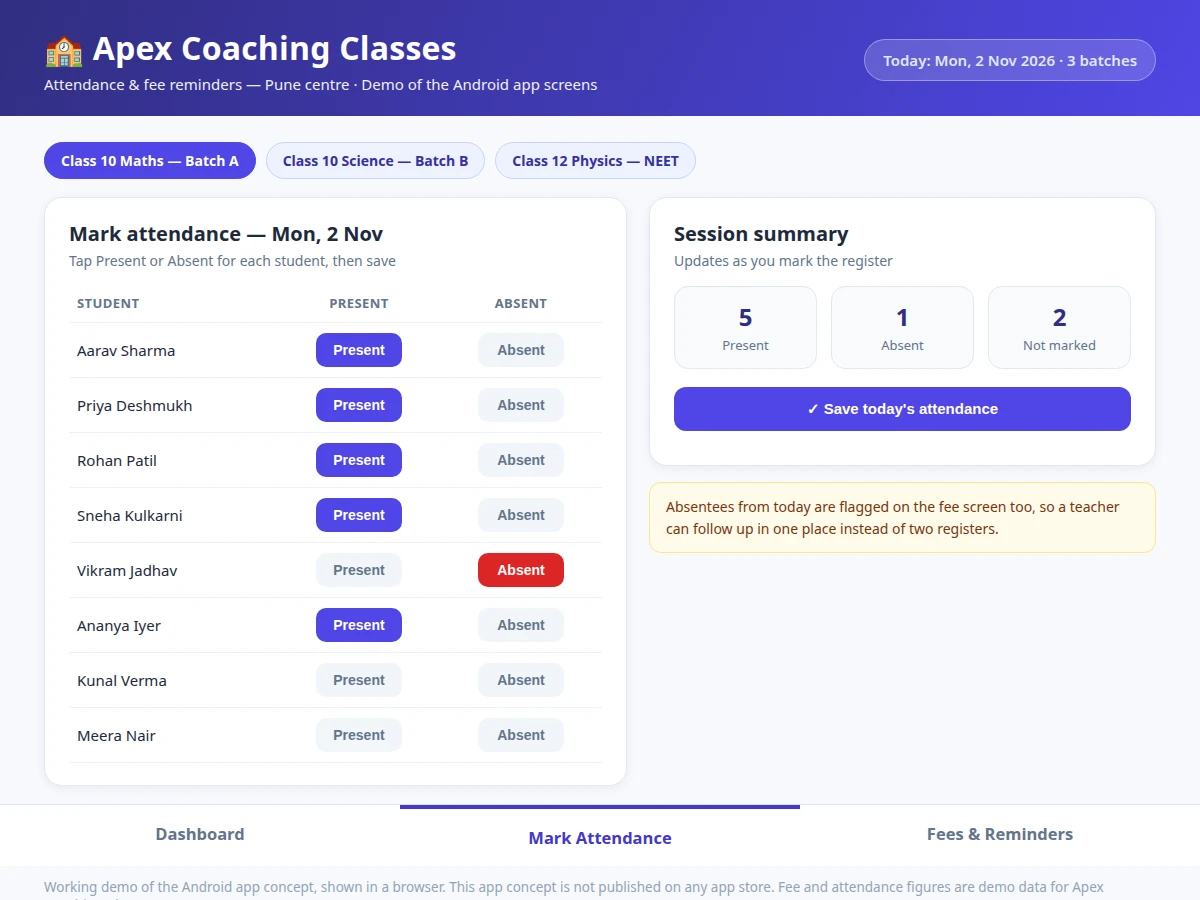
- On a class day, the teacher opens that day's batch and taps Present or Absent beside each student's name on the register screen.
- The teacher saves the session, which updates the batch's attendance percentage and each student's personal attendance history at the same time.
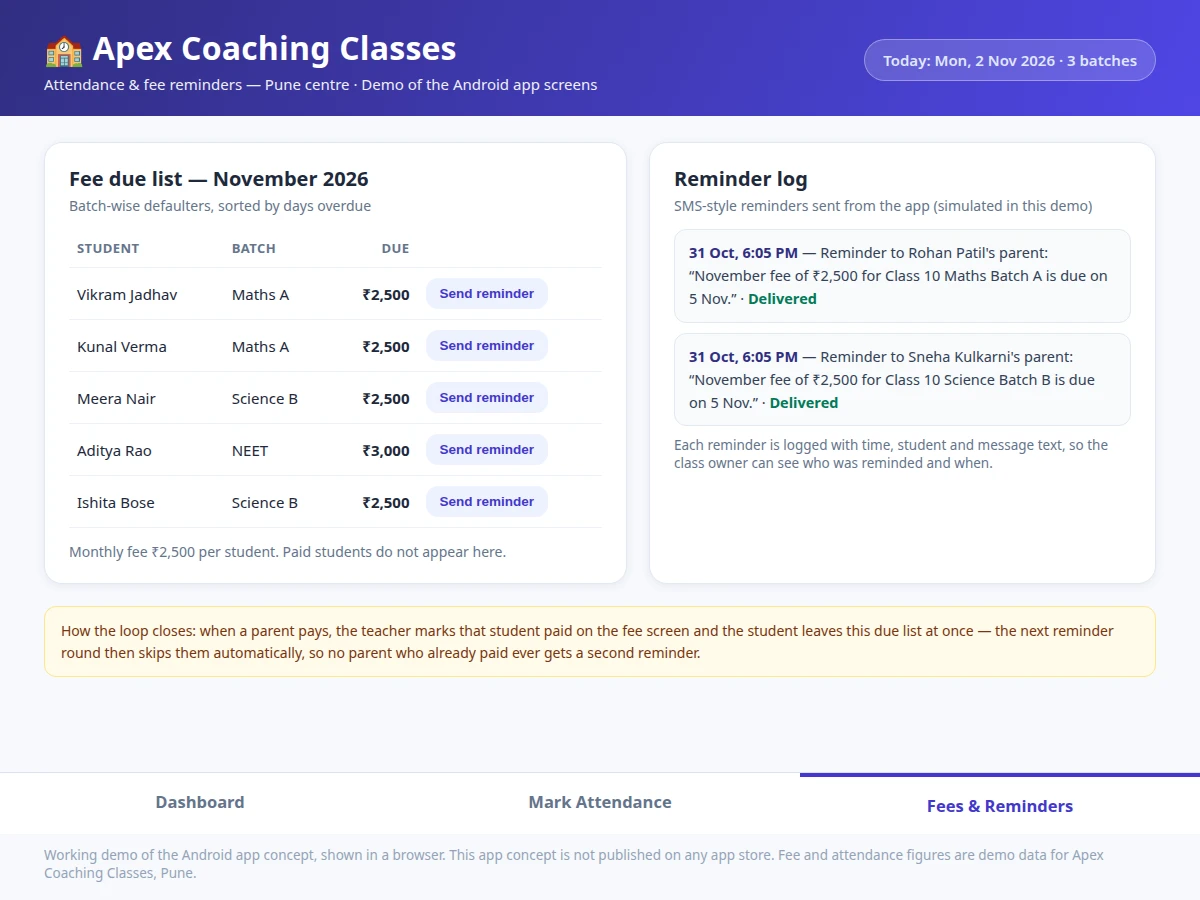
- The fee screen watches due dates and lists every student past the due date, batch by batch, sorted by days overdue with the amount beside each name.
- The teacher picks a student and sends an SMS-style reminder to the parent naming the amount and batch, and the reminder log records the time, student, and message text.
- When the parent pays, the teacher marks the fee paid in the app, the student leaves the due list at once, and the next reminder round skips that student automatically.
Tech stack:
- Android app in Kotlin · batch attendance and fee screens
- Android Studio · app build and testing environment
- Room local database · batches students attendance and fee records on the device
- RecyclerView lists · batch student and due-list screens
- SMS-style reminder sending · parent reminders from the fee screen
- Material Design components · buttons cards and navigation
- Date and due-date logic · overdue calculation and reminder timing
- Demo web build · browser screens showing the app's flows
| Parameter | Value |
|---|---|
| Platform | Android phone or tablet · app screens shown as a working web demo (design target) |
| Batches in demo | 3 batches · Class 10 Mathematics · Class 10 Science · Class 12 Physics NEET (demo data) |
| Students per batch | 32 students per batch · 96 students across 3 batches (demo data) |
| Demo register sample | 8 students shown on the sample attendance screen (demo data) |
| Monthly fee | ₹2,500 per student per month · ₹3,000 per student per month for the NEET batch (demo data) |
| Attendance record | Present · Absent · Not marked per student per session (design target) |
| Reminder channel | SMS-style message to the parent · simulated in the demo (design target) |
| Reminder log | Time · student name · message text per reminder (design target) |
| Data storage | On-device local database in the base app · no cloud sync (design target) |
| Not included | App store publishing · live SMS gateway account · online payment collection · biometric check-in · cloud sync (not in this build) |
Project features
The app's three strongest capabilities are the ones a coaching class owner uses every day: batch-wise attendance marking, a batch-wise fee due list, and parent reminders with a log. Attendance marking works batch by batch, so a teacher teaching three batches never mixes their registers, and the session summary counts present, absent, and not-marked students live as each name is tapped. The fee due list turns the fee diary into a working list: it shows only students who still owe money, sorted by how long overdue they are, with the amount and batch beside each name. The reminder step closes the loop: one tap sends an SMS-style reminder to the parent, and the reminder log records the time, student, and message text, so the owner never has to remember who was already reminded.
- [Batch-wise attendance marking] The teacher picks a batch and taps Present or Absent beside each student's name for that session, so each batch keeps its own register and no batch's attendance mixes with another's. Implemented in the base app.
- [Live session summary] Present, absent, and not-marked counts update on every tap, so an unmarked student is visible before the session is saved. Implemented in the base app.
- [Batch-wise fee due list] Students who still owe money appear batch by batch with the amount and days overdue, sorted longest-overdue first, so the teacher works through the most urgent cases first. Implemented in the base app.
- [Parent reminders with a log] One tap sends an SMS-style reminder naming the amount and batch, and the reminder log records the time, student, and message text for every reminder sent. Implemented in the base app.
- [Dashboard] Today's attendance percentage, this month's collection, and the total overdue amount sit on one screen, with per-batch attendance and a weekly timetable below. Implemented in the base app.
- [Student and batch records] The owner creates batches, adds students with their monthly fee once, and edits records when a student joins or leaves, so the registers always match the real class. Implemented in the base app.
- [WhatsApp-style reminder channel] Reminders go out over a chat channel instead of SMS-style messages, for parents who respond faster there. Optional extension, not in the base app: it needs a messaging provider account.
What is included
- Working demo of the app's three screens: dashboard with attendance and collection totals, batch attendance marking with a live session summary, and the fee due list with a reminder log
- Android app source code for batches, students, attendance marking, fee records, and reminders, with a local database for on-device records
- Demonstration procedure, including marking a batch's attendance, saving a session, sending a reminder from the due list, and marking a fee paid so the student leaves the list
- Screens and data-model documentation covering the batch, student, attendance, fee, and reminder-log records and how the reminder flow moves between them
- Builder note from the demo build: the attendance screen keeps a live present, absent, and not-marked count that updates on every tap, so a teacher spots an unmarked student before saving — the demo's Batch A register opens at 5 present, 1 absent, and 2 not marked
- Project report PDF (background, attendance and fee workflows, data model, methodology, limitations)
- PPT presentation for final review
- Viva Q&A preparation document (batch data model, due-date logic, reminder flow, demo-vs-live SMS boundary)
Limitations & prerequisites
- The app is an Android-app concept shown as a working web demo of its screens and flows: the delivered Android build is installed directly for demonstration and is not published on any app store.
- Reminder sending in the demo is simulated: a live build needs a messaging provider account, and per-message charges from that provider are not part of the base build.
- Attendance is marked by hand by the teacher: there is no biometric check-in, QR scan, or automatic detection in the base build, so a wrong tap is possible and the session summary exists to catch it before saving.
- Records live on the device in the base build: there is no cloud sync and no multi-teacher sharing, so a second phone would hold a separate copy of the records.
- The app records fees and reminders but does not collect money: it is not a billing or accounting system, and payment handling stays with the class's usual method.
- Demo figures such as batch sizes, fee amounts, and collection totals are sample data for demonstration, not a real coaching class's records, and the report must label them as such.
Frequently Asked Questions
How does the teacher mark attendance in the app?
The teacher opens the app, picks the day's batch, and taps Present or Absent beside each student's name, then saves the session. A live summary counts present, absent, and not-marked students as each name is tapped, so an unmarked student is visible before saving. Saving updates the batch's attendance percentage and each student's personal attendance history at the same time. Batches stay separate, so marking Batch A never touches Batch B's register, and a saved session can be reviewed later from the student's history.
How does a fee reminder reach a parent?
The teacher opens the fee due list, picks a student who is past the due date, and sends an SMS-style reminder to that student's parent from the app, with the amount and batch named in the message. The reminder log then records the time, the student's name, and the exact message text, so the class owner can check later who was reminded and when, without relying on memory. In the working demo the sending step is simulated and the log entry appears at once; a live build connects the same step to a messaging provider account.
Is this project suitable for a final-year project?
Yes, because it combines a working Android app with a real problem a coaching class owner faces every day, and every feature can be shown live in a review: marking attendance, viewing the due list, and sending a reminder. The work covers app screens, a local database, list handling, date logic, and message sending, which together make a full software project rather than a single screen. Students in Computer Science, IT, and Android app development can extend it with a backend, a payment record, or a parent login.
Does the app collect fees or take payments from parents?
No, the base app records fees and reminds parents, but it does not collect money or process any payment itself. The teacher records a payment in the app after the parent has paid by the class's usual method, and that entry marks the student paid, removes the student from the due list, and stops further reminders for that month. Adding an online payment link is an optional extension that needs a payment provider account and is not part of the base build.
Is the app published on the Google Play Store?
No, this is an app concept delivered as a working demo of its screens and flows, and it is not published on any app store. The demo runs in a browser so a reviewer can try the dashboard, the attendance screen, and the fee screen directly, and the delivered Android build is installed on a phone for demonstration rather than downloaded from a store. Store publishing is a separate step with its own account and listing requirements and is not claimed anywhere in this project.
Can the app handle more than one batch?
Yes, the app is built around batches: the class owner creates one batch per subject and class, adds that batch's students to it, and every screen works batch by batch. The demo shows three batches, Class 10 Mathematics, Class 10 Science, and Class 12 Physics for NEET, each with its own register, fee list, and attendance percentage, so no batch's records mix with another's. Adding a batch means adding its students and their monthly fee once; the attendance and fee screens then follow that batch automatically.
Components & software requirements
- Android app in Kotlin · batch attendance and fee screens
- Android Studio · app build and testing environment
- Room local database · batches students attendance and fee records on the device
- RecyclerView lists · batch student and due-list screens
- SMS-style reminder sending · parent reminders from the fee screen
- Material Design components · buttons cards and navigation
- Date and due-date logic · overdue calculation and reminder timing
- Demo web build · browser screens showing the app's flows
Delivery information
Built-to-order project. Delivery timeline is shared after order confirmation based on current queue.
Support terms
Complete documentation, setup guide, and viva preparation included. Support for setup and explanation provided.
Download free synopsis (PDF)
Enter your name and WhatsApp number — the synopsis PDF downloads immediately. We may send occasional project updates on WhatsApp; no spam.