
More project photos (3)
The problem
Brand logo detection in photos using YOLOv8 solves a concrete computer-vision problem: automatically finding and naming company logos in everyday pictures. Logos appear on streets, storefronts, vehicles, packaging and social-media photos, and analysing those images by hand means a person looking at every photo and drawing every box — slow, expensive and inconsistent at scale. The approach trains a YOLOv8 object detector on the FlickrLogos-32 dataset, a public benchmark of 8,240 real-world Flickr photos covering 32 brand classes with bounding-box annotations, so the finished model draws a box around each logo it sees and labels it with a confidence score. The student receives a working detector that marks logos in any photo, plus the complete pipeline behind it: public dataset, documented training, held-out evaluation and an honest report. That combination — a real benchmark, a modern detector and measured results — is what makes brand logo detection a rigorous final-year computer-vision build rather than a toy demo.
Logo detection is harder than it looks: logos shrink to a few dozen pixels in wide shots, hide behind occlusion and glare, and similar wordmarks confuse even careful models. This build confronts those difficulties openly — the limitations section documents exactly where the detector struggles, and the evaluation report measures it.
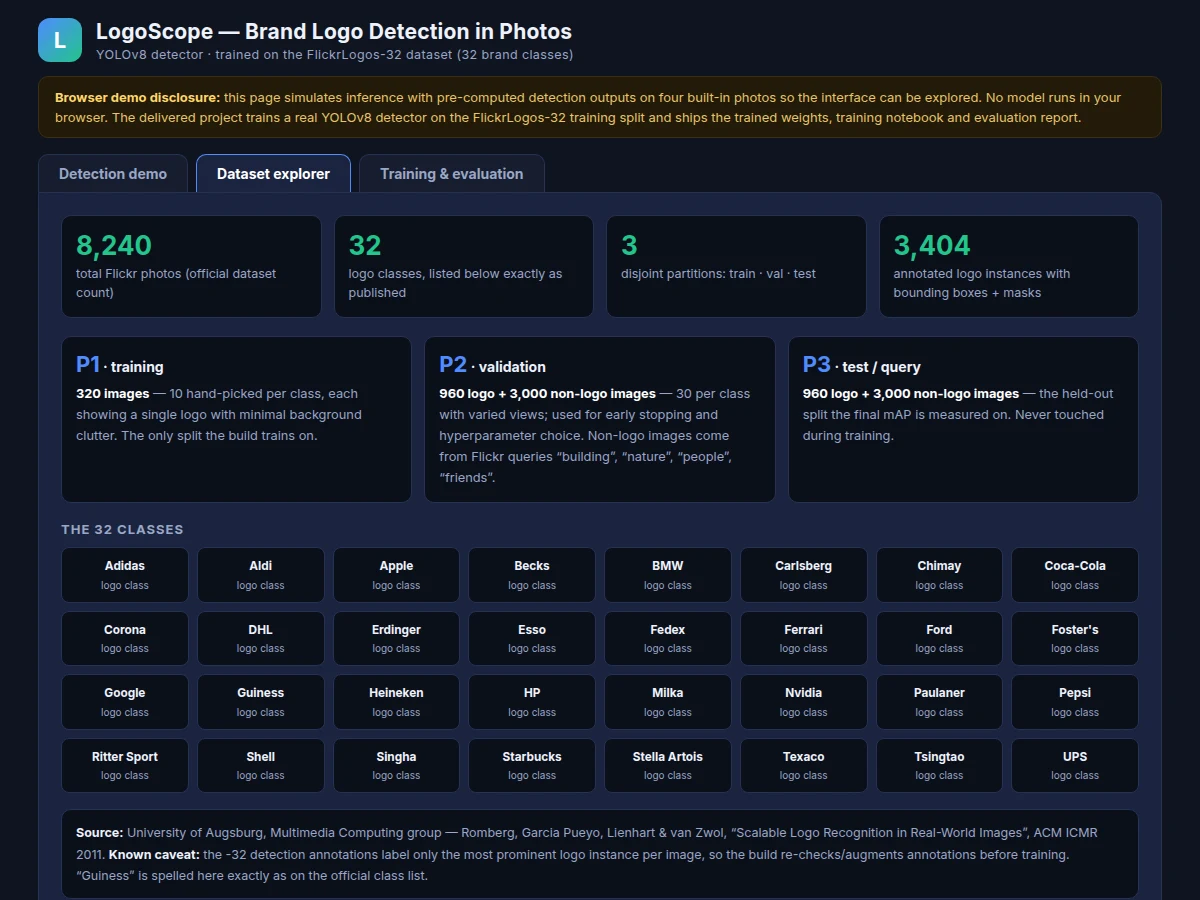
8,240 photos, 32 brands, disjoint P1/P2/P3 splits.
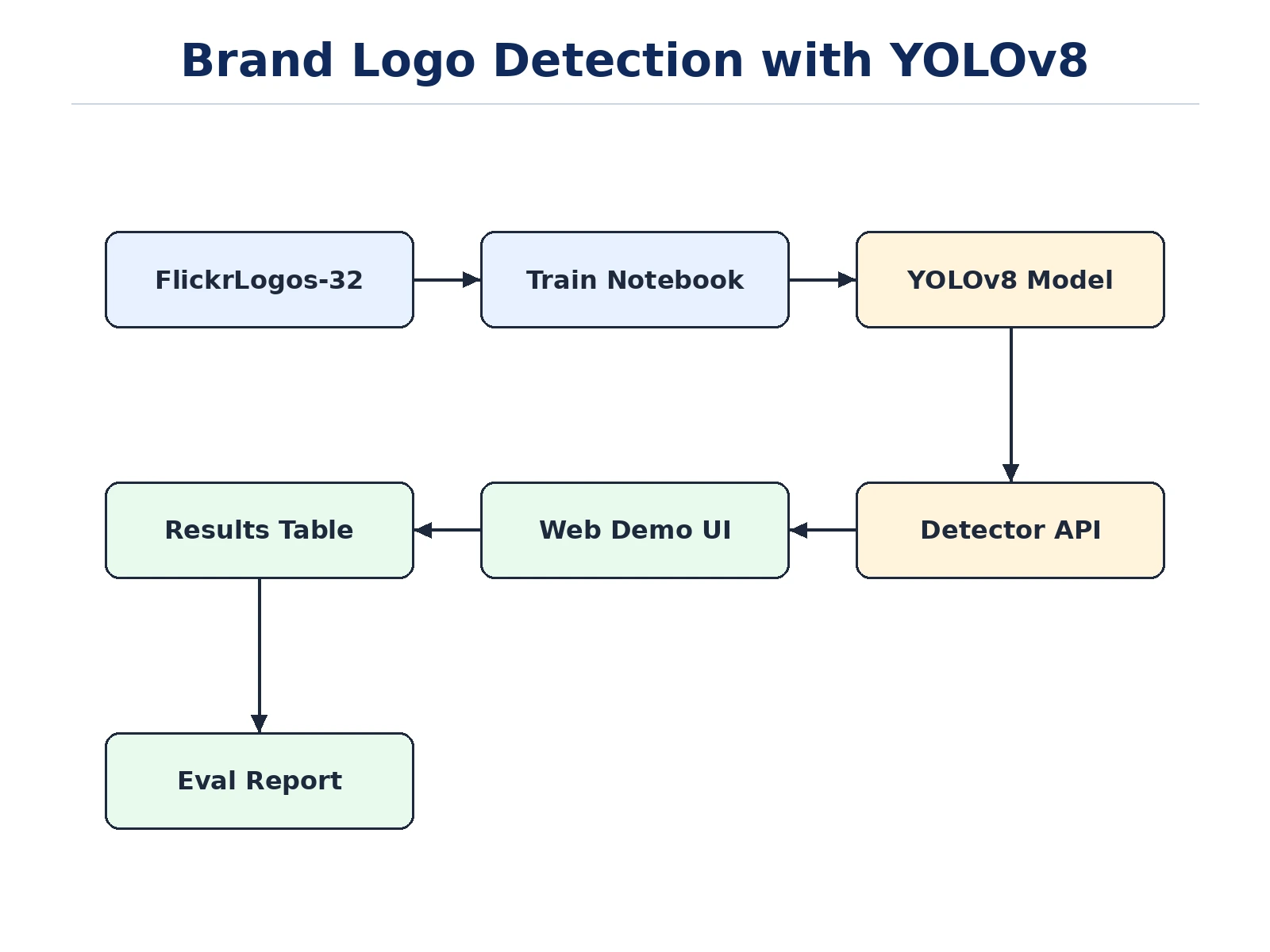
Follow the working sequence
How it works
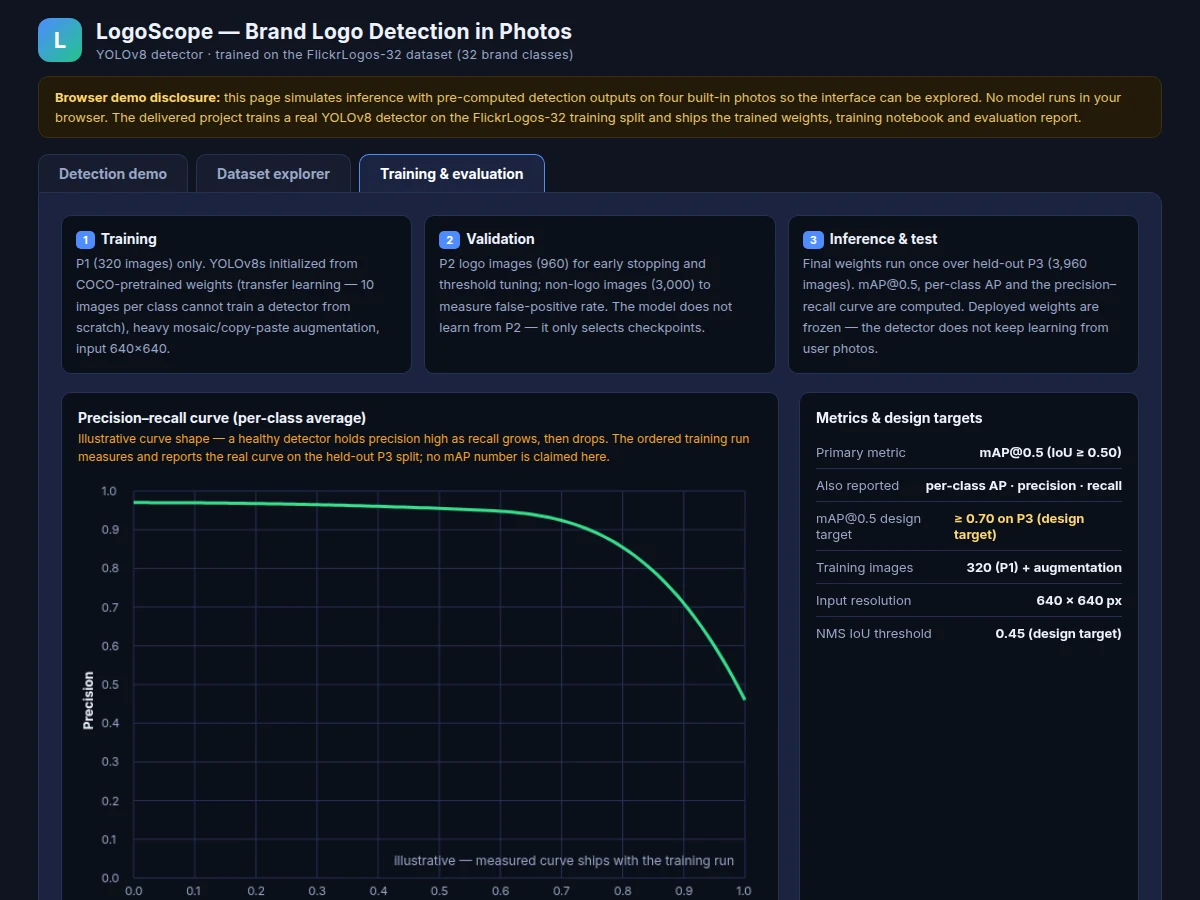
A photo enters the system and is letterboxed to 640×640 pixels, then passes once through the YOLOv8 network: a CSPDarknet backbone extracts features, a PAN-FPN neck fuses them across three scales, and the detection head predicts a class, a bounding box and a confidence score from every grid cell. Non-maximum suppression (IoU 0.45, design target) removes duplicate boxes for the same logo, and the surviving detections are drawn on the photo with brand labels. Training follows the dataset's own protocol — the detector fine-tunes from COCO-pretrained weights on the 320-image P1 training split with heavy augmentation, validates on P2 for early stopping, and is measured exactly once on the held-out P3 test split, where mAP@0.5, per-class AP and precision–recall curves are computed. The final weights are frozen at deployment: the delivered detector does not keep learning from new photos, it only runs inference.
- Dataset preparation and annotation review: FlickrLogos-32 is obtained through the official request process, bounding boxes are converted to YOLO format, and P1/P2 images are re-inspected to complete the secondary-logo boxes the official -32 annotations omit.
- Transfer-learning setup: YOLOv8s starts from COCO-pretrained weights with the backbone frozen for the first epochs, because 320 training images cannot train approximately 11.2 million parameters from scratch.
- Augmented training: mosaic, copy-paste, HSV jitter and flips multiply the effective variety of the small training split; input stays at 640×640 pixels until validation mAP plateaus.
- Validation and threshold tuning: the P2 split drives early stopping and the confidence-threshold choice, while its 3,000 non-logo images measure the false-positive rate.
- Held-out evaluation: final weights run once over the P3 test split; mAP@0.5, per-class AP, precision, recall and PR curves are recorded in the evaluation report.
- Demo and delivery: weights are exported (.pt), wired into the web demo, and the notebook, report, PPT and viva Q&A are assembled for the order.
Tech stack:
- Python 3, PyTorch
- Ultralytics YOLOv8
- OpenCV (image loading, letterboxing, box drawing)
- NumPy, Matplotlib (metrics and plots)
- Jupyter Notebook (training and evaluation)
- FlickrLogos-32 dataset (University of Augsburg)
- HTML, CSS, JavaScript (interactive web demo)
Dataset & model details
- Dataset: FlickrLogos-32 — 8,240 real-world Flickr photos across 32 logo classes (Adidas, Aldi, Apple, Becks, BMW, Carlsberg, Chimay, Coca-Cola, Corona, DHL, Erdinger, Esso, Fedex, Ferrari, Ford, Foster's, Google, Guiness, Heineken, HP, Milka, Nvidia, Paulaner, Pepsi, Ritter Sport, Shell, Singha, Starbucks, Stella Artois, Texaco, Tsingtao, UPS), published by the University of Augsburg (Romberg, Garcia Pueyo, Lienhart, van Zwol — "Scalable Logo Recognition in Real-World Images", ACM ICMR 2011). Partitions: P1 training 320 images (10 hand-picked per class), P2 validation 960 logo + 3,000 non-logo images, P3 test 960 logo + 3,000 non-logo images. 3,404 annotated logo instances with bounding boxes and binary masks. Known caveat: the -32 annotations label only the most prominent logo instance per image.
- Task: Object detection — input is a photo of any size; output is a list of detections, each with a brand class label, a bounding box and a confidence score.
- Model: YOLOv8s (Ultralytics) — anchor-free, single-stage detector; approximately 11.2 million parameters (Ultralytics-published figure). Input 640×640 pixels letterboxed; predictions from three feature grids (strides 8, 16, 32); non-maximum suppression at IoU 0.45 (design target).
- Metrics: mAP@0.5 (primary), per-class average precision, precision, recall, precision–recall curves. Design target: mAP@0.5 ≥ 0.70 on the held-out P3 split (design target, never claimed as measured). No accuracy is claimed until the training run is executed for the order.
| Parameter | Value |
|---|---|
| Task | Object detection: brand label + bounding box + confidence per logo |
| Dataset | FlickrLogos-32 — 8,240 real-world Flickr photos (dataset value) |
| Classes | 32 logo classes (dataset value) |
| Training images | 320 (P1 split) + augmentation (dataset value) |
| Validation / test images | 960 logo + 3,000 non-logo images per split (dataset values) |
| Model | YOLOv8s, Ultralytics — anchor-free, single-stage |
| Parameters | Approximately 11.2 million (Ultralytics-published) |
| Input resolution | 640 × 640 px, letterboxed |
| NMS IoU threshold | 0.45 (design target) |
| Primary metric | mAP at IoU ≥ 0.50 |
| mAP design target | ≥ 0.70 on the held-out P3 split (design target, not measured) |
| Inference | GPU real-time capable (expected); CPU slower — measured on the build machine |
| Weights format | .pt (PyTorch), exported from Ultralytics training |
| Demo | Single-file web app; browser outputs simulated on built-in samples |
Project features
The heart of this project is a real trained detector: YOLOv8s fine-tuned on the FlickrLogos-32 training split, able to find and label all 32 brand classes — from Adidas and BMW to Starbucks and Shell — in ordinary photos, drawing a bounding box and a confidence score around every logo it finds. Around that model sits an interactive web demo where you can use built-in sample photos or upload your own, drag a confidence slider and watch boxes appear or disappear, with detections listed in a results table. The build also ships a complete training notebook documenting every choice — transfer learning from COCO-pretrained weights, mosaic augmentation, early stopping on the validation split — and an evaluation report measuring mAP@0.5, per-class average precision and precision–recall curves on the held-out test split. Finally, because the dataset's own annotations label only the most prominent logo in each image, the project includes a documented annotation-review step so secondary logos never train as background.
- [Trained YOLOv8 logo detector] YOLOv8s fine-tuned on the FlickrLogos-32 training split; detects all 32 brand classes in ordinary photos and returns a bounding box, brand label and confidence score per logo.
- [32-class brand coverage] The full official class list — Adidas, Aldi, Apple, Becks, BMW, Carlsberg, Chimay, Coca-Cola, Corona, DHL, Erdinger, Esso, Fedex, Ferrari, Ford, Foster's, Google, Guiness, Heineken, HP, Milka, Nvidia, Paulaner, Pepsi, Ritter Sport, Shell, Singha, Starbucks, Stella Artois, Texaco, Tsingtao, UPS.
- [Interactive web demo] Single-file HTML app with four built-in real sample photos, photo upload, a working confidence-threshold slider and a results table — honest about simulated browser outputs.
- [Full training notebook] Dataset download and YOLO-format conversion, transfer-learning setup, augmentation recipe, training loop and evaluation in one reproducible Jupyter notebook.
- [Evaluation report] mAP@0.5, per-class average precision, precision, recall and precision–recall curves measured on the held-out P3 test split, with the measured figures recorded after the training run.
- [Annotation-review log] Documents the re-inspection of training images to complete the secondary-logo boxes that the official -32 annotations omit, so they are not trained as background.
- [Viva-ready documentation] Every hyperparameter and design decision recorded with reasoning, plus a Q&A document covering detectors, IoU, mAP and NMS.
What is included
- Complete training and evaluation Jupyter notebook (Ultralytics YOLOv8)
- Trained detector weights (.pt) with an inference script
- Interactive web demo: sample photos, upload, confidence slider, results table
- Evaluation report: mAP@0.5, per-class AP, precision–recall curves, confusion analysis
- Annotation-review log documenting the completed bounding boxes
- Project report PDF, PPT presentation and viva Q&A document
- Project abstract PDF
Limitations & prerequisites
- Small or distant logos are missed: a logo narrower than approximately 30 px at the 640 px input resolution is typically not detected (expected) — the finest detection grid has no cells covering it.
- The official -32 annotations label only the most prominent logo instance per image (dataset caveat); the build re-inspects and completes boxes before training, but edge cases can remain.
- Similar-looking wordmarks confuse the model — text-heavy logos are the hardest class, and the expected confusion pairs are documented in the evaluation report.
- Heavy occlusion, glare, motion blur and extreme angles degrade detections; training photos are everyday Flickr images, not studio shots.
- The 0.70 mAP@0.5 figure is a design target, not a measured claim — the report records the actual measured value after the training run.
- Deployed weights are frozen: the detector does not learn from new photos after delivery (no online learning).
Frequently Asked Questions
Which dataset is used for training, and is it a real benchmark?
FlickrLogos-32, released by the University of Augsburg (Romberg et al., ACM ICMR 2011). It holds 8,240 real Flickr photos across 32 brand classes — Adidas, BMW, Coca-Cola, Shell, Starbucks and 27 more — with bounding-box annotations in disjoint train, validation and test partitions. It is a genuine published benchmark, not a scraped image folder. The dataset is obtained through the university's official request process; the build converts its masks and boxes to YOLO format and re-inspects training images to complete the secondary-logo boxes the official -32 annotations omit.
Which model is used, and why YOLOv8?
YOLOv8s from Ultralytics — a single-stage, anchor-free detector that predicts class, box and confidence in one forward pass. It runs fast enough for per-frame inference, fine-tunes well on small datasets via transfer learning, and its training tooling (mosaic augmentation, early stopping, mAP logging) is mature and well documented. The small variant is chosen deliberately: with only 320 training images, the larger YOLOv8 variants would overfit faster while adding little, and YOLOv8s already carries approximately 11.2 million parameters.
Is the mAP or accuracy guaranteed?
No — and that honesty is the point. The design target is mAP@0.5 of at least 0.70 on the held-out P3 test split, stated as a target rather than a promise, and the evaluation report carries the actual measured figure after the training run is executed. Final performance depends on the training run, the augmentation recipe, image quality and how different the deployment photos are from Flickr-style images. Any seller quoting a fixed mAP before training is inventing it.
Can it detect logos in a live camera feed?
Yes — the delivered weights are a standard YOLOv8 model, so the same detector can run per-frame on a webcam or video file through OpenCV, typically in real time on a CUDA GPU. The included web demo works on still photos, while a live-camera mode that draws boxes on each video frame is available as an optional customization. CPU-only machines will run slower, which the report quantifies on the build machine.
Can new brand classes be added later?
Yes, provided you supply new labeled data. Adding a brand means collecting photos where its logo appears, drawing bounding boxes in YOLO format, adding the class name to the dataset configuration and retraining — and the notebook documents each of these steps exactly. Like the original 32 classes, a new class needs varied examples across angles, lighting and sizes, and the build's augmentation recipe is reused so small new classes generalize.
Is this project suitable for a final-year project?
Yes — for AI & Machine Learning, Computer Science, IT and Electronics & Telecommunication programs. It demonstrates the full object-detection pipeline: public dataset handling, transfer learning, augmentation design, validation discipline, honest evaluation with mAP, and a working demo — every part defensible in a viva. The report, PPT and Q&A document are written so the student can explain each decision, from the 640 px input choice to the NMS threshold.
Components & software requirements
- Python 3, PyTorch
- Ultralytics YOLOv8
- OpenCV (image loading, letterboxing, box drawing)
- NumPy, Matplotlib (metrics and plots)
- Jupyter Notebook (training and evaluation)
- FlickrLogos-32 dataset (University of Augsburg)
- HTML, CSS, JavaScript (interactive web demo)
Dataset & model details
- Dataset: FlickrLogos-32 — 8,240 real-world Flickr photos across 32 logo classes (Adidas, Aldi, Apple, Becks, BMW, Carlsberg, Chimay, Coca-Cola, Corona, DHL, Erdinger, Esso, Fedex, Ferrari, Ford, Foster's, Google, Guiness, Heineken, HP, Milka, Nvidia, Paulaner, Pepsi, Ritter Sport, Shell, Singha, Starbucks, Stella Artois, Texaco, Tsingtao, UPS), published by the University of Augsburg (Romberg, Garcia Pueyo, Lienhart, van Zwol — "Scalable Logo Recognition in Real-World Images", ACM ICMR 2011). Partitions: P1 training 320 images (10 hand-picked per class), P2 validation 960 logo + 3,000 non-logo images, P3 test 960 logo + 3,000 non-logo images. 3,404 annotated logo instances with bounding boxes and binary masks. Known caveat: the -32 annotations label only the most prominent logo instance per image.
- Task: Object detection — input is a photo of any size; output is a list of detections, each with a brand class label, a bounding box and a confidence score.
- Model: YOLOv8s (Ultralytics) — anchor-free, single-stage detector; approximately 11.2 million parameters (Ultralytics-published figure). Input 640×640 pixels letterboxed; predictions from three feature grids (strides 8, 16, 32); non-maximum suppression at IoU 0.45 (design target).
- Metrics: mAP@0.5 (primary), per-class average precision, precision, recall, precision–recall curves. Design target: mAP@0.5 ≥ 0.70 on the held-out P3 split (design target, never claimed as measured). No accuracy is claimed until the training run is executed for the order.
Delivery information
Built-to-order project. Delivery timeline is shared after order confirmation based on current queue.
Support terms
Complete documentation, setup guide, and viva preparation included. Support for setup and explanation provided.
Download free synopsis (PDF)
Enter your name and WhatsApp number — the synopsis PDF downloads immediately. We may send occasional project updates on WhatsApp; no spam.