
More project photos (2)
The problem
Book Reading Tracker is a full-stack web platform that turns reading intentions into measurable progress. This project builds the tracker as a MERN application — React frontend, Node.js and Express API, MongoDB storage — where each user keeps personal shelves, logs daily page sessions, and watches a yearly goal recalculated into a daily pace. The headline mechanism is the pace engine: (books remaining × ~380 average pages) ÷ days left in the year, turning an abstract 24-book goal into a pages-per-day number updated with every log. Books are added manually or pulled from the Google Books API v1, whose documented default quota is 1,000 requests per day. One builder note shaped the design: progress is stored as page N of M, not a percentage, because one percent of a 688-page novel is 7 pages of real work that percentages hide. The demo preview ships with 24 seeded books and 79 logged sessions totalling 2,802 pages across 37 active days.
The reader logs a reading session: book, pages read, and date.
Follow the working sequence
How it works
Every action travels a short web path: the React frontend collects the input, the Express API validates it and applies the rules, MongoDB persists the result, and the UI re-renders from fresh data. Signup hashes passwords with bcrypt; signin returns a signed JWT attached to every request, and an admin flag on the user document gates management routes. Adding a book queries the Google Books API v1 or takes a manual form, then stores a book document on the reader's shelf. Each logged session writes one document; the book's current page is the sum of its sessions, so correcting an old entry keeps progress consistent. The goal engine reads the yearly target and finished count, derives expected pace from the day of the year, and computes the catch-up rate as (books remaining × ~380 average pages) ÷ days left in the year. Chart endpoints aggregate sessions by day and by book for the dashboard.
- The reader signs up or signs in; the API verifies credentials and issues a signed JWT access token used on all later requests.
- Books are added by searching the Google Books API v1 (title, author or ISBN) or through a manual entry form, then placed on the Currently Reading, Want to Read or Finished shelf.
- Each reading session is logged with book, pages and date; the book's current page is recomputed as the exact sum of its session documents.
- The goal engine compares finished books against the yearly target, derives expected pace from the current day of the year, and computes the catch-up pages-per-day as (books remaining × ~380 average pages) ÷ days left in the year.
- Aggregation endpoints group sessions by day and by book to feed the weekly pages chart, the goal ring, the cumulative sparkline and the streak counter.
- Ratings and reviews are attached to finished books; reading notes can be kept on in-progress titles.
- Admin users manage accounts and the shared catalogue through role-gated routes, while readers only ever see their own data.
Tech stack:
- React 18 (frontend SPA)
- Node.js with Express.js (REST API)
- MongoDB with Mongoose (database & ODM)
- JWT authentication with bcryptjs password hashing
- Google Books API v1 (book metadata & search)
- Recharts (dashboards in the delivered app)
- React Router (client-side navigation)
- Git (version control)
| Parameter | Value |
|---|---|
| Architecture | MERN: React SPA → Express REST API → MongoDB via Mongoose |
| Authentication | JWT access tokens; passwords hashed with bcrypt (design) |
| User roles | Reader and Admin, enforced by role-gated API routes (design) |
| Book metadata | Google Books API v1; documented default quota 1,000 requests/day |
| Progress model | Page N of M per book, derived from summed session logs, never hand-edited (design) |
| Pace formula | (books remaining × ~380 average pages) ÷ days left in the year (design) |
| Charts | Weekly pages bar chart, goal ring, cumulative sparkline; Recharts in the delivered app (design) |
| Demo dataset | 24 seeded books · 79 logged sessions · 2,802 pages · 37 active days (measured from the demo seed) |
| Seeded streak | 18-day reading streak in the demo dataset (measured) |
| API performance | Expected p95 under 300 ms for log and stats endpoints on a 2 GB reference VPS (expected) |
| Concurrent users | Design target: 500 concurrent sessions on a single 2 GB VPS (design target) |
| Deployment | Expected: any Node.js host with a MongoDB connection string (expected) |
Project features
Book Reading Tracker is organised around four capabilities that work as one loop: a three-shelf personal library, one-tap book entry through the Google Books API v1, page-session logging that records exactly how many pages were read on which date, and a goal engine that converts the yearly book target into a living pages-per-day pace with charts and streaks on top. The library keeps currently-reading, want-to-read and finished shelves separate so the dashboard always shows what is being read now. Logging a session is a single form — book, pages, date — and the book's current page is the sum of its sessions, never a hand-edited number. The pace engine recomputes after every log: books remaining times roughly 380 average pages, divided by days left in the year. Weekly bar charts, a goal ring and a reading streak turn the raw logs into feedback the reader checks daily, and ratings with reviews close the loop when a book is finished.
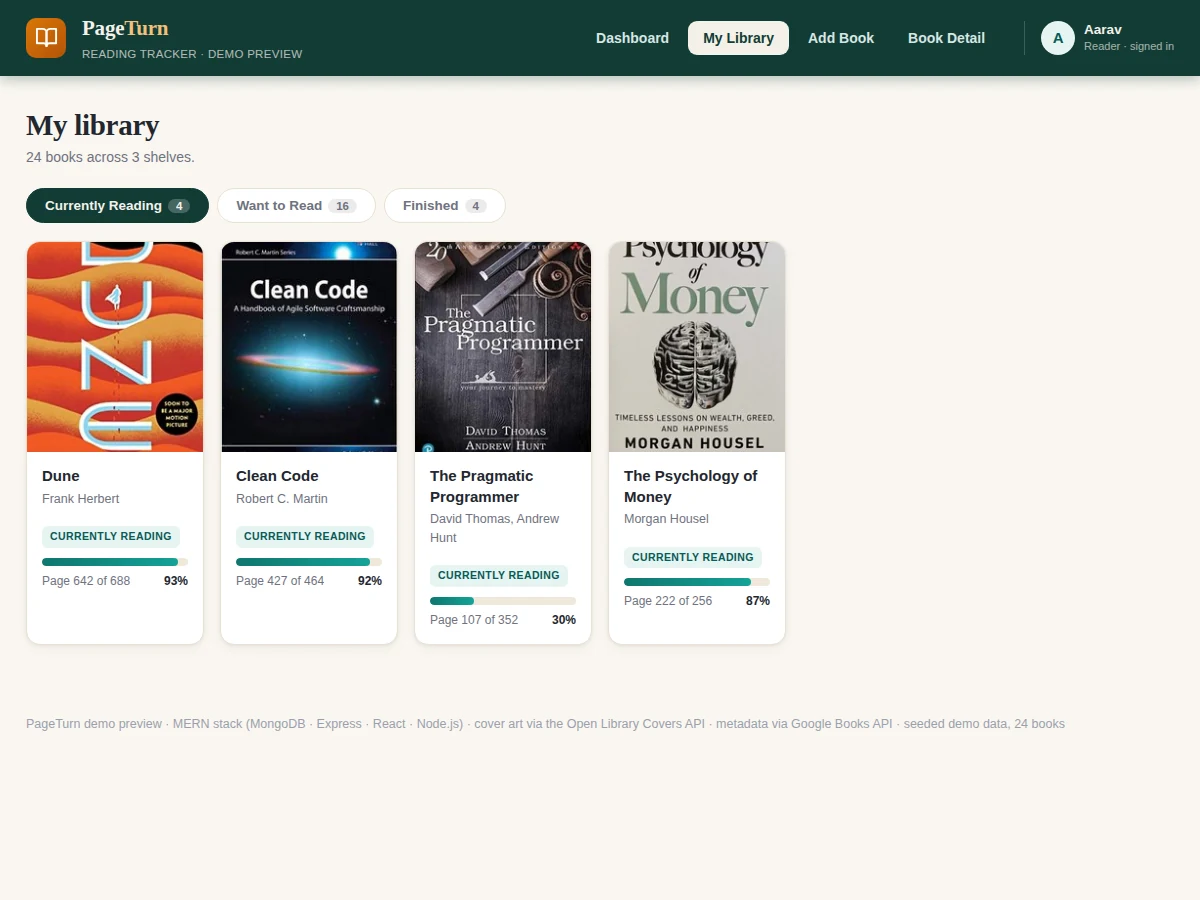
- [Three-shelf personal library] Every user organises books into Currently Reading, Want to Read and Finished shelves, with per-book progress bars computed live from logged sessions.
- [Google Books search and add] Search the Google Books API v1 by title, author or ISBN and shelve a result in one tap; manual entry covers books the catalogue misses. Implemented.
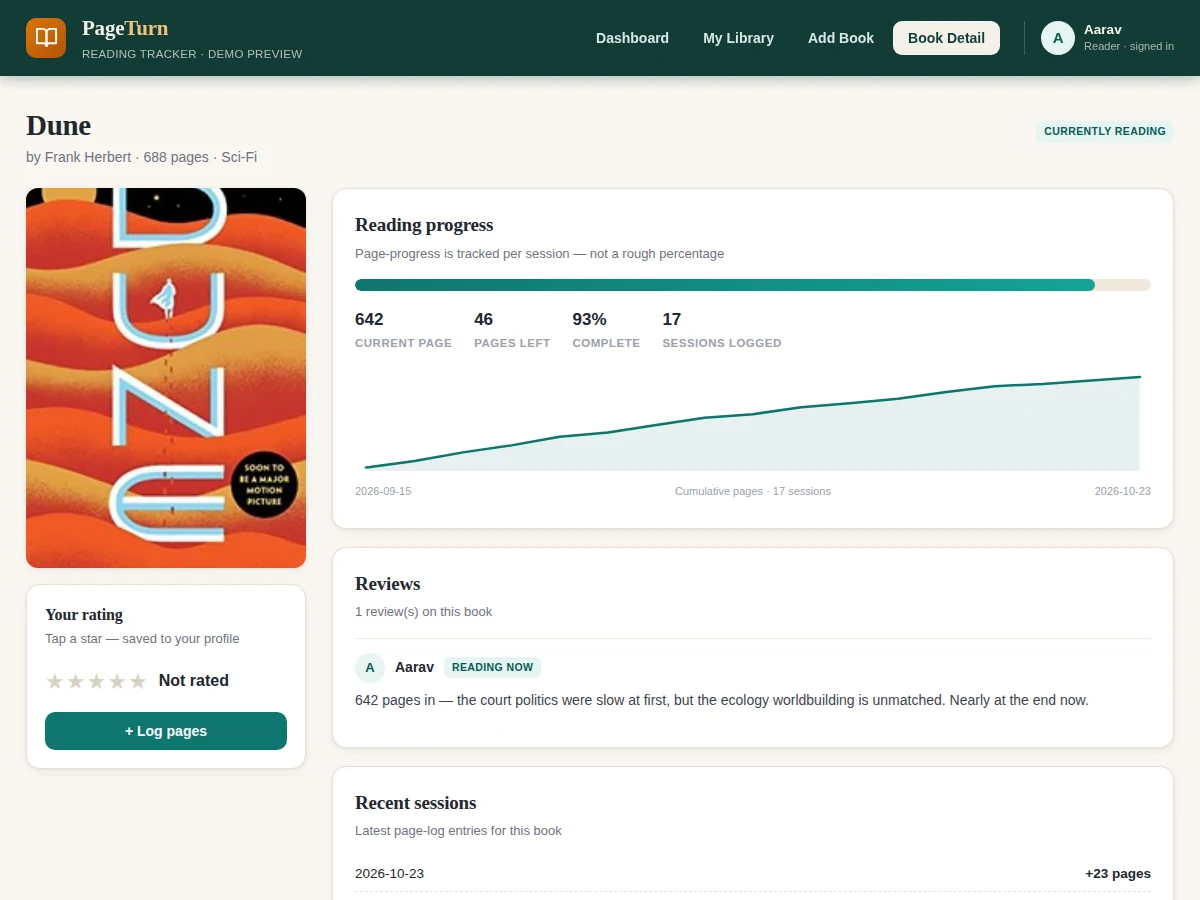
- [Page-session logging] Each session stores book, pages and date; a book's current page is always the exact sum of its sessions, so progress survives edits and stays auditable. Implemented.
- [Yearly goal with pace engine] Set a books-per-year target; the dashboard shows finished-vs-target, expected pace for today's date, and the catch-up pages-per-day needed, recomputed on every log. Implemented.
- [Progress charts and streaks] Weekly pages bar chart, goal ring, cumulative per-book sparkline and a consecutive-day streak counter, all aggregated from the session log. Implemented.
- [Ratings and reviews] Finished books get a 5-star rating and a written review; in-progress books carry reading notes instead of premature verdicts. Implemented.
- [JWT authentication with reader and admin roles] Readers manage their own library; admins oversee users and the catalogue. Passwords are hashed with bcrypt and sessions use signed JWT access tokens. Implemented.
- [Social reading feeds] Future scope: follow friends, compare streaks and share finished-book reviews; not part of the base build.
What is included
- Complete MERN source code (React frontend, Express API, Mongoose models)
- MongoDB seed script with 24 books and 79 reading sessions
- JWT authentication with reader/admin roles
- Setup instructions (local run and VPS deployment notes)
- Project report PDF (background, architecture, methodology, screens)
- PPT presentation for final review
- Viva Q&A preparation document (MERN concepts, JWT flow, API design, quota handling)
- Demo guidance for the review demonstration
Limitations & prerequisites
- Book metadata depends on the Google Books API v1: the documented default quota is 1,000 requests per day, and catalogue data quality varies by title.
- Page counts come from publisher metadata and can differ between editions of the same book; the tracker trusts the edition the reader added.
- The pace engine assumes roughly 380 average pages per remaining book, so dense nonfiction or short novellas will skew the catch-up number.
- Streaks reward daily logging, which measures consistency rather than comprehension or reading quality.
- There is no offline mode in the base build — logging a session needs connectivity; a PWA offline queue is listed as future scope.
- Hosting and domain costs are not part of the software itself.
Frequently Asked Questions
Is this project suitable for a final-year project?
Yes, for Computer Science, IT and related programs. It demonstrates a complete MERN build: REST API design, JWT authentication with roles, MongoDB modelling, third-party API integration with quota handling, and data aggregation for charts — each of which gives the viva examiner something concrete to probe.
How does the reading-goal pace calculation work?
The engine turns the yearly book target into a daily number with one formula: (books remaining × ~380 average pages) ÷ days left in the year. It also shows the expected finished-count for today's date, so the reader sees exactly how far behind or ahead of pace they are, and the number updates after every logged session.
Does adding books require a Google Books API key?
Search works without a key at low volume, but a free API key from the Google Cloud console is recommended because the documented default quota is 1,000 requests per day. When the quota is exhausted the app falls back to manual book entry, so logging never stops.
Can this be hosted online?
Yes. The frontend builds to static files served from any static host, and the Express API plus MongoDB run on any Node.js host such as a small VPS. The setup guide covers environment variables, the database connection string and the JWT secret configuration.
Can more features be added later?
Yes. Realistic extensions include Goodreads CSV import, a PWA offline logging queue, social reading feeds with shared streaks, and a companion mobile app. The session-log data model already stores everything these features need, so they build on the existing API rather than replacing it.
Components & software requirements
- React 18 (frontend SPA)
- Node.js with Express.js (REST API)
- MongoDB with Mongoose (database & ODM)
- JWT authentication with bcryptjs password hashing
- Google Books API v1 (book metadata & search)
- Recharts (dashboards in the delivered app)
- React Router (client-side navigation)
- Git (version control)
Delivery information
Built-to-order project. Delivery timeline is shared after order confirmation based on current queue.
Support terms
Complete documentation, setup guide, and viva preparation included. Support for setup and explanation provided.
Download free synopsis (PDF)
Enter your name and WhatsApp number — the synopsis PDF downloads immediately. We may send occasional project updates on WhatsApp; no spam.