
More project photos (3)
The problem
An Android society maintenance bill payment app with receipts and due alerts is a mobile app that replaces a housing society's paper bill book with one shared record: the secretary raises monthly bills with an itemised breakdown, residents pay through a UPI intent, and every confirmed payment issues a numbered receipt while unpaid flats get automatic reminders before and after the due date. Most small societies still track maintenance in notebooks or spreadsheets, so nobody can see at a glance who has paid, and follow-ups depend on the secretary remembering every due date. The app fixes that by keeping bills, payments and receipts in one offline Room database, marking each flat paid, due or overdue, and scheduling a reminder for each unpaid flat. In the demo build, a 12-flat sample society bills ₹32,000 for November 2026, with ₹20,900 collected and ₹11,100 still due — figures the demo computes live from its own bill list, not numbers typed into a slide.
Society secretary who raises monthly bills and tracks collection.
Follow the working sequence
How it works
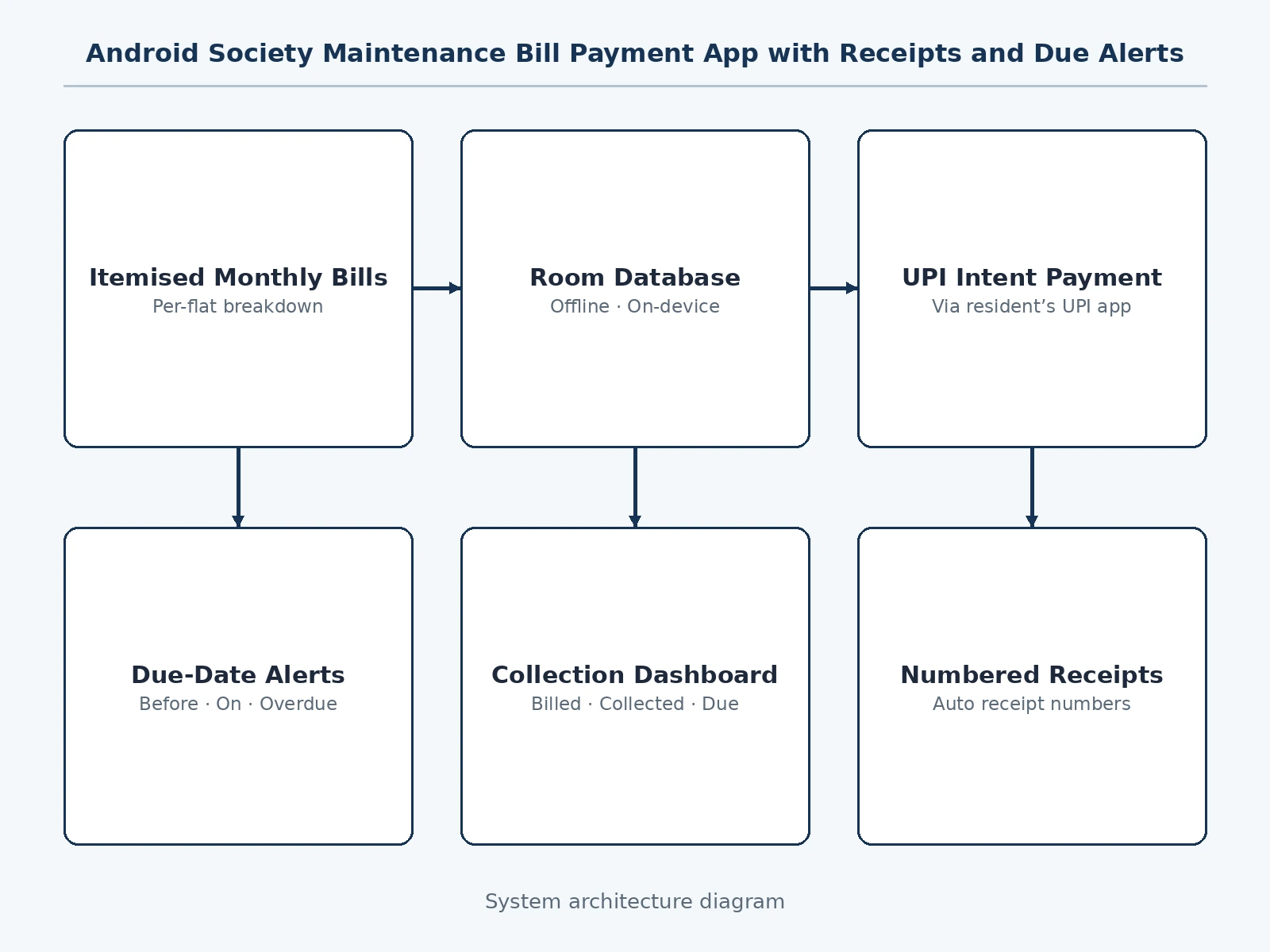
A society maintenance bill travels from billing to receipt in one loop inside the app. The secretary first raises the month's bills, one per flat, each with an itemised breakdown and a due date, and the app stores them in its on-device Room database. Each resident opens their flat's bill, checks the breakdown, and pays through a UPI intent that opens their own UPI app with the society's UPI ID and amount pre-filled, or records a cash or bank-transfer payment by uploading a receipt photo. When the payment is confirmed, the app marks the flat paid, generates a numbered receipt, and updates the collection dashboard immediately. Meanwhile the reminder engine watches every unpaid flat and fires alerts two days before the due date, on the due date, and daily while overdue, so the secretary never has to chase payments by hand.
- The secretary raises November bills for all 12 flats, each with a breakdown (maintenance, water, sinking fund, parking) and a due date between 5 and 25 Nov 2026.
- Bills are stored in the on-device Room database and listed on the dashboard with paid, due and overdue states.
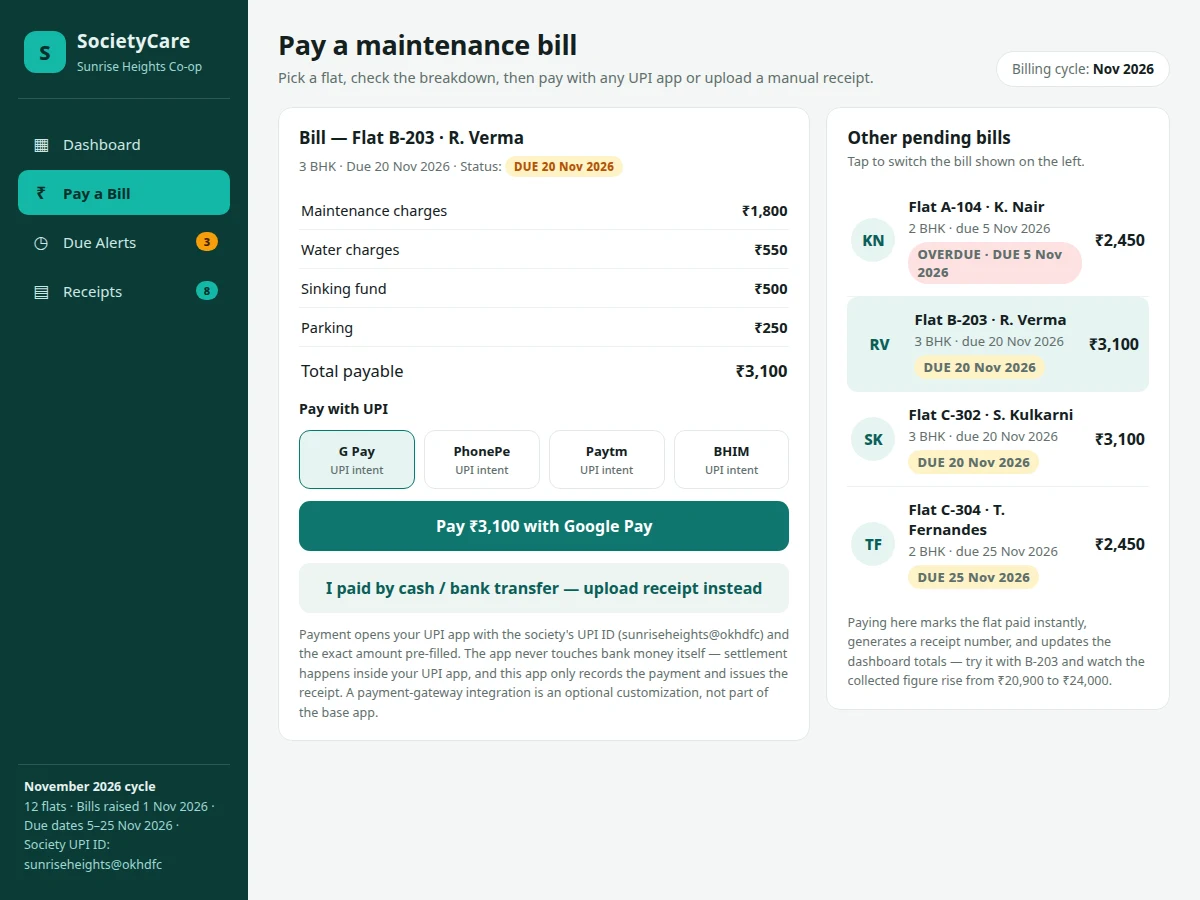
- A resident opens their flat's bill, checks the breakdown, and taps pay — the app fires a UPI intent to their chosen UPI app with the society UPI ID and amount pre-filled.
- After the UPI app confirms the payment, the resident returns to the app, which marks the flat paid and generates a numbered receipt (for example RCP-2026-11-0009).
- Cash and bank-transfer payments are recorded instead by uploading a photo of the receipt, marked for verification by the secretary.
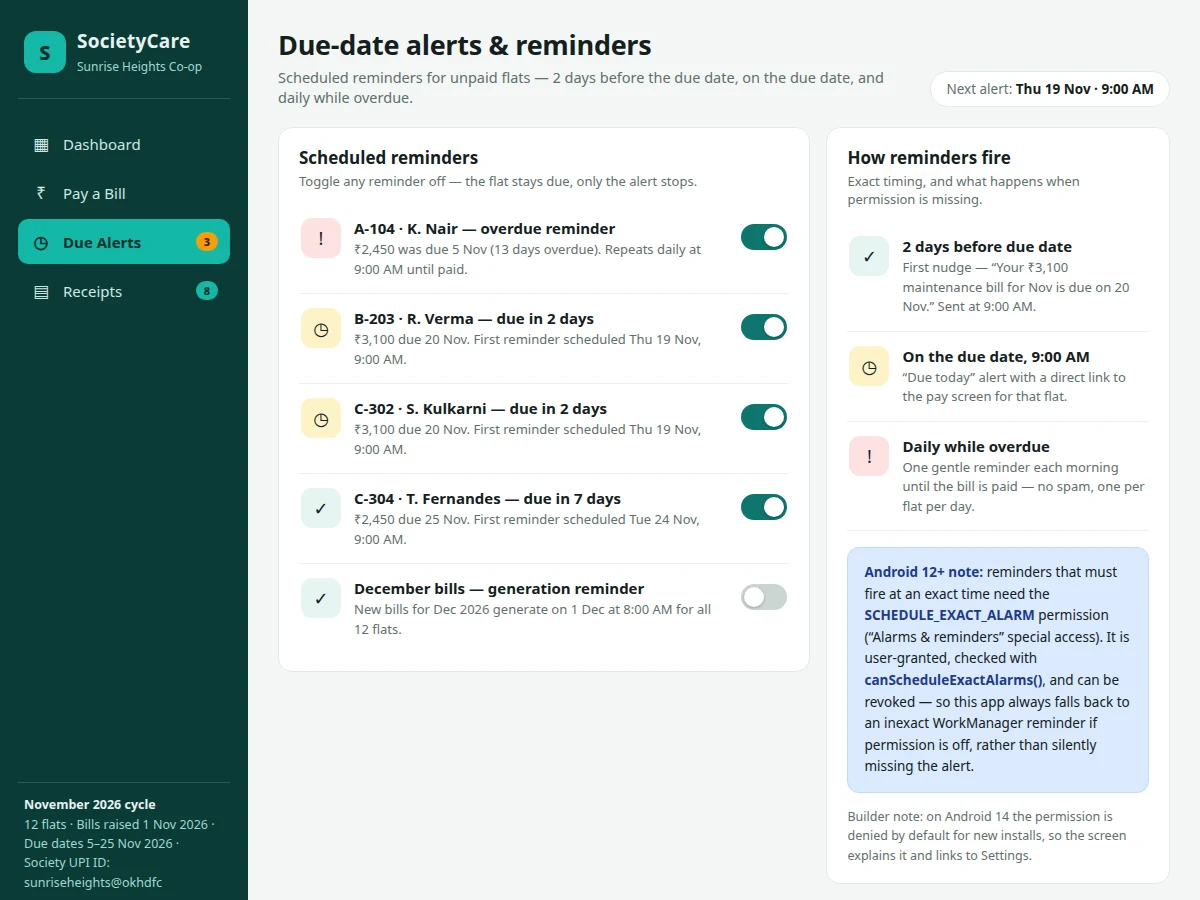
- The reminder engine schedules alerts for each unpaid flat — two days before the due date, on the due date, and daily while overdue — using AlarmManager with a WorkManager fallback if exact-alarm permission is off.
Tech stack:
- Kotlin, Android Studio
- Jetpack Compose (UI) with Material 3
- Room database over on-device SQLite
- AlarmManager with WorkManager fallback (reminders)
- UPI intent (payment via the resident's UPI app)
- MVVM architecture with Repository pattern
- Android 12+ exact-alarm permission handling
| Parameter | Value |
|---|---|
| Platform | Android 8.0 (API level 26) and above (design target) |
| Language | Kotlin |
| UI | Jetpack Compose with Material 3 |
| Database | Room over on-device SQLite |
| Demo society size | 12 flats (sample data in the demo) |
| Sample monthly bill (2 BHK) | ₹2,450 per flat per month (demo sample data) |
| Sample monthly bill (3 BHK) | ₹3,100 per flat per month (demo sample data) |
| Sample society monthly total | ₹32,000 billed per month (demo sample data, computed live by the demo) |
| Sample collection (demo) | ₹20,900 collected and ₹11,100 pending (demo sample data) |
| Reminder schedule | 2 days before due date · on due date · daily while overdue |
| Exact-alarm permission | SCHEDULE_EXACT_ALARM (Android 12 and above, user-granted) |
| Payment flow | UPI intent to the society UPI ID; no gateway settlement in the base build |
| Offline support | Bills, payments and receipts stored on-device; the UPI step needs internet inside the UPI app |
| App size | Approximately 12 MB installed (expected for the base build) |
| Society capacity | Up to 500 flats (design target; demo ships with 12 flats of sample data) |
Project features
The app covers the whole billing cycle. First, itemised monthly billing: each flat gets a bill broken into maintenance, water, sinking fund and parking, so residents see exactly what they are paying for instead of one unexplained total. Second, UPI-intent payment with manual receipt upload as the alternative: the app opens the resident's own UPI app with the society's UPI ID and amount pre-filled, and a cash or bank-transfer payment can be recorded by uploading a photo of the receipt. Third, automatic numbered receipts: every confirmed payment generates a receipt with a running number, stored against the bill and shareable with the resident. Fourth, due-date alerts: reminders are scheduled two days before the due date, on the due date, and daily while a bill is overdue, with an exact-alarm permission fallback so alerts are never silently missed.
- [Itemised monthly bills] The secretary raises one bill per flat each month, broken into maintenance, water, sinking fund and parking charges, with a due date per flat. The bill screen shows the full breakdown before any payment is offered.
- [UPI-intent payment + manual receipt upload] Tapping pay opens the resident's own UPI app with the society UPI ID and the exact amount pre-filled. A cash or bank-transfer payment is recorded instead by uploading a photo of the receipt for verification.
- [Automatic numbered receipts] Every confirmed payment generates a receipt with a running number (for example RCP-2026-11-0009), stored against the flat's bill and viewable in the receipts list at any time.
- [Due-date alerts] Reminders fire two days before the due date, on the due date at 9:00 AM, and daily while a bill stays overdue — one reminder per flat per day, with each reminder switchable off without cancelling the bill.
- [Collection dashboard] The dashboard shows the month's billed, collected and pending totals with every flat marked paid, due or overdue, so the secretary sees the whole society's position in one screen.
- [Offline-first Room database] Bills, payments and receipts live in a Room database on the device, so viewing records and issuing receipts works without internet; only the UPI step itself needs connectivity inside the UPI app.
- [Payment-gateway settlement — optional customization] Live gateway settlement is NOT part of the base app. A Razorpay or PayU gateway integration can be developed separately on request, with merchant onboarding handled by the society.
What is included
- Complete Android Studio source code (Kotlin + Jetpack Compose)
- Room database schema with a 12-flat sample society dataset
- Working demo app simulation (single-file HTML) used for the listing screenshots
- Project report and abstract PDF
- Setup and build instructions
- PPT presentation for final review
- Viva Q&A preparation document (Room, UPI intent, AlarmManager permissions, MVVM)
Limitations & prerequisites
- Payment is UPI intent or manual receipt upload only — the base app performs no live payment-gateway settlement, and the society's UPI ID must be configured before use.
- Reminders that must fire at an exact time need the SCHEDULE_EXACT_ALARM permission on Android 12 and above; if the user revokes it, alerts fall back to inexact WorkManager timing and may arrive late.
- The base build serves one society; multi-society administration and per-society treasurer roles are an optional customization.
- Receipts are local society records, not GST invoices or audited statements of account.
- The demo ships with a 12-flat sample society; larger societies are a design target of up to 500 flats and need performance testing before use.
- The UPI step needs internet inside the resident's UPI app; offline mode covers viewing bills, receipts and records only.
Frequently Asked Questions
Is this project suitable for a final-year project?
Yes — for Computer Science, IT and Electronics & Telecommunication students. It demonstrates a complete Android app: Jetpack Compose UI, a Room database, UPI-intent payment, receipt generation and scheduled reminders with Android 12+ exact-alarm permission handling, all in one working build.
How does payment work — is a payment gateway integrated?
Payment works through a UPI intent, not a gateway. The app opens the resident's own UPI app with the society's UPI ID and the exact amount pre-filled, so settlement happens inside the UPI app and this app only records the payment and issues the receipt. A Razorpay or PayU gateway integration is an optional customization, not part of the base build.
Does the app work without internet?
Bills, payments and receipts work offline, because everything is stored in an on-device Room database. Viewing the dashboard, checking a bill and issuing a receipt need no connectivity. Only the UPI payment step itself needs internet, and that happens inside the resident's UPI app, not inside this app.
How do due-date reminders work on Android 12 and above?
Reminders are scheduled with AlarmManager for 9:00 AM two days before the due date, on the due date, and daily while a bill is overdue. On Android 12 and above, exact timing needs the SCHEDULE_EXACT_ALARM permission, which is user-granted and checked with canScheduleExactAlarms(); if it is off, the app falls back to an inexact WorkManager reminder instead of missing the alert.
Can this project be customized?
Yes — realistic customizations include more flats or multiple wings, society-specific charge heads, a treasurer/admin role with bill approval, SMS or WhatsApp reminder delivery, a web dashboard for the committee, and a payment-gateway integration. Each is quoted separately based on scope and timeline.
Components & software requirements
- Kotlin, Android Studio
- Jetpack Compose (UI) with Material 3
- Room database over on-device SQLite
- AlarmManager with WorkManager fallback (reminders)
- UPI intent (payment via the resident's UPI app)
- MVVM architecture with Repository pattern
- Android 12+ exact-alarm permission handling
Delivery information
Built-to-order project. Delivery timeline is shared after order confirmation based on current queue.
Support terms
Complete documentation, setup guide, and viva preparation included. Support for setup and explanation provided.
Download free synopsis (PDF)
Enter your name and WhatsApp number — the synopsis PDF downloads immediately. We may send occasional project updates on WhatsApp; no spam.