
More project photos (2)
The problem
Android Bus Pass Renewal for Students with Route Timetables is an Android application that replaces paper bus-pass queues with a renewal workflow built for students. A student creates an application or renews an expiring pass inside the app, uploads a college ID card, a photograph and route proof, and tracks the request until an admin approves it. Approval issues a digital pass carrying a QR code, a pass ID and validity dates, so the pass can be shown to a conductor without paper. The app sends a renewal reminder seven days before expiry, so a student is warned before the pass lapses. Route timetables sit alongside the pass as a secondary feature: the admin enters routes, stops and departure times, and students read them in the app. No live vehicle tracking and no fare calculation sit at the centre of this system, and no connection to any real transport authority is claimed.
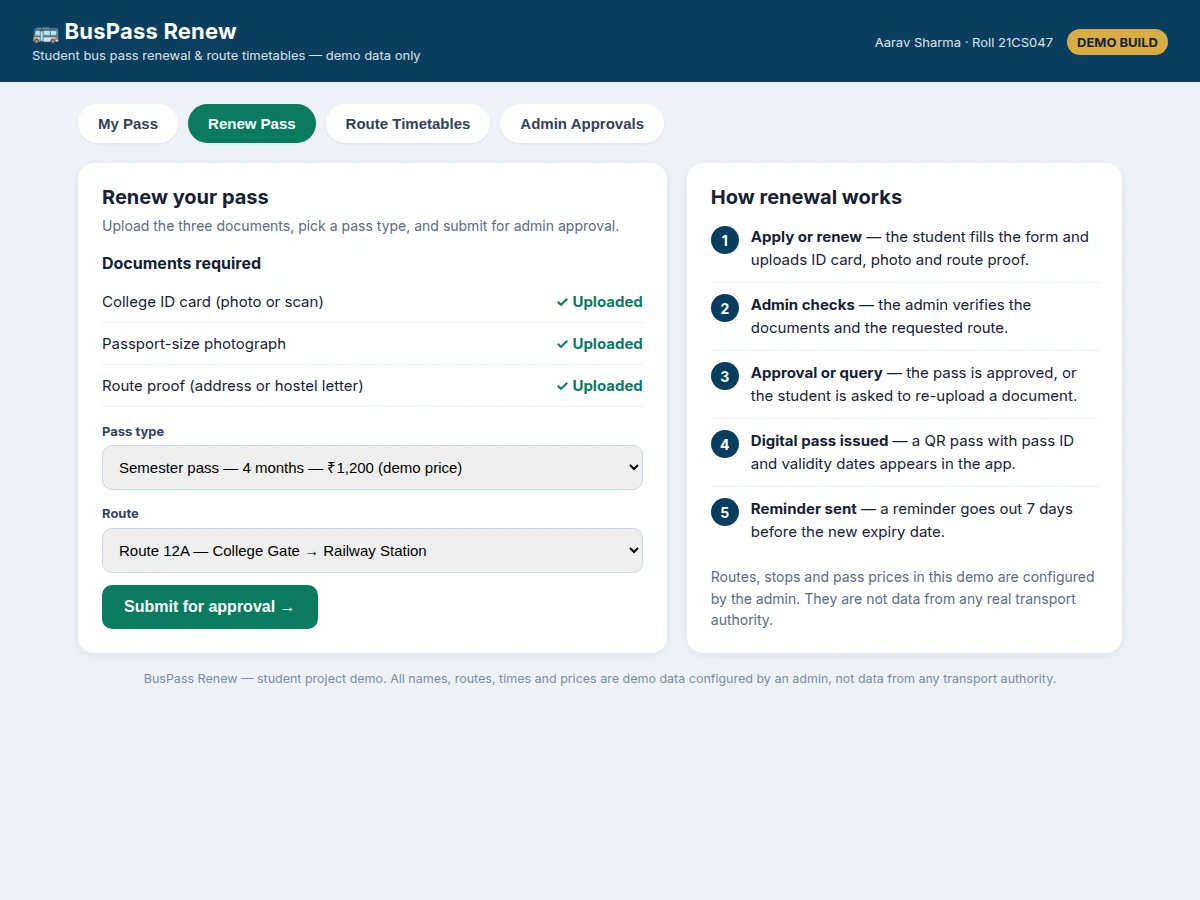
Student signs in and starts a pass application.
Follow the working sequence
How it works
The system runs as one end-to-end renewal workflow with two roles: the student who applies, and the admin who verifies and approves. A student signs in, picks a route and a pass type, and uploads three documents — a college ID card, a photograph and route proof — and the request enters the admin queue as pending. The admin checks the documents against the requested route, approves the request or asks for a clearer document, and approval issues a digital pass carrying a QR code, a pass ID and validity dates. The QR check rests on a first-principles point: the pass ID and the validity dates travel with the code itself, so validity is judged by comparing the current date with the printed dates rather than by a live lookup. Seven days before expiry, the app sends a renewal reminder, and the student repeats the same workflow to renew.
- The student signs in and creates a profile with college details, roll number and home route.
- The student chooses a pass type and a route, then uploads the college ID card, a photograph and route proof.
- The request enters the admin queue with the status pending, and the student can track it in the app.
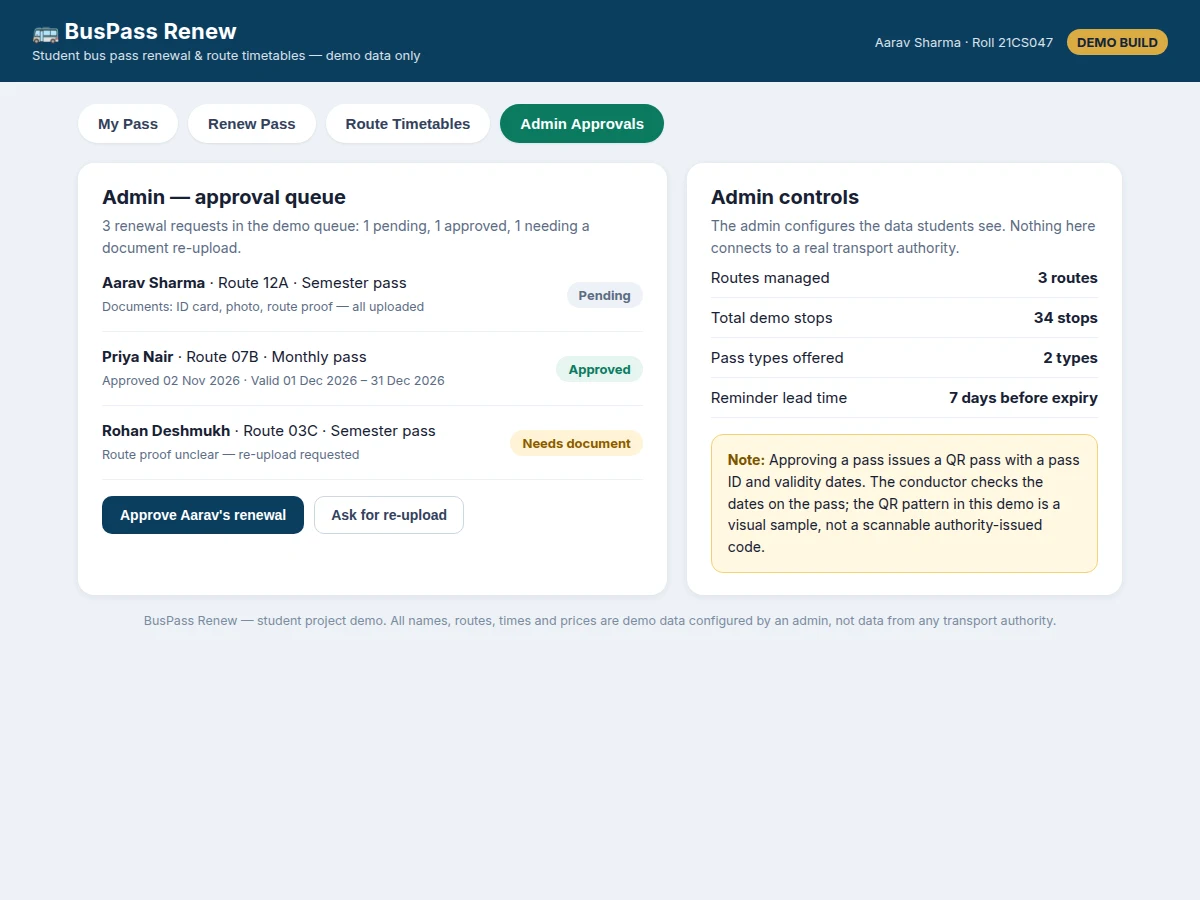
- The admin verifies the documents and the requested route, then approves the request or asks for a clearer document.
- Approval issues the digital pass, showing a QR code, a pass ID, the route and the start and end validity dates.
- The student shows the digital pass to the conductor, who checks the pass ID, route and validity dates.
- Seven days before the expiry date, the app sends a renewal reminder, and the student renews through the same workflow before the pass lapses.
Tech stack:
- Kotlin · Android Studio
- Jetpack Compose · Material Design
- Room database · local storage
- Firebase Authentication · Cloud Firestore
- QR code generation · ZXing library
- WorkManager · renewal reminders
- REST API · admin web panel
- Git · version control
| Parameter | Value |
|---|---|
| User roles | 2 roles (student and admin) |
| Documents per application | 3 documents (ID card · photograph · route proof) |
| Pass types in demo data | 2 types (Semester and Monthly) |
| Semester pass validity | 4 months (design target) |
| Monthly pass validity | 1 month (design target) |
| Renewal reminder lead time | 7 days before expiry (configurable) |
| Demo routes | 3 routes (admin-configured demo data) |
| Demo stops in total | 34 stops across 3 demo routes (14 + 11 + 9) |
| Demo departures on Route 12A | 6 departures per day (Monday to Saturday) |
| Minimum Android version | Android 8.0 (minimum version) |
| QR pass contents | Pass ID · validity dates · route code |
| Internet requirement | Required for submission and approval · pass display works offline after issue |
Project features
The strongest capabilities in this build are the renewal application with document upload, the admin approval workflow, the digital QR pass with validity dates, and the renewal reminder system, with static route timetables supporting the pass rather than leading it. A student moves from application to approved pass inside one workflow instead of visiting an office with paper forms, and the admin sees every request in a single queue with its documents attached. Builder note from the demo build: the demo queue holds three requests — one pending, one approved and one needing a document re-upload — and the three demo routes total 34 stops, from 14 plus 11 plus 9 stops. The timetable feature stays deliberately static, because a renewal system needs correct departure times and routes far more than it needs a moving dot on a map.
- [Renewal application with document upload] The student applies for a new pass or renews an expiring one, uploading a college ID card, a photograph and route proof through the app, with the request status visible at every stage.
- [Admin approval workflow] The admin reviews each request with its documents attached, approves it, rejects it with a reason, or asks the student to re-upload a single unclear document without restarting the whole application.
- [Digital QR pass with validity dates] Approval issues a digital pass showing a QR code, a pass ID, the route and start and end validity dates, which the student shows to a conductor instead of a paper pass.
- [Renewal reminders] The app schedules a reminder seven days before the pass expiry date, so the student can renew before the pass lapses and avoid a gap in travel.
- [Static route timetables] The admin enters routes, stops and departure times, and students browse the timetable for their route, including the next departures from their boarding point.
- [Pass status tracking] Every request shows one clear status — pending, approved, needs document, or expired — so the student always knows whether action is needed.
- [Admin configuration of routes and pass types] The admin manages routes, stops, timetables and pass types (Semester and Monthly in the demo data), so the system can be set up for one college without code changes.
Optional customization (not in the base build): a payment step inside the app, a conductor-side scanner app, and SMS reminders in addition to in-app reminders. Future scope (not implemented): live vehicle positions, automatic ID verification, and integration with a real transport authority system.
What is included
- Complete Android app source code (student app with renewal, documents, QR pass and reminders)
- Admin web panel source code for the approval queue and route configuration
- Working single-file demo of the app screens for presentation and testing
- Project report PDF (background, workflow design, database design, methodology, limitations)
- PPT presentation for final review
- Viva Q&A preparation document (Android components, approval workflow, QR validity logic, Room and WorkManager)
Limitations & prerequisites
- Timetables are static admin-entered data: delays, cancellations and route diversions are not reflected, and no live vehicle position is shown.
- No connection to any real transport authority is included: routes, stops, timetables and pass prices are entered by the admin as college or demo data.
- Document verification is manual: the admin judges each document, and no automated ID or forgery check is performed.
- Pass checking is a visual date and route check by the conductor: a dedicated scanner-verified system is an optional customization, not part of the base build.
- Submission and approval need an internet connection, although an issued pass can be displayed offline afterwards.
- No payment gateway is included in the base build: pass payment, where a college charges for passes, is handled outside the app unless added as a customization.
Frequently Asked Questions
Is this project suitable for a final-year project?
Yes, this project fits Computer Science, IT and Android application development final-year work because it combines a complete student-facing workflow with an admin workflow, local storage, document handling, QR pass generation and scheduled reminders in one demonstrable system that a team can build, test and explain end to end. It also gives a clear viva story: one workflow, two roles, and a pass whose validity can be checked from the dates printed on it.
How is this different from a bus tracking app?
This system is a renewal system, not a tracking system: it manages applications, documents, approvals, digital passes and reminders, while timetables are static admin-entered data and no live vehicle positions are shown or required for the core workflow, and success is judged on renewals, approvals and reminders working correctly. Students who want live tracking should pick a tracking topic instead, because adding it here would change the project into a different system.
Does it connect to a real transport authority?
No, the system does not connect to any real transport authority or live booking service: routes, stops, timetables and pass prices are entered and managed by the admin as demo or college-configured data, which keeps the project buildable without external approvals, accounts or live feeds. A college can later replace the demo data with its own routes without changing the workflow.
What does the admin actually do in this system?
The admin reviews every renewal request with its documents attached, approves it, rejects it with a reason, or asks the student to re-upload one unclear document, and separately manages routes, stops, timetables and pass types for the whole system and every student using it. The admin queue is the control point of the project: nothing becomes a valid pass until the admin approves it.
Can the pass be used without an internet connection?
Yes, an issued pass can be displayed offline because the pass ID, route and validity dates are stored on the device after approval, although submission of a new application and admin approval both need an internet connection at the time they happen. This split matters for daily use: a student shows the pass at the bus stop without depending on mobile signal at that moment.
Can the system be customized for a particular college?
Yes, routes, stops, timetables, pass types, the required document list and the reminder lead time are all admin-configured, so the same build can be set up for a different college without code changes for a new academic year or a new campus route. Deeper changes, such as a payment step, a conductor scanner app or SMS reminders, can be developed as optional customizations based on the college requirements.
Components & software requirements
- Kotlin · Android Studio
- Jetpack Compose · Material Design
- Room database · local storage
- Firebase Authentication · Cloud Firestore
- QR code generation · ZXing library
- WorkManager · renewal reminders
- REST API · admin web panel
- Git · version control
Delivery information
Built-to-order project. Delivery timeline is shared after order confirmation based on current queue.
Support terms
Complete documentation, setup guide, and viva preparation included. Support for setup and explanation provided.
Download free synopsis (PDF)
Enter your name and WhatsApp number — the synopsis PDF downloads immediately. We may send occasional project updates on WhatsApp; no spam.