
More project photos (3)
The problem
An electric vehicle owner who needs a charge faces the same uncertainty: the nearest station may be occupied, its connector may not fit, or the queue may outlast the charge itself. Driving from station to station wastes battery and time, and a busy station can leave a driver waiting with no plan around it. This Android app for electric vehicle charging station finder with slot booking removes that uncertainty, showing nearby stations on a map with live slot availability, connector types and charger speeds before the driver sets out. The user filters by connector — CCS2, CHAdeMO or Type 2 — picks a free 30-minute slot, sees a fare estimate, and books the slot so the charger is held for arrival. Built with Kotlin, Google Maps and Firebase, it demonstrates location services, realtime data and a transactional booking flow in one working product. As on 1 August 2025, India had 29,277 public EV charging stations installed (Ministry of Power).
Opens the app to find a nearby charger that fits the vehicle and has a free slot.
Follow the working sequence
How it works
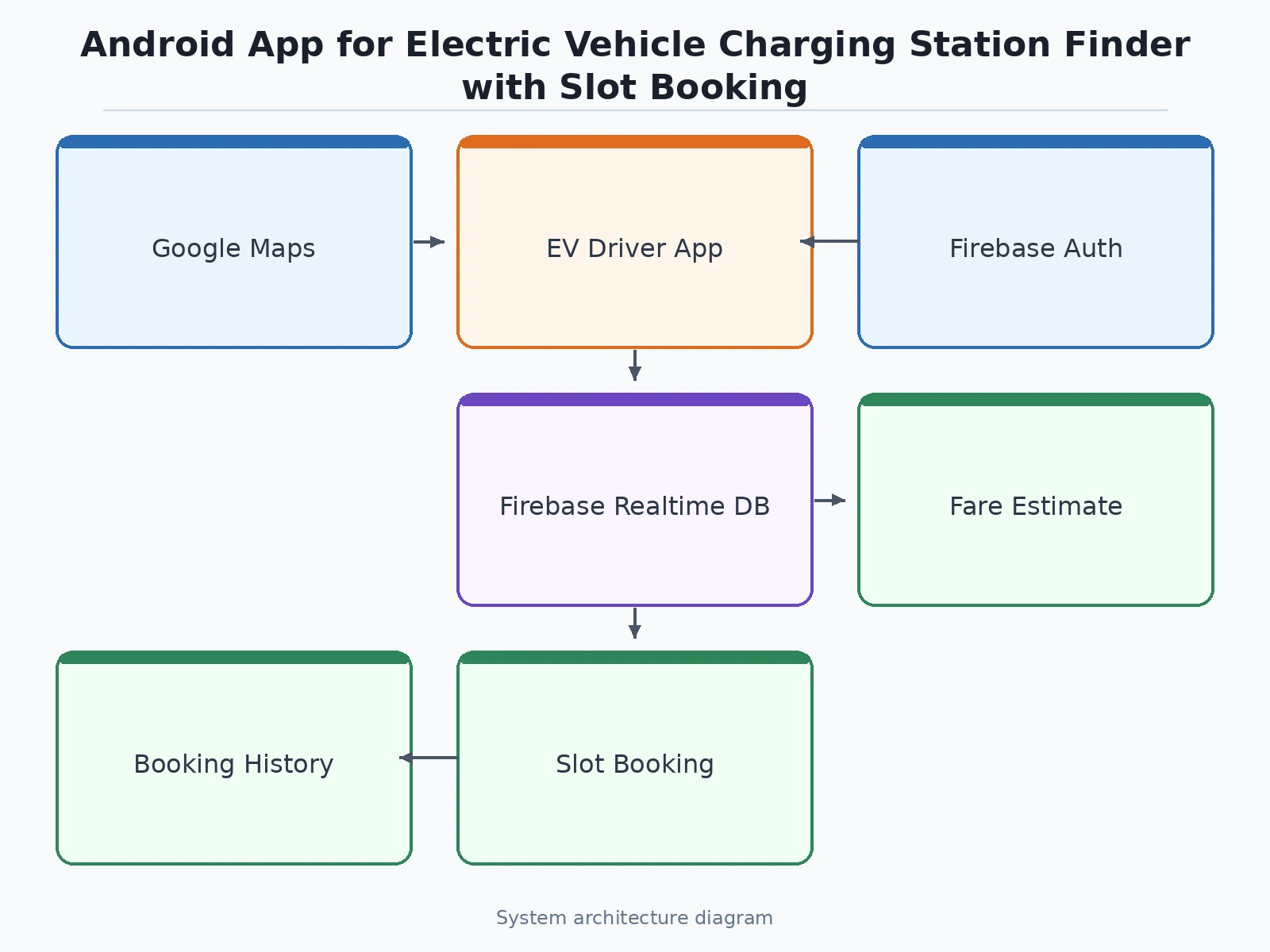
The app works as one continuous flow from the driver's location to a confirmed booking. It opens on a map centred on the user's position and loads nearby stations from Firebase, each marked with connector types, charger power and free slots. The user narrows the list with filters for connector — CCS2, CHAdeMO or Type 2 — and for charger speed, AC or DC fast, then taps a station to see its connectors, prices and opening hours. Choosing a 30-minute slot shows a fare estimate from the station's per-kWh price and the planned energy draw. Tapping confirm writes the booking as a single Firebase transaction that checks the slot is still free and locks it in the same step, so two users can never hold the same slot. The booking then appears under My Bookings with its ID, charger number and start time, and a reminder is sent 15 minutes before the slot begins.
- The user signs in with Firebase Authentication and picks a saved vehicle, which sets the default connector filter (CCS2, CHAdeMO or Type 2).
- The app reads the phone's location and loads nearby stations from Firebase, rendering them on Google Maps with distance, charger power and free-slot counts.
- The user applies filters for connector type and charger speed; stations that do not match disappear from the map and the list.
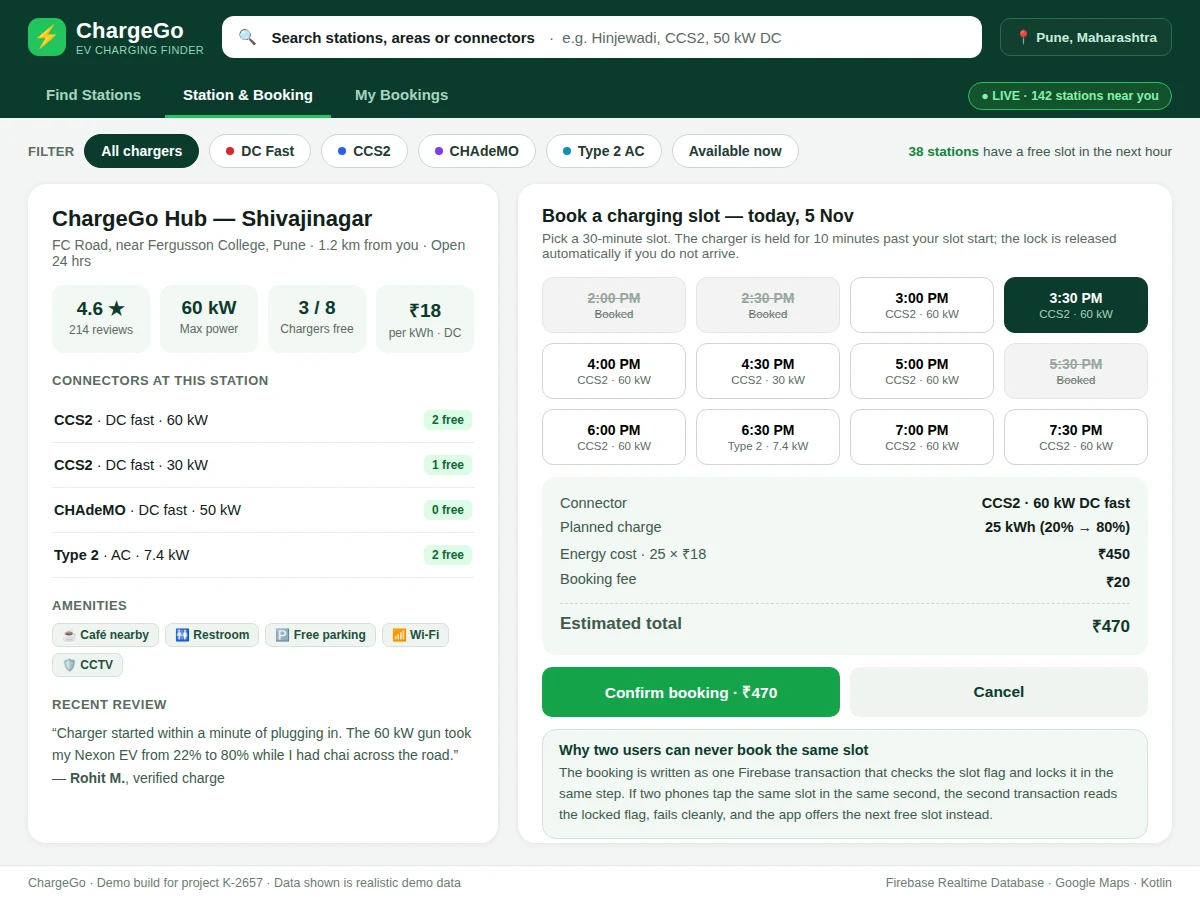
- Tapping a station opens its detail screen: connectors with free counts, per-kWh price, opening hours, amenities and user reviews.
- The user picks a free 30-minute slot; the app shows a fare estimate from the station's per-kWh rate and the planned energy draw.
- Confirming the booking runs one Firebase transaction that checks the slot flag and locks it in the same step — if the slot was just taken, the transaction fails and the app offers the next free slot.
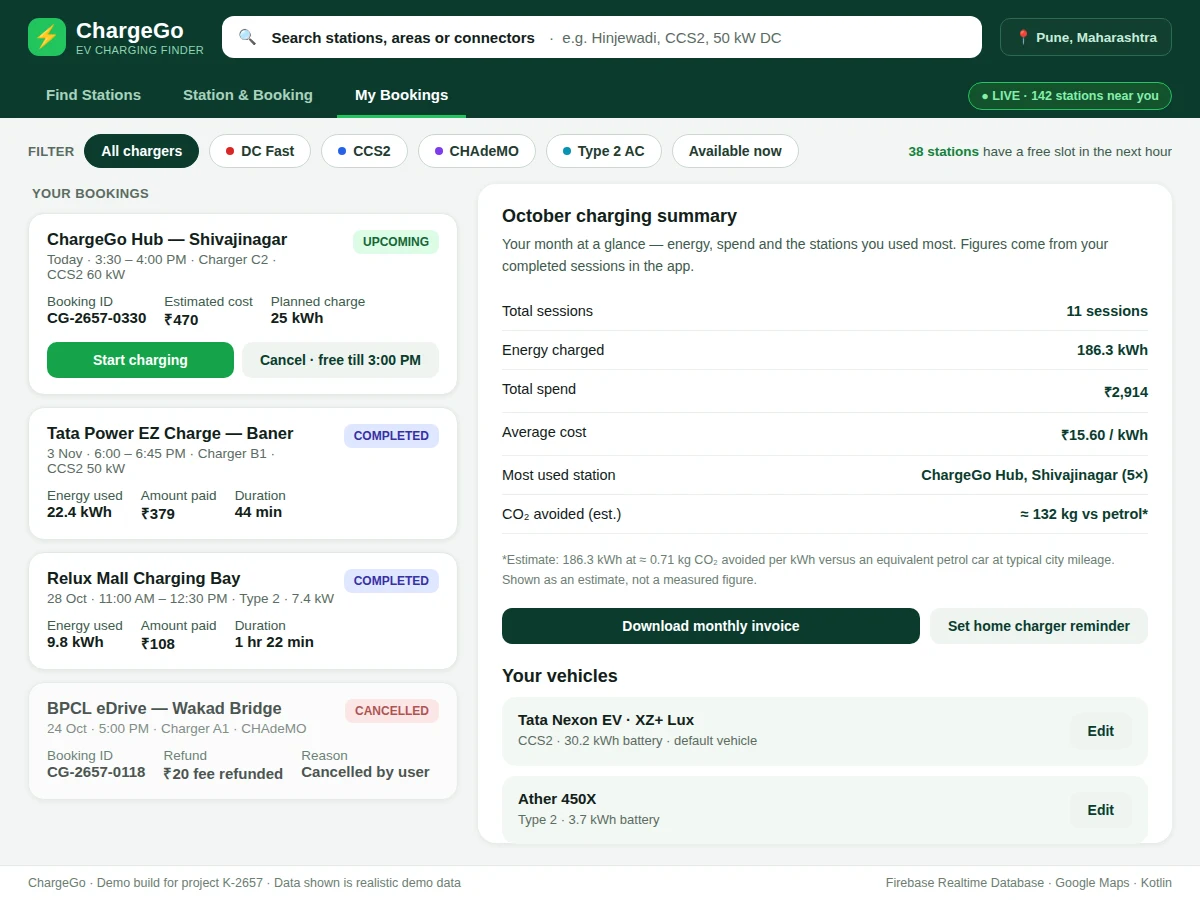
- The confirmed booking appears under My Bookings with its booking ID, charger number and start time, and a reminder is sent 15 minutes before the slot.
Tech stack:
- Kotlin · Android Studio
- Google Maps SDK for Android
- Firebase Authentication
- Firebase Realtime Database
- Retrofit · REST APIs
- Material Design 3 components
- Payment gateway SDK (optional)
- Git
| Parameter | Value |
|---|---|
| Platform | Android 8.0 (API 26) and above (design target) |
| Language | Kotlin |
| Map | Google Maps SDK for Android |
| Backend | Firebase Realtime Database + Firebase Authentication |
| Slot length | 30 minutes (configurable) |
| Slot hold | 10 minutes past slot start (design target) |
| Booking fee | ₹20 per booking (demo value in the working demo) |
| Fare estimate | Station per-kWh rate × planned kWh + booking fee |
| Reminder | 15 minutes before slot start (design target) |
| Demo data | 4 Pune stations with realistic connector, price and slot data |
Project features
The app's strongest capabilities are the ones an EV driver checks before every trip: finding the right station, knowing a slot is genuinely free, and booking it without a wasted drive. Map-based discovery shows nearby stations with distance, charger power and live availability, so the driver compares real options instead of guessing. Connector and charger-type filters narrow the list to stations that physically fit the vehicle — CCS2, CHAdeMO or Type 2, AC or DC fast — which matters because the wrong connector makes a station useless however close it is. Live slot availability comes from Firebase Realtime Database, so a slot booked by another driver disappears from the list within seconds. Slot booking with transactional locking then holds the chosen charger for the driver's arrival, and the fare estimate shows the expected cost before any money is committed.
- [Map-based station discovery] Nearby charging stations appear on a Google Map with distance, charger power, per-kWh price and how many slots are free right now, sorted nearest first.
- [Connector and charger-type filters] The list narrows by connector — CCS2, CHAdeMO, Type 2 or Bharat AC-001 — and by charger speed, AC slow or DC fast, so only stations that fit the user's vehicle are shown.
- [Live slot availability] Slot status is read from Firebase Realtime Database, so a slot booked by another driver updates on every user's screen within seconds of the booking.
- [Slot booking with transactional locking] A booking is written as a single Firebase transaction that checks the slot is free and locks it in the same step, so two users tapping the same slot at the same second can never both succeed.
- [Fare estimate before booking] The app shows the estimated cost for the planned charge — energy price at the station's per-kWh rate plus the booking fee — before the user confirms.
- [Booking history and monthly summary] Every completed session is kept under My Bookings with energy used, amount paid and duration, and a monthly summary totals sessions, energy and spend.
- [Sign-in and saved vehicles] Firebase Authentication signs the user in, and saved vehicle profiles (model, connector, battery size) pre-fill the connector filter and the fare estimate.
What is included
- Complete Android app source code in Kotlin (Android Studio project)
- Firebase backend setup: Realtime Database structure, security rules and Authentication configuration
- Working demo build (APK) with realistic Pune station data
- Google Maps integration with station markers, filters and detail screens
- Project report PDF (background, architecture, booking-transaction design, limitations)
- PPT presentation for final review
- Viva Q&A preparation document (location services, Firebase transactions, Maps SDK, connector standards)
Limitations & prerequisites
- Live station data depends on station operators publishing availability; the demo ships with realistic sample data and a documented procedure for connecting a real operator feed.
- Google Maps SDK requires a valid API key and an enabled billing account; the key is configured by the student during setup and is not bundled with the code.
- Slot availability is only as fresh as the operator feed — a charger that goes offline without reporting will still show its last known state until the feed updates.
- Fare estimates use the station's listed per-kWh rate and the planned energy draw; the final bill depends on the energy actually drawn and the operator's billing rules.
- Payment gateway integration is optional and not part of the base build: bookings in the base app are confirmed without payment, and gateway integration is quoted separately.
- The app targets Android only; an iOS version would be a separate build.
- Location accuracy depends on the phone's GPS signal and is weaker indoors and in underground parking.
Frequently Asked Questions
Is this project suitable for a final-year project?
Yes — for Computer Science, IT and Electronics & Telecommunication programs. It demonstrates Android development in Kotlin, Google Maps integration, Firebase Authentication and Realtime Database, and a transactional booking flow that prevents double-booking, all in one working app with a clear problem and measurable behaviour.
How does the app prevent two users from booking the same slot?
Through a single Firebase transaction that checks the slot flag and locks it in the same step. If two phones tap the same slot in the same second, the second transaction reads the locked flag and fails cleanly, and the app immediately offers the next free slot instead of creating a double booking.
Does the app need internet to work?
Yes — the app needs internet for its core functions, because maps, station lists, live slot availability and bookings all depend on Firebase Realtime Database, where slot data lives and updates in real time. Without a connection the app cannot load stations or confirm a booking. The saved vehicle profile and booking history already loaded on the phone remain visible offline, but no new booking can be made without a connection.
Is payment gateway integration included?
No — payment gateway integration is optional and is not part of the base build, so bookings in the base app are confirmed without any payment and the fare estimate is shown before confirmation. UPI or card payment through a gateway SDK can be added on request. Adding it needs the student's own merchant account and production approval from the gateway provider.
Can the app be customised for a different city or vehicle type?
Yes — station data, connector lists and per-kWh prices are all driven by Firebase, so a new city is added by loading its stations into the database with no code change, and the map, filters and fare estimate pick them up automatically. Vehicle profiles already cover CCS2, CHAdeMO, Type 2 and Bharat AC-001, and new connector types can be added to the filter list.
Components & software requirements
- Kotlin · Android Studio
- Google Maps SDK for Android
- Firebase Authentication
- Firebase Realtime Database
- Retrofit · REST APIs
- Material Design 3 components
- Payment gateway SDK (optional)
- Git
Delivery information
Built-to-order project. Delivery timeline is shared after order confirmation based on current queue.
Support terms
Complete documentation, setup guide, and viva preparation included. Support for setup and explanation provided.
Download free synopsis (PDF)
Enter your name and WhatsApp number — the synopsis PDF downloads immediately. We may send occasional project updates on WhatsApp; no spam.