
More project photos (2)
The problem
An AI video summarizer using Whisper and LLM takes a video file — a lecture, a meeting recording or an interview — and returns a short, structured summary instead of the full recording. Whisper, OpenAI's speech-recognition model, transcribes the spoken audio with timestamps, and a large language model then condenses that transcript into chapters, key points and action items, each linked to its moment in the video. The problem it solves is concrete: a student facing a 24-minute lecture or a team revisiting a 60-minute meeting must either rewatch the whole recording or skim handwritten notes that miss half the content. Scrubbing through a timeline to find one explanation wastes the time the recording was supposed to save. This project closes that gap with a web app where the video, its transcript and its summary sit side by side, so any claim in the summary can be checked against the exact spoken words at the exact timestamp.
This is a built-to-order software project: the Whisper transcription pipeline, LLM summarization service, web app, demo with a sample lecture and the complete viva kit (report, PPT, Q&A) are prepared fresh for you.
| Feature | This video summarizer | A text-only lecture summarizer | A generic chatbot |
|---|---|---|---|
| Input | Video file (MP4/WebM/MOV) with spoken audio | Pasted or uploaded text only | Typed questions only |
| Speech to text | Yes — Whisper with timestamps | No — needs text already | No transcription at all |
| Chapters with timestamps | Yes — clickable, jumps the playhead | No — flat text summary | No — chat answers only |
| Searchable transcript | Yes — full text, keyword search | No transcript exists | No transcript exists |
| Key points + export | Yes — 12 key points, Markdown export | Summary only, usually no export | Answers only, nothing exportable |
| What a student learns | ASR + LLM pipeline end to end | Text summarization only | Prompting only |
A lecture, meeting or interview recording in MP4, WebM or MOV format, up to 2 GB as a design target.
Follow the working sequence
How it works
The AI video summarizer works as a two-stage pipeline: speech to text, then text to summary. A video file is uploaded and FFmpeg extracts its audio track, resampled to 16 kHz mono, which is the format Whisper expects. Whisper then transcribes the audio in 30-second windows, producing text with segment timestamps and a detected language, and the segments are joined into a full transcript with word counts recorded. The transcript is split into chunks at topic shifts, each chunk is sent to the LLM with a prompt that asks for a chapter title, a one-paragraph summary and the key points, and the chapter summaries are stitched into the final output with their start times. The web app then presents the video, the searchable transcript and the chaptered summary together, so the user reads the short version and jumps to the exact moment for anything that needs checking.
- The user uploads a video file (MP4, WebM or MOV, up to 2 GB as a design target) or picks one of the three built-in samples.
- FFmpeg extracts the audio track and resamples it to 16 kHz mono, the input format Whisper is built for.
- Whisper transcribes the audio in 30-second windows, detecting the language and returning segments with start and end timestamps.
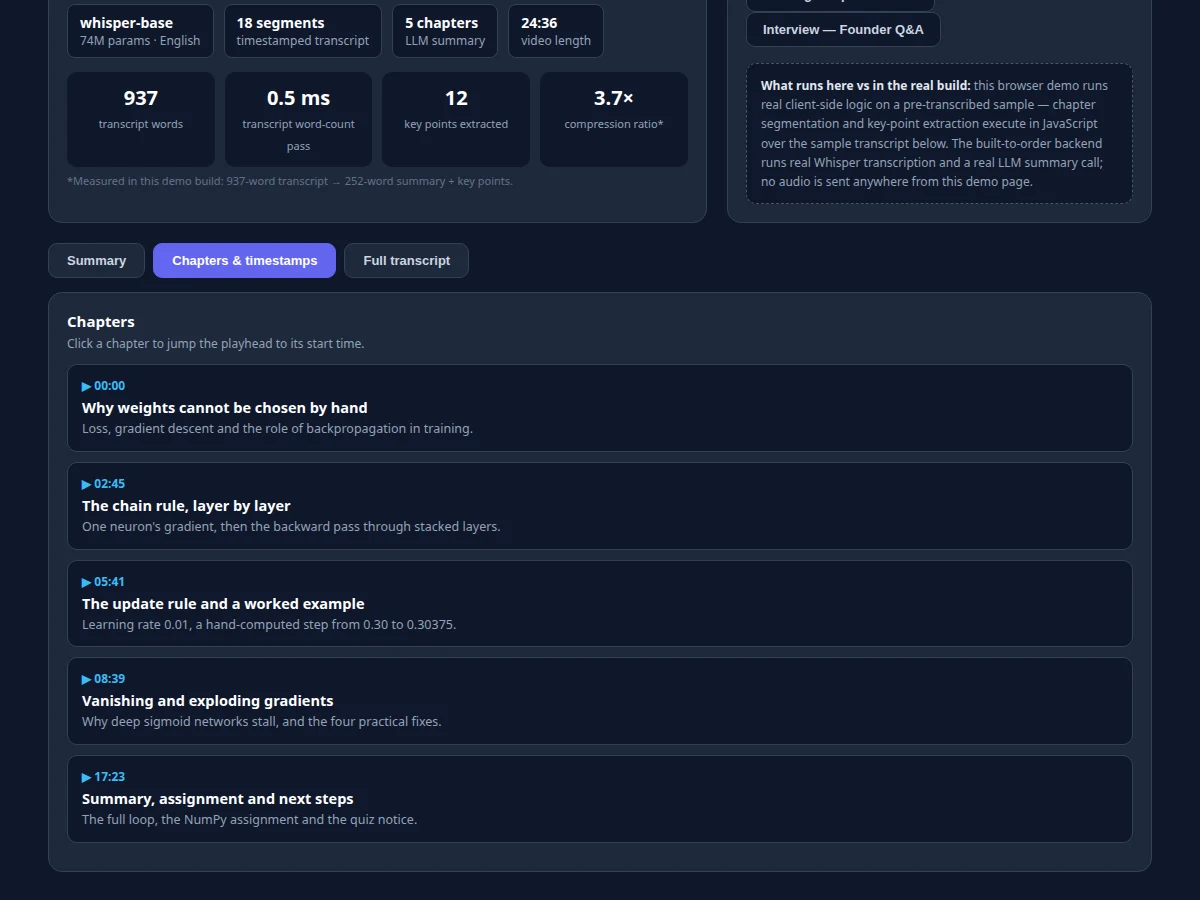
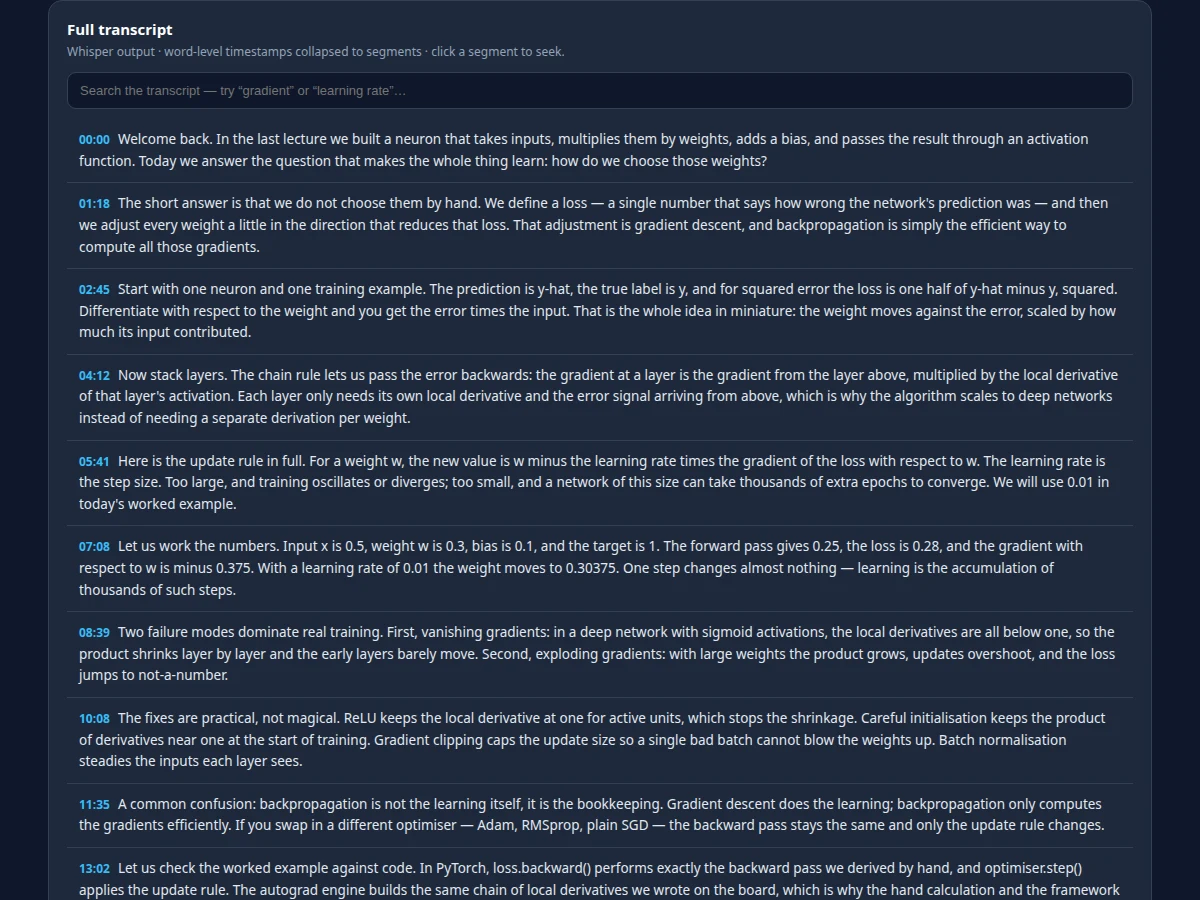
- The segments are joined into a full transcript; the demo build's sample lecture produces 18 segments and 937 words, counted in the demo build.
- The transcript is split into chunks at topic shifts, and each chunk is sent to the LLM with a prompt asking for a chapter title, a summary paragraph and key points.
- Chapter summaries are stitched into the final output with their start times — 5 chapters and 12 key points in the demo build, a 3.7× compression measured from the 937-word transcript to the 252-word summary.
- The web app shows the video, the searchable transcript and the chaptered summary side by side, with click-to-seek on every segment and Markdown export for the summary.
Tech stack:
-
Python 3 · Flask
-
OpenAI Whisper · faster-whisper
-
FFmpeg audio extraction
-
LLM API · chat completions
-
HTML · CSS · JavaScript
-
LibriSpeech test-clean · WER evaluation
-
SQLite job store
-
Git
-
Dataset: Whisper was trained by OpenAI on 680,000 hours of labelled audio collected from the internet — 438,000 hours of English audio with English transcripts, 126,000 hours of non-English audio with English transcripts, and 117,000 hours of non-English audio with matching transcripts, covering 99 languages (OpenAI Whisper README, Hugging Face model card). For this build's own evaluation, the LibriSpeech test-clean set (5.4 hours of read English speech, 2,620 utterances) is used to measure word error rate, plus the project's own sample lecture transcript — 937 words across 18 segments, counted in the demo build.
-
Task: Automatic speech recognition followed by abstractive summarization; input = a video file with spoken audio, output = a timestamped transcript plus a chaptered summary with key points.
-
Model: Whisper encoder-decoder Transformer in five sizes — tiny 39M, base 74M, small 244M, medium 769M and large 1,550M parameters (OpenAI Whisper README); the demo build uses whisper-base (74M parameters, English). The LLM stage is a chat-completions call over the chunked transcript, prompted for chapter titles, summaries and key points.
-
Metrics: Word error rate (WER) on LibriSpeech test-clean for the transcription stage; summary compression ratio (transcript words ÷ summary words) and chapter-boundary agreement against the sample lecture's hand-marked chapters for the summarization stage. No accuracy or WER figure is claimed as measured until the build's own evaluation run is executed; the only measured figures quoted are the demo build's own counts — 937 transcript words, 252 summary words, 3.7× compression.
| Parameter | Value |
|---|---|
| Input formats | MP4, WebM, MOV video files, up to 2 GB (design target) |
| Audio preprocessing | FFmpeg extraction, resampled to 16 kHz mono (Whisper input format) |
| Transcription model | OpenAI Whisper, five sizes: tiny 39M, base 74M, small 244M, medium 769M, large 1,550M parameters (OpenAI README values) |
| Demo model | whisper-base, 74M parameters, English (used in the demo build) |
| Training data | 680,000 hours of labelled audio, 99 languages (OpenAI README values) |
| Transcription windows | 30-second windows (Whisper design) |
| Evaluation set | LibriSpeech test-clean, 5.4 hours, 2,620 utterances (dataset values) |
| Demo transcript | 937 words across 18 segments (measured in the demo build) |
| Demo summary | 252 words, 5 chapters, 12 key points (measured in the demo build) |
| Compression ratio | 3.7× transcript-to-summary (measured in the demo build) |
| Summary model | LLM chat-completions call over chunked transcript (provider API key required) |
| Output | Chaptered Markdown summary, key points, searchable transcript, click-to-seek timestamps |
| Backend | Python 3, Flask, faster-whisper, FFmpeg, SQLite job store |
| Frontend | Single-file HTML, CSS and JavaScript demo app, runs in any modern browser |
Project features
The AI video summarizer combines four capabilities: Whisper speech-to-text transcription that turns a video's audio into a timestamped transcript, LLM chaptering that splits the transcript into titled chapters with start times, an extractive key-points list that pulls out the claims worth revising from, and a searchable transcript view where clicking any segment jumps the video to that moment. The pipeline runs in two clear stages — Whisper first, LLM second — so a transcription error and a summarization error can be told apart and fixed separately. Summaries are exportable as Markdown, chapters are clickable, and the whole app is a standard web stack: a Python backend for audio extraction and transcription, an LLM call for the summary, and a plain HTML, CSS and JavaScript frontend that works in any browser.
- [Whisper transcription with timestamps] The video's audio is extracted with FFmpeg and transcribed by OpenAI Whisper, producing segment-level timestamps so every sentence in the transcript knows its moment in the video.
- [LLM chaptered summaries] The transcript is chunked by topic shift and passed to the LLM, which writes a short summary per chapter with a title and a start time, plus an overall summary of the whole video.
- [Searchable timestamped transcript] The full transcript is shown beside the video with keyword search; clicking any segment seeks the playhead to that timestamp, so a summary claim can be checked against the spoken words.
- [Key points and action items] The LLM extracts the concrete claims, definitions and follow-ups — 12 key points in the demo build — separated from the narrative summary so they can be revised from directly.
- [Markdown export] The chaptered summary and key points download as a Markdown file, and copy to clipboard, so the summary can go straight into notes or a report.
- [Three sample videos wired in] A lecture, a meeting and an interview sample are built into the demo, so the pipeline can be shown end to end without uploading a real recording.
- [Model size switch] Whisper runs as tiny (39M parameters) through large (1,550M parameters), so the build can trade transcription speed against accuracy on the machine it runs on.
What is included
- Complete Python backend: video upload, FFmpeg audio extraction, Whisper transcription with timestamps, transcript chunking and LLM summarization
- Web app with video player, waveform, searchable transcript, clickable chapters and Markdown export
- Working single-file demo app with a pre-transcribed sample lecture (937 words, 18 segments, 5 chapters, 12 key points)
- LibriSpeech test-clean evaluation script with word error rate reporting
- Project report PDF (background, Whisper and LLM theory, methodology, results, limitations)
- PPT presentation for final review
- Viva Q&A preparation document (ASR, Transformers, WER, prompt design, chunking, timestamps)
Limitations & prerequisites
- Transcription quality depends on the recording: clear single-speaker English lectures transcribe best, while overlapping speakers, heavy accents, background music and low-bitrate audio raise the word error rate, and no WER figure is promised before the build's own evaluation run.
- Whisper's large model (1,550M parameters) needs approximately 10 GB of VRAM per the OpenAI README, so the large model is not a laptop default — the demo build uses whisper-base (74M parameters) instead.
- The LLM summary stage needs an internet connection and a valid provider API key; without it, transcription still works but no chaptered summary is produced.
- Summaries can compress away nuance or misstate a number from the transcript, so every summary claim should be checked against the linked timestamp before it is quoted.
- A 2 GB upload limit is a design target, not a tested maximum, and very long videos increase both transcription time and LLM cost roughly in proportion to length.
- The build transcribes speech only; on-screen slides, whiteboard writing and diagrams are not read, so a lecture whose meaning lives in its visuals needs those slides alongside the summary.
Frequently Asked Questions
How is this different from a text summarizer?
A text summarizer needs text as its input, so a lecture video is useless to it until someone types the whole lecture out by hand. This project starts from the video file itself: Whisper listens to the audio and writes the transcript, and only then does the LLM summarize it. The transcript, chapters and timestamps are all produced by the build, which is why the pipeline has two stages — speech to text, then text to summary.
Which Whisper model is used, and can it change?
The demo build uses whisper-base, which has 74M parameters and runs on a laptop CPU, while the full build lets the user pick any of the five sizes — tiny at 39M up to large at 1,550M parameters. Larger models transcribe more accurately but need more memory: the large model needs approximately 10 GB of VRAM per the OpenAI README. The model is one setting in the backend, so it can be changed without touching the frontend.
Does it work on Hindi or other languages?
Yes, in principle: Whisper was trained on 99 languages, so a Hindi lecture can be transcribed in Hindi and summarized in Hindi or translated to English by the LLM stage. The demo build is English-only because its sample lecture and its evaluation set are English, and accuracy varies by language — Whisper's own published results show English strongest. A non-English build needs its own evaluation run before any accuracy claim is made.
How long does a video take to summarize?
It depends on the video length and the Whisper model size: transcription runs roughly in proportion to audio length, and the LLM stage adds one call per transcript chunk. The demo build's 24-minute sample lecture transcribes and summarizes in a few minutes on a laptop with whisper-base, but no exact time is promised because it varies with the machine, the model size and the LLM provider's response time.
Can I search inside the video?
Yes — that is one of the main features. The full transcript is searchable, and clicking any matching segment jumps the video playhead to that timestamp, so finding the moment a term was explained takes seconds instead of scrubbing through the timeline. The search runs over the Whisper transcript in the browser, highlights the match, and works on the sample lecture in the demo without any upload.
Is this project suitable for a final-year project?
Yes — for AI & Machine Learning, Computer Science and IT programs. It demonstrates a real two-stage AI pipeline — Whisper speech recognition with timestamps, then LLM summarization with chunking and prompt design — plus a working web app, an evaluation on LibriSpeech test-clean, and a demo with measured results, which together give a viva plenty of concrete material to discuss.
Components & software requirements
- Python 3 · Flask
- OpenAI Whisper · faster-whisper
- FFmpeg audio extraction
- LLM API · chat completions
- HTML · CSS · JavaScript
- LibriSpeech test-clean · WER evaluation
- SQLite job store
- Git
Delivery information
Built-to-order project. Delivery timeline is shared after order confirmation based on current queue.
Support terms
Complete documentation, setup guide, and viva preparation included. Support for setup and explanation provided.
Download free synopsis (PDF)
Enter your name and WhatsApp number — the synopsis PDF downloads immediately. We may send occasional project updates on WhatsApp; no spam.