
More project photos (3)
The problem
Students drown in PDF notes before exams and the standard revision loop — re-reading the same pages — is one of the least effective study methods known. Active recall (testing yourself) works far better, but writing good questions from your own notes is slow and most students never do it. This project automates the conversion: a web app takes the student's study notes, breaks them into coherent chunks, and uses a large language model API to generate quiz questions in three formats (multiple-choice, true/false, short answer). The student then takes the quiz interactively — timed per question, with explanations after each answer and a per-topic score breakdown that shows exactly which sections need revision. Quizzes can be exported for printing. The built-to-order build wires a real LLM API; the included demo runs the same pipeline with a transparent rule-based generator so the whole system works with no API key.
This is a built-to-order software project: the web app, the LLM-integration code with prompt templates, the quiz engine and the complete viva kit (report, PPT, Q&A) are prepared fresh for you.
Students preparing for semester exams typically revise by re-reading PDF notes — highlighting lines they already know — and walk into the exam having never once tested themselves. The AI Quiz Generator from PDF Notes using LLM closes that gap: it turns the student's own study material into an interactive quiz so revision becomes active recall instead of passive reading. Answering questions exposes which concepts are shaky, and the per-topic analytics point at the sections to re-study. Hand-writing questions from a 60-page PDF takes hours, so students skip it — and generic quiz sites quiz someone else's syllabus, not the student's own notes. This project answers both problems: the LLM reads the student's actual notes and generates questions grounded in that text, in MCQ, true/false and short-answer formats, while the built-in quiz runner adds exam pressure with a per-question timer and immediate explanations.
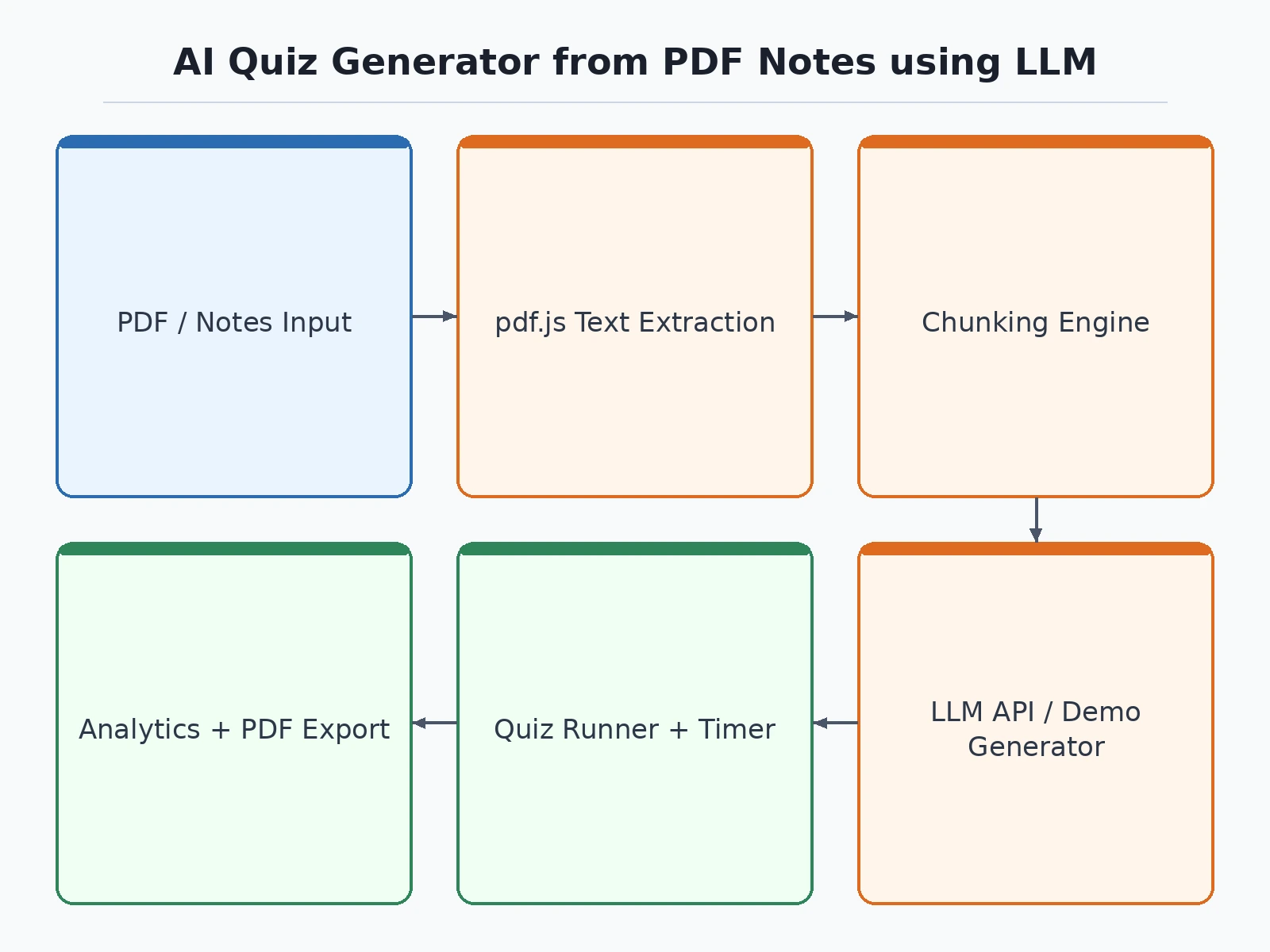
Student pastes notes or uploads a text-based PDF; pdf.js extracts the text in the browser.
Follow the working sequence
How it works
Notes enter as pasted text or a PDF upload; pdf.js extracts the text in the browser, so study material never leaves the machine in demo mode. The text is split into overlapping chunks (default 500-word windows with 50-word overlap, both configurable); the overlap keeps questions from straddling section boundaries. In the built-to-order build, each chunk goes to the LLM API with a structured prompt asking for MCQs, true/false and short-answer questions in JSON, each with an answer and explanation. Demo mode runs the same step locally: a rule-based generator scores sentences by keyword density and turns the top-scoring sentence's key phrase into the MCQ's correct option, with the next-best phrases as distractors. Each question inherits its chunk's topic. The quiz runner presents them one at a time with a configurable timer, checks answers instantly with explanations, and aggregates per-topic accuracy and average time per question into a results screen from which the quiz can be printed or exported.
- The student uploads a PDF (text extraction runs locally with pdf.js) or pastes notes directly into the app.
- The notes are split into overlapping chunks — 500-word windows with 50-word overlap by default, both adjustable in the settings panel.
- Each chunk is labelled with a topic derived from its most frequent key term, so later analytics can attribute every question to a section of the notes.
- Question generation runs per chunk: the built-to-order build calls the LLM API (Gemini or OpenAI) with a structured JSON prompt; demo mode instead runs the local rule-based generator, which scores sentences by keyword density and builds the MCQ/true-false/short-answer items from the top-scoring sentences.
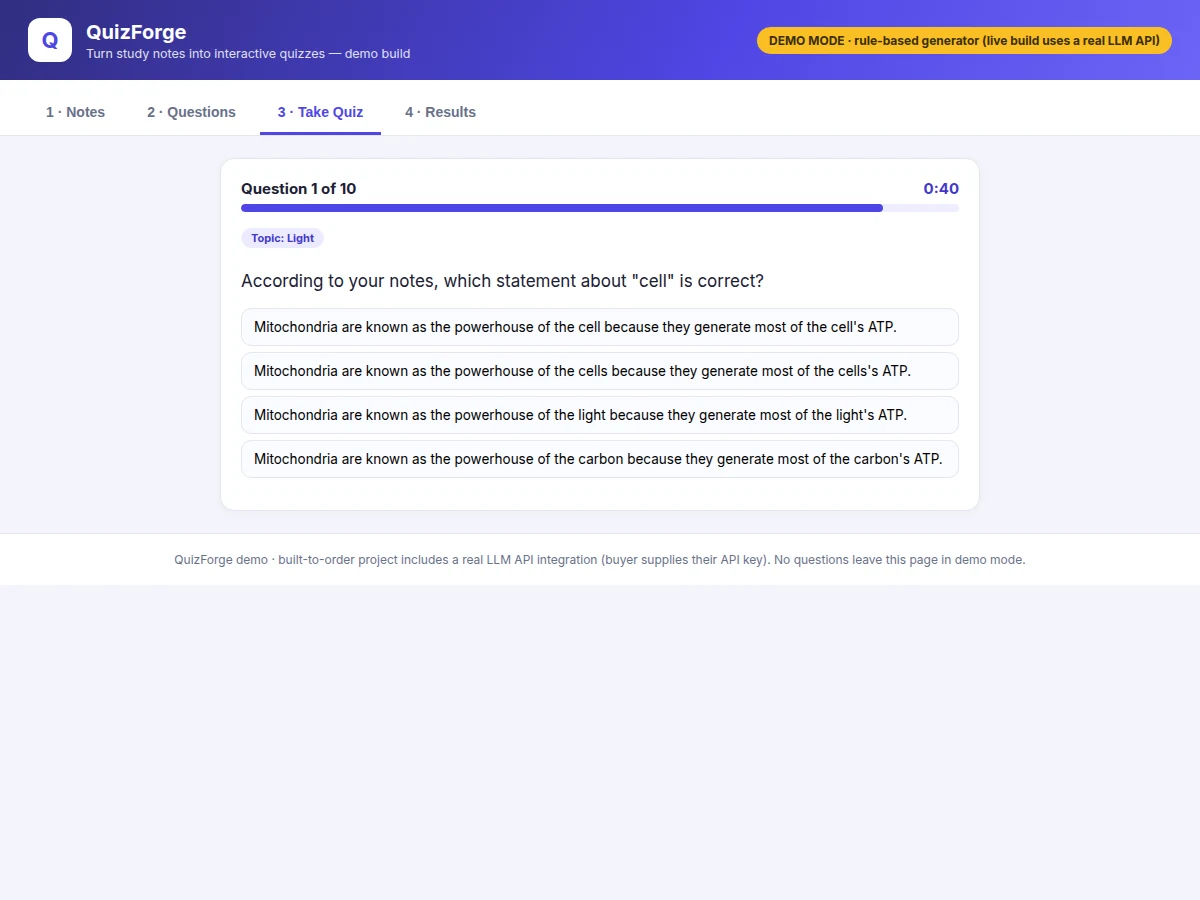
- The student starts the quiz: questions appear one at a time with a per-question timer (default 45 seconds), answers are checked immediately, and an explanation is shown for every question.
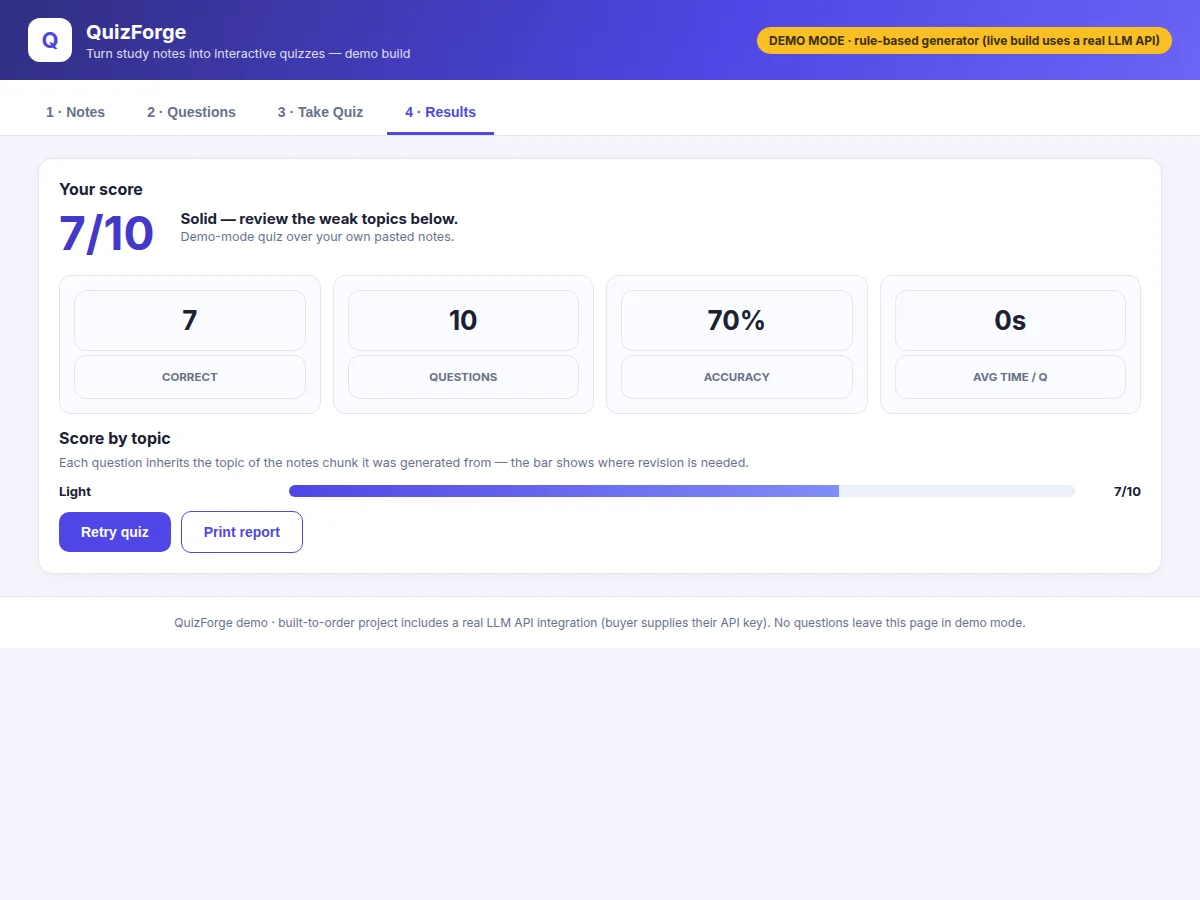
- The results screen shows the score, accuracy, average time per question and a per-topic bar chart; the student can retry the quiz or export the full question set for printing.
Tech stack:
- JavaScript (ES2020) single-file web app — no build step, runs offline
- pdf.js for in-browser PDF text extraction
- LLM API integration: Gemini API or OpenAI API (buyer's API key required)
- Structured JSON prompting with per-question answer + explanation fields
- CSS-only responsive UI with print stylesheet for quiz export
- Demo-mode rule-based generator: keyword-density sentence scoring, no network calls
LLM integration & data honesty
- Model: No custom model is trained and no dataset is used. Question generation calls a hosted LLM (Gemini 1.5 Flash class or GPT-4o-mini class) through its public API — input is a notes chunk plus a structured prompt, output is JSON questions with answers and explanations.
- Prerequisite: The buyer supplies their own API key; API usage is billed by the provider (both offer free tiers sufficient for a student project).
- Quality control: LLM output is non-deterministic and can occasionally produce a weak question — the report includes a human review checklist (answer verifiable in the notes, exactly one correct option, explanation cites the chunk) instead of any invented quality score. No accuracy numbers are claimed anywhere.
- Privacy: Text extraction and the demo generator run fully in the browser; only the LLM path sends chunk text to the provider's API.
| Parameter | Value |
|---|---|
| Chunk size | 500 words (configurable 100–2000 words) |
| Chunk overlap | 50 words (configurable 0–300 words) |
| Question types | 3 (MCQ · True/False · Short answer) |
| Questions per quiz | Up to 30 (design target) |
| Timer per question | 45 seconds default (configurable 10–300 seconds) |
| Demo generation time | Approximately 100 ms for a 10-question quiz (measured ~104 ms in the demo, headless Chromium on a laptop-class machine) |
| LLM question latency | Varies with provider and is not measured — depends on the buyer's API plan |
| Input formats | Pasted text · text-based PDFs (scanned image PDFs need OCR, listed as future scope) |
| Runtime | Any modern browser, no installation (expected) |
Project features
The AI Quiz Generator's core is the notes-to-quiz pipeline: PDF text extraction that runs entirely in the browser, a configurable chunking engine that keeps questions inside coherent passages, and question generation in three formats with explanations. Around that sit the parts that make it a revision tool rather than a toy — a timed quiz runner with instant feedback, per-topic score analytics that show which sections need re-study, and one-click export for printing. The built-to-order build generates questions through a real LLM API with structured JSON prompts, while the included demo mode runs the identical pipeline with a transparent rule-based generator (keyword-density sentence scoring) so every screen works with no API key. Difficulty selection, timer configuration and chunk-size tuning are all exposed in the UI, and nothing about the question quality is exaggerated — the report documents a human review checklist instead of invented scores.
- [Notes input + PDF text extraction] Paste notes or upload a PDF; text is extracted in the browser with pdf.js, so study material never leaves the machine in demo mode. Word count and chunk preview are shown before generation.
- [Configurable chunking engine] Notes are split into overlapping windows — 500-word chunks with 50-word overlap by default, both adjustable. The overlap keeps questions from straddling section boundaries; each chunk is auto-labelled with a topic from its top key term.
- [LLM question generation (built-to-order)] Each chunk is sent to the Gemini or OpenAI API with a structured prompt producing MCQs, true/false and short-answer questions as JSON, each with the correct answer and a short explanation. The buyer's API key is the only prerequisite.
- [Demo-mode rule-based generator] The shipped demo generates questions locally with no API key: it scores sentences by keyword density, turns the top-scoring sentence's key phrase into the MCQ's correct option and the next-best phrases into distractors. Clearly labelled as demo mode, not the LLM.
- [Timed interactive quiz runner] One question at a time, configurable per-question timer with a visual countdown, instant right/wrong marking, and the explanation shown after every answer. Short answers are matched fuzzily so close spellings count.
- [Per-topic score analytics] Every question inherits its chunk's topic; the results screen shows score, accuracy, average time per question and a per-topic bar chart ranked weakest-first, so revision targets the shaky sections.
- [Export quiz to print/PDF] The generated question set and the results report print cleanly via a dedicated print stylesheet — usable as a revision handout with no extra tooling.
- [Difficulty selection] Easy draws from the highest keyword-density sentences (key facts), medium adds definitions, hard targets detail-level statements — in the LLM build this becomes a prompt parameter.
Configurable: chunk size, chunk overlap, question count, question mix, difficulty, per-question timer. Optional: which LLM provider and model the build wires (Gemini vs OpenAI). Future scope: OCR for scanned PDFs, spaced-repetition scheduling of weak topics, multi-user classrooms with a teacher dashboard, image/diagram-based questions.
What is included
- Complete single-file web app (notes input, chunking, quiz runner, analytics, export)
- LLM integration module with structured prompt templates for both Gemini and OpenAI APIs
- Demo-mode rule-based generator (works with no API key)
- API-key setup guide (getting a free-tier key, cost expectations)
- Human review checklist for generated questions
- Project report PDF (background, architecture, chunking design, prompt design, LLM-vs-demo comparison)
- PPT presentation for final review
- Viva Q&A preparation document (LLMs, prompt engineering, chunking trade-offs, evaluation honesty)
Limitations & prerequisites
- The LLM path needs the buyer's own API key — question generation quality and cost follow the provider's terms, and no quality score is claimed.
- LLM output is non-deterministic: occasionally a question is weak or ambiguous, which is why the human review checklist ships with the project.
- Only text-based PDFs are supported; scanned/image PDFs need OCR (future scope).
- The demo-mode generator is rule-based and visibly simpler than LLM output — it is labelled as demo mode everywhere and is not presented as the real thing.
- Quiz analytics measure performance on generated questions, not exam readiness — no claim is made about grade improvement.
- Large note sets (100+ pages) make LLM generation slow and costly; the report documents chunk-budget guidance.
Frequently Asked Questions
Does this project really use AI, or is it faked?
It really uses an LLM. The built-to-order build calls the Gemini or OpenAI API with structured prompts that turn each notes chunk into MCQs, true/false and short-answer questions — every question returned with its correct answer and an explanation, grounded in the student's own notes. The only prerequisite is the buyer's own API key (free tiers suffice). The bundled demo additionally includes a transparent rule-based generator so the full pipeline runs with no key — and it is clearly labelled as demo mode, never presented as the LLM.
Do I need to train a model or collect a dataset?
No — there is no model training and no dataset anywhere in this project. It integrates a hosted LLM (Gemini or OpenAI) through its public API: the input is a notes chunk plus a structured prompt, and the output is JSON questions with answers and explanations. The report documents this integration honestly instead of pretending a model was trained, and evaluation is a human review checklist — never invented accuracy numbers.
How does it turn my notes into questions?
Your notes are split into overlapping chunks — 500-word windows with 50-word overlap by default, both adjustable. In the built-to-order build, each chunk plus a structured prompt goes to the LLM API, which returns questions grounded in that chunk, each with an answer and explanation. In demo mode, a local generator scores sentences by keyword density and builds questions from the top-scoring sentences. Every question inherits its chunk's topic for the analytics.
What does the per-topic analytics screen show?
Score, accuracy, average time per question, and a bar chart of correct/total per topic, ranked weakest-first. Because each question is tagged with the topic of the notes chunk it came from, the chart directly shows which sections of your notes need re-study.
Can it read scanned PDFs or handwritten notes?
Not as shipped — the app extracts text from text-based PDFs with pdf.js, so scanned or image-only PDFs and handwritten notes cannot be read yet. An OCR stage for scanned pages is listed as future scope in the report, not in the current build. Pasted text always works regardless of source, so typed-up notes are the reliable input today.
Is this project suitable for a final-year project?
Yes — for Computer Science and IT programs, because it demonstrates real API integration, prompt engineering, text-chunking design, a complete interactive web app, and honest evaluation of non-deterministic AI output — exactly the engineering decisions examiners probe in a viva. The report documents each one with its trade-offs, so the student can defend every design choice.
Suitable for B.E./B.Tech final-year projects in Computer Science and IT.
Components & software requirements
- JavaScript (ES2020) single-file web app — no build step, runs offline
- pdf.js for in-browser PDF text extraction
- LLM API integration: Gemini API or OpenAI API (buyer's API key required)
- Structured JSON prompting with per-question answer + explanation fields
- CSS-only responsive UI with print stylesheet for quiz export
- Demo-mode rule-based generator: keyword-density sentence scoring, no network calls
LLM integration & data honesty
- Model: No custom model is trained and no dataset is used. Question generation calls a hosted LLM (Gemini 1.5 Flash class or GPT-4o-mini class) through its public API — input is a notes chunk plus a structured prompt, output is JSON questions with answers and explanations.
- Prerequisite: The buyer supplies their own API key; API usage is billed by the provider (both offer free tiers sufficient for a student project).
- Quality control: LLM output is non-deterministic and can occasionally produce a weak question — the report includes a human review checklist (answer verifiable in the notes, exactly one correct option, explanation cites the chunk) instead of any invented quality score. No accuracy numbers are claimed anywhere.
- Privacy: Text extraction and the demo generator run fully in the browser; only the LLM path sends chunk text to the provider's API.
Delivery information
Built-to-order project. Delivery timeline is shared after order confirmation based on current queue.
Support terms
Complete documentation, setup guide, and viva preparation included. Support for setup and explanation provided.
Download free synopsis (PDF)
Enter your name and WhatsApp number — the synopsis PDF downloads immediately. We may send occasional project updates on WhatsApp; no spam.