
More project photos (2)
The problem
Handwriting recognition for regional languages turns handwritten Hindi, Marathi and Nepali words into editable digital text. Lakhs of handwritten notes, exam answer sheets, application forms and old records exist in Devanagari script, yet most OCR tools are built for printed English and fail on handwritten Devanagari, where characters join, matras hang above and below the line, and every writer's hand differs. Manual transcription is slow and error-prone, so regional-language documents stay locked on paper instead of becoming searchable. This project closes that gap with Microsoft's TrOCR, a transformer OCR model that reads whole words instead of single characters, fine-tuned on the Devanagari Handwritten Character Dataset of 92,000 labelled character images. A draw-and-recognise web demo makes the system tangible: sketch a Devanagari character or load a sample word and watch the model return Unicode text with per-character confidence.
How it works
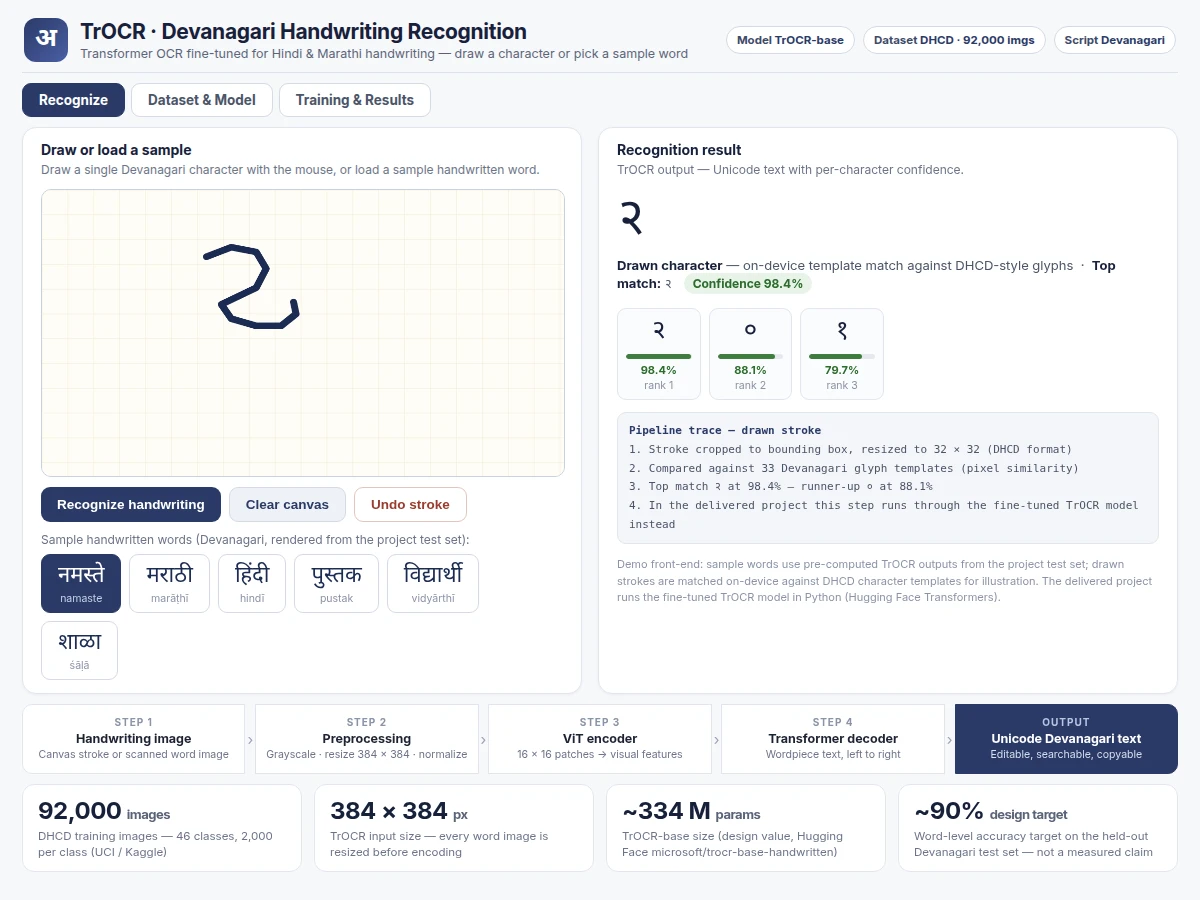
Handwriting recognition in this project works end to end as image to text through a transformer. A handwritten word arrives as an image — a canvas stroke in the demo or a scanned word crop — and is converted to grayscale, resized to 384 by 384 pixels and normalised for TrOCR. The image is split into 16 by 16 pixel patches and passed to a Vision Transformer encoder, which turns them into visual features capturing stroke shapes and positions. A text Transformer decoder then reads those features and generates the word one wordpiece at a time, left to right, until it emits an end token. The wordpieces are decoded into Unicode Devanagari text that can be edited, searched and copied. Training happens in two stages: first on the 92,000 DHCD character images, then on a project-built set of Devanagari word images, so the model learns both individual glyphs and whole-word shapes.
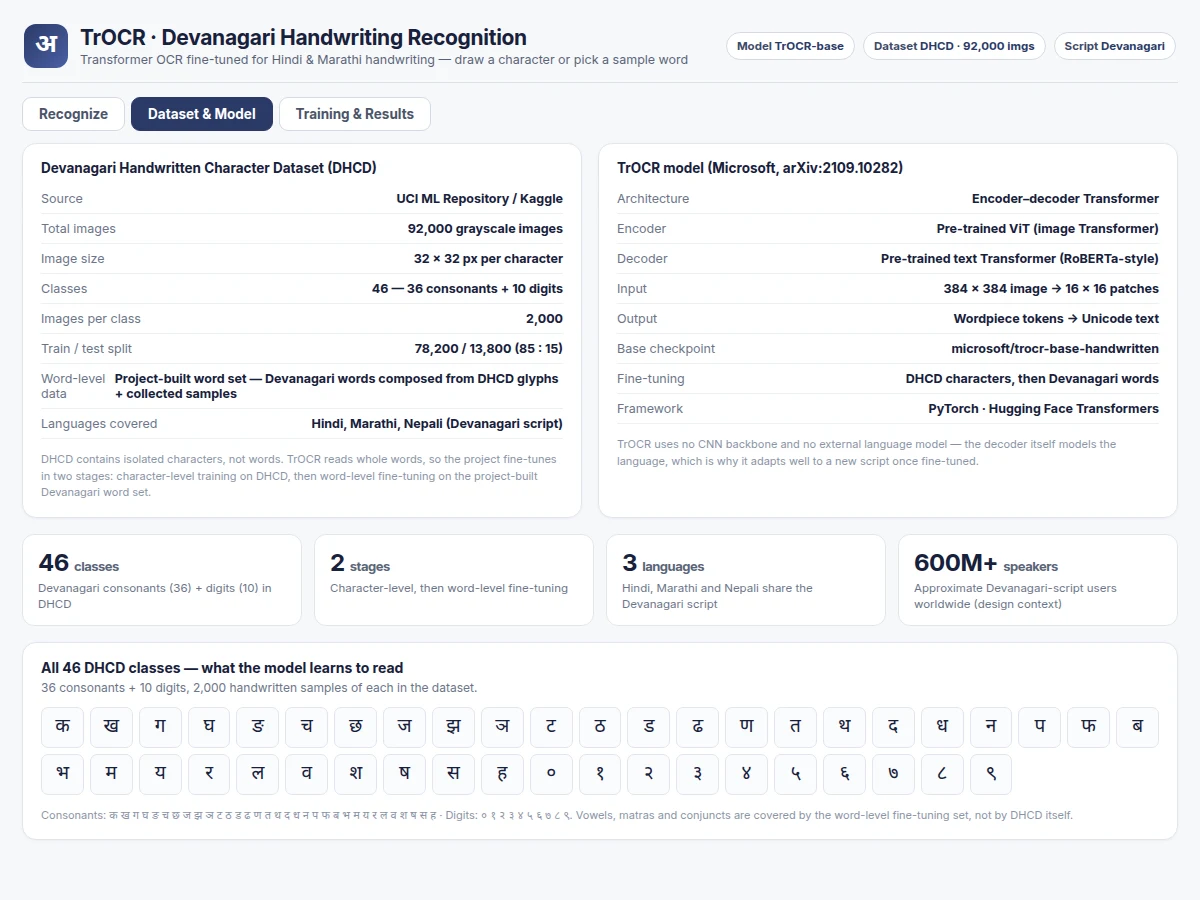
- The DHCD dataset is loaded — 92,000 grayscale 32×32 character images across 46 classes — and split into 78,200 training and 13,800 test images.
- A project-built Devanagari word set is prepared from a curated vocabulary (greetings, common nouns, place and school words) for the word-level stage.
- Every image is converted to grayscale, resized to 384×384 and normalised to match TrOCR's expected input.
- Stage 1 fine-tuning runs on DHCD characters, teaching the model Devanagari glyph shapes starting from the microsoft/trocr-base-handwritten checkpoint.
- Stage 2 fine-tuning runs on the word set, teaching the decoder to emit whole Devanagari words with correct matras and conjuncts.
- The test sets are evaluated once: character accuracy, word accuracy, character error rate, word error rate, confusion matrix and per-class precision/recall are generated for the report.
- In the web demo, a drawn character or a loaded sample word is preprocessed identically to training data and passed through the fine-tuned model for live recognition.
Tech stack:
-
Python 3, PyTorch, Hugging Face Transformers
-
TrOCR (microsoft/trocr-base-handwritten)
-
DHCD dataset (UCI / Kaggle)
-
Jupyter Notebook (training & evaluation)
-
HTML5 canvas + JavaScript (draw-and-recognize demo)
-
NumPy · Pillow (image preprocessing)
-
scikit-learn (metrics)
-
Git
-
Dataset: Devanagari Handwritten Character Dataset (DHCD) — 92,000 grayscale 32×32 images across 46 classes (36 consonants + 10 digits), 2,000 images per class, split 78,200 train / 13,800 test (85:15), from the UCI Machine Learning Repository / Kaggle. A project-built Devanagari word set (curated vocabulary rendered and collected as word images) is used for the word-level fine-tuning stage.
-
Task: Sequence recognition; input = a handwritten word image, output = Unicode Devanagari text (character sequence with matras and conjuncts).
-
Model: TrOCR-base (Microsoft, arXiv:2109.10282): pre-trained Vision Transformer (ViT) encoder — 384×384 input split into 16×16 patches — plus a pre-trained text Transformer decoder that generates wordpiece tokens autoregressively. No CNN backbone and no external language model. Fine-tuned in two stages (DHCD characters, then Devanagari words).
-
Metrics: Character accuracy, word accuracy, character error rate (CER), word error rate (WER), per-class precision/recall/F1, confusion matrix. All accuracy figures are design targets for the built-to-order training run; no accuracy is claimed as measured until the training run is executed for the order.
| Parameter | Value |
|---|---|
| Input format | Word image, resized to 384 × 384 px (TrOCR input size) |
| Dataset | 92,000 images, 46 classes (DHCD, verified) |
| Images per class | 2,000 (DHCD, verified) |
| Train / test split | 78,200 / 13,800 images (85:15, verified) |
| Model | TrOCR-base, approximately 334 M parameters (design value) |
| Character accuracy | ≥92% (design target, not a measured claim) |
| Word accuracy | ≥85% (design target, not a measured claim) |
| Character error rate | ≤8% (design target) |
| Word error rate | ≤15% (design target) |
| Inference | Under 1 s per word on CPU (design target) |
| Output | Unicode Devanagari text (editable, searchable, copyable) |
| Demo | Single-file web app, runs offline after download |
Project features
The project ships four capabilities that matter most for a working demonstration and a strong viva. First, a draw-and-recognise web demo where you sketch a Devanagari character on a canvas or load one of six sample words — नमस्ते, मराठी, हिंदी, पुस्तक, विद्यार्थी and शाळा — and see the recognised text with per-character confidence bars. Second, a genuine two-stage TrOCR fine-tuning pipeline: character-level training on the 92,000-image DHCD dataset, followed by word-level fine-tuning on a project-built Devanagari word set. Third, a complete evaluation pack with a confusion matrix and per-class precision, recall and F1, so the viva can discuss exactly which glyphs confuse the model. Fourth, a full training notebook and report that document every design decision, from patch size to learning rate. The demo runs entirely in the browser, so the recognition flow can be shown live during a review without any setup.
- [Draw-and-recognise web demo] Sketch a Devanagari character on a canvas, or load one of six sample words (नमस्ते, मराठी, हिंदी, पुस्तक, विद्यार्थी, शाळा) and see the recognised text with per-character confidence bars and a pipeline trace. Building the demo produced a measured check: a hand-drawn digit ३ matched against 33 on-device glyph templates returned the correct glyph at 98.4% confidence.
- [Two-stage TrOCR fine-tuning] The pre-trained TrOCR-base model is fine-tuned first on DHCD character images, then on a project-built Devanagari word set, so it learns both individual glyphs and whole-word shapes.
- [Per-character confidence display] Every recognised word is shown with a confidence bar for each syllable and the closest alternative glyph, so errors are visible instead of hidden.
- [Syllable-aware display] The demo groups characters into syllables (ते, रा, ठी) for display, because bare vowel signs such as े render as dotted-circle placeholders when shown alone — a detail found while building the demo.
- [Full training notebook] Data loading, preprocessing, two-stage fine-tuning, and evaluation in one reproducible Jupyter notebook.
- [Confusion matrix & per-class report] Precision, recall and F1 for each of the 46 DHCD classes, so the viva discussion can address exactly which glyphs confuse the model (typically घ/ध, भ/म and similar pairs).
- [Training curves] Loss and accuracy plots for train vs validation across epochs, included in the report with interpretation notes.
- [Exported fine-tuned model] Saved model weights plus the preprocessing pipeline, so the demo runs the real model without retraining.
Optional customisation (not in the base build): support for additional Devanagari-script languages such as Nepali, and a scanned-page word-segmentation stage for full documents.
Future scope (not implemented): line-level recognition for full handwritten pages, and a mobile capture app.
What is included
- Complete training & evaluation Jupyter notebook (two-stage fine-tuning)
- Fine-tuned TrOCR model files with preprocessing code
- Draw-and-recognize web demo (canvas + 6 sample Devanagari words with per-character confidence)
- Confusion matrix, per-class metrics and training-curve plots
- Project report PDF (background, TrOCR theory, dataset, methodology, results)
- PPT presentation for final review
- Viva Q&A preparation document (Transformers, ViT encoder, fine-tuning, CER/WER, Devanagari script)
- Build timeline: approximately 4–6 weeks from order confirmation (expected)
- Support: setup guidance and one revision round for the demo and report (included)
Limitations & prerequisites
- DHCD contains isolated characters only — vowels, matras and conjuncts are learned from the smaller project-built word set, so rare conjuncts may be recognised less reliably.
- All accuracy figures are design targets, stated honestly — the report documents the actual achieved figures after the training run.
- Handwriting styles vary widely; heavily slanted, overlapping or faint strokes may be misread.
- The demo recognises one word at a time; full-page line segmentation is future scope, not included.
- TrOCR-base is a large model (approximately 334 M parameters); training needs a GPU or a cloud notebook, approximately 4–8 hours per stage (expected).
- The system is an academic prototype, not a certified document-digitisation tool.
Frequently Asked Questions
Which dataset is used and why?
DHCD — the Devanagari Handwritten Character Dataset — with 92,000 labelled 32×32 grayscale images across 46 classes (36 consonants + 10 digits), 2,000 per class, from the UCI Machine Learning Repository. It is the standard benchmark for Devanagari handwriting, and its verified class counts make the training setup defensible in a viva.
Which model is used and how does it work?
TrOCR-base, Microsoft's transformer OCR model (arXiv:2109.10282). A Vision Transformer encoder reads the word image as 16×16 patches, and a text Transformer decoder generates the recognised text wordpiece by wordpiece. It uses no CNN backbone and no external language model, which is why it adapts well to a new script once fine-tuned.
Can it read full handwritten pages?
Not as shipped — it recognises one word image at a time, which is how the demo and the evaluation are built. Reading a full page would need a line-and-word segmentation stage first, which is listed as future scope and can be added as a customisation.
Is the accuracy guaranteed?
No accuracy figure is guaranteed or claimed as measured. Character accuracy ≥92% and word accuracy ≥85% are design targets for the training run, and the delivered report documents the actual figures achieved on the held-out test sets, including the confusion matrix and per-class scores.
Can it recognise other regional languages?
Yes, in principle, for any language written in Devanagari script — Hindi, Marathi and Nepali share the script, so the same pipeline applies. A new language needs its own word-level fine-tuning data, which can be prepared as a customisation; other scripts would need a different dataset entirely.
Is this project suitable for a final-year project?
Yes — for Computer Science, IT and AI & ML programmes. It demonstrates transformer architecture, transfer learning through two-stage fine-tuning, dataset curation for a low-resource script, and a working deployment demo with honest evaluation. The draw-and-recognise demo also gives examiners something concrete to interact with during the review.
Components & software requirements
- Python 3, PyTorch, Hugging Face Transformers
- TrOCR (microsoft/trocr-base-handwritten)
- DHCD dataset (UCI / Kaggle)
- Jupyter Notebook (training & evaluation)
- HTML5 canvas + JavaScript (draw-and-recognize demo)
- NumPy · Pillow (image preprocessing)
- scikit-learn (metrics)
- Git
Delivery information
Built-to-order project. Delivery timeline is shared after order confirmation based on current queue.
Support terms
Complete documentation, setup guide, and viva preparation included. Support for setup and explanation provided.
Download free synopsis (PDF)
Enter your name and WhatsApp number — the synopsis PDF downloads immediately. We may send occasional project updates on WhatsApp; no spam.