
More project photos (2)
The problem
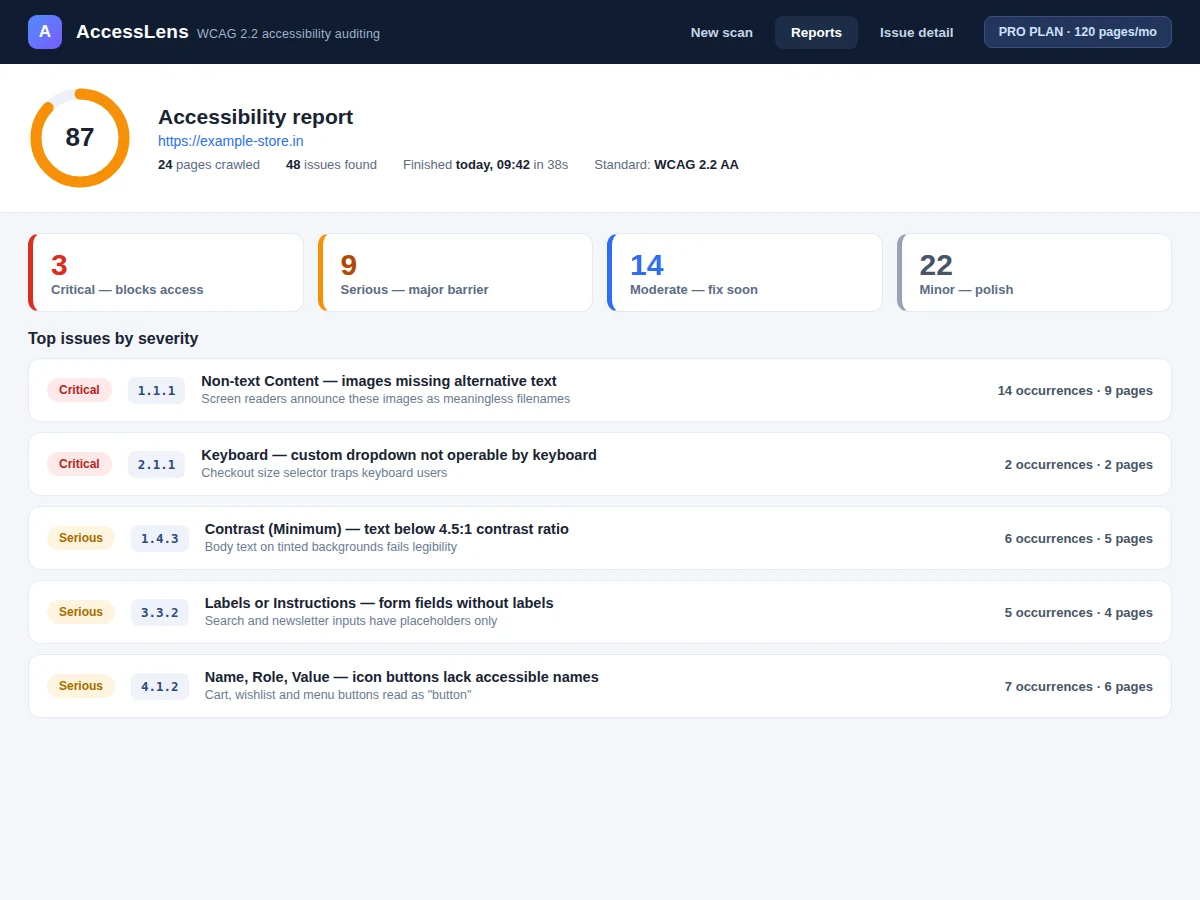
Most websites fail basic accessibility: images without alt text, grey-on-grey text, buttons a keyboard can never reach. Developers usually discover this from an angry audit, not from tooling they run themselves, because existing checkers either scan one page at a time or drown the user in raw violations with no sense of priority. This project builds a crawler-backed accessibility checker that starts from one URL, walks the site's pages, and runs 58 automated checks mapped to WCAG 2.2 success criteria — contrast ratios computed from rendered styles, missing alt text, unlabeled form fields, absent focus indicators, broken ARIA references and more. Every issue is triaged by severity, linked to its WCAG success criterion, and paired with a before/after code fix. Pages get a 0–100 score so progress is measurable across re-scans.
How it works
- The user submits a seed URL with crawl options (max pages, max depth, same-domain restriction).
- A headless-Chromium crawler fetches each page, waiting for network idle so rendered styles and late-injected DOM are captured.
- The check engine walks the DOM and runs 58 checks: contrast ratios computed from computed styles, alt attributes, label associations, focus visibility, heading order, ARIA name computation and more.
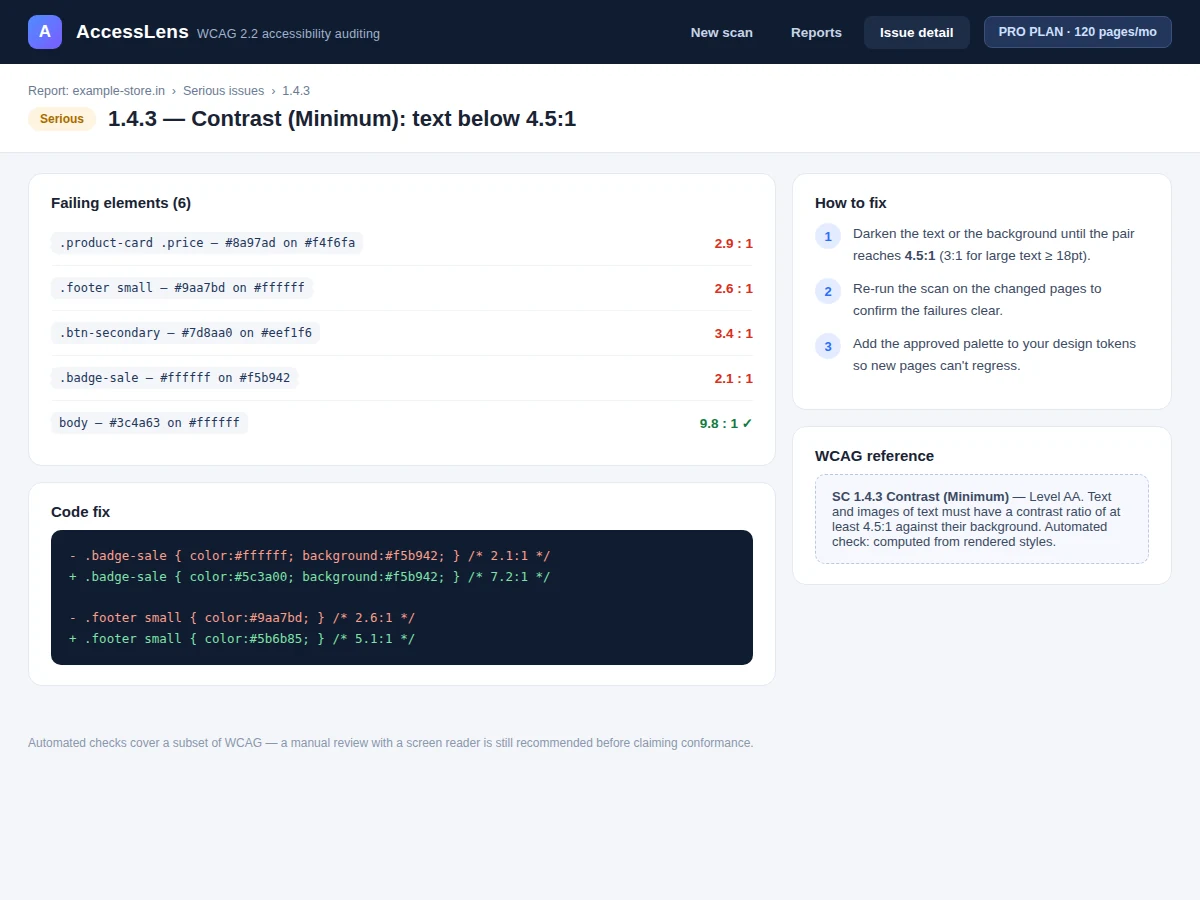
- Each finding is mapped to its WCAG 2.2 success criterion, level (A/AA) and principle, with the failing selectors and measured values recorded.
- Findings are weighted by severity into a 0–100 page score; principle sub-scores show which of the four principles needs work.
- The dashboard renders the report — severity summary, issue list, per-issue detail with code fixes — and stores the scan for history comparison and export.
Tech stack:
- Python 3 with Playwright (headless Chromium crawling)
- axe-core accessibility rule engine
- FastAPI backend (scan jobs, REST API)
- SQLite (scan history and findings store)
- HTML, CSS and JavaScript dashboard
- ReportLab (PDF report export)
- Docker (one-command deployment)
| Parameter | Value |
|---|---|
| Automated checks | 58, mapped to WCAG 2.2 success criteria |
| Crawl capacity | Up to 120 pages per scan (configurable, design target) |
| Scan speed | Approximately 40 seconds per 25 pages (expected, network-dependent) |
| Score scale | 0–100 per page, severity-weighted (design formula) |
| Standards mapping | WCAG 2.2 Levels A and AA |
| Report exports | PDF and CSV |
| Deployment | Local Docker container; runs offline after setup |
Project features
- [Multi-page crawler] Starts from a seed URL and walks same-domain pages up to a configurable depth and page cap, so an audit covers the site rather than a single page.
- [58 automated WCAG 2.2 checks] Each check is mapped to a real success criterion across the four WCAG principles, from 1.1.1 Non-text Content to 4.1.2 Name, Role, Value.
- [Per-page 0–100 score] Issues are weighted by severity into a single comparable score, with principle-level breakdowns showing where a page is weakest.
- [Issue detail with code fixes] Every finding shows the failing elements, measured values (e.g. the actual 2.9:1 contrast ratio), and a before/after code snippet for the fix.
- [Severity triage] Critical, Serious, Moderate and Minor bands separate barriers that block access from polish items, so remediation has an order.
- [Scan history and comparison] Past scans are stored, so re-scans show the score delta and which issues were fixed or newly introduced.
- [PDF and CSV export] One-click reports for sharing with a team or attaching to project documentation.
What is included
- Crawler + check-engine source code with WCAG mapping documentation
- Scoring logic and severity-weight configuration
- Web dashboard (new scan, report view, issue detail, history)
- PDF/CSV export module
- Sample scan dataset on a demo site for the viva demo
- Project report PDF (background, WCAG primer, architecture, check catalog, methodology)
- PPT presentation for final review
- Viva Q&A preparation document (WCAG principles, contrast math, ARIA, crawler design)
Limitations & prerequisites
- Automated checks cover a subset of WCAG — meaning-based criteria (is the alt text accurate?) need human review; the report states this on every export.
- Pages behind logins, paywalls or CAPTCHAs cannot be crawled without credentials/configuration.
- The 0–100 score is a comparative remediation aid, not a legal conformance claim.
- Heavy JavaScript single-page apps may need longer wait timeouts; configured per scan.
- Contrast is computed from rendered styles and may differ on user-overridden stylesheets.
Frequently Asked Questions
Which standard does it check against?
WCAG 2.2, Levels A and AA. Every automated check names its success criterion (e.g. 1.4.3 Contrast Minimum), its level and its principle, and the report links each finding to the criterion text.
How is the 0–100 score calculated?
Findings are weighted by severity — Critical counts most, Minor least — and subtracted from 100. The exact weights are configurable and documented, so the score is transparent rather than a black box.
Can it scan my whole website?
Yes, within the configured cap (default 120 pages): the crawler follows same-domain links up to the set depth, so multi-page audits run from one seed URL.
Does a score of 100 mean the site is fully accessible?
No — and the report says so explicitly. Automated testing catches roughly a quarter to a third of WCAG issues; keyboard walkthroughs and screen-reader testing are still needed for a conformance claim.
What does the PDF report contain?
The score summary, severity breakdown, every issue with its WCAG reference and measured values, code-level fixes, and a scan-over-scan comparison when history exists.
Is this project suitable for a final-year project?
Yes — for Computer Science, IT and Web Development programs. It combines web crawling, DOM analysis, standards mapping and a genuinely useful developer tool. Suitable for B.E./B.Tech final-year projects in Computer Science, IT and Web Development.
Components & software requirements
- Python 3 with Playwright (headless Chromium crawling)
- axe-core accessibility rule engine
- FastAPI backend (scan jobs, REST API)
- SQLite (scan history and findings store)
- HTML, CSS and JavaScript dashboard
- ReportLab (PDF report export)
- Docker (one-command deployment)
Delivery information
Built-to-order project. Delivery timeline is shared after order confirmation based on current queue.
Support terms
Complete documentation, setup guide, and viva preparation included. Support for setup and explanation provided.