
More project photos (2)

The problem
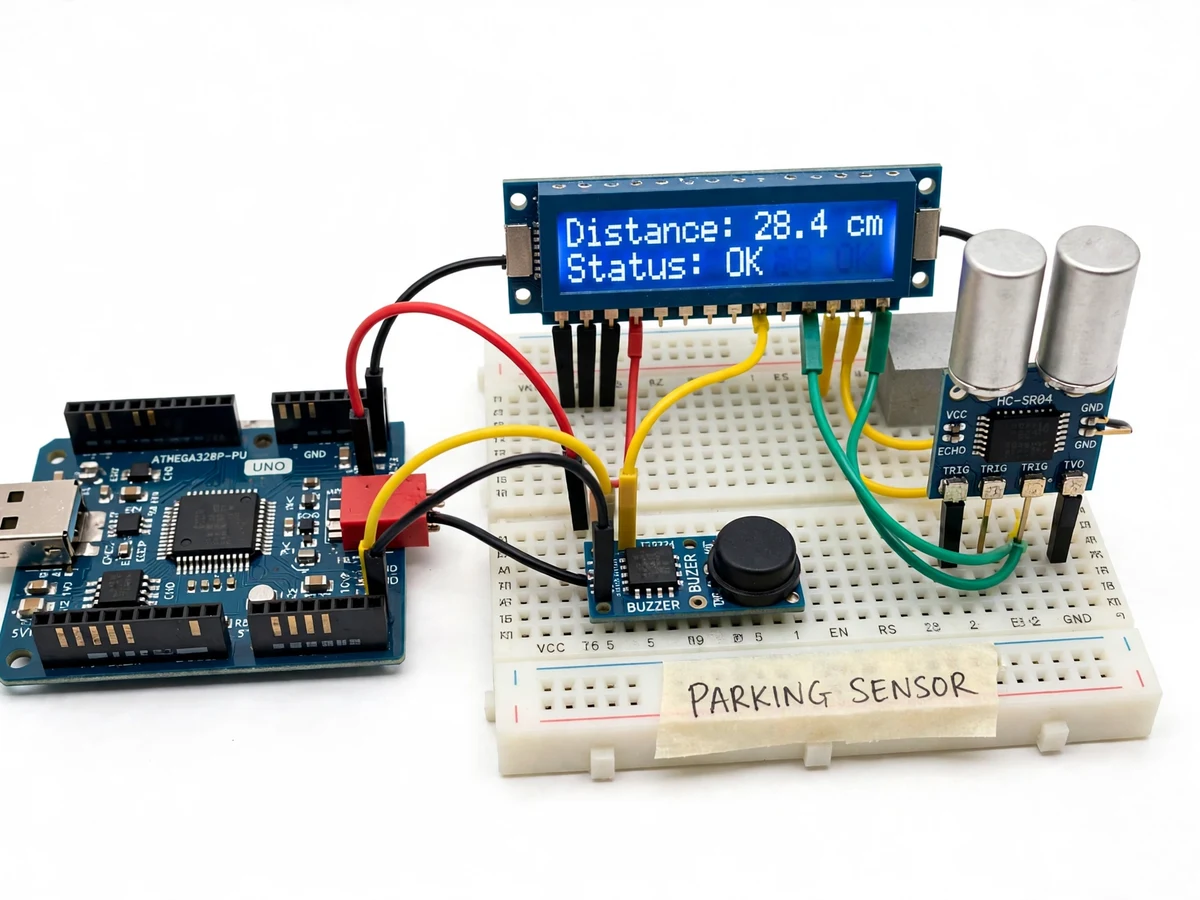
Reversing into a tight parking space is a guessing game: the driver cannot see the wall, pillar or parked car directly behind the bumper, and the mirrors leave a blind zone low down at the rear. A small misjudgement scrapes a bumper or dents a panel, and a new driver has no reliable sense of how much space is actually left. The Ultrasonic Parking Sensor with Distance Display and Buzzer Alerts answers this with a bench-built rear parking aid: an HC-SR04 ultrasonic sensor measures the distance to the obstacle behind, an Arduino Uno converts the echo time into centimetres, a 16x2 LCD shows the live distance, and a buzzer beeps faster as the gap shrinks, switching to a continuous tone below the stop threshold. The build demonstrates the full sensing chain — ultrasonic pulse, echo timing, distance conversion, zone logic and audible alert — on parts a student can wire on a breadboard in an afternoon.
Fires an 8-cycle 40 kHz burst and times the echo
Follow the working sequence
How it works
The Ultrasonic Parking Sensor with Distance Display and Buzzer Alerts works as a sense-and-warn loop. The Arduino sends a 10 microsecond trigger pulse to the HC-SR04, which answers by firing an 8-cycle burst of 40 kHz ultrasound from its transmitter. The sound travels to the obstacle behind, reflects, and returns to the receiver; the sensor holds its echo pin high for the round-trip time, which the Arduino measures with microsecond timing. Dividing that time by two and multiplying by the speed of sound — approximately 343 metres per second at 20 degrees Celsius — gives the distance in centimetres, so an obstacle 100 cm away produces an echo round-trip time of about 5.8 milliseconds. The firmware compares the distance against the alert zones, updates the 16x2 LCD with the number and the zone, and drives the buzzer at the beep rate, then waits more than 60 milliseconds before the next trigger so one burst never interferes with the next.
- The Arduino sends a 10 microsecond HIGH pulse to the HC-SR04 trigger pin to start a measurement cycle.
- The sensor transmits an 8-cycle burst of 40 kHz ultrasound and raises its echo pin while it waits for the reflection.
- The echo returns from the obstacle and the sensor drops the echo pin; the Arduino measures how long the pin stayed high.
- The firmware converts the echo time to distance in centimetres using the speed of sound, approximately 343 metres per second at 20 degrees Celsius.
- The distance is compared with the four alert zones — silent, slow beep, fast beep, continuous tone — and the 16x2 LCD is updated with the distance and the sensor status.
- The buzzer is driven at the beep rate for the current zone, then the loop waits more than 60 milliseconds before triggering the next measurement.
Tech stack:
- Arduino Uno (ATmega328P)
- HC-SR04 ultrasonic sensor
- 16x2 LCD with I2C adapter
- Active buzzer, 5 V
- Arduino IDE, Embedded C
- Breadboard and jumper wires
- 5 V USB bench supply
- 12 V to 5 V buck regulator
| Parameter | Value |
|---|---|
| Controller | Arduino Uno, ATmega328P, 16 MHz clock |
| Distance sensor | HC-SR04 ultrasonic module (datasheet) |
| Measuring range | 2–400 cm (datasheet) |
| Operating frequency | 40 kHz (datasheet) |
| Trigger pulse | 10 microseconds minimum HIGH pulse (datasheet) |
| Ultrasonic burst | 8 cycles at 40 kHz per measurement (datasheet) |
| Sensor working current | 15 mA (datasheet) |
| Measuring angle | 15 degrees (datasheet) |
| Display | 16x2 LCD with I2C adapter |
| Alert zones | Silent above 100 cm; slow beep 50–100 cm; fast beep 20–50 cm; continuous tone below 20 cm (design behaviour) |
| Stop threshold | 20 cm (design target) |
| Echo round-trip time | Approximately 5.8 ms at 100 cm distance (design-target figure) |
| Measurement interval | Greater than 60 ms between triggers (datasheet) |
| Display refresh | Approximately 10 readings per second (design target) |
| Bench power | 5 V via USB |
| Vehicle power | 12 V vehicle supply through a 12 V to 5 V regulator (design target) |
| Sensor mounting angle | Approximately 10 degrees downward tilt (design target) |
Project features
The Ultrasonic Parking Sensor with Distance Display and Buzzer Alerts is built around four capabilities that work together every time the sensor fires. First, the 16x2 LCD shows the live distance in centimetres, refreshed about 10 times per second, so the driver always has an exact number instead of a vague warning. Second, the buzzer translates that number into sound: it stays silent beyond 100 cm, beeps slowly between 50 and 100 cm, beeps fast between 20 and 50 cm, and sounds a continuous tone below the 20 cm stop threshold, so the driver can judge the gap without looking at the display. Third, the firmware handles the awkward cases honestly — readings below the 2 cm minimum or beyond the 400 cm maximum are flagged as out of range instead of shown as false distances. Fourth, every threshold is a single constant in the code, so the alert distances can be retuned for a different vehicle without rewiring anything.
- [Live distance readout on 16x2 LCD (Implemented)] The display shows the measured distance in centimetres on the first line and the sensor status on the second line (OK while a valid reading is present, OUT OF RANGE otherwise), refreshed about 10 times per second, so the reading is always current.
- [Zone-based buzzer alerts (Implemented)] The buzzer stays silent above 100 cm, beeps slowly at about 1 beep per second between 50 and 100 cm, and beeps fast at about 4 beeps per second between 20 and 50 cm, giving an audible sense of the closing gap.
- [Continuous stop tone (Implemented)] Below the 20 cm stop threshold the buzzer sounds a continuous tone, telling the driver to stop reversing immediately.
- [Out-of-range and no-echo handling (Implemented)] Distances below the 2 cm sensor minimum or beyond the 400 cm maximum, and echoes that never return, are shown as out of range on the LCD instead of as a false number.
- [Angled sensor mounting (Implemented)] The HC-SR04 sits on a small bracket tilted slightly downward, about 10 degrees from horizontal, so its beam catches low bumpers and kerbs instead of passing over them.
- [Adjustable alert thresholds (Configurable)] The four zone boundaries are constants at the top of the firmware, so the slow-beep, fast-beep and stop distances can be retuned in code without changing any wiring.
- [Second sensor and LED bar (Optional customization)] A second HC-SR04 for the other rear corner, or a row of LEDs that light up as the gap shrinks, can be added on request as a separate customization.
What is included
- Working prototype: Arduino Uno, HC-SR04 sensor on an angled bracket, 16x2 LCD and buzzer wired on a breadboard
- Complete firmware (Arduino sketch) with the zone thresholds as adjustable constants
- Circuit and wiring diagram with pin connections for the sensor, LCD and buzzer
- Component list with part numbers and quantities
- Step-by-step setup and calibration instructions, including the tape-measure check
- Project report PDF (background, ultrasonic theory, methodology, results)
- PPT presentation for final review
- Viva Q&A preparation document (ultrasonic ranging, echo timing, zone logic, power supply)
Limitations & prerequisites
- Minimum detection distance is 2 cm (datasheet): obstacles closer than 2 cm return unreliable readings and are shown as out of range.
- Maximum range is 400 cm (datasheet): the sensor cannot warn about obstacles beyond 4 metres, so it suits parking, not highway driving.
- Soft surfaces such as cloth, foam or a person in thick clothing absorb ultrasound and can read as farther away than they are, or not at all.
- Angled surfaces deflect the echo away from the receiver, so a sharply angled bumper or a round pillar can be missed or read late.
- The 15 degree measuring cone (datasheet) can catch a nearby kerb or a second obstacle at the edge of the beam and report the nearer one.
- Readings shift slightly with air temperature because the speed of sound changes with temperature; the firmware uses the standard value at 20 degrees Celsius.
- The bench demo runs on 5 V USB power; fitting it in a real vehicle needs a 12 V to 5 V regulator and weatherproof mounting, which are documented but not part of the bench build.
- This is an academic driver-assistance prototype, not a certified automotive safety system, and it does not replace mirrors or a reversing camera.
Frequently Asked Questions
Is this project suitable for a final-year project?
Yes, for Electronics and Telecommunication, Electrical and Instrumentation programs. It demonstrates ultrasonic sensing, echo-time measurement, microcontroller interfacing, LCD and buzzer driving, and zone-based alert logic in one complete, explainable build, and the report covers the ultrasonic theory, the distance calculation, the calibration procedure and the limitations, so the viva discussion has real technical depth rather than a single borrowed circuit.
Which controller and sensor are used, and why?
An Arduino Uno (ATmega328P) and an HC-SR04 ultrasonic sensor. The Uno is used because its microsecond timing functions measure the echo pulse directly, its 5 V logic matches the sensor and the LCD without level shifting, and its wide community support makes wiring and debugging straightforward for a student team. The HC-SR04 is used because its 2–400 cm range, 40 kHz operation and 3 mm datasheet accuracy cover the whole parking-distance band, and its trigger-echo interface needs only two digital pins.
How close can an obstacle be before the sensor stops reading it?
The HC-SR04 cannot measure below 2 cm, its datasheet minimum range. An obstacle closer than 2 cm returns erratic readings or no echo at all, and the firmware shows this as out of range on the LCD rather than inventing a number. In practice the 20 cm stop threshold matters far more: the continuous tone tells the driver to stop long before the sensor reaches its minimum, so the 2 cm limit is never approached in normal use.
What power supply does it need, and can it run from a car battery?
On the bench it runs from a 5 V USB supply, which powers the Arduino, the sensor and the LCD together. In a vehicle it runs from the 12 V battery through a 12 V to 5 V buck regulator, because the sensor and LCD need a regulated 5 V rail. The 12 V supply must never be connected directly to the 5 V pin; it goes through the regulator, or into the Arduino barrel jack, which accepts 7–12 V.
Why do soft or sharply angled surfaces give wrong readings?
Because the sensor only hears what comes back to it. Soft materials such as cloth, foam or thick clothing absorb the 40 kHz sound instead of reflecting it, so the echo is weak or absent and the obstacle reads farther away or not at all. Sharply angled surfaces reflect the burst away from the receiver instead of back toward it, so the sensor can miss a slanted bumper or a round pillar entirely. Flat, hard surfaces facing the sensor give the most reliable readings.
Can the alert distances be changed for a different vehicle?
Yes, the four zone boundaries are constants at the top of the firmware, so the slow-beep, fast-beep and stop distances can be retuned by editing a few numbers and re-uploading the sketch, with no wiring changes. A larger vehicle can use a longer stop threshold, and a small car can use shorter zones. The sensor mounting angle can also be adjusted on its bracket, and a second HC-SR04 for the other rear corner can be added as an optional customization.
Components & software requirements
- Arduino Uno (ATmega328P)
- HC-SR04 ultrasonic sensor
- 16x2 LCD with I2C adapter
- Active buzzer, 5 V
- Arduino IDE, Embedded C
- Breadboard and jumper wires
- 5 V USB bench supply
- 12 V to 5 V buck regulator
Delivery information
Built-to-order project. Delivery timeline is shared after order confirmation based on current queue.
Support terms
Complete documentation, setup guide, and viva preparation included. Support for setup and explanation provided.
Download free synopsis (PDF)
Enter your name and WhatsApp number — the synopsis PDF downloads immediately. We may send occasional project updates on WhatsApp; no spam.