
More project photos (2)
The problem
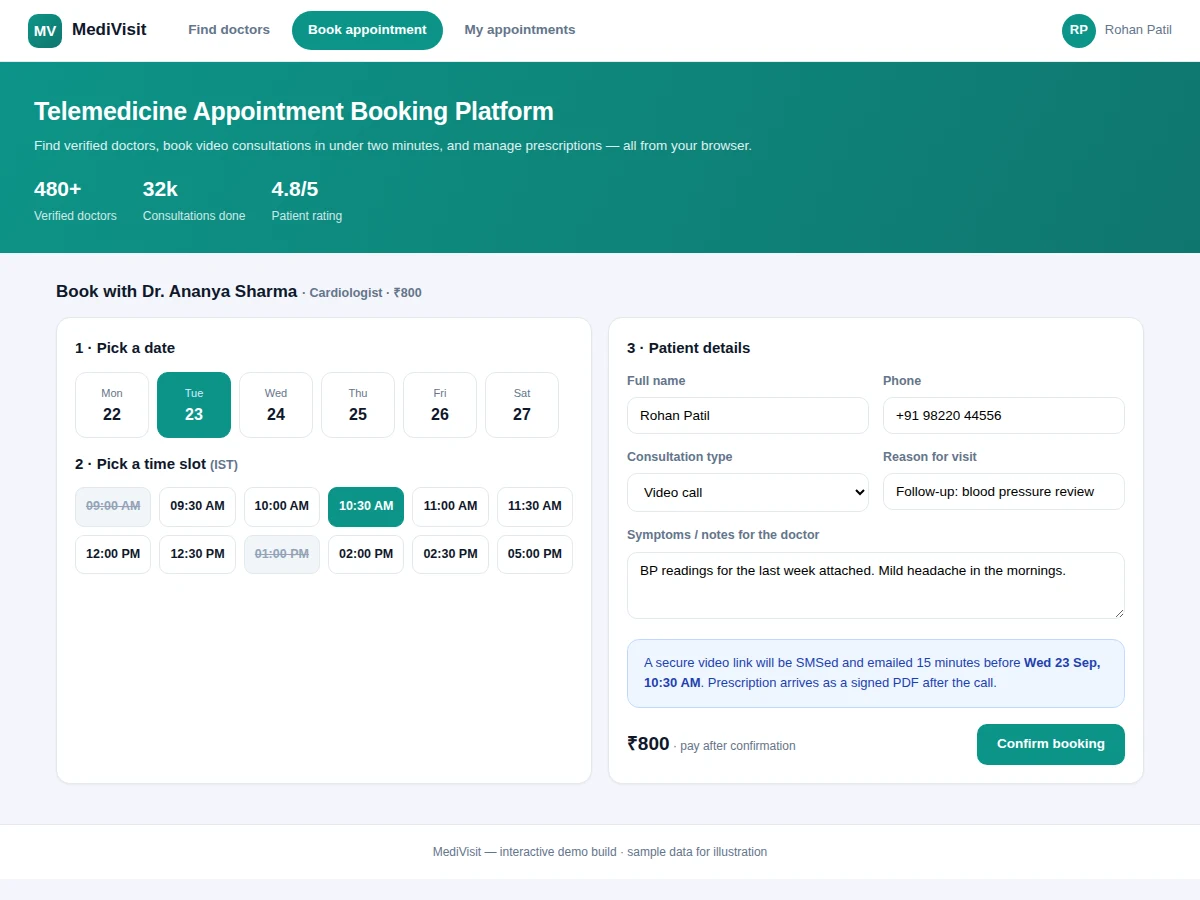
Seeing a specialist still means phone calls, waiting rooms and paper prescriptions for most patients, while clinics lose hours to manual scheduling and no-shows. Telemedicine removes the distance, but only a purpose-built booking layer makes it trustworthy: verified doctor profiles with genuine availability, slots that cannot be double-booked, reminders that cut no-shows, and a prescription trail the patient keeps. This project builds exactly that layer as a full web application. Patients search doctors by specialty, fee and rating, pick a real open slot from a live calendar, and join a secure video session; doctors control their weekly schedules and issue prescriptions from templates that generate signed PDFs. The booking engine uses database-level constraints so two patients clicking the same slot resolve to exactly one confirmed appointment.
How it works
- The doctor sets a weekly schedule template (working days, slot length, breaks) from the doctor dashboard.
- A patient searches by specialty and opens a doctor profile showing fee, rating and genuinely open slots.
- Selecting a date renders the day's slots minus already-booked ones; picking a slot creates a provisional hold.
- The patient submits details, the hold converts to a confirmed booking, and both sides get confirmation.
- Fifteen minutes before the session, a secure video link is sent by SMS and email to both parties.
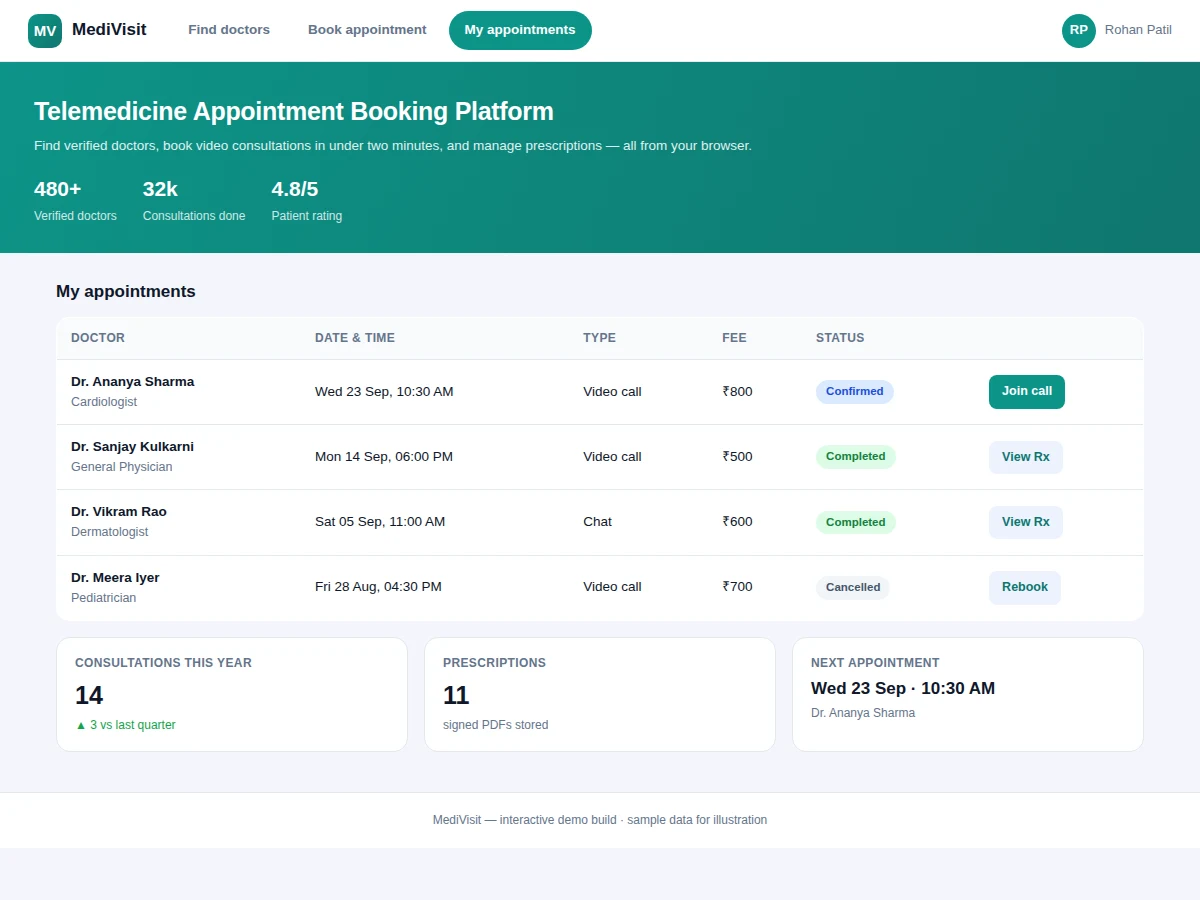
- After the consultation, the doctor issues a prescription from a template; the signed PDF lands in the patient's history.
- Cancellations and reschedules follow the configured policy (for example, free until 4 hours before).
Tech stack:
- Python (Django/Flask) or Node.js (Express) REST backend
- PostgreSQL or MySQL with transactional booking constraints
- HTML5, CSS3, JavaScript responsive frontend
- WebRTC video provider integration for session links
- SMS/email gateway for reminders
- PDF generation library for prescriptions
| Parameter | Value |
|---|---|
| Users | Patient, doctor, admin roles |
| Booking guarantee | Database-level uniqueness on (doctor, date, slot) |
| Consultation types | Video, audio, chat |
| Reminder lead time | Configurable (default 15 min + 24 hr) |
| Prescription format | Signed PDF, stored per patient |
| Cancellation policy | Configurable (default free until 4 hrs before) |
| Frontend | Responsive; works on mobile browsers |
| Demo data | 25+ doctor profiles across 8 specialties (sample) |
Project features
- [Verified doctor discovery] Search by specialty, fee, rating and real availability — profiles show experience, consultation types and patient reviews.
- [Conflict-free slot engine] Live date-wise calendars generated from each doctor's schedule template; database constraints make double-booking impossible.
- [Video, audio & chat consults] Secure per-appointment session links delivered by SMS/email 15 minutes before the slot.
- [Digital prescriptions] Doctors issue prescriptions from medicine templates; patients get signed PDFs stored in their history.
- [Reminders & policies] Automated reminders plus configurable cancellation and rescheduling rules.
- [Doctor dashboard] Schedule management, appointment lists, earnings overview and patient notes.
- [Patient history] Every consultation, prescription and payment in one timeline the patient can revisit.
What is included
- Complete web application (patient, doctor and admin modules)
- Database schema with seed data and booking-constraint logic
- Video-session link integration wiring
- Prescription PDF generation module
- Project report PDF (architecture, schema design, booking logic)
- PPT presentation for final review
- Viva Q&A preparation document (concurrency, scheduling, WebRTC basics)
Limitations & prerequisites
- Video sessions depend on a third-party WebRTC provider account, configured at deployment.
- The demo ships with sample doctor data; real listings need an onboarding/verification process.
- Payment collection is modeled at booking confirmation; a live gateway is integrated per order requirements.
- Prescriptions are advisory documents from the demo flow, not a certified medical-records system.
- Reminder delivery needs an SMS/email gateway account with its own billing.
Frequently Asked Questions
How does the system prevent double-booking?
Each booking is created inside a database transaction with a uniqueness constraint on doctor, date and slot. If two patients click the same slot simultaneously, exactly one transaction commits; the other gets a clean 'slot just taken' response and picks another.
Is the video call built from scratch?
No — the platform generates secure per-appointment links through a standard WebRTC provider and delivers them by SMS/email. Building a video stack from scratch is out of scope; the project focuses on the booking and records layer.
Can doctors manage their own availability?
Yes. Each doctor has a weekly schedule template plus per-day overrides for leave, so the patient-facing calendar always reflects reality.
What happens on cancellation?
The configured policy applies (default: free until 4 hours before), the slot is released back to the pool immediately, and both parties are notified.
Is this project suitable for a final-year project?
Yes — for Computer Science, IT and Web Development programs. It demonstrates database design, concurrency-safe booking logic, role-based access and third-party API integration. Suitable for B.E./B.Tech final-year projects in Computer Science, IT and Web Development.
Components & software requirements
- Python (Django/Flask) or Node.js (Express) REST backend
- PostgreSQL or MySQL with transactional booking constraints
- HTML5, CSS3, JavaScript responsive frontend
- WebRTC video provider integration for session links
- SMS/email gateway for reminders
- PDF generation library for prescriptions
Delivery information
Built-to-order project. Delivery timeline is shared after order confirmation based on current queue.
Support terms
Complete documentation, setup guide, and viva preparation included. Support for setup and explanation provided.