
More project photos (2)

The problem
Students lose marks less often to difficulty than to disorganisation — syllabi finished too late, revisions crammed the night before, no honest record of hours actually studied. Existing study apps are usually either pomodoro timers with no plan or rigid timetables with no memory of what was actually learned. The gap this project fills is a planner that remembers: exam dates drive countdowns, countdowns drive urgency, and an SM-2-inspired spaced-repetition scheduler decides what gets revised today based on past recall ratings. A topic you failed yesterday comes back tomorrow; one you aced three times waits a month. That forgetting-curve logic is the interesting computer-science content — a priority queue keyed on overdue-days and exam proximity — wrapped in a dashboard students would genuinely open daily.
How it works
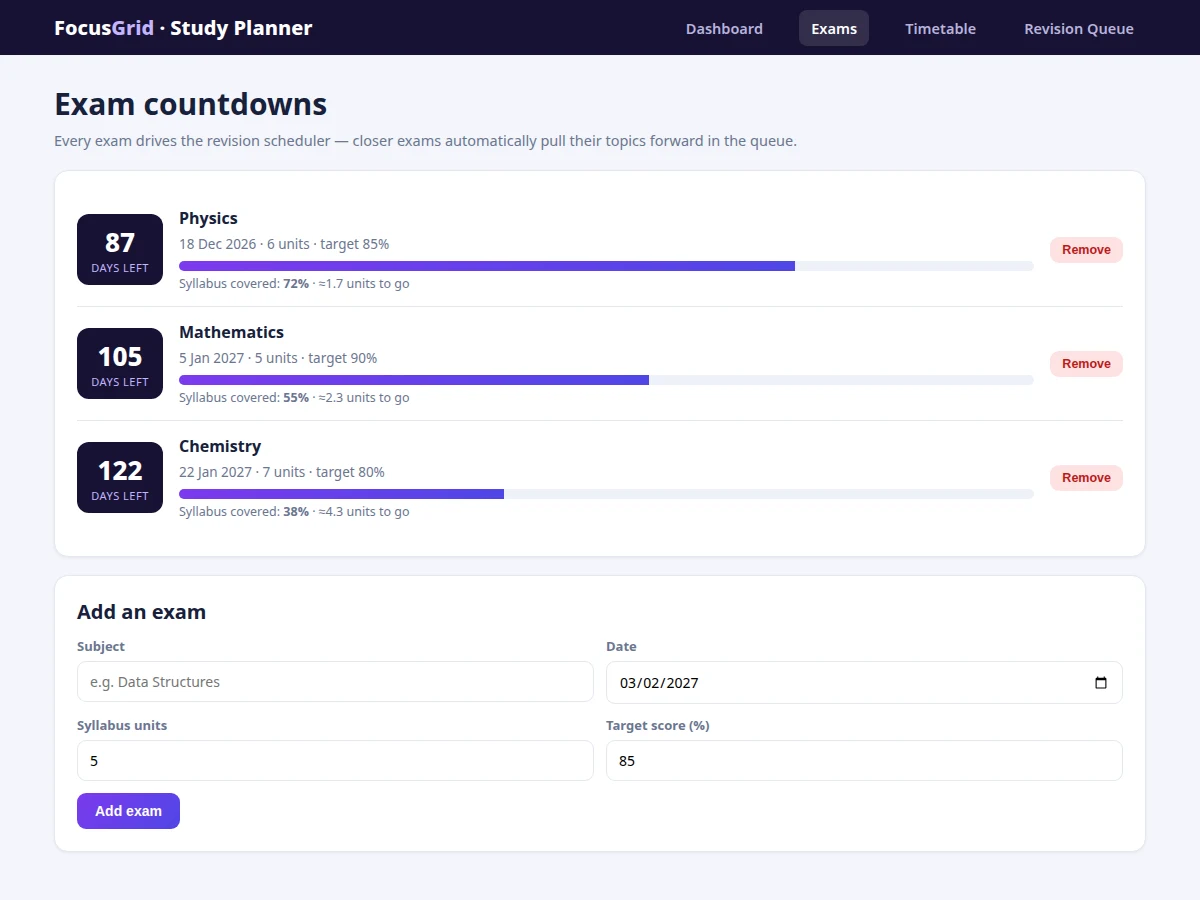
- Exams are stored as {subject, date, units, target, syllabus%} objects; days-left is computed live from the system date.
- When a topic session is completed, the student rates recall 1–5; the scheduler maps the rating to the next interval on the SM-2-inspired ladder.
- The revision queue sorts due reviews by an urgency score combining overdue days and the proximity of the linked exam.
- Passing a review advances the topic one rung up the interval ladder; failing resets it to 1 day — both update the queue immediately.
- The timetable marks queue-pulled reviews as (R) sessions so the week's plan reflects what the scheduler decided.
- The dashboard aggregates today's sessions into focused hours and completion fraction, drawn as a progress bar and a stacked weekly chart on Canvas.
- The full project extends this with accounts, cloud sync, a mobile PWA and teacher-shared study plans.
Tech stack:
- HTML5, CSS3 (custom design system, no framework)
- Vanilla JavaScript (ES6)
- Canvas API for weekly study chart
- Hash-based SPA routing
- SM-2-inspired spaced-repetition algorithm
| Parameter | Value |
|---|---|
| App type | Single-file web app (approximately 17 KB HTML) |
| Views | 4 (Dashboard, Exams, Timetable, Revision Queue) |
| Scheduler | SM-2-inspired intervals: 1 → 3 → 7 → 14 → 30 days |
| Demo data | 3 exams, 6 daily sessions, 7 queued revisions |
| Charts | Canvas stacked bar chart, computed live |
| Persistence | In-memory demo build (localStorage path documented) |
| Routing | Hash-based, deep-linkable views |
| Deployment | Static file — any static host or opened directly |
Project features
- [Exam countdowns with syllabus tracking] Each exam shows days remaining, unit count, target score and a syllabus-coverage bar computed from completed units.
- [SM-2-inspired revision scheduler] Recall ratings 1–5 set the next review interval (1 → 3 → 7 → 14 → 30 days); failed recalls reset to 1 day.
- [Priority revision queue] Due reviews are ordered by urgency (days overdue × exam proximity) with pass/fail actions that reschedule instantly.
- [Weekly timetable] Fixed study slots across the week with (R) markers for sessions pulled from the revision queue.
- [Focus dashboard] Today's sessions with done/undo, focused-hours total, day streak and revisions-due count, plus a weekly hours chart split by first-learn vs revision.
- [Add/remove exams and sessions] Full CRUD on exams and today's sessions in the demo build.
- [Single-file SPA] Four hash-routed views, no build step, no server, deployable anywhere.
What is included
- Complete single-file study planner web app
- Spaced-repetition scheduler module with documented interval logic
- Demo dataset (exams, sessions, revision queue, timetable)
- Project report PDF (requirements, scheduler design, architecture, screenshots)
- PPT presentation for final review
- Viva Q&A preparation document (SM-2 algorithm, forgetting curve, SPA design)
Limitations & prerequisites
- The demo build keeps state in memory — a refresh resets to the bundled dataset; the report documents the localStorage/cloud upgrade path.
- Recall ratings are self-reported; the scheduler is only as honest as the input.
- The interval ladder is a simplified SM-2 variant tuned for demo clarity, not a clinically validated memory model.
- No accounts, sync or notifications in the demo build — listed as future scope.
- Timetable is a fixed weekly template; drag-and-drop rescheduling is future scope.
Frequently Asked Questions
How does the revision scheduler decide what I study today?
Each topic has a level on an interval ladder (1 → 3 → 7 → 14 → 30 days). Your recall rating after a session moves it up the ladder or resets it on failure. Due reviews are then ordered by urgency: days overdue weighted by how close the linked exam is.
Is this the real SM-2 algorithm?
It's an SM-2-inspired simplification — the same core idea (expanding intervals on success, reset on failure) with a fixed ladder for clarity. The report documents the exact mapping and how full SM-2 differs.
Do I need a server to run it?
No. The demo is one HTML file that runs in any modern browser; persistence upgrades are documented in the report.
Can I add my own exams and subjects?
Yes — the Exams view has a full add form with date, units and target score, and exams sort by date automatically.
What would the viva focus on?
The forgetting curve, how SM-2 intervals work, the urgency scoring of the queue, and how you'd persist and sync this data in a production build.
Is this project suitable for a final-year project?
Yes — for Computer Science, IT and Software Engineering. It combines algorithms (spaced repetition, priority scheduling) with a complete working product. Suitable for B.E./B.Tech final-year projects in Computer Science, IT and Software Engineering.
Components & software requirements
- HTML5, CSS3 (custom design system, no framework)
- Vanilla JavaScript (ES6)
- Canvas API for weekly study chart
- Hash-based SPA routing
- SM-2-inspired spaced-repetition algorithm
Delivery information
Built-to-order project. Delivery timeline is shared after order confirmation based on current queue.
Support terms
Complete documentation, setup guide, and viva preparation included. Support for setup and explanation provided.