
More project photos (2)
The problem
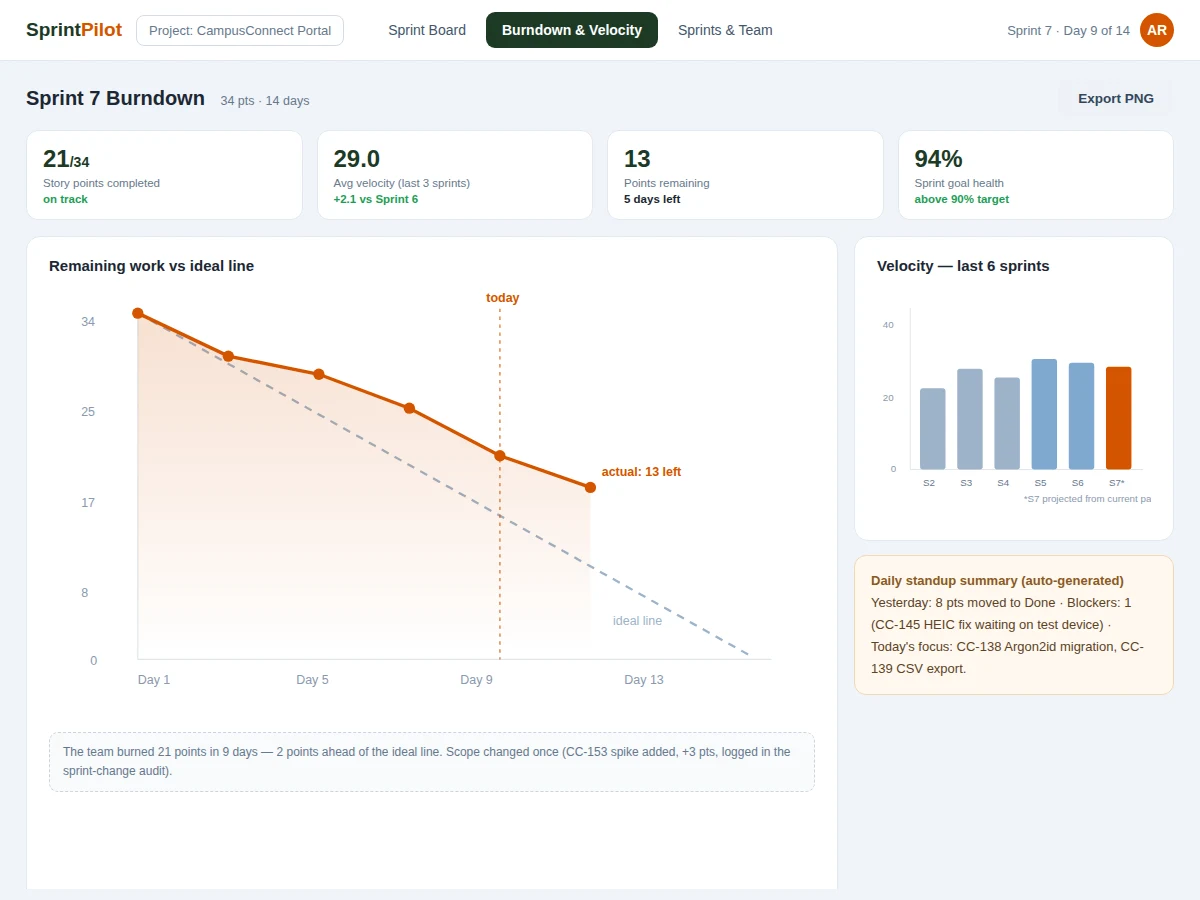
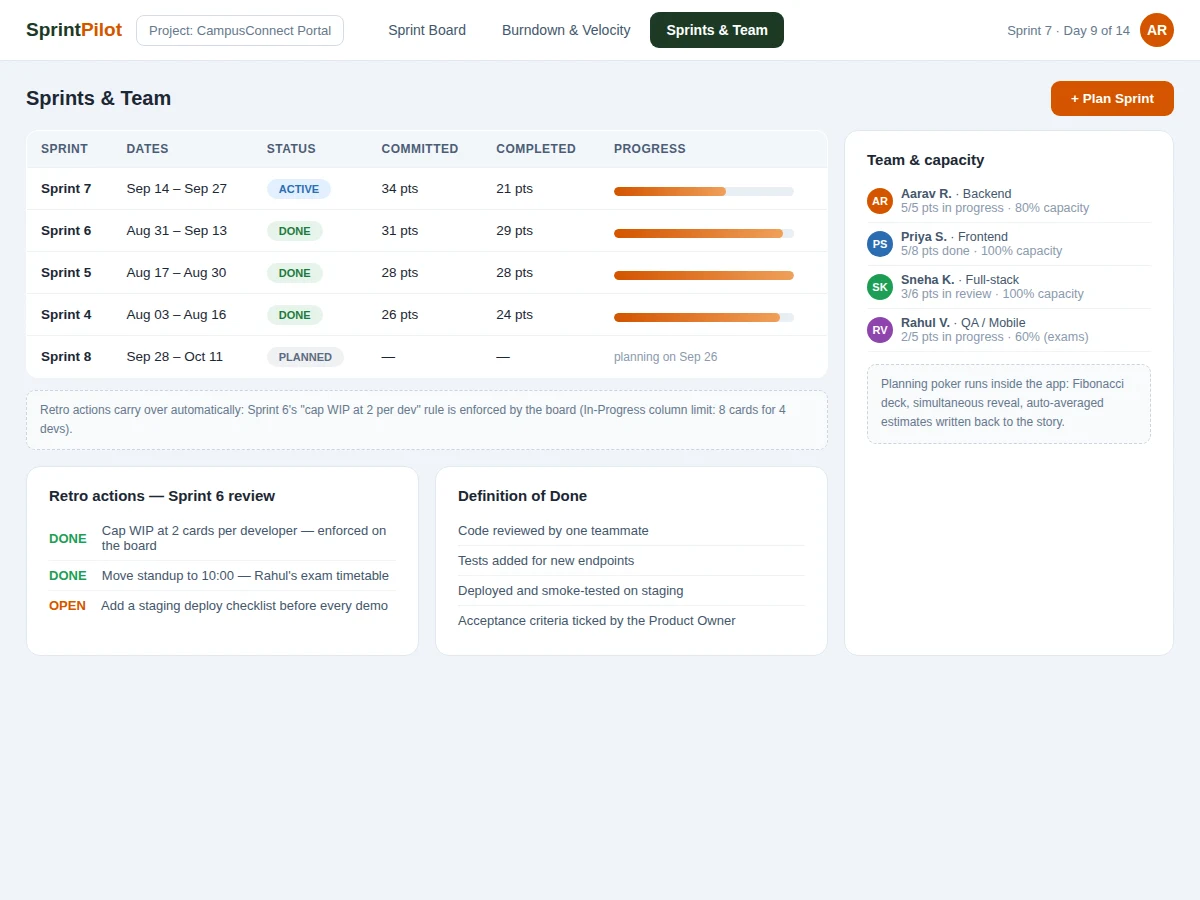
Student teams run their final-year projects on chat messages and hope — then discover in the last month that half the work was never started. Professional teams avoid this with Scrum: fixed-length sprints, a visible board, and a burndown chart that makes slippage impossible to ignore. This project is a full Scrum sprint planner built with Django: story and bug tracking on a kanban board with WIP limits, sprint planning with story-point commitment, burndown charts plotted against the ideal line, velocity history across sprints, in-app planning poker, and auto-generated standup summaries. The demo walks through a realistic sprint — Sprint 7 of a campus portal build — with the board, the burndown (21 of 34 points done, ahead of the ideal line) and the sprint/team management views exactly as the Django app renders them.
How it works
- The Product Owner creates epics and stories with acceptance criteria; the team estimates them in-app with planning poker.
- At sprint planning, the team pulls stories into the sprint up to the velocity-guided commitment; the burndown's ideal line is drawn from committed points over sprint days.
- Developers move cards across the board; WIP limits on In Progress are enforced (the demo caps 8 cards for 4 developers).
- A nightly job snapshots remaining points, so the burndown reflects daily progress; scope changes are logged in the sprint-change audit.
- Velocity is recomputed from completed sprints and shown as the commitment guide for the next planning session.
- Each morning the standup summary aggregates yesterday's card movements, open blockers and today's focus into one digest.
Tech stack:
- Python 3.10, Django 4.2, Django REST Framework (board APIs)
- PostgreSQL (projects, sprints, stories, estimates); Redis (real-time board updates via channels)
- HTML/CSS/JS frontend (kanban board, SVG burndown and velocity charts)
- Single-file HTML/CSS/JS demo walkthrough mirroring the Django screens
- pytest suite for sprint math (burndown, velocity, WIP enforcement)
| Parameter | Value |
|---|---|
| Backend | Django 4.2 + DRF, PostgreSQL, Redis channels |
| Board | 5 columns, drag-and-drop, WIP limits enforced server-side |
| Estimation | Fibonacci planning poker, simultaneous reveal |
| Burndown | Daily snapshots, ideal line, scope-change annotations |
| Velocity | Rolling average over completed sprints |
| Roles | Scrum Master, Product Owner, Developer |
| Demo data | Sprint 7, campus portal project, 21 dev-team cards |
| Tests | pytest suite for burndown math, velocity, WIP limits |
Project features
- [Kanban sprint board] Five columns (Backlog, To-Do, In Progress, In Review, Done) with drag-and-drop cards, story points, assignees and WIP limits.
- [Burndown charts] Remaining work plotted daily against the ideal line, with scope-change annotations when stories are added mid-sprint.
- [Velocity tracking] Completed points per sprint charted across the last six sprints, with the running average used for commitment guidance.
- [Sprint planning] Sprint creation with date ranges, story-point commitment, goal statements and retro-action carryover.
- [Planning poker] In-app Fibonacci estimation with simultaneous reveal; averaged estimates write back to the story.
- [Standup summaries] Auto-generated daily digest: what moved, current blockers, today's focus per developer.
- [Team & capacity view] Per-developer workload against declared capacity (the demo models a teammate at 60% during exams).
- [Role-based access] Scrum Master, Product Owner and Developer roles with appropriate permissions on sprints and stories.
What is included
- Complete Django source code (models, views, DRF APIs, board frontend, chart rendering)
- pytest test suite for sprint calculations and permissions
- Project report PDF (agile background, data model, sprint algorithms, UI design, test results)
- PPT presentation for final review
- Viva Q&A preparation document (Scrum framework, Django MVT, DRF, WebSockets, estimation theory)
- Setup guide (environment, migrations, seed data, running the demo)
Limitations & prerequisites
- Single-project demo seed data; multi-project portfolio rollups are out of scope.
- Real-time board updates need Redis — without it the board falls back to polling refresh.
- Burndown math assumes story points are the unit of work; hour-based tracking is not supported.
- The standup summary is a rules-based aggregation, not an LLM — it reports card movements, it does not infer blockers from chat.
- No mobile app; the board is responsive in a mobile browser but touch drag-and-drop is basic.
Frequently Asked Questions
What does the planner include?
Kanban sprint board with WIP limits, burndown charts, velocity tracking, sprint planning, in-app planning poker, standup summaries, team capacity view and role-based access.
Which framework is used?
Django 4.2 with Django REST Framework for the board APIs, PostgreSQL for data, Redis channels for live board updates, and a server-rendered + JS frontend with SVG charts.
How is the burndown computed?
A nightly snapshot records remaining story points; the chart plots snapshots against the ideal line drawn from committed points over sprint days. Mid-sprint scope changes are annotated, not hidden.
Does it work without Redis?
Yes, with a fallback: the board polls for updates instead of receiving them over WebSockets. The report documents both paths.
What are the main limitations?
Single-project scope; Redis needed for true real-time; story-point-only tracking; rules-based (not AI) standup summaries; no native mobile app.
Is this project suitable for a final-year project?
Yes — for Computer Science, IT and Web Development programs. It demonstrates full-stack Django development, real-time features, data visualization and agile methodology, all strong viva material. Suitable for B.E./B.Tech final-year projects in Computer Science, IT and Web Development.
Components & software requirements
- Python 3.10, Django 4.2, Django REST Framework (board APIs)
- PostgreSQL (projects, sprints, stories, estimates); Redis (real-time board updates via channels)
- HTML/CSS/JS frontend (kanban board, SVG burndown and velocity charts)
- Single-file HTML/CSS/JS demo walkthrough mirroring the Django screens
- pytest suite for sprint math (burndown, velocity, WIP enforcement)
Delivery information
Built-to-order project. Delivery timeline is shared after order confirmation based on current queue.
Support terms
Complete documentation, setup guide, and viva preparation included. Support for setup and explanation provided.