
More project photos (2)
The problem
Salons run on two systems that rarely talk to each other — a paper appointment diary at the reception and a separate billing register. Double-booked stylists, forgotten appointments, unbilled add-on services and loyalty tracked on punch cards are the daily reality, while customers increasingly expect to book from their phones and see real prices upfront. This project unifies both sides in one web system: online service booking with stylist-wise slots, a per-stylist daily schedule, POS billing that pulls appointments directly, membership discounts and loyalty applied automatically, and SMS reminders that cut no-shows. The scheduling core is built on a database-level uniqueness guarantee, so double-booking is impossible no matter how many customers book at once.
How it works
- The admin defines services (price, duration), stylists and their weekly shifts; the system generates bookable slots.
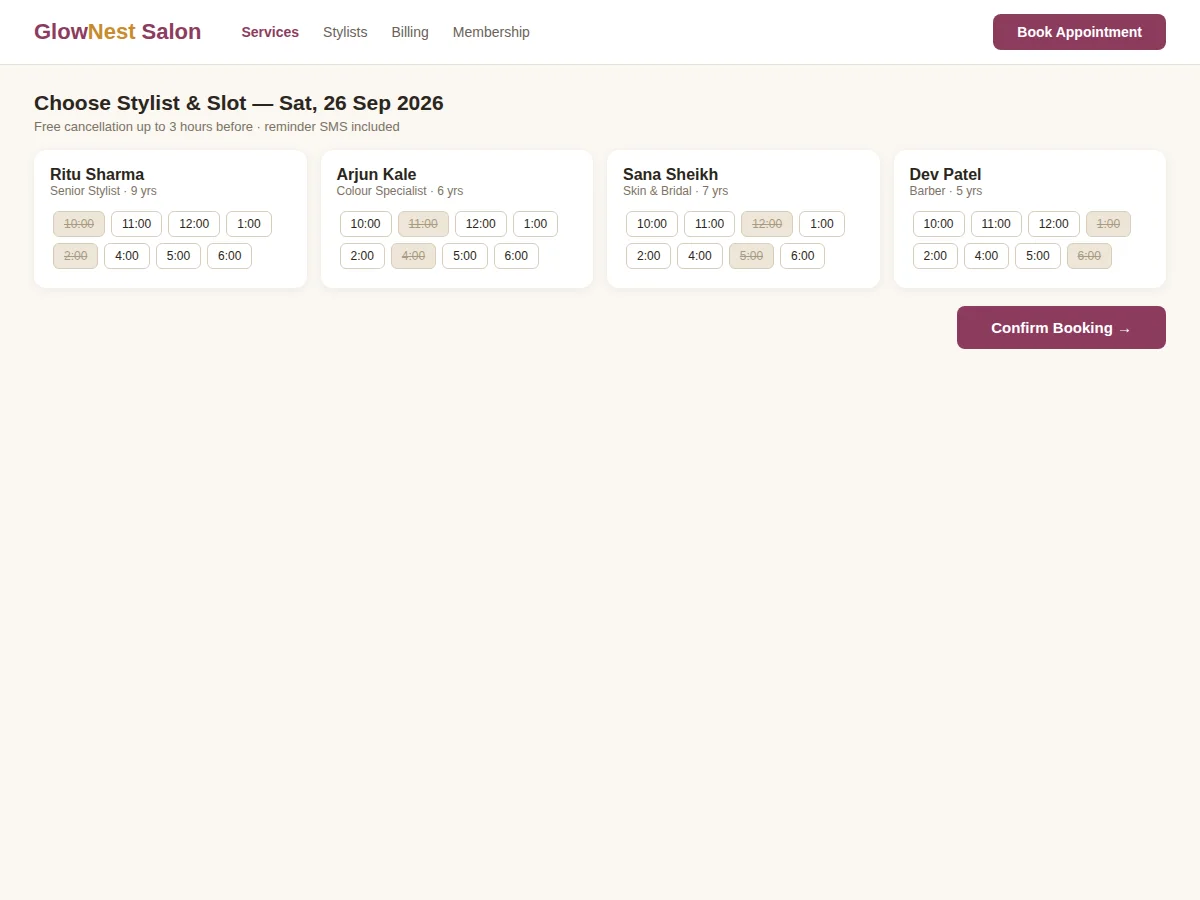
- A customer selects a service and sees each stylist's free slots for the chosen day, then books with a confirmation.
- A reminder goes out before the visit; the appointment appears on the stylist's day schedule.
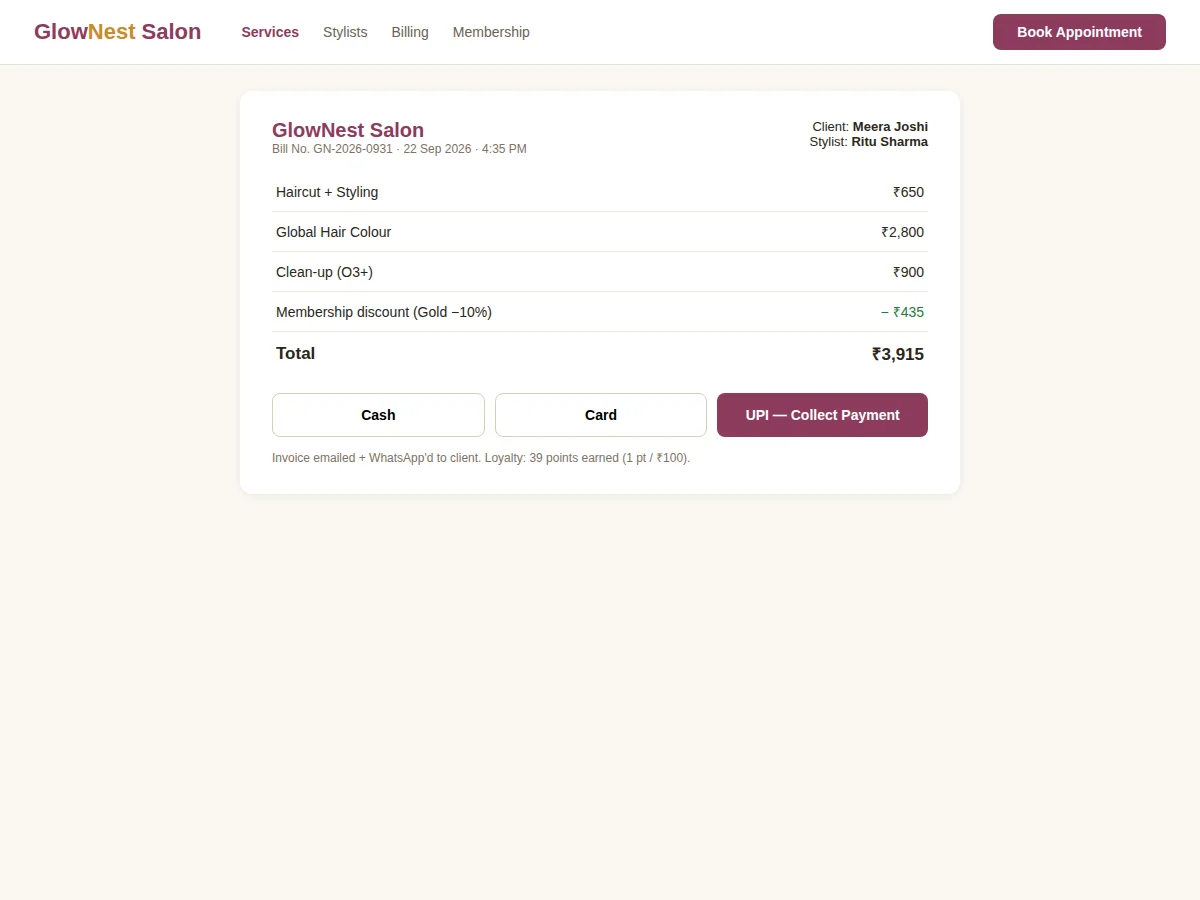
- At checkout, the cashier opens the appointment, adds extra services or products, and the bill applies membership discount, loyalty redemption and tax.
- Points accrue per rupee spent into the customer's loyalty ledger.
- The owner dashboard aggregates revenue, utilization and repeat-visit analytics, including a no-show report.
Tech stack:
- Flask on Python 3.11+
- PostgreSQL relational database
- Jinja2 templates with responsive CSS
- Unique constraints for slot-conflict prevention
- Scheduled jobs for reminders
- SMS/email gateway hooks
- Session authentication with role-based access
| Parameter | Value |
|---|---|
| Slot generation | From stylist shifts × service durations |
| Double-booking guard | Unique index on (stylist, start_time) |
| Booking hold | 10 minutes (configurable) |
| Loyalty | 1 point per ₹100 (configurable) |
| User roles | Admin/owner, receptionist/cashier, customer |
| Deployment | Self-hosted; tablet-friendly billing screen |
Project features
- [Online slot booking] Customers pick a service, stylist and free slot; holds expire in 10 minutes if not confirmed.
- [Stylist schedule view] Day view per stylist showing booked, held and free slots with service durations blocking correctly.
- [Double-booking protection] Unique database constraint on stylist plus start time — the database itself rejects overlaps.
- [POS billing] Counter billing that pulls the day's appointments, adds walk-in services and retail products, with tax and split payments.
- [Memberships and loyalty] Membership plans with automatic discounts; loyalty points earned per rupee and redeemable at billing.
- [Reminders] Booking confirmations plus scheduled SMS/email reminders before appointments to reduce no-shows.
- [Owner dashboard] Daily revenue, per-stylist utilization, top services and repeat-visit rate.
What is included
- Complete source code (Flask app, models, scheduling logic, billing, seed data)
- Database schema and slot-generation documentation
- Setup guide (local run, reminder job setup, deployment notes)
- Project report PDF (background, scheduling design, billing rules, testing notes)
- PPT presentation for final review
- Viva Q&A preparation document (scheduling algorithms, constraints, Flask, POS design)
Limitations & prerequisites
- SMS reminders need a gateway account; the build includes the hooks and works with email out of the box.
- Online advance payment is not included — payment is recorded at the counter.
- The demo ships with sample services, stylists and shifts; real data must be configured.
- Multi-branch support (per-branch schedules and reports) is out of scope for this version.
- Retail product inventory is billing-only; full stock management is future scope.
- Peak-load performance tuning beyond the student build is not included.
Frequently Asked Questions
How does it stop two customers booking the same slot?
A unique database constraint on stylist plus start time means the database itself rejects the second booking — no application-level race is possible.
What if a customer doesn't confirm in time?
The slot hold expires after 10 minutes and the slot becomes bookable again automatically.
How do memberships work?
The admin defines plans (e.g. Gold −10%); the discount applies automatically at billing for active members.
Can walk-in customers be billed?
Yes — the POS screen handles walk-ins alongside appointments, with the same discounts and loyalty.
Does it track which stylist earned what?
Yes — revenue and utilization are reported per stylist on the owner dashboard.
Is this project suitable for a final-year project?
Yes — for Computer Science, IT and related programs. It demonstrates web development, scheduling logic, database constraints and real-world billing workflows. Suitable for B.E./B.Tech final-year projects in Computer Science, IT and Web Development.
Components & software requirements
- Flask on Python 3.11+
- PostgreSQL relational database
- Jinja2 templates with responsive CSS
- Unique constraints for slot-conflict prevention
- Scheduled jobs for reminders
- SMS/email gateway hooks
- Session authentication with role-based access
Delivery information
Built-to-order project. Delivery timeline is shared after order confirmation based on current queue.
Support terms
Complete documentation, setup guide, and viva preparation included. Support for setup and explanation provided.